
1. Introduction
This manual provides essential information for the proper handling, installation, and application of the TE CONNECTIVITY 1624333-1 thermistor. This component is designed for precise temperature sensing in various electronic circuits. Please read these instructions carefully before use to ensure optimal performance and safety.
2. Safety Information
Observe the following safety precautions when working with electronic components:
- Always disconnect power before installing or removing components.
- Handle components with care to prevent physical damage or electrostatic discharge (ESD). Use appropriate ESD protection measures.
- Ensure proper soldering techniques are used to avoid overheating the component.
- Do not exceed the specified electrical ratings for voltage and current.
- Consult the full product datasheet for detailed safety and handling instructions.
3. Product Overview
The TE CONNECTIVITY 1624333-1 is a Negative Temperature Coefficient (NTC) thermistor. NTC thermistors exhibit a decrease in electrical resistance as their temperature increases. This characteristic makes them suitable for temperature measurement, control, and compensation applications.
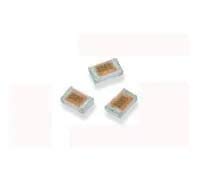
Figure 1: TE CONNECTIVITY 1624333-1 Thermistor. This image displays the physical appearance of the thermistor, which is a compact, dark-colored component with two metallic leads for electrical connection.
4. Installation and Mounting
Proper installation is crucial for accurate temperature sensing and component longevity.
- Lead Forming: Bend the leads carefully, ensuring the bend radius is not too sharp and does not stress the thermistor body. Avoid bending leads close to the component body.
- Soldering: Use a soldering iron with a controlled temperature. Apply solder quickly to minimize heat transfer to the thermistor body. Maintain a minimum distance from the thermistor body to the solder joint as specified in the datasheet.
- Placement: Position the thermistor in the area where temperature measurement is required. Ensure good thermal contact with the object or medium whose temperature is being monitored. Avoid placing it near heat sources that are not part of the intended measurement.
- Encapsulation (Optional): For environmental protection or improved thermal contact, the thermistor may be encapsulated. Ensure any encapsulating material is thermally conductive and compatible with the thermistor's operating temperature range.
5. Application Guidelines
The 1624333-1 thermistor can be integrated into various circuit configurations for temperature sensing.
- Voltage Divider: A common method is to use the thermistor in a voltage divider circuit with a fixed resistor. The voltage across the thermistor (or the fixed resistor) will vary with temperature, which can then be read by an analog-to-digital converter (ADC).
- Self-Heating: Be aware of self-heating effects. Passing too much current through the thermistor can cause its temperature to rise above the ambient temperature, leading to inaccurate readings. Limit current to keep self-heating negligible for measurement applications.
- Linearization: The resistance-temperature characteristic of an NTC thermistor is non-linear. For applications requiring a linear output, external circuitry or software algorithms (e.g., Steinhart-Hart equation) may be used for linearization.
- Response Time: The thermal response time depends on the thermistor's mass, packaging, and the thermal coupling to the environment. Consider this when designing for dynamic temperature changes.
6. Specifications
The following are general specifications for the TE CONNECTIVITY 1624333-1 thermistor. For detailed and precise electrical characteristics, always refer to the official product datasheet.
| Parameter | Description |
|---|---|
| Model Number | 1624333-1 |
| Type | NTC Thermistor |
| Resistance at 25°C (R25) | Refer to Datasheet (e.g., 10 kΩ, 100 kΩ) |
| B-Constant (B25/85) | Refer to Datasheet (e.g., 3435K, 3950K) |
| Operating Temperature Range | Refer to Datasheet (e.g., -40°C to +125°C) |
| Dissipation Constant | Refer to Datasheet (e.g., 2 mW/°C) |
| Thermal Time Constant | Refer to Datasheet (e.g., 10 seconds in still air) |
Note: The values provided in the table for R25, B-Constant, Operating Temperature Range, Dissipation Constant, and Thermal Time Constant are examples. Always consult the official TE CONNECTIVITY 1624333-1 datasheet for precise and verified specifications.
7. Maintenance and Storage
Thermistors are passive components and generally require no active maintenance once installed correctly. However, proper storage and handling are important:
- Storage: Store thermistors in their original packaging in a dry, cool environment, away from direct sunlight and corrosive gases.
- Cleaning: If cleaning is necessary, use a soft, dry brush or lint-free cloth. Avoid harsh chemicals or abrasive materials.
- Inspection: Periodically inspect installed thermistors for any signs of physical damage, corrosion on leads, or compromised encapsulation.
8. Troubleshooting
If the thermistor circuit is not performing as expected, consider the following:
- Incorrect Resistance Reading:
- Verify the thermistor is at the expected temperature.
- Check for proper electrical connections and soldering.
- Ensure the measurement equipment (e.g., multimeter) is functioning correctly and calibrated.
- Confirm the correct R25 and B-constant values are used in calculations.
- Inaccurate Temperature Measurement:
- Check for significant self-heating due to excessive current.
- Ensure good thermal contact between the thermistor and the object being measured.
- Verify that the linearization algorithm or lookup table is correctly implemented.
- Check for external heat sources affecting the thermistor.
- No Reading/Open Circuit:
- Inspect leads for breaks or poor solder joints.
- Test the thermistor's resistance directly if possible.
9. Warranty and Support
TE CONNECTIVITY products are manufactured to high standards. For specific warranty information, please refer to the terms and conditions provided at the time of purchase or visit the official TE CONNECTIVITY website. For technical support, datasheets, or further assistance, please contact TE CONNECTIVITY customer service or your authorized distributor.
TE CONNECTIVITY Official Website: www.te.com


