
1. Product Overview
The INNOREL F60 Fluid Head is a professional-grade video camera tripod head designed for smooth and precise camera movements. Constructed from all-metal precision CNC and casting technologies, it offers stability and durability for various photographic and videographic applications, including DSLR cameras, camcorders, and telescopes.
Key features include a detachable handle for user comfort, a safety lock mechanism, and a wide range of motion for versatile shooting.

Image 1.1: The INNOREL F60 Fluid Head supporting a camera with a large lens on a tripod, demonstrating its load capacity and stability.
2. Setup and Assembly
2.1 Package Contents
Before assembly, ensure all components are present:
- INNOREL F60 Fluid Head
- Quick Release Plate
- Detachable Handle
- 1/4" and 3/8" Mounting Screws
- Allen Wrench
- User Manual (this document)

Image 2.1: The INNOREL F60 Fluid Head and its accessories as packaged, including the quick release plate, handle, Allen wrench, and manual.
2.2 Attaching the Fluid Head to a Tripod/Monopod
- Locate the 3/8" screw hole at the bottom base of the fluid head (diameter 2.36 in/60 mm).
- Align this screw hole with the mounting screw on your tripod or monopod.
- Rotate the fluid head clockwise onto the tripod/monopod until it is securely fastened. Ensure it is tight to prevent wobbling during use.
2.3 Installing the Detachable Handle
- Identify the handle attachment points on either side of the fluid head.
- Insert the handle into the desired attachment point (left or right, based on your preference).
- Tighten the handle's locking mechanism to secure it firmly in place.
2.4 Attaching Your Camera/Device
- Ensure the quick release plate is detached from the fluid head by disengaging the Q.R. Plate Locking Lever and pressing the safety button.
- Attach the quick release plate to the bottom of your camera or device using the appropriate 1/4" or 3/8" screw. Use a coin or screwdriver to tighten the screw securely.
- Slide the quick release plate, with your camera attached, back into the fluid head's receiver.
- Engage the safety lock and then tighten the Q.R. Plate Locking Lever to ensure the camera is firmly secured and cannot accidentally slide off.

Image 2.2: The fluid head's user-friendly design, highlighting the safety button, quick release plate, and handle adjustability.
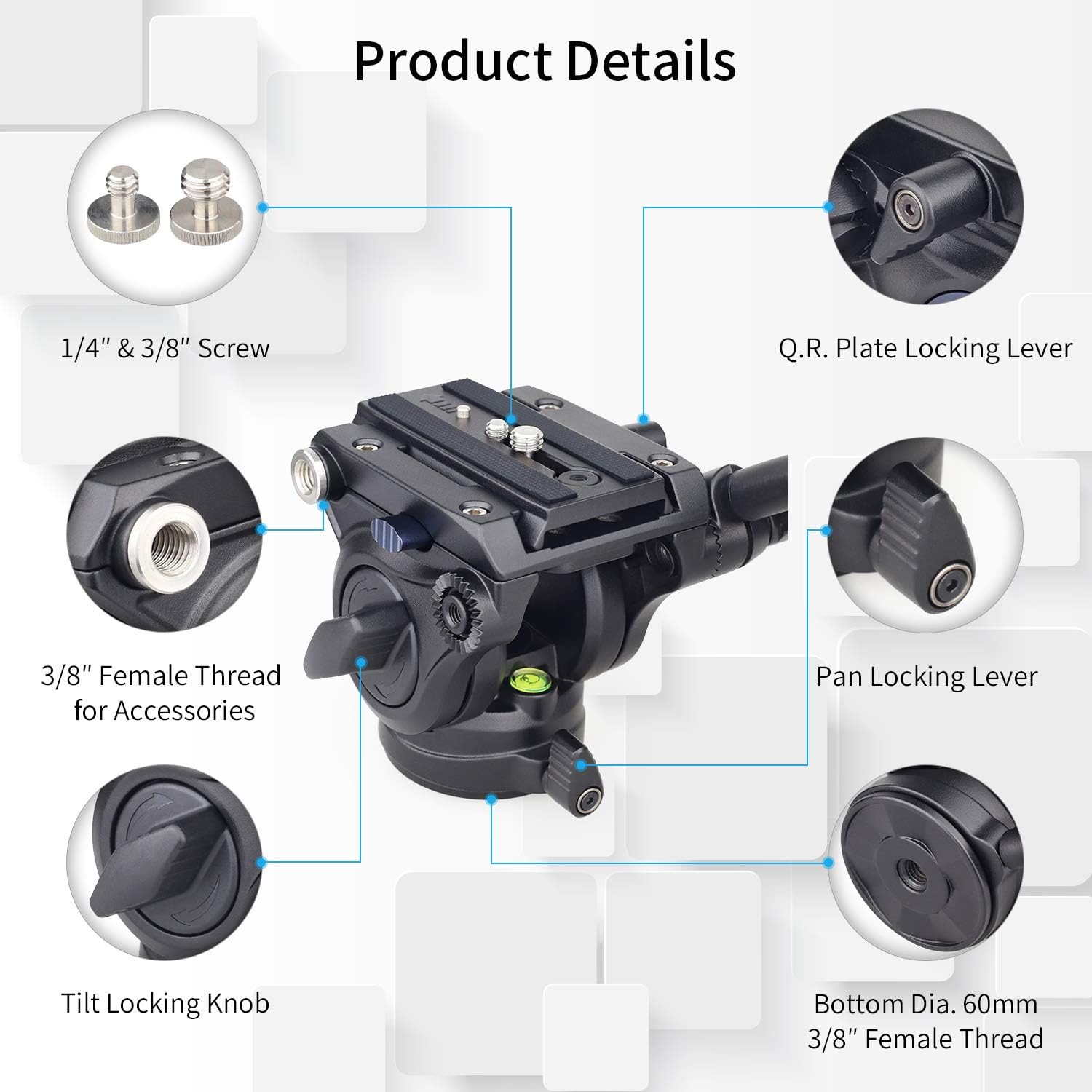
Image 2.3: Product details illustrating the various components and their functions on the fluid head.
3. Operating Instructions
3.1 Pan Movement (Horizontal Rotation)
The fluid head allows for a full 360-degree horizontal rotation. To adjust the pan movement:
- Unlock: Loosen the Pan Locking Lever to allow free horizontal rotation.
- Pan: Gently move the handle to achieve the desired horizontal angle. The fluid damping ensures smooth motion.
- Lock: Tighten the Pan Locking Lever to secure the head in position.
3.2 Tilt Movement (Vertical Angle Adjustment)
The fluid head supports a tilt range from -52° to +91°. To adjust the tilt movement:
- Unlock: Loosen the Tilt Locking Knob to allow vertical angle adjustment.
- Tilt: Gently move the handle to achieve the desired vertical angle. The fluid damping provides smooth tilting.
- Lock: Tighten the Tilt Locking Knob to secure the head at the chosen angle.

Image 3.1: Illustration of the fluid head's pan and tilt capabilities, along with handle dimensions.
3.3 Multi-Angle Shooting
The design of the F60 fluid head allows for various shooting angles, including horizontal, vertical, and angled shots, by utilizing its pan and tilt functions effectively.

Image 3.2: Examples of multi-angle shooting positions achievable with the fluid head.
3.4 Video Demonstration
Video 3.1: An official demonstration video showcasing the INNOREL F60/F80 Tripod Fluid Head in use, highlighting its smooth operation and features.
4. Maintenance
Proper maintenance ensures the longevity and optimal performance of your INNOREL F60 Fluid Head.
- Cleaning: Use a soft, dry cloth to wipe down the fluid head after each use. For stubborn dirt, a slightly damp cloth can be used, followed by immediate drying. Avoid harsh chemicals or abrasive materials.
- Lubrication: The fluid damping system is sealed and does not require user lubrication. Do not attempt to disassemble the fluid head for lubrication.
- Storage: Store the fluid head in a clean, dry environment, away from extreme temperatures and humidity.
- Inspection: Periodically check all screws and levers to ensure they are tight. If any part feels loose, gently tighten it with the provided Allen wrench or appropriate tool.
5. Troubleshooting
If you encounter issues with your INNOREL F60 Fluid Head, refer to the following common problems and solutions:
| Problem | Possible Cause | Solution |
|---|---|---|
| Pan or tilt movement is not smooth or feels sticky. | Locking levers/knobs are too tight; internal fluid issue (rare). | Ensure pan and tilt locking mechanisms are fully disengaged. If the issue persists, contact customer service. |
| Camera is not securely attached to the fluid head. | Quick release plate not properly seated or locked; mounting screw loose. | Ensure the quick release plate is fully inserted, the safety lock is engaged, and the Q.R. Plate Locking Lever is tightened. Check that the camera's mounting screw on the plate is tight. |
| Fluid head wobbles on the tripod. | Fluid head not securely attached to the tripod/monopod. | Tighten the fluid head onto the tripod/monopod's mounting screw. Ensure the tripod's legs are stable. |
| Handle feels loose. | Handle locking mechanism not tightened. | Tighten the locking mechanism on the handle. |
| Fluid head does not fit 1/4" tripod screw. | The fluid head has a 3/8" bottom thread. | An adapter (3/8" to 1/4") is required for tripods with a 1/4" mounting screw. This adapter is typically not included and must be purchased separately. |
6. Specifications
Detailed specifications for the INNOREL F60 Fluid Head:
- Model: F60
- Material: All-metal precision CNC and casting technologies
- Maximum Load Capacity: 22 lbs (10 kg)
- Net Weight: 1.9 lbs (0.86 kg)
- Tilt Angle Range: +91° to -52°
- Pan Range: 360°
- Bottom Base Diameter: 2.36 inches (60 mm)
- Bottom Mounting Thread: 3/8" Female Thread
- Top Mounting Screws: 1/4" and 3/8" (on quick release plate)
- Folded Size: 79mm * 94mm * 104mm
- Compatible Devices: Tripods, Monopods, DSLR Cameras, Camcorders, Telescopes
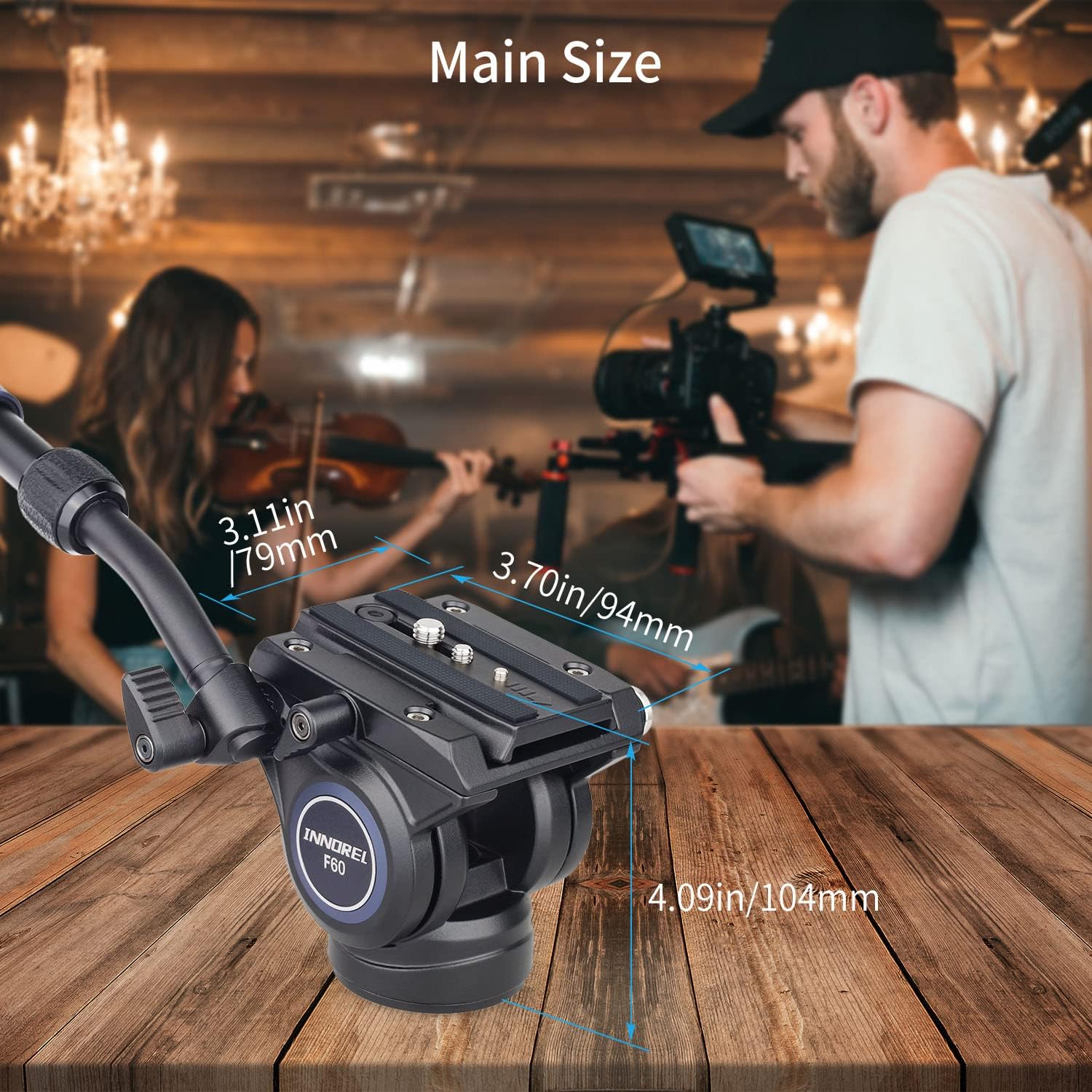
Image 6.1: Main dimensions of the INNOREL F60 Fluid Head.
7. Warranty and Support
INNOREL is committed to providing high-quality products and customer satisfaction.
7.1 Customer Service
For any inquiries, technical support, or assistance, INNOREL offers 24-hour customer service. Please refer to the contact information provided with your purchase or visit the official INNOREL store online.
7.2 Warranty Information
Specific warranty terms and conditions may vary. Please retain your proof of purchase. For detailed warranty information, including coverage and duration, please contact INNOREL customer service or refer to the warranty card included in your product packaging.
