1. Product Overview
The OLIGHT i1R 2 EOS is a compact and powerful rechargeable keychain flashlight designed for everyday carry. It features a brand new 5-sided glowing Chip Scale Packaging LED, delivering a maximum output of 150 lumens. Its small size and dual modes make it suitable for various situations, from camping and hiking to dog walking and general utility.
The entire flashlight is as slim as a pinky finger and weighs only 0.46oz (13g), making it incredibly lightweight and easy to carry without being cumbersome. It is built from durable aluminum alloy, ensuring a robust and reliable feel.

Image: The OLIGHT i1R 2 EOS flashlight, showcasing its compact design and the charging port when twisted open.
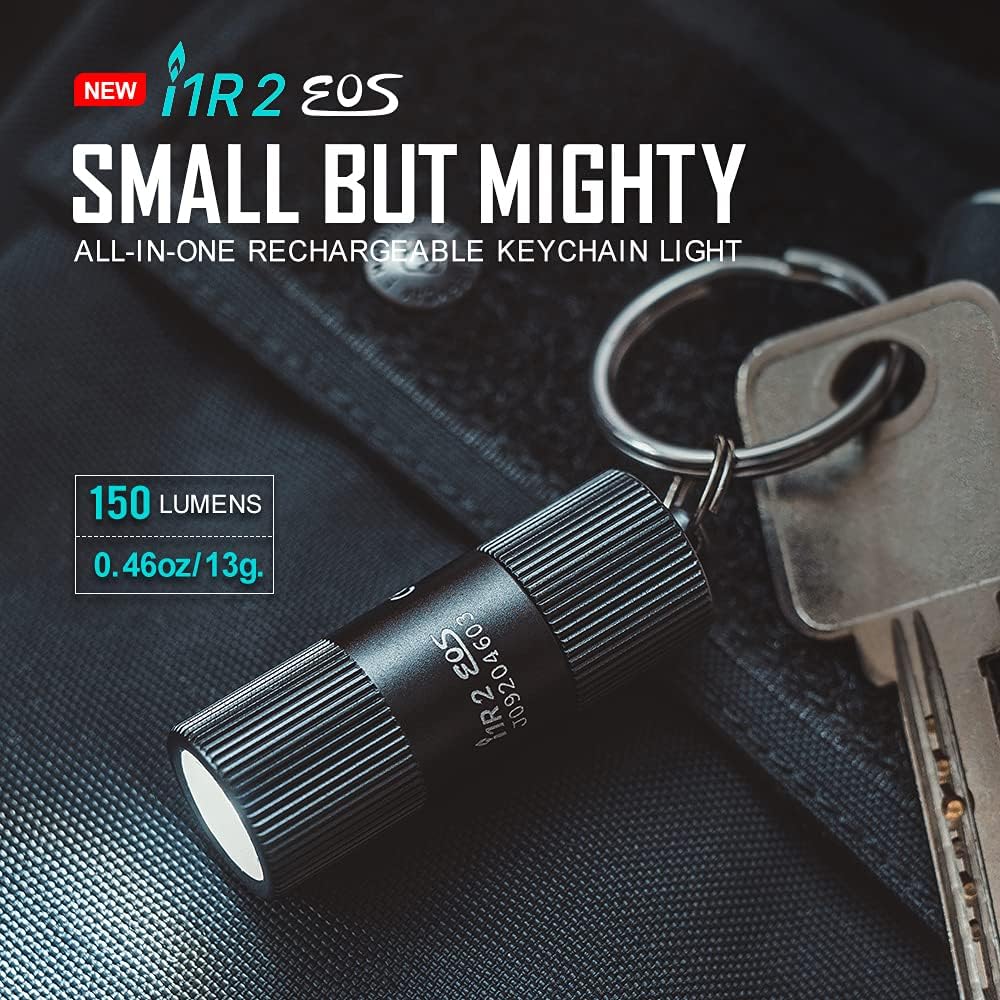
Image: The OLIGHT i1R 2 EOS flashlight next to a set of keys, illustrating its small size and highlighting its 150 lumens output and 0.46oz/13g weight.
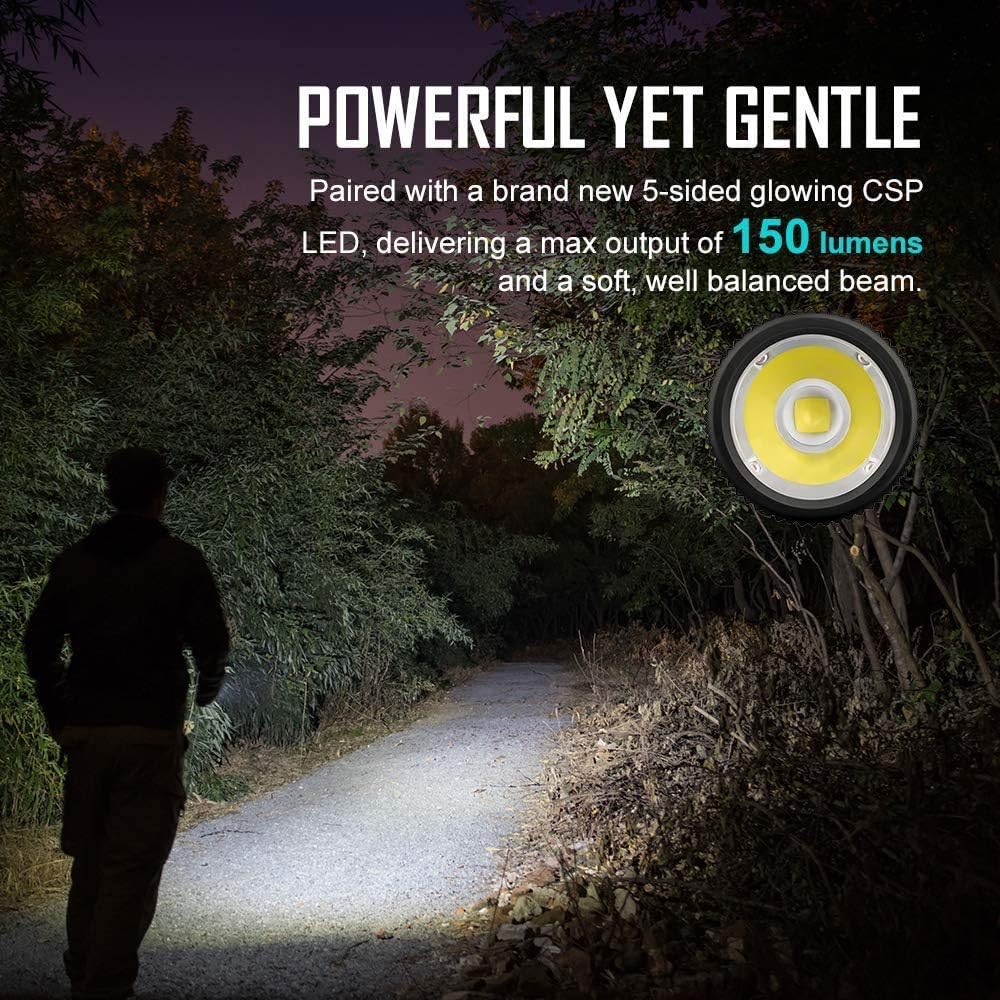
Image: A person walking on a dark path illuminated by the OLIGHT i1R 2 EOS flashlight, demonstrating its powerful yet balanced beam. An inset shows the 5-sided glowing CSP LED.

Image: A hand holding the OLIGHT i1R 2 EOS flashlight, emphasizing its sleek design and compact size, stating it's as slim as a pinky finger and weighs only 0.46oz/13g.

Image: An infographic summarizing key specifications: Max Output 150 Lumens, Max Runtime 6 Hours, Max Throw 40 Meters, Rechargeable Battery, Drop Test 1.5 Meters, Waterproof IPX8.
2. What's in the Box
Upon opening your OLIGHT i1R 2 EOS package, you should find the following items:
- Flashlight i1R 2 EOS (with Key Ring) x 1
- Micro USB Cable x 1
- User Manual x 1

Image: The contents of the OLIGHT i1R 2 EOS package, including the flashlight, Micro USB cable, and user manual.
3. Setup
Charging the Flashlight
The OLIGHT i1R 2 EOS features a built-in rechargeable battery that charges conveniently through a Micro-USB port. There is no need to disassemble the light for charging.
- Locate the Micro-USB charging port by twisting the head of the flashlight to reveal it.
- Connect the provided Micro USB cable to the flashlight's charging port.
- Connect the other end of the Micro USB cable to a USB power source (e.g., computer, wall adapter).
- The flashlight can be fully charged in approximately 75 minutes.
Image: The OLIGHT i1R 2 EOS flashlight connected to a Micro-USB charging cable, demonstrating the charging process.
4. Operating Instructions
Turning On/Off and Mode Selection
The OLIGHT i1R 2 EOS is designed for simple and intuitive operation. The ON/OFF function and mode changes are controlled by twisting the light head.
- To turn the flashlight on to the low mode (5 lumens), twist the light head slightly.
- To switch to the high mode (150 lumens), twist the light head a bit more.
- To turn the flashlight off, twist the light head back to its original closed position.

Image: A hand demonstrating the twisting motion of the OLIGHT i1R 2 EOS flashlight head to turn it on and switch between brightness modes.
5. Maintenance
Proper maintenance ensures the longevity and optimal performance of your OLIGHT i1R 2 EOS flashlight.
- Regular Cleaning: Keep the flashlight body and lens clean. Use a soft, clean cloth to wipe away dust and debris. For the lens, use a lens cleaning solution and a microfiber cloth.
- Charging: To maintain battery health, charge the flashlight regularly, especially if it has not been used for an extended period. Avoid completely draining the battery before recharging.
- Storage: Store the flashlight in a cool, dry place away from direct sunlight and extreme temperatures.
- Water Resistance: The flashlight is rated IPX8 waterproof. While it can withstand immersion, ensure the head is fully twisted to the off position to protect the charging port from water ingress. After exposure to water, dry the flashlight thoroughly.
6. Troubleshooting
If you encounter issues with your OLIGHT i1R 2 EOS flashlight, please refer to the following common troubleshooting steps:
- Flashlight Not Turning On:
- Ensure the battery is charged. Connect the flashlight to a Micro USB power source and allow it to charge for at least 15 minutes.
- Verify that the light head is twisted correctly to the ON position. Twist it fully to the low or high mode.
- Light is Dim or Flickering:
- The battery may be low. Recharge the flashlight fully.
- Ensure the light head is twisted firmly to ensure proper contact.
- Charging Issue:
- Check the Micro USB cable for damage. Try a different Micro USB cable if available.
- Ensure the USB power source is functioning correctly. Try a different USB port or wall adapter.
- Clean the charging port gently with a dry, non-conductive tool to remove any debris.
If these steps do not resolve the issue, please contact OLIGHT customer service for further assistance.
7. Specifications
| Feature | Detail |
|---|---|
| Brand | OLIGHT |
| Model | i1R 2 EOS |
| Model Number | AM-OL-I1R 2+USB |
| Color | Black |
| Material | Aluminum |
| Power Source | Battery Powered |
| Light Source Type | LED |
| Brightness | 150 Lumens (Max) |
| Light Path Distance | 40 Meters |
| Runtime | 6 hours (Low Mode) / 15 minutes (High Mode) |
| Battery Type | 1 Lithium Ion battery (included, customized rechargeable) |
| Item Weight | 0.46 ounces (13g) |
| Product Dimensions | 1.73"D x 0.58"W x 0.58"H |
| Water Resistance Level | Waterproof (IPX8) |
| Special Features | Adjustable Light Modes, High Power, Lightweight, Portable, Rechargeable |
8. Warranty and Support
OLIGHT provides a 12-month warranty for the i1R 2 EOS flashlight, ensuring friendly customer service and support for any product-related issues.
For detailed warranty information and to access additional support resources, please visit the official OLIGHT store:
Visit the OLIGHT Store on Amazon
You can also download the official User Manual in PDF format for comprehensive information:


