
1. Introduction
This manual provides detailed instructions for the operation and maintenance of the POMIACAM IV8W 5-inch 4-in-1 CCTV Tester Monitor. This device is designed for on-site installation and maintenance of various HD coaxial camera systems, including AHD, TVI, CVI, and CVBS. It features a high-resolution display, PTZ control capabilities, and power output for cameras, making it an essential tool for security professionals.
2. Safety Information
- Read all instructions carefully before using the device.
- Do not expose the device to moisture, extreme temperatures, or direct sunlight.
- Use only the provided power adapter and cables.
- Do not attempt to disassemble or repair the device yourself. Refer all servicing to qualified personnel.
- Keep the device away from strong magnetic fields.
- Dispose of batteries according to local regulations. Do not incinerate or expose batteries to high temperatures.
3. Package Contents
Verify that all items listed below are included in your package. If any items are missing or damaged, contact your vendor.
- POMIACAM IV8W CCTV Tester Monitor
- DC5V 1A Power Adapter (with USB cable)
- BNC Cable
- Audio Cable
- RS485 Connector
- Power Output Conversion Cable
- Lanyard
- Tool Bag
- User Manual (this document)

Image 3.1: Contents of the POMIACAM IV8W package, including the tester, cables, adapter, and tool bag.
4. Product Overview
The POMIACAM IV8W is a compact and robust CCTV tester designed for field use. It features a 5-inch display and a durable casing with protective rubberized edges.

Image 4.1: Front view of the POMIACAM IV8W CCTV Tester Monitor.
4.1. Ports and Connectors
The device is equipped with various ports for connectivity and testing:
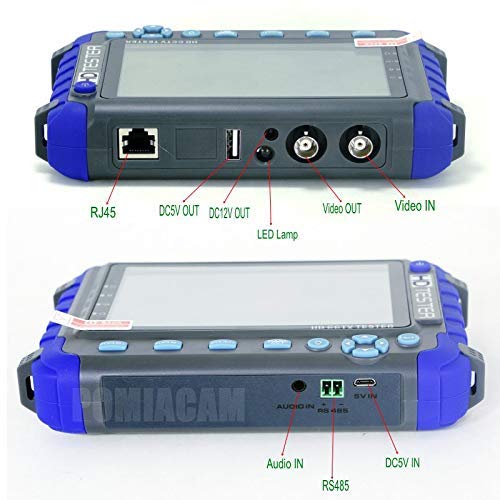
Image 4.2: Labeled ports and connectors on the POMIACAM IV8W.
- RJ45 Port: For network cable testing.
- DC5V OUT: 5V power output for external devices.
- DC12V OUT: 12V 1A power output for powering cameras.
- LED Lamp: Integrated light for working in dark environments.
- Video OUT: BNC connector for video signal output (image generator).
- Video IN: BNC connector for video signal input from cameras.
- Audio IN: For audio signal input from pickup devices.
- RS485: Terminal for PTZ control connections.
- DC5V IN: Power input for charging the device.
4.2. Controls and Buttons
The front panel includes buttons for navigation, focus, zoom, and menu access. A power button is located on the top right side.
5. Setup
5.1. Charging the Battery
The POMIACAM IV8W features a built-in 2600mAh Lithium-Ion battery. Before first use, fully charge the device.
- Connect the provided USB cable to the DC5V IN port on the tester.
- Connect the other end of the USB cable to the DC5V 1A power adapter.
- Plug the power adapter into a standard electrical outlet.
- The charging indicator will illuminate. A full charge typically takes 3-4 hours, providing approximately 11 hours of working time.
5.2. Powering On/Off
- To Power On: Press and hold the power button (located on the top right) until the screen illuminates.
- To Power Off: Press and hold the power button until the device shuts down.
6. Operating Instructions
6.1. Video Test (AHD/TVI/CVI/CVBS)
The IV8W supports testing for 8MP AHD, 8MP TVI, 8MP CVI, and CVBS cameras.

Image 6.1: The tester displaying a camera feed, demonstrating 4-in-1 compatibility.
- Connect the video output of your camera to the Video IN BNC port on the tester using a BNC cable.
- Ensure the camera is powered on. If needed, use the tester's 12V power output (see Section 6.3).
- The tester will automatically detect the video signal type (AHD, TVI, CVI, or CVBS) and display the camera's image on the 5-inch screen.
- The display supports PAL/NTSC standard video signals.
6.2. PTZ Control
The tester supports Pelco-D/P PTZ control protocols via the RS485 interface.
- Connect the RS485 wires from the PTZ camera to the RS485 terminal on the tester.
- Access the PTZ control menu on the tester.
- Configure the PTZ address, protocol (Pelco-D/P), and baud rate to match your camera's settings.
- Use the directional buttons and zoom/focus controls on the tester to manipulate the PTZ camera's movement, zoom, focus, and aperture.
6.3. 12V Power Output
The tester can provide DC12V 1A power to temporarily power a camera during installation or testing.

Image 6.2: Demonstrating the 12V power output feature.
- Connect the power output conversion cable to the DC12V OUT port on the tester.
- Connect the other end of the conversion cable to the camera's power input.
- Ensure the camera's power requirements do not exceed 12V 1A.
6.4. Image Generator
The multi-format video OUT port can send various standard color graphics sections (e.g., PAL, NTSC) for display testing.
- Connect a display device (e.g., monitor, DVR) to the Video OUT BNC port on the tester.
- Navigate to the Image Generator function in the tester's menu.
- Select the desired test pattern (e.g., color bars, grid) and video standard (PAL/NTSC).
- The selected pattern will be outputted to the connected display device.
6.5. Audio Testing
Test audio input from pickup devices.
- Connect the audio output of a pickup device to the Audio IN port on the tester using the audio cable.
- Access the audio testing function in the tester's menu.
- Monitor the audio signal on the tester's display or through an external speaker if connected.
6.6. Cable Testing
The tester supports UTP cable and telephone cable order and connectivity tests.
- Connect one end of the UTP or telephone cable to the RJ45 port on the tester.
- Connect the other end of the cable to the appropriate remote unit (if applicable) or loopback connector.
- Navigate to the Cable Test function in the tester's menu.
- The tester will display the wiring order and connectivity status, helping to identify faults.
6.7. Official Product Video
Watch this video for a visual demonstration of the POMIACAM IV8W CCTV Tester Monitor's features and capabilities.
Video 6.1: An overview of the POMIACAM IV8W CCTV Tester Monitor, showcasing its design, various ports, and key functionalities such as 4-in-1 camera testing, 12V power output, and included accessories.
7. Maintenance
- Cleaning: Use a soft, dry cloth to clean the device. Do not use abrasive cleaners or solvents.
- Storage: Store the device in a cool, dry place away from direct sunlight and extreme temperatures when not in use.
- Battery Care: For prolonged storage, charge the battery to approximately 50% every three months to maintain battery health.
8. Troubleshooting
| Problem | Possible Cause | Solution |
|---|---|---|
| Device does not power on | Low battery; Power button not pressed correctly | Charge the device; Press and hold the power button for a few seconds |
| No video signal displayed | Incorrect cable connection; Camera not powered; Incompatible camera type | Check BNC cable connection; Ensure camera is powered; Verify camera is AHD/TVI/CVI/CVBS (not HDMI) |
| PTZ control not working | Incorrect RS485 wiring; Mismatched protocol/baud rate; PTZ camera not powered | Check RS485 connections (A/B); Verify PTZ settings in tester menu; Ensure PTZ camera has power |
| 12V power output not working | Cable not connected; Camera draws too much current | Check power output conversion cable; Ensure camera current draw is within 1A limit |
9. Specifications
| Feature | Specification |
|---|---|
| Model Number | IV8W |
| Display | 5.0-inch LCD, 800(RGB) x 480 resolution |
| Video Input Formats | CVBS, 8MP AHD, 8MP TVI, 8MP CVI |
| Video Standard | PAL/NTSC (auto-detection) |
| PTZ Control | RS485, supports Pelco-D/P protocols |
| Power Output | DC12V 1A (for camera power) |
| Battery | Built-in 2600mAh Lithium-Ion (18650 type) |
| Battery Life | Approx. 11 hours (after 3-4 hours charge) |
| Dimensions | 6.3 x 1.18 x 4.33 inches (16 x 3 x 11 cm) |
| Weight | 1.8 Pounds (0.82 kg) |
| Operating Temperature | Not specified (typical range for electronics) |
10. Warranty and Support
For warranty information and technical support, please refer to the documentation provided at the time of purchase or contact POMIACAM customer service through their official channels. Keep your purchase receipt as proof of purchase for warranty claims.

