
1. Introduction
Thank you for choosing the INNOREL MT70 Multifunction Video Tripod. This manual provides detailed instructions for the proper setup, operation, and maintenance of your tripod. Please read this manual thoroughly before using the product to ensure optimal performance and longevity.
The INNOREL MT70 is a versatile 4-section aluminum tripod designed for DSLR cameras, compact camcorders, and digital cinema cameras. It features a fluid head for smooth movements, a unique leveling center column, and the ability to convert into a monopod.
2. Product Overview and Components
The INNOREL MT70 is designed with several key features to enhance your photography and videography experience.

Figure 2.1: Key features of the INNOREL MT70 tripod, including its 2-in-1 functionality, leveling center column, and fast flip buckle lock design.
Familiarize yourself with the various parts of your INNOREL MT70 tripod.

Figure 2.2: Exploded view showing key components such as the fluid head, 3/8" screw, removable monopod leg, angle adjustment, stainless steel spike, non-slip rubber foot, and flip lock.
- Fluid Head: Provides smooth panning and tilting for video recording.
- Quick Release Plate: For fast attachment and detachment of your camera.
- Center Column: Adjustable height, with an integrated half-ball leveling base.
- Tripod Legs: Four sections with flip locks for quick height adjustment.
- Leg Angle Adjustment: Allows setting legs at different angles for stability on uneven terrain or low-angle shots.
- Monopod Leg: One detachable leg that combines with the center column to form a monopod.
- Rubber Feet / Stainless Steel Spikes: Interchangeable feet for various surfaces.
3. Setup
3.1 Unpacking and Initial Inspection
Carefully remove all components from the packaging. Verify that all items listed in the packing list are present and undamaged.

Figure 3.1: Contents of the INNOREL MT70 package, including tripod bag, main body, short central column, pan bar handle, flip lock adjusting tool, stainless steel spikes, Allen keys, warranty card, and instruction manual.
- Tripod Bag
- Main Tripod Body with Fluid Head
- Short Central Column
- Pan Bar Handle
- Flip Lock Adjusting Tool
- Stainless Steel Spikes (3x)
- Allen Keys (4x)
- Warranty Card
- Instruction Manual
- Strap for Tripod Bag
3.2 Deploying the Tripod
- Unfold the tripod legs by releasing the leg angle adjustment locks.
- Extend the tripod legs to the desired height by opening the flip locks on each section and then closing them securely.
- Adjust the leg angles for stability. The tripod offers multiple leg angle positions (e.g., 12°, 42°, 70°).

Figure 3.2: Demonstrates various leg angle adjustments (12°, 42°, 70°) and the inverted state for low-angle shooting.
3.3 Attaching the Camera to the Fluid Head
- Ensure the quick release plate is detached from the fluid head.
- Securely attach the quick release plate to the bottom of your camera using the appropriate screw (1/4" or 3/8").
- Slide the quick release plate with your camera into the fluid head receiver until it locks into place. Ensure it is firmly seated.
4. Operating Instructions
4.1 Adjusting Tripod Height
The MT70 tripod offers a height range from 65 cm (25.6 inches) to 182.9 cm (72 inches).
- To extend or retract the legs, open the flip locks on each leg section, adjust to the desired length, and then firmly close the flip locks.
- To adjust the center column height, loosen the center column locking knob, raise or lower the column, and then tighten the knob.

Figure 4.1: Illustrates the various working heights of the tripod, ranging from 59cm (23.2in) to 195cm (76.8in) with the center column fully extended.
4.2 Using the Fluid Head
The F60 fluid head provides smooth and precise camera movements.
- Pan Movement: Loosen the pan lock knob to allow 360° horizontal rotation. Tighten to secure.
- Tilt Movement: Loosen the tilt lock knob to allow vertical tilt from +91° to -52°. Tighten to secure.
- Leveling: The integrated half-ball leveling base allows for quick leveling of the fluid head without adjusting the tripod legs. Loosen the half-ball locking lever, adjust the head until the bubble level indicates it is level, then tighten the lever.

Figure 4.2: Details the smooth operation of the fluid head, showing 360° pan range and +91°/-52° tilt range, along with dimensions.

Figure 4.3: Illustrates the half-ball leveling platform and its locking lever, enabling quick leveling for panoramic shots.
4.3 Monopod Conversion
The INNOREL MT70 can be converted into a monopod for increased portability and flexibility.
- Identify the tripod leg with the foam grip. This is the detachable monopod leg.
- Unscrew and remove this leg from the tripod main body.
- Unscrew the center column from the tripod main body.
- Attach the removed monopod leg to the bottom of the center column.
- You now have a fully functional monopod. You can attach the fluid head to the top of the center column if desired.
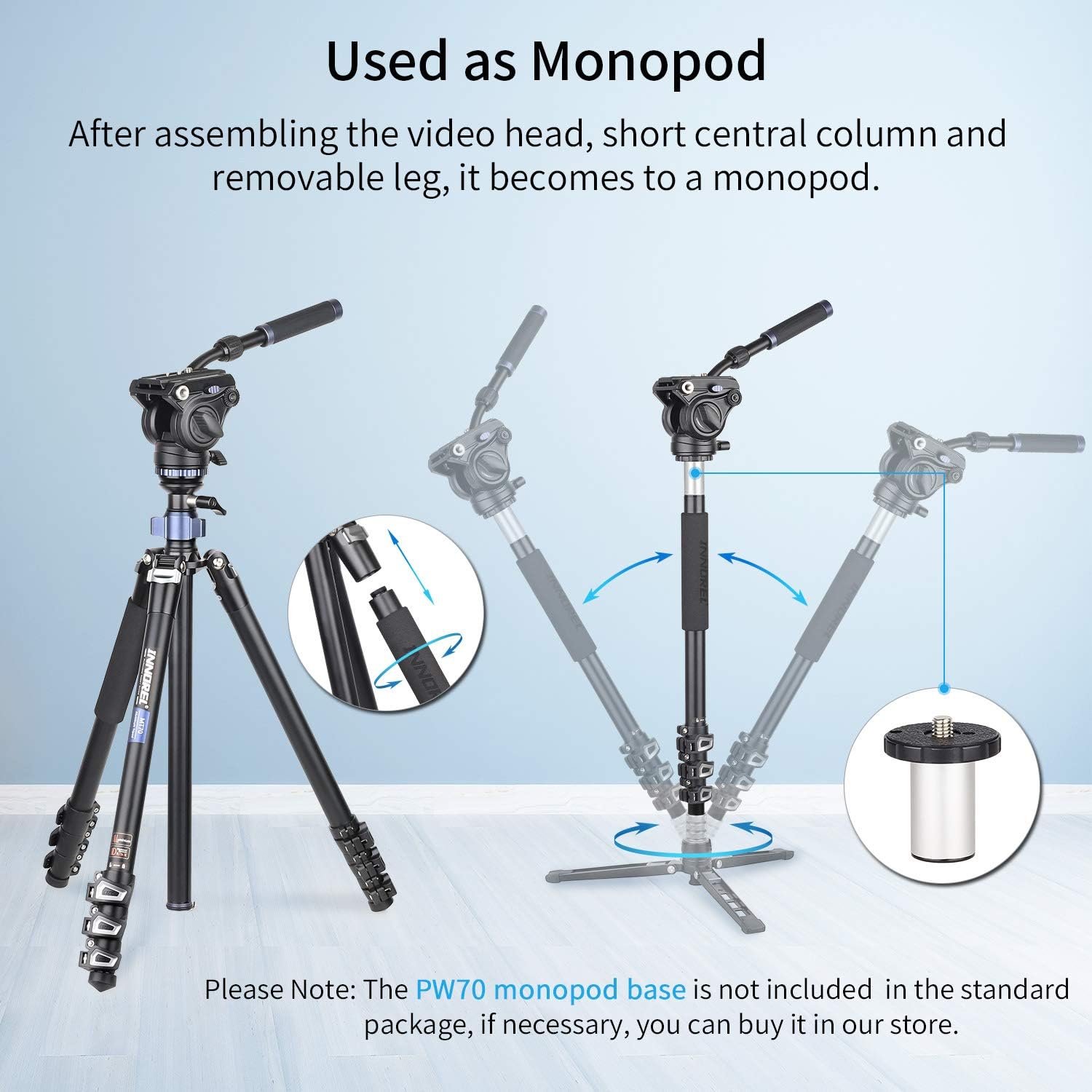
Figure 4.4: Step-by-step illustration of converting the tripod into a monopod by combining the video head, short central column, and a removable leg.
4.4 Low-Angle and Macro Shooting
The exclusive center column with its half-ball leveling base allows for unique low-angle and macro photography.
- Inverted Center Column: The center column can be inverted and mounted upside down for extremely low-angle shots or macro photography, bringing your camera closer to the ground.
- 25° Tilt: The center column and mounting plate can tilt up to 25° in any direction, facilitating creative angles for macro or specialized shots.
5. Maintenance
- Cleaning: Wipe down the tripod with a soft, damp cloth after each use, especially if used in dusty, sandy, or wet environments. Avoid harsh chemicals.
- Lubrication: Periodically check the fluid head for smooth operation. If resistance is felt, consult a professional for lubrication. Do not attempt to lubricate internal fluid head mechanisms yourself.
- Tightness: Regularly check all screws, knobs, and flip locks for tightness. Use the provided Allen keys and adjusting tool as needed.
- Storage: Store the tripod in its bag in a dry, cool place away from direct sunlight and extreme temperatures.
- Feet: Ensure the rubber feet or stainless steel spikes are clean and free of debris. Replace if worn.
6. Troubleshooting
| Problem | Possible Cause | Solution |
|---|---|---|
| Tripod legs slide or collapse. | Flip locks are not fully engaged or are loose. | Ensure all flip locks are securely closed. Use the adjusting tool to tighten flip locks if they feel loose. |
| Fluid head movements are stiff or jerky. | Lock knobs are too tight, or internal fluid is cold/damaged. | Loosen pan and tilt lock knobs. Allow the tripod to warm up in cold conditions. If the issue persists, contact customer support. |
| Tripod is unstable. | Legs not fully extended, uneven ground, or excessive load. | Ensure all leg sections are fully extended and flip locks are secured. Adjust leg angles to match uneven terrain. Verify camera weight is within the 10 kg (22 lbs) limit. |
| Quick release plate not locking. | Plate not inserted correctly, or locking mechanism obstructed. | Ensure the quick release plate is fully seated and aligned. Check for any debris obstructing the locking mechanism. |
7. Specifications
| Feature | Detail |
|---|---|
| Brand | INNOREL |
| Model | MT70 |
| Material | Aluminum |
| Color | Aluminum |
| Maximum Load Capacity | 10 kg (22 lbs) |
| Maximum Height | 183 cm (72 inches) |
| Minimum Height | 65 cm (25.6 inches) |
| Folded Length | 55.1 cm (21.7 inches) |
| Item Weight | 2.96 kg (6.5 lbs) |
| Tripod Head Type | Fluid Head (F60) |
| Pan Range | 360° |
| Tilt Angle | +91° / -52° |
| Leg Sections | 4 |
| Special Features | Lightweight, Convertible to Monopod, Leveling Center Column |
| Compatible Devices | DSLR Cameras, Compact Camcorders, Digital Cinema Cameras, Manfrotto/Leofoto/Sirui/Sachtler Ball Head/Fluid Video Head/Gimbal Head |
8. Warranty and Support
The INNOREL MT70 Multifunction Video Tripod comes with a 2-year manufacturer's warranty.
For warranty claims, technical support, or any inquiries regarding your product, please contact INNOREL customer service through your purchase platform or the official INNOREL website.
Please retain your proof of purchase for warranty validation.