
1. Important Safety Information
Before operating the Propel FitnessOne HT55 Treadmill, please read and understand all safety instructions. Retain this manual for future reference.
- Always attach the safety key to your clothing before starting a workout. In case of an emergency, pulling the safety key will immediately stop the treadmill.
- Ensure the treadmill is placed on a flat, stable surface with adequate clearance around it.
- Keep children and pets away from the treadmill during operation.
- Consult a physician before starting any new exercise program.
- Do not operate the treadmill if it is damaged or malfunctioning.
- Maximum user weight capacity is 100 kg.
2. Package Contents
Verify that all components are present in the box:
- 1 x Treadmill Set (Main Unit)
- 1 x Assembly Kit (Screws, bolts, washers, Allen key, wrench)
- 1 x Safety Key
- 1 x User Manual (This document)
- 1 x Warranty Card
3. Setup and Installation
The Propel FitnessOne HT55 Treadmill is designed for easy setup. Follow these steps for assembly:
3.1 Unboxing and Initial Setup
Carefully open the package and remove the treadmill and all accessories. Place the treadmill on a flat surface.

Figure 3.1: Propel FitnessOne HT55 Treadmill in its operational state.
3.2 Assembling the Upright Posts and Console
The treadmill comes largely pre-assembled. You will need to lift the console and secure it.
- Lift the treadmill stem vertically until it locks into place.
- Unpack the provided screws, bolts, and nuts from the assembly kit.
- Fix the upright posts using the provided screws and bolt nuts. Tighten them securely with the Allen key.
- Attach the protective guard to the base of the treadmill and secure it with the appropriate screws.
Video 3.2: Installation guide for the Propel FitnessOne HT55 Treadmill, demonstrating the assembly process.
Video 3.3: Detailed installation steps for the Propel FitnessOne HT55 Treadmill, including securing components.
3.3 Connecting Power and Safety Key
- Plug the power cord into a suitable electrical outlet.
- Insert the safety key into its designated slot on the console. The treadmill will not operate without the safety key in place.
4. Operating Instructions
Familiarize yourself with the control console and features of your HT55 Treadmill.
4.1 Control Console Overview

Figure 4.1: The control console of the HT55 Treadmill.
The 5-inch blue backlit LCD display shows key workout metrics:
- Time: Duration of your workout.
- Speed: Current running speed (0.8 to 12 km/hr).
- Distance: Total distance covered.
- Calories: Estimated calories burned.
- Pulse: Heart rate detected by hand sensors.
- Steps: Number of steps taken.
The console also features an MP3 interface with AUX input and built-in speakers for audio playback.

Figure 4.2: Close-up of the LCD display and console features.
4.2 Starting a Workout
- Ensure the safety key is properly placed on the console and clipped to your clothing.
- Press the START button to begin. The treadmill will typically start at a low speed.
- Adjust the speed using the SPEED +/- buttons on the console or the quick-speed keys (2, 4, 6, 8, 10, 12 km/hr). Speed controls are also available on the handrails.
- To stop, press the STOP button or pull the safety key.
4.3 Workout Programs
The HT55 Treadmill includes 15 pre-set programs and 3 user-defined programs. Select a program using the MODE button or dedicated program buttons on the console.
4.4 Manual Incline Adjustment
The treadmill features a 3-level manual incline. To adjust the incline, you must manually lift or lower the rear of the running deck and secure it at the desired level before starting your workout.
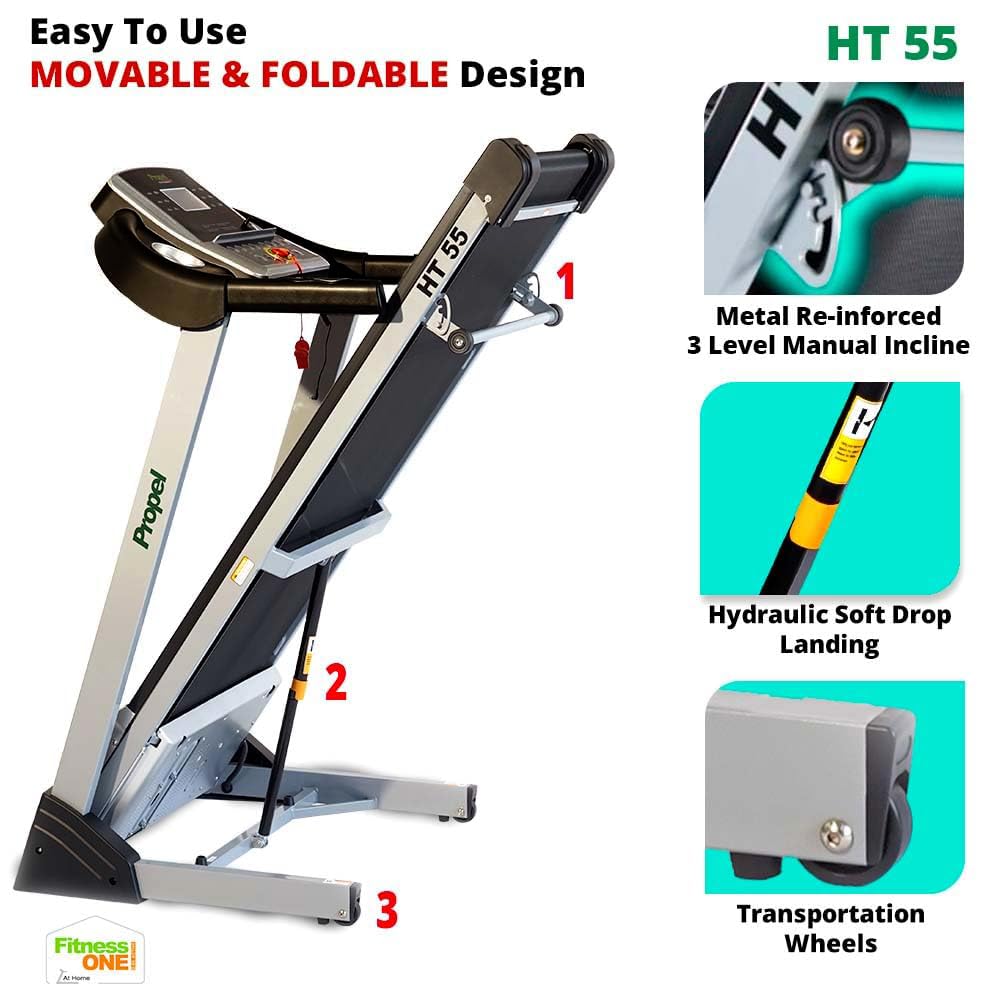
Figure 4.3: Manual incline adjustment mechanism.
4.5 Hand Sensors and Audio
- Grip the hand sensors on the handlebars to monitor your pulse.
- Connect your MP3 device to the AUX input to play music through the built-in speakers.
5. Maintenance
Regular maintenance ensures the longevity and optimal performance of your treadmill.
- Cleaning: Wipe down the treadmill after each use with a damp cloth to remove sweat and dust. Avoid abrasive cleaners.
- Lubrication: Periodically lubricate the running belt as per the instructions in the full user manual to reduce friction and wear.
- Belt Adjustment: Check the running belt tension and alignment regularly. Adjust if necessary to prevent slipping or uneven wear.
- Motor Area: Keep the motor cover area clean and free from dust and debris to ensure proper ventilation.
6. Troubleshooting
If you encounter issues with your treadmill, refer to the following common solutions:
- Treadmill not starting: Ensure the power cord is securely plugged in and the safety key is correctly placed. Check the power switch.
- Belt slipping: The running belt may need tensioning or lubrication. Refer to the detailed maintenance section in the full user manual.
- Unusual noises: Stop the treadmill immediately. Check for loose parts or foreign objects under the belt. If the noise persists, contact customer support.
- Inaccurate heart rate readings: Ensure your hands are firmly placed on the pulse sensors. Dry hands or excessive movement can affect accuracy.
For more complex issues, contact Propel customer support.
7. Specifications
Key technical specifications for the Propel FitnessOne HT55 Treadmill:
| Feature | Specification |
|---|---|
| Brand | Propel |
| Model Name | HT55 |
| Motor Power | 3 HP Peak DC Motor |
| Maximum Speed | 12 km/h |
| Incline Levels | 3-Level Manual Incline |
| Running Surface | 48 x 17 inches (1220 x 430 mm) |
| Maximum User Weight | 100 kg |
| Display Type | 5-inch Blue Backlit LCD |
| Pre-set Programs | 15 |
| Connectivity | MP3, AUX input |
| Foldable Design | Yes, with Hydraulic Soft Drop Landing |
| Item Weight | 44 Kilograms |
| Product Dimensions (Operational) | 152D x 75.2W x 118H Centimeters |

Figure 7.1: Operational dimensions of the HT55 Treadmill.

Figure 7.2: Running surface dimensions.

Figure 7.3: The 3HP Peak DC Motor.
8. Warranty and Support
Propel FitnessOne provides comprehensive warranty coverage and support for your HT55 Treadmill:
- Frame: 5 years warranty.
- Motor: 1 year warranty.
- Parts: 1 year warranty.
For installation assistance, video-guided support is available. In-person assembly support can be arranged for a nominal fee. Refer to your warranty card for detailed terms and conditions or contact Propel customer care at 96000 09010 or visit www.fitnessone.in.