
LEVOIT Core P350
LEVOIT Core P350-P Pet Care Air Purifier User Manual
Model: Core P350-P | Brand: LEVOIT
Introduction
The LEVOIT Core P350-P Pet Care Air Purifier is designed to improve indoor air quality, specifically targeting pet-related allergens and odors. This manual provides essential information for the safe and effective operation, maintenance, and troubleshooting of your air purifier.
Important Safety Information
Please read and follow all safety instructions before using this appliance to prevent fire, electric shock, or injury.
- Always place the air purifier on a firm, flat surface.
- Keep the appliance away from heat sources and direct sunlight.
- Do not block air openings.
- Do not use in wet or humid environments.
- Unplug the air purifier before moving, cleaning, or performing any maintenance.
- This appliance is not intended for use by persons (including children) with reduced physical, sensory or mental capabilities, or lack of experience and knowledge, unless they have been given supervision or instruction concerning use of the appliance by a person responsible for their safety.
- Do not use chemical sprays or liquids near the air purifier. The Core P350-P does not use ions to purify the air, ensuring safety from harmful particle exposure.
Product Overview
Familiarize yourself with the components of your LEVOIT Core P350-P Air Purifier.

The LEVOIT Core P350-P Air Purifier in gray, featuring a sleek cylindrical design with a perforated lower section for air intake.
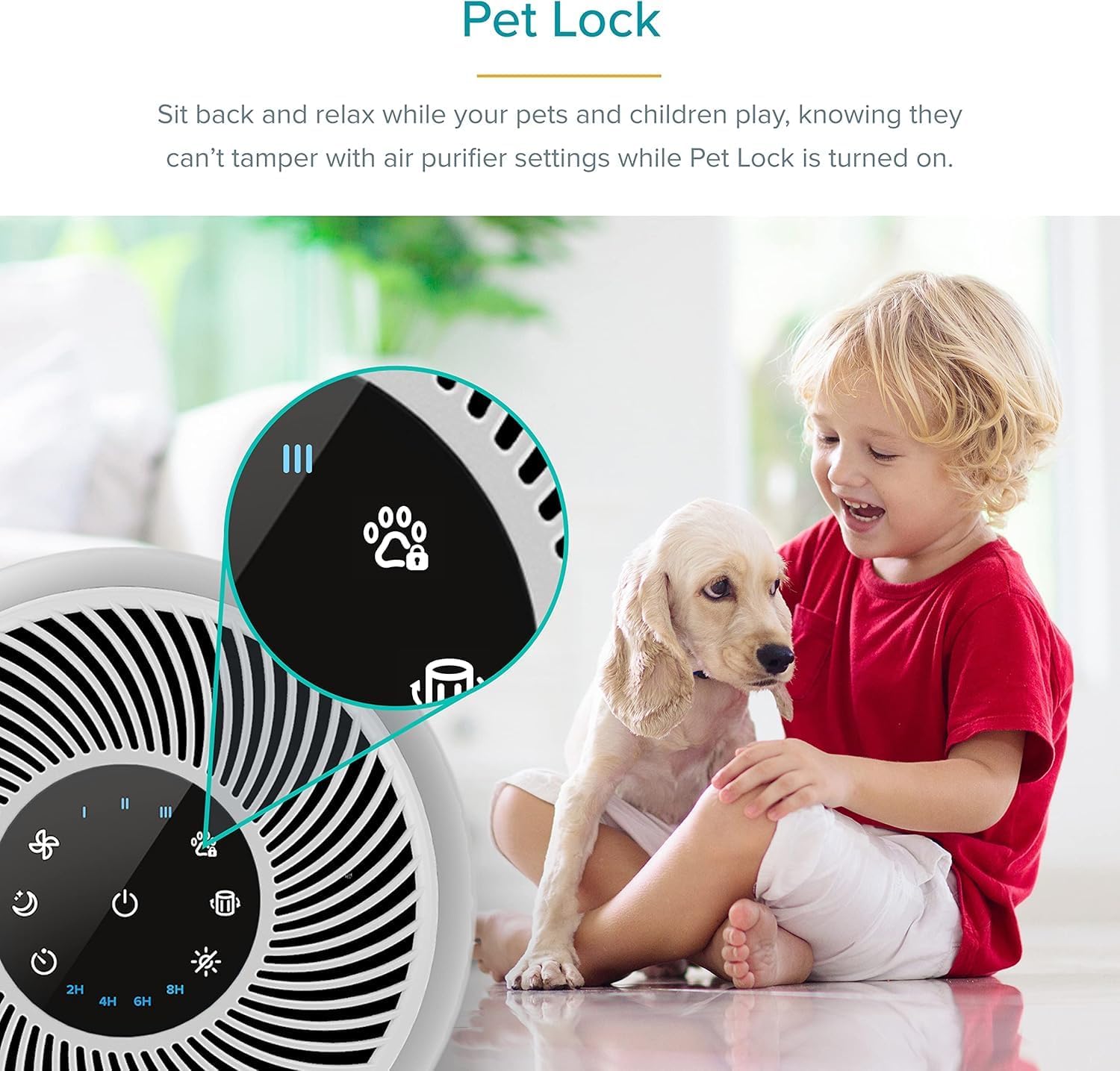
Close-up of the control panel on the LEVOIT Core P350-P, highlighting the Pet Lock icon, which prevents accidental changes to settings by children or pets.
Control Panel Functions:
- Power Button: Turns the unit on/off.
- Fan Speed Button: Adjusts fan speed (Low, Medium, High).
- Sleep Mode Button: Activates ultra-quiet operation (24dB) with dimmed display.
- Timer Button: Sets operation timer (2H, 4H, 8H, 12H).
- Pet Lock Button: Engages/disengages the child/pet lock function.
- Filter Reset Indicator: Lights up when filter replacement is needed.
Setup
Follow these steps to set up your air purifier for the first time.
- Unpack the Air Purifier: Carefully remove the air purifier and all its components from the packaging. Ensure all packing materials are removed.
- Remove Filter Packaging: Turn the air purifier upside down and twist the base counter-clockwise to unlock. Remove the pre-installed 3-Stage Pet Allergy Filter and remove any plastic packaging from the filter.
- Reinstall Filter: Place the filter back into the air purifier with the pull tabs facing up.
- Secure Base: Replace the base and twist clockwise to lock it securely.
- Placement: Place the air purifier on a flat, stable surface in the desired room. Ensure there is at least 6 inches (15 cm) of clearance on all sides for optimal airflow.
- Plug In: Plug the power cord into a grounded electrical outlet.
Operating Instructions
Learn how to use the various functions of your LEVOIT Core P350-P Air Purifier.
Turning On/Off:
- Press the Power Button to turn the air purifier on or off.
Adjusting Fan Speed:
- Press the Fan Speed Button repeatedly to cycle through fan speeds: Low, Medium, High.
- Higher fan speeds will purify air more quickly but will produce more noise.
Sleep Mode:
- Press the Sleep Mode Button to activate Sleep Mode. In this mode, the display indicators will dim to half-brightness, and the fan will operate at a whisper-quiet 24dB.
- Press any button (except Power) to exit Sleep Mode.

The LEVOIT Core P350-P operates at a quiet 24dB in Sleep Mode, ensuring minimal disturbance for both you and your pets.
Setting a Timer:
- Press the Timer Button repeatedly to select a timer duration: 2 hours, 4 hours, 8 hours, or 12 hours.
- The air purifier will automatically turn off once the timer expires.
Pet Lock Function:
- Press and hold the Pet Lock Button for 3 seconds to activate or deactivate the Pet Lock.
- When activated, the control panel buttons will be disabled to prevent accidental changes by children or pets.
Air Purification Performance:
The Core P350-P is designed for efficient air purification, especially in pet-friendly homes. It can purify 217 sq ft in approximately 12.5 minutes.

Visual representation of the LEVOIT Core P350-P's air purification capabilities, including CADR ratings for smoke, dust, and pollen, and its ability to purify a 217 sq ft room in 12.5 minutes.
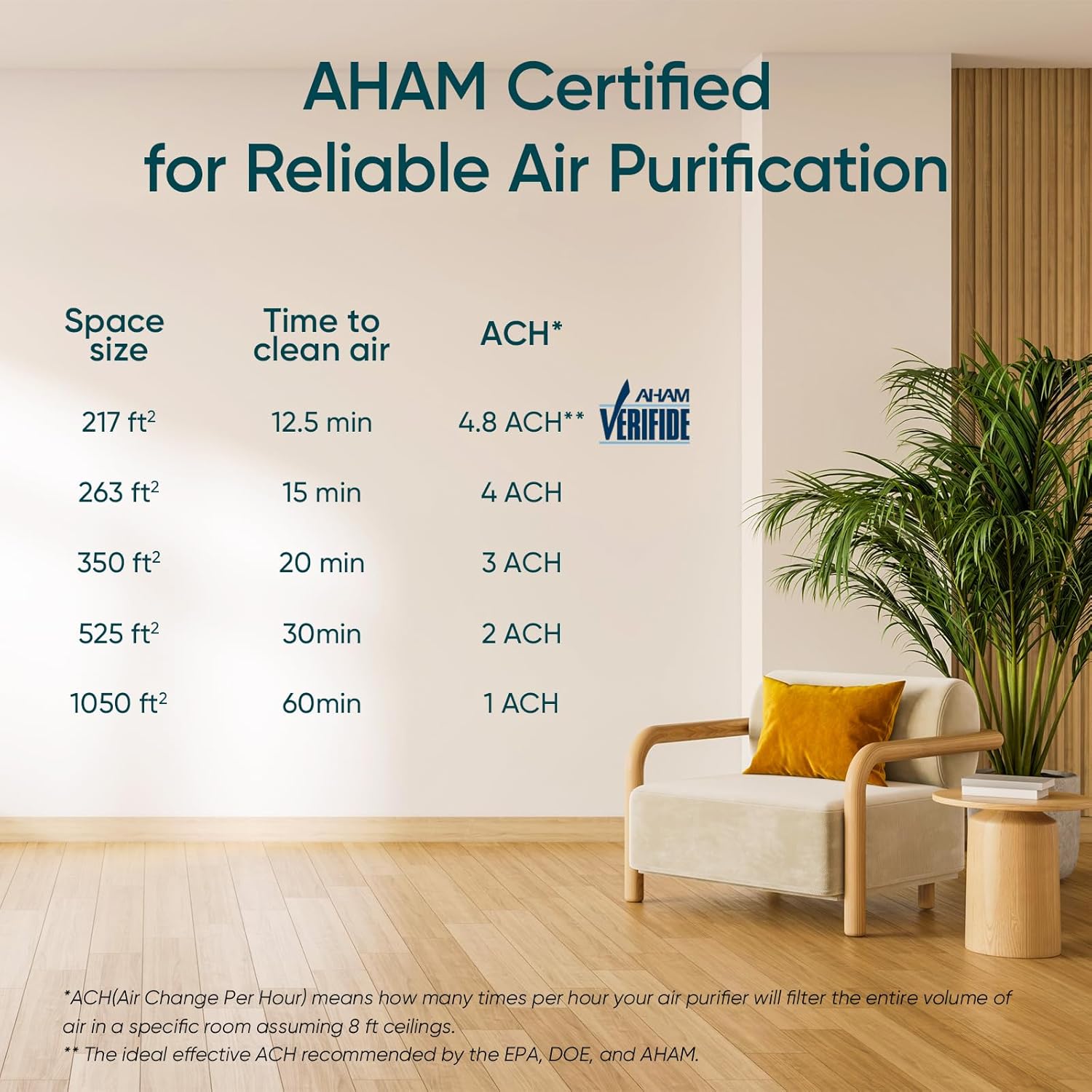
Table detailing AHAM certified space sizes, time to clean air, and Air Changes Per Hour (ACH) for various room sizes, demonstrating the purifier's efficiency.
Maintenance
Regular maintenance ensures optimal performance and extends the lifespan of your air purifier.
Filter System:
The Core P350-P utilizes a 3-in-1 filtration system:
- Fine Non-Woven Fabric Pre-Filter: Captures large particles like pet fur, hair, dust, and lint.
- Efficient Middle Filter: Traps fine dust, pet dander, smoke particles, and pollen.
- Efficient Activated Carbon Filter: Neutralizes fumes, smoke, VOCs, and odors, especially pet odors and litter box smells, with over 92% deodorization rate due to ARC Formula technology.

An illustration highlighting the high-activated carbon filter's ability to eliminate odors, showing a 95% ammonia removal rate.
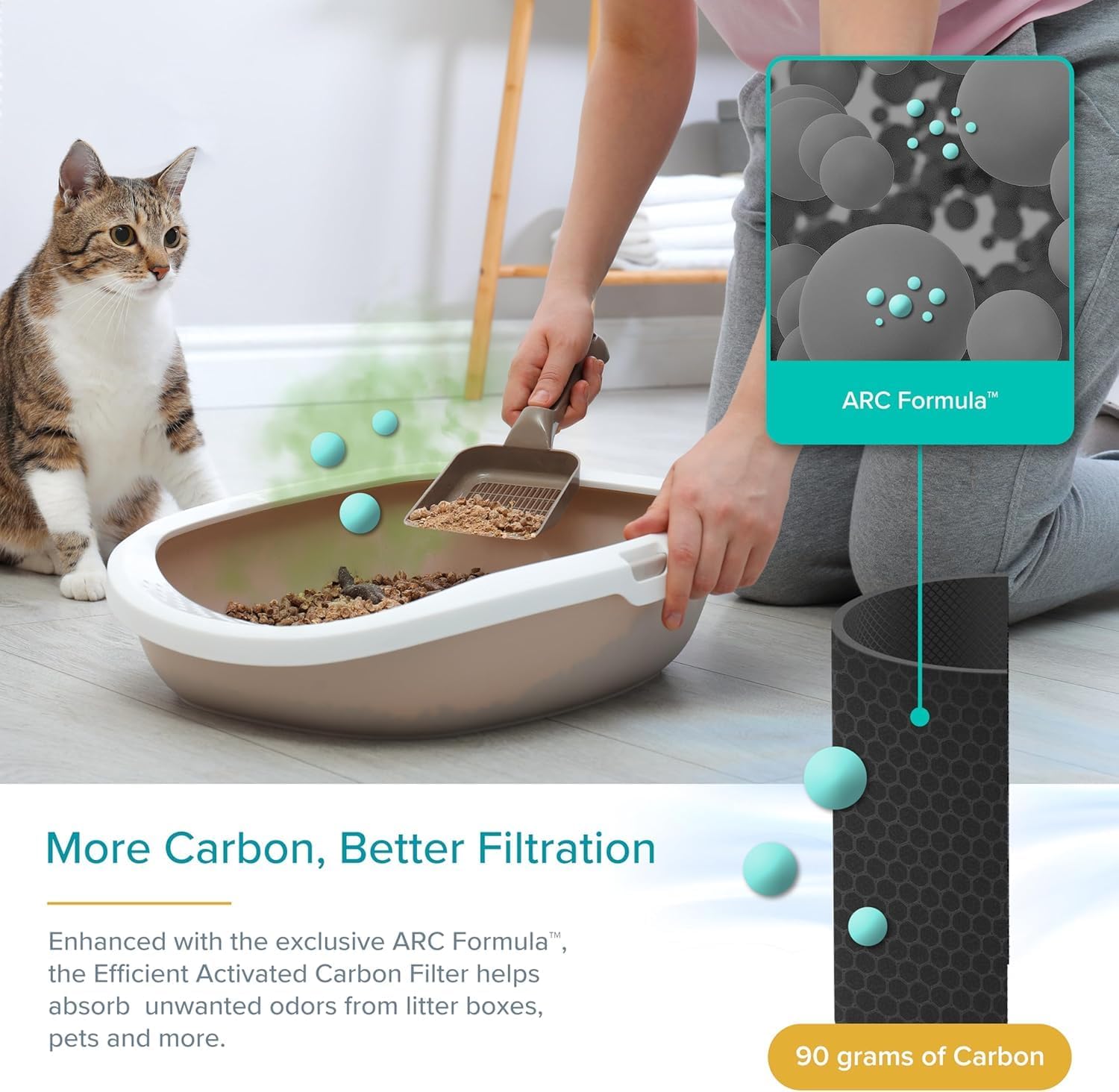
A visual explaining the ARC Formula technology and how the activated carbon filter absorbs unwanted odors, indicating 90 grams of carbon for enhanced filtration.

An image illustrating the efficient middle filter, designed to trap pet dander, dust, pollen, and other allergens, contributing to a healthier environment.

A woman and her golden retriever enjoying a clean, allergy-free home, demonstrating the product's effectiveness in filtering pet dander, dust mites, and pollen with a 99.97% filtration rate.
Filter Replacement:
Filters should be replaced every 6–8 months, depending on usage and air quality. The Filter Reset Indicator will illuminate when it's time to replace the filter.
- Unplug the air purifier.
- Turn the unit upside down and twist the base counter-clockwise to unlock.
- Remove the old filter. Dispose of it properly.
- Insert a new LEVOIT Core P350-RF replacement filter (search for "Core P350-RF" to find official filters).
- Replace the base and twist clockwise to lock.
- Plug in the air purifier.
- Press and hold the Filter Reset Button for 3 seconds until the indicator light turns off.

The "100% Levoit Genuine" badge, indicating that using official replacement filters ensures perfect fit, no unwanted odors, advanced sealing, and high-efficiency filtration materials.
Troubleshooting
If you encounter any issues with your air purifier, refer to the following common problems and solutions.
| Problem | Possible Cause | Solution |
|---|---|---|
| Air purifier does not turn on. | Not plugged in; power outlet not working; Pet Lock activated. | Ensure power cord is securely plugged in. Try a different outlet. Deactivate Pet Lock by pressing and holding the Pet Lock button for 3 seconds. |
| Airflow is significantly reduced. | Filter is dirty or clogged; air intake/outlet blocked. | Check and replace the filter if necessary. Ensure no objects are blocking the air intake or outlet. |
| Unusual noise. | Filter not installed correctly; foreign object inside. | Ensure the filter is seated properly. Unplug and check for any foreign objects inside the unit. |
| Odor persists or is not reduced. | Filter needs replacement; room size too large. | Replace the filter. Ensure the air purifier is appropriately sized for the room (217 sq ft recommended for optimal performance). |
Specifications
| Feature | Detail |
|---|---|
| Model Number | Core P350 |
| Color | Gray |
| Product Dimensions (D x W x H) | 8.7" x 8.7" x 14.2" |
| Recommended Floor Area | Up to 219 Square Feet |
| Noise Level | 24 dB (Sleep Mode) |
| Particle Retention Size | 0.3 Micron |
| Controller Type | Button Control |
| Wattage | 56 watts |
| Item Weight | 7.5 pounds |
| Care Instructions | Filters should be replaced every 6–8 months |
| Included Components | 1 x Pet Care Air Purifier, 1 x 3-Stage Pet Allergy Filter (Pre-Installed), 1 x User Manual, 1 x Quick Start Guide |
Warranty and Support
LEVOIT is dedicated to delivering premium quality and friendly customer support. For warranty information, product registration, or any questions and feedback, please refer to the official LEVOIT website or contact their customer support directly. Your satisfaction is their priority.
For further assistance, you may visit the LEVOIT Store on Amazon.
Related documentsCore P350


Ask a question about this manual
Ask about setup, troubleshooting, compatibility, parts, safety, or missing instructions. Manuals+ will review the question and use this page’s manual context to help answer it.