
1. Introduction
This manual provides essential instructions for the safe and effective operation, setup, and maintenance of your HITBOX 200A Multi-Process Welder. This versatile machine supports Flux Core MIG, Stick (ARC), and Lift TIG welding, featuring a synergy one-knob intelligent control system for optimized welding parameters. Its compact and lightweight design ensures portability and ease of use.
2. Safety Information
WARNING: Welding can be hazardous. Always follow safety precautions to prevent injury or death.
- Eye and Face Protection: Always wear a welding helmet with appropriate shade lenses to protect your eyes and face from arc rays and sparks.
- Body Protection: Wear flame-resistant clothing, heavy-duty gloves, and protective footwear. Avoid synthetic clothing.
- Ventilation: Ensure adequate ventilation to remove welding fumes and gases from the work area. Welding fumes can be hazardous to your health.
- Fire Prevention: Keep a fire extinguisher nearby. Remove all flammable materials from the welding area. Sparks and hot metal can cause fires.
- Electrical Safety: Ensure the welder is properly grounded. Do not operate in wet conditions. Inspect cables for damage before each use. Avoid touching live electrical parts.
- Burn Hazard: Hot metal and electrodes can cause severe burns. Allow welded materials to cool before handling.
- Electromagnetic Fields (EMF): Welding current creates electromagnetic fields. Consult a physician if you have a pacemaker or other medical implant.
3. Package Contents
Verify that all items are present in your package:
- 1x HITBOX Inverter Welder (ARC200D MINI)
- 1x Split Welding Gun (for MIG/Flux Core)
- 1x Electrode Holder (for Stick/ARC welding)
- 1x Grounding Clamp
- 1x Brush
- 2x Nozzles (for MIG/Flux Core)
- 1x 0.5KG Flux Wire (for Flux Core MIG)
4. Setup
4.1 Power Connection
The HITBOX 200A Welder supports dual voltage (110V/220V). Ensure your power source matches the welder's requirements and is capable of providing sufficient current. Use the appropriate power plug for your region.

Image: HITBOX ARC200D welder connected to power and welding cables, illustrating dual voltage compatibility.
4.2 Connecting Welding Cables (Stick/ARC Mode)
- Connect the electrode holder cable to the positive (+) terminal on the front panel of the welder.
- Connect the ground clamp cable to the negative (-) terminal on the front panel.
- Securely attach the ground clamp to the workpiece or welding table, ensuring good electrical contact.
- Insert the welding electrode into the electrode holder.
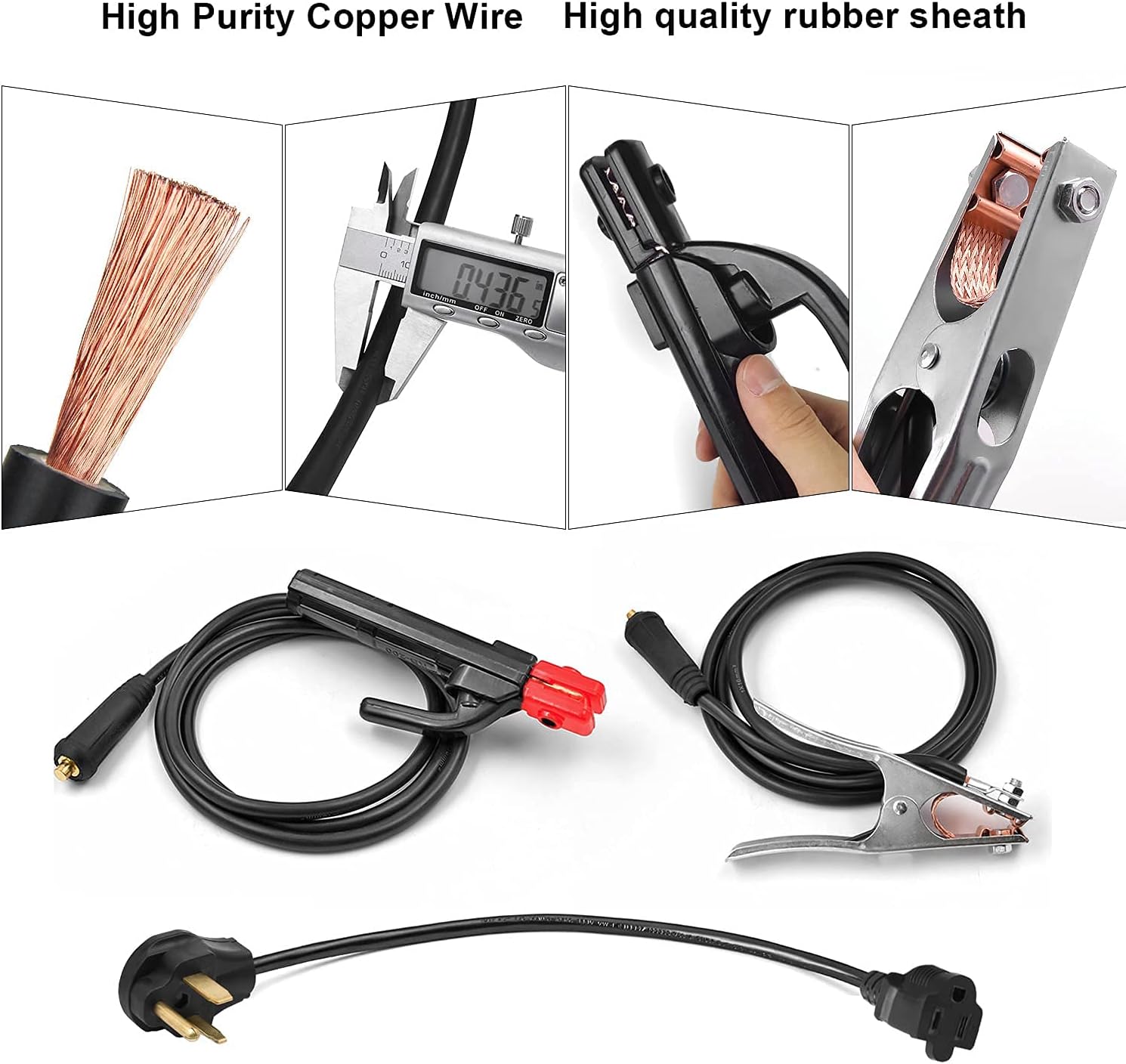
Image: High purity copper welding cables and power cord for the HITBOX ARC200D welder.
4.3 Connecting Welding Cables (MIG/Flux Core Mode)
For MIG/Flux Core welding, connect the MIG torch to the appropriate terminal (refer to the specific port on your unit, typically positive for flux core and negative for gas MIG). Connect the ground clamp to the remaining terminal. Install the flux core wire spool and feed the wire through the torch liner as per the detailed instructions in the full product manual.
5. Operating Instructions
5.1 Powering On
After connecting all cables, switch the power button located on the rear panel to the 'ON' position. The digital display on the front will illuminate.
5.2 Mode Selection and Current Adjustment
The HITBOX 200A features a one-knob intelligent control system. Rotate the adjustment knob on the front panel to select your desired welding current (amperage). The digital display will show the selected value. For Flux Core welding, this knob also controls the wire feed speed in synergy with the current.

Image: Front view of the HITBOX ARC200D Inverter Welder, highlighting the digital display and adjustment knob.
5.3 Welding Process (Stick/ARC)
With proper safety gear, strike the electrode against the workpiece to initiate an arc. Maintain a consistent arc length and travel speed for optimal weld quality. The machine's synergy system helps maintain a stable arc.

Image: A person performing stick welding with the HITBOX ARC200D welder.
5.4 Duty Cycle
The welder has a rated duty cycle of 60% at 140A (at 40°C). This means it can weld continuously for 6 minutes out of every 10-minute period at 140A before requiring a cooling period. Exceeding the duty cycle can trigger the overheating protection and potentially damage the machine.

Image: Multiple views of the HITBOX ARC200D welder, highlighting its duty cycle.
5.5 Product Demonstration Video
Video: This video demonstrates the physical features, power connection, and basic operation of the HITBOX ARC200D Inverter Welder, including connecting the welding cables and initiating an arc.
6. Maintenance
Regular maintenance ensures the longevity and optimal performance of your welder.
- Cleaning: Periodically clean the internal components using compressed air to remove dust and metal particles. Ensure the machine is unplugged before cleaning.
- Cable Inspection: Regularly inspect welding cables, electrode holder, and ground clamp for cuts, fraying, or loose connections. Replace damaged components immediately.
- Ventilation Grilles: Keep the ventilation grilles clear of obstructions to ensure proper airflow and prevent overheating.
- Storage: Store the welder in a dry, clean environment, away from excessive dust and moisture.

Image: Internal components of the HITBOX ARC200D welder, showing areas for cleaning and inspection.
7. Troubleshooting
Refer to this section for common issues and their solutions.
- No Arc:
- Check power supply and connections.
- Ensure ground clamp has good contact with the workpiece.
- Verify electrode is properly inserted and not damp.
- Poor Weld Quality (Excessive Spatter, Weak Penetration):
- Adjust welding current (amperage) according to material thickness and electrode type.
- Maintain correct arc length and travel speed.
- Ensure workpiece is clean and free of rust, paint, or oil.
- Overheating Protection Activated:
- Allow the machine to cool down. The fan will continue to run.
- Check for blocked ventilation grilles.
- Reduce welding time or current if operating near the duty cycle limit.
8. Specifications
| Feature | Specification |
|---|---|
| Manufacturer | SHENZHEN UNITWELD WELDING AND MOTOR |
| Part Number | ARC200D |
| Item Weight | 6.27 pounds |
| Product Dimensions | 0.01 x 0.01 x 7.09 inches |
| Item Model Number | ARC200D MINI |
| Size | MIG Welder 140A-2 (Note: Product title states 200A, actual welding effect 140A) |
| Style | 3 in 1 Mig (MIG, ARC, Lift TIG) |
| Material | Metal |
| Pattern | ARC-200 |
| Power Source | DC |
| Item Package Quantity | 1 |
| Special Features | Portable |
| Included Components | User Manual |
| Batteries Included? | No |
| Batteries Required? | No |
| Date First Available | January 8, 2020 |
9. Warranty and Support
HITBOX offers a 2-year warranty on this product. For any questions, concerns, or warranty claims, please contact our customer service team. Provide your order number for efficient assistance.
We are committed to providing high-quality products and unique customer service.


