
Introduction
This manual provides comprehensive instructions for the assembly, operation, and maintenance of your INNOREL VM70K Professional Video Monopod Kit. Please read this manual carefully before using the product to ensure proper function and longevity.
Packing List
Verify that all components are present in the package:
- Monopod Bag x 1
- Main Body (Monopod with integrated fluid head) x 1
- Pan Bar x 1
- Allen Key x 4
- Flip Lock Adjusting Tool x 1
- Instruction Manual x 1

Image: Components included in the INNOREL VM70K Monopod Kit package. This includes the monopod, fluid head, pan bar, tools, and manual.
Setup and Assembly
1. Attaching the Fluid Head
The fluid head is designed for smooth panning and tilting. It features a quick-release plate for easy camera attachment.
- Ensure the monopod's mounting platform is clean.
- Align the fluid head with the monopod's 3/8" screw (a spare 1/4" screw is also provided for compatibility).
- Rotate the fluid head clockwise until securely fastened.
- Attach the pan bar to the fluid head by screwing it into the designated port.

Image: Detailed view of the fluid head components, including 1/4" & 3/8" screws, Q.R. plate locking lever, 3/8" female thread for accessories, pan locking lever, tilt locking knob, and bottom 3/8" female thread.
2. Attaching the Camera
- Release the quick-release plate from the fluid head by operating the Q.R. Plate Locking Lever.
- Attach the quick-release plate to the bottom of your camera or camcorder using the appropriate screw (1/4" or 3/8").
- Slide the camera with the attached quick-release plate back into the fluid head until it locks securely. Ensure the locking lever is engaged.
3. Understanding the Monopod Base
The monopod features a flexible tripod base that can be used in various configurations.

Image: Illustration of the flexible monopod stand's capabilities, showing vertical locking, ball locking, 360° swiveling, 45° tilting, and 90° drop-notch functionality.
The base can also be detached and used as a mini tabletop tripod:
- To remove the monopod base, locate the locking mechanism at the bottom of the main monopod leg and disengage it.
- The detached base can then be used independently. It includes 1/4" male thread and 3/8" female thread options for various accessories.
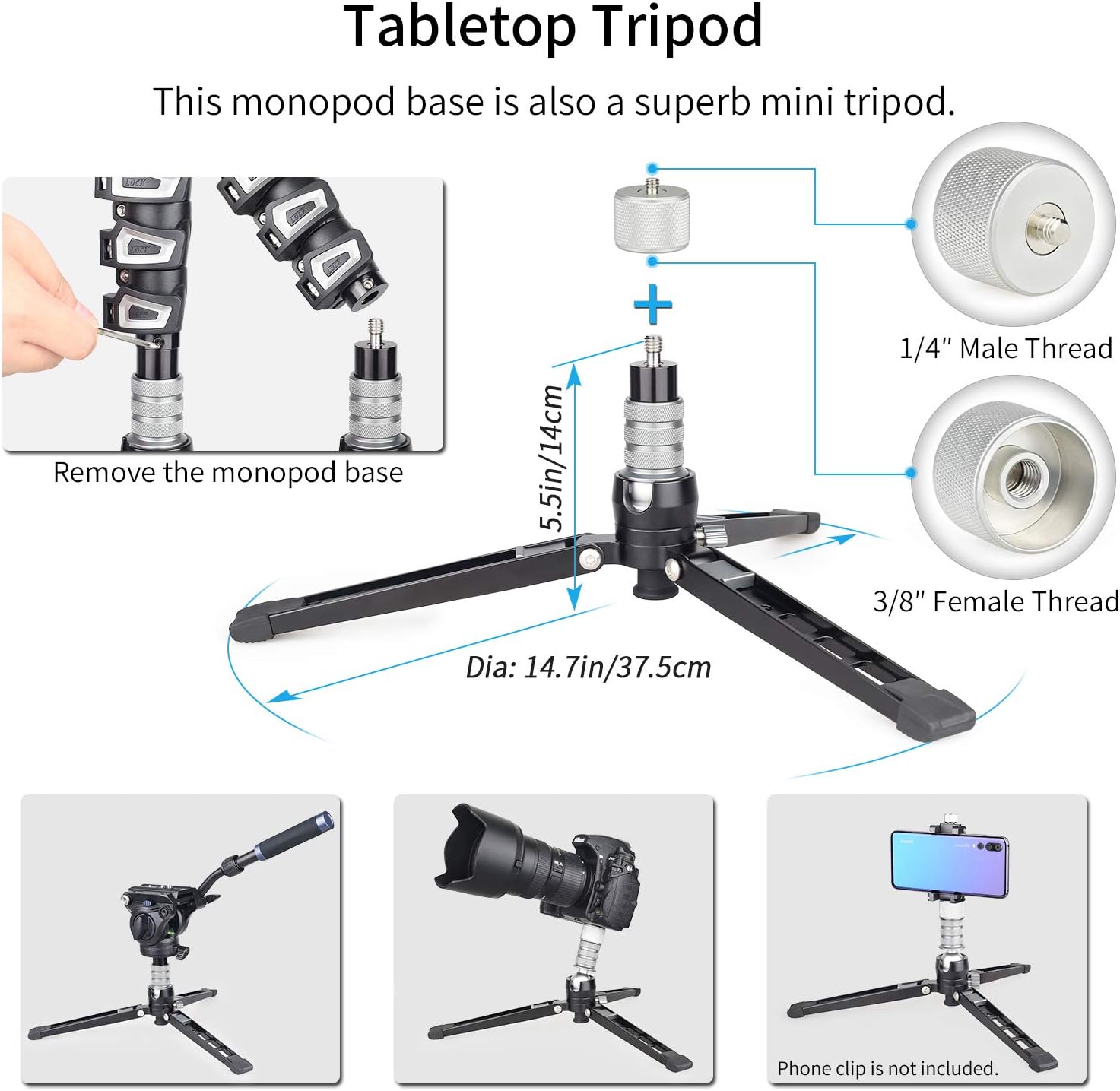
Image: Demonstrates how the monopod base can be removed and used as a mini tabletop tripod, highlighting its 1/4" male thread and 3/8" female thread options.
Operation
1. Adjusting Monopod Height
The monopod features 4 sections with ergonomic flip locks for quick height adjustments.
- To extend a section, open the corresponding flip lock, pull the leg section to the desired height, and then close the flip lock firmly.
- To retract a section, open the flip lock, push the leg section back in, and close the flip lock.
- The monopod can extend from a minimum height of 28.3 inches (72 cm) to a maximum height of 71.7 inches (182 cm).

Image: Close-up view of the monopod's adjustable flip locks and interchangeable 1/4" and 3/8" threads.

Image: Visual representation of the monopod's various height settings, ranging from 28.3 inches (72 cm) to 71.7 inches (182 cm).

Image: The monopod in its folded length of 30 inches (71 cm), demonstrating its compact and portable design.
2. Using the Fluid Head
The fluid head allows for precise camera movements.
- Pan Movement: Loosen the Pan Locking Lever to allow 360° horizontal rotation. Tighten to lock the position.
- Tilt Movement: Loosen the Tilt Locking Knob to allow vertical tilt from -52° to +91°. Tighten to lock the position.
- The fluid head provides smooth damping for controlled movements during video recording.

Image: Illustrates the working range of the fluid head, showing 360° pan, -52° to +91° tilt, and the dimensions of the pan bar.
3. Utilizing the Flexible Tripod Base
The base offers stability and flexibility for various shooting angles.
- Swiveling: The base enables 360° swiveling when unlocked.
- Tilting: It allows 45° tilting in all directions.
- Drop-notch: A 90° drop-notch allows for quick switching between vertical and horizontal modes.
- Vertical Lock: Use the vertical lock to secure the monopod in an upright position.
- Ball Locking Knob: Adjust this knob to control the flexibility of the base's ball joint.
Maintenance
- Cleaning: Wipe down the monopod and fluid head with a soft, dry cloth after each use. For stubborn dirt, use a slightly damp cloth and mild soap, then dry thoroughly. Avoid harsh chemicals.
- Lubrication: The fluid head is designed for smooth operation and generally does not require user lubrication. If movements become stiff, consult professional service.
- Flip Lock Adjustment: If the flip locks become too loose or too tight, use the supplied Y-key (Flip Lock Adjusting Tool) to adjust the tightness as needed. Refer to the "Monopod Details" image for visual guidance on the flip lock mechanism.
- Storage: Store the monopod in a dry, dust-free environment, preferably in its monopod bag, when not in use.
- Inspection: Periodically check all screws and connections to ensure they are secure. Do not overtighten.
Troubleshooting
This section addresses common issues you might encounter with your INNOREL VM70K monopod.
- Monopod sections not locking securely:
Solution: Use the provided Flip Lock Adjusting Tool (Y-key) to tighten the flip lock mechanisms. Turn the adjustment screw clockwise in small increments until the lock holds the section firmly.
- Fluid head movements are stiff or jerky:
Solution: Ensure that the Pan Locking Lever and Tilt Locking Knob are fully loosened. If the issue persists, the fluid head may require professional inspection or service. Avoid attempting to disassemble the fluid head yourself.
- Monopod base is unstable:
Solution: Ensure the vertical lock on the base is engaged if you intend for it to stand upright. Check that the ball locking knob on the base is tightened to secure the desired angle. Ensure the legs of the base are fully extended and on a flat surface.
- Camera not attaching securely to the fluid head:
Solution: Verify that the quick-release plate is correctly attached to your camera and that the Q.R. Plate Locking Lever on the fluid head is fully engaged after inserting the plate.
Specifications
| Feature | Detail |
|---|---|
| Model | VM70K |
| Material | Aluminum Alloy, ABS |
| Sections | 4 |
| Mounting Platform | 1/4" and 3/8" screw (interchangeable) |
| Max Load Capacity | 22 lb (10 kg) |
| Max. Height | 71.7" (182 cm) |
| Min. Height | 28.3" (72 cm) |
| Folded Length | 30" (71 cm) |
| Item Weight | 4.4 lb (1.96 kg) |
| Fluid Head Tilt Range | -52° to +91° |
| Fluid Head Pan Range | 360° |
| Leg Diameter | 32mm/29mm/26mm/22mm |
Warranty and Support
For warranty information, please refer to the documentation provided at the time of purchase or contact your retailer. For technical support or service inquiries, please visit the official INNOREL website or contact their customer service department.
Official INNOREL Store: INNOREL Store on Amazon