
Introduction
The Power Dynamics PDM25 is a compact and versatile 100V amplifier designed for small installations such as shops, restaurants, and offices. It offers easy operation, reliable performance, and a range of features including Bluetooth connectivity, an integrated MP3 player, USB input, AUX input, and a wireless remote control. This manual provides essential information for the safe and efficient use of your PDM25 amplifier.
Safety Instructions
- Read this manual thoroughly before using the product.
- Keep this manual for future reference.
- Observe all warnings and follow all instructions.
- Do not use this apparatus near water.
- Clean only with a dry cloth.
- Do not block any ventilation openings. Install in accordance with the manufacturer's instructions.
- Do not install near any heat sources such as radiators, heat registers, stoves, or other apparatus (including amplifiers) that produce heat.
- Do not defeat the safety purpose of the polarized or grounding-type plug. A polarized plug has two blades with one wider than the other. A grounding-type plug has two blades and a third grounding prong. The wide blade or the third prong are provided for your safety. If the provided plug does not fit into your outlet, consult an electrician for replacement of the obsolete outlet.
- Protect the power cord from being walked on or pinched, particularly at plugs, convenience receptacles, and the point where they exit from the apparatus.
- Only use attachments/accessories specified by the manufacturer.
- Unplug this apparatus during lightning storms or when unused for long periods of time.
- Refer all servicing to qualified service personnel. Servicing is required when the apparatus has been damaged in any way, such as power-supply cord or plug is damaged, liquid has been spilled or objects have fallen into the apparatus, the apparatus has been exposed to rain or moisture, does not operate normally, or has been dropped.
- WARNING: To reduce the risk of fire or electric shock, do not expose this apparatus to rain or moisture.
- CAUTION: Do not open the cover. No user-serviceable parts inside. Refer servicing to qualified personnel only.
Product Overview
The PDM25 amplifier features a user-friendly front panel with controls for various audio sources and volume adjustments, along with a clear digital display. The rear panel provides all necessary connections for speakers, external audio sources, and power.

Figure 1: Front Panel Overview of the PDM25 Amplifier.

Figure 2: Rear Panel Connections of the PDM25 Amplifier.
Setup
1. Unpacking
Carefully remove the amplifier from its packaging. Inspect the unit for any signs of damage during transit. Retain the original packaging for future transport or storage.
2. Placement
Place the amplifier on a stable, flat surface. Ensure adequate ventilation around the unit to prevent overheating. Avoid placing it near heat sources or in direct sunlight.
3. Speaker Connection
The PDM25 supports both 100V line speakers and low impedance (4-16 Ohm) speakers.
- For 100V Line Speakers: Connect the positive (+) terminal of your 100V speaker system to the "100V" terminal on the amplifier's rear panel. Connect the negative (-) terminal to the "COM" terminal.
- For Low Impedance Speakers (4-16 Ohm): Connect the positive (+) terminal of your speaker to the "4-16 Ohm" terminal on the amplifier's rear panel. Connect the negative (-) terminal to the "COM" terminal.
Ensure correct polarity (+ to + and - to -) for optimal sound quality. Do not connect both 100V and low impedance speakers simultaneously to the same output.
4. Audio Source Connection
- AUX Input: Connect external audio devices (e.g., CD player, mixer) to the RCA "AUX" input jacks on the rear panel using an RCA cable.
- Microphone Input: Connect a microphone to the 6.3mm jack on the front panel.
- USB Input: Insert a USB flash drive containing MP3 files into the USB port on the front panel.
5. Power Connection
Connect the supplied power cable to the AC inlet on the rear panel of the amplifier and then to a suitable mains power outlet (230 Vac/50 Hz).
Operating Instructions
1. Power On/Off
Press the "ON/OFF" switch on the front panel to power on or off the amplifier.
2. Source Selection
Use the "MODE" button on the front panel or the remote control to cycle through available input sources: Bluetooth, USB/MP3, AUX, and Radio. The selected mode will be displayed on the digital screen.

Figure 3: Front Panel Controls and USB Input.
3. Volume Control
- Master Volume: Adjust the main output volume using the large "VOLUME" knob on the front panel.
- Individual Source Volume: Adjust the volume for MP3, AUX, and MIC inputs using their respective smaller "VOLUME" knobs.
4. Tone Control
Use the "TREBLE" and "BASS" knobs on the front panel to adjust the high and low frequencies of the audio output.
5. Bluetooth Operation
- Select "Bluetooth" mode using the "MODE" button. The display will show "BLUE".
- On your Bluetooth-enabled device (smartphone, tablet, etc.), search for available devices and select "PDM25".
- Once paired, you can stream audio wirelessly to the amplifier.
6. USB/MP3 Player Operation
- Insert a USB flash drive into the USB port. The amplifier will automatically switch to USB mode and begin playing MP3 files.
- Use the play/pause, next, and previous track buttons on the front panel or remote control to manage playback.
7. Radio Operation
In Radio mode, use the control buttons to scan for and select radio stations.
8. Remote Control
The included remote control provides convenient access to power, mode selection, volume, track control, and equalizer presets.
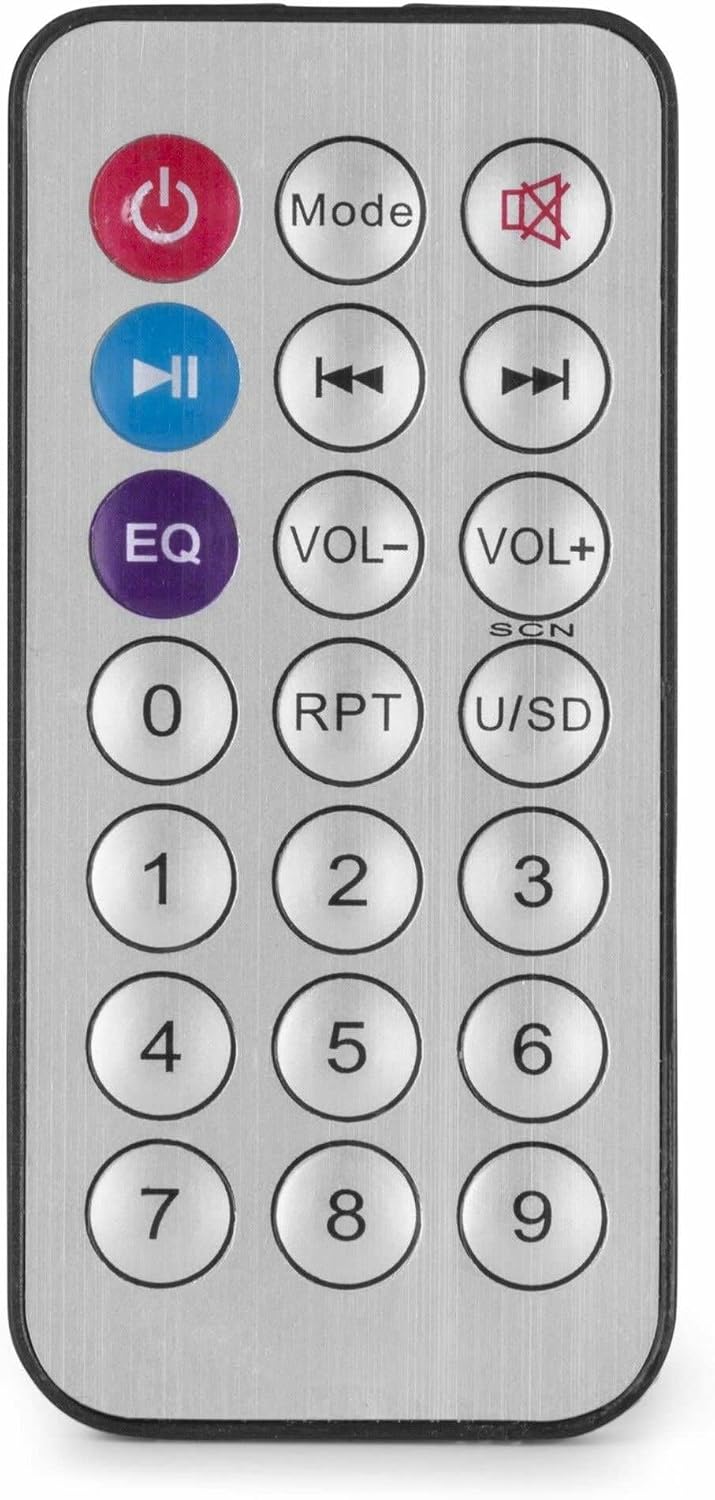
Figure 4: Wireless Remote Control.
Maintenance
- Cleaning: Disconnect the power before cleaning. Use a soft, dry cloth to wipe the exterior of the amplifier. Do not use liquid cleaners or aerosols.
- Ventilation: Ensure that the ventilation openings are clear of dust and debris to maintain proper airflow.
- Storage: If storing the unit for an extended period, disconnect it from power and store it in a cool, dry place, preferably in its original packaging.
Troubleshooting
| Problem | Possible Cause | Solution |
|---|---|---|
| No power | Power cable not connected; Power outlet faulty; Amplifier switch off. | Check power cable connection; Test power outlet; Ensure amplifier switch is ON. |
| No sound output | Incorrect source selected; Volume too low; Speaker connections faulty; Mute activated. | Select correct input source; Increase master and source volume; Check speaker wiring; Deactivate mute function on remote. |
| Bluetooth not connecting | Amplifier not in Bluetooth mode; Device too far; Device already paired with another unit. | Ensure amplifier is in Bluetooth mode ("BLUE" displayed); Move device closer; Disconnect from other devices and try again. |
| USB playback issues | USB drive not formatted correctly; Incompatible file format; USB drive faulty. | Ensure USB drive is FAT32 formatted; Use MP3 files; Try a different USB drive. |
| Distorted sound | Volume too high; Incorrect impedance matching for speakers; Faulty audio source. | Reduce volume; Verify speaker impedance matches amplifier output; Test with a different audio source. |
Specifications
- Output Power: 25 W
- Speaker Output: 100V and 4-16 Ohm
- Frequency Range: 50 Hz - 18 kHz
- Signal-to-Noise Ratio: >75 dB
- Connection Voltage: 230 Vac/50 Hz
- Dimensions (L x W x H): 205 x 285 x 65 mm
- Weight: 1.5 kg
- Features: Bluetooth, USB MP3 Player, Radio, AUX Input, Microphone Input, Bass/Treble Control, Integrated Equalizer, Remote Control
- Model Number: PDM25
- Manufacturer: Tronios B.V.
Warranty and Support
For warranty information and technical support, please refer to the documentation provided with your purchase or visit the official Power Dynamics website. Keep your proof of purchase for any warranty claims.
Manufacturer: Tronios B.V.
Website: www.power-dynamics.eu


