
Introduction
Thank you for choosing the Midea MDRT385MTE46 No Frost Refrigerator. This manual provides essential information for the safe and efficient operation, installation, and maintenance of your appliance. Please read it thoroughly before use and keep it for future reference.
Important Safety Information
Always follow basic safety precautions when using electrical appliances to reduce the risk of fire, electric shock, and injury. This appliance is intended for household use only.
- Ensure the refrigerator is properly grounded.
- Do not damage the refrigerant circuit.
- Keep ventilation openings clear of obstruction.
- Do not use mechanical devices or other means to accelerate the defrosting process, other than those recommended by the manufacturer.
- Unplug the appliance before cleaning or performing maintenance.
- Do not store explosive substances such as aerosol cans with a flammable propellant in this appliance.
Setup and Installation
Unpacking
Carefully remove all packaging materials. Inspect the refrigerator for any damage that may have occurred during transit. Report any damage to your retailer immediately.
Placement
- Place the refrigerator on a firm, level surface.
- Allow adequate space around the appliance for proper ventilation (at least 10 cm at the back and sides).
- Avoid direct sunlight and heat sources (e.g., stoves, heaters).
- Ensure the ambient temperature is within the recommended range for the appliance's climate class.
Power Connection
Connect the refrigerator to a dedicated, properly grounded 220V electrical outlet. Do not use extension cords or multiple outlet adapters.
Initial Cleaning
Before first use, clean the interior and exterior of the refrigerator with a soft cloth and mild detergent. Rinse and dry thoroughly.

Figure 1: Exterior view of the Midea MDRT385MTE46 No Frost Refrigerator. This image shows the overall design and silver finish of the appliance.
Operating Instructions
Temperature Control
Your refrigerator features electronic temperature control. The control panel is typically located inside the refrigerator compartment. Adjust the temperature settings according to your needs. Refer to the markings on the control for specific temperature ranges.
Food Storage Guidelines
- Refrigerator Compartment: Ideal for fresh foods, dairy products, and beverages. Utilize the tempered glass shelves for organized storage.
- Vegetable Crisper: The crisper drawer includes humidity control to keep fruits and vegetables fresh for longer. Adjust the slider to regulate humidity levels.
- Freezer Compartment: Suitable for long-term storage of frozen foods.
- Door Cooling Vents: Two additional vents are present in the door to ensure consistent cooling throughout the compartment.
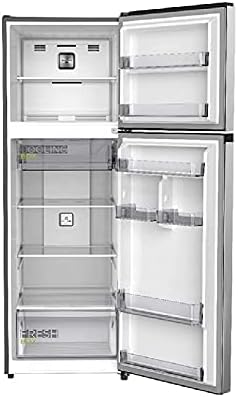
Figure 2: Interior view of the Midea MDRT385MTE46 Refrigerator. This image highlights the tempered glass shelves, vegetable crisper, and door storage.
Maintenance and Cleaning
Cleaning the Interior
Clean the interior regularly with a solution of warm water and mild detergent. Avoid abrasive cleaners or solvents. Remove shelves and drawers for thorough cleaning. Ensure all parts are dry before returning them to the refrigerator.
Cleaning the Exterior
Wipe the exterior surfaces with a soft, damp cloth. For stainless steel surfaces, use a specialized stainless steel cleaner if necessary. Keep the door seals clean to ensure a tight seal.
Defrosting
This is a No Frost refrigerator, meaning it features an automatic defrost system. Manual defrosting is not required. If ice buildup occurs, check if the door is sealing properly or if the temperature setting is too low.
Power Saving Tips
- Do not open the doors too frequently or for too long.
- Allow hot food to cool before placing it in the refrigerator.
- Ensure the door seals are clean and intact.
- Place the refrigerator in a cool, well-ventilated area away from direct sunlight and heat sources.
Troubleshooting
| Problem | Possible Cause | Solution |
|---|---|---|
| Refrigerator does not operate. | No power supply. | Check if the power cord is plugged in correctly and if the circuit breaker is on. |
| Temperature is not cold enough. | Door opened too frequently; warm food placed inside; temperature setting too high. | Reduce door openings; allow food to cool; adjust temperature setting lower. |
| Unusual noises. | Appliance not level; objects touching the back wall. | Adjust leveling feet; ensure nothing is touching the back. |
| Water on the floor. | Drain hole blocked. | Clear the drain hole at the back of the refrigerator compartment. |
If the problem persists after checking the above, please contact customer support.
Specifications
| Feature | Detail |
|---|---|
| Brand Name | Midea |
| Model Information | MDRT385MTE46 |
| Product Dimensions (D x W x H) | 54.51 x 61.01 x 165.71 cm |
| Item Weight | 49 Kilograms |
| Capacity | 266 Liters |
| Annual Energy Consumption | 464 kWh per year |
| Fresh Food Capacity | 206 Liters |
| Freezer Capacity | 380 Liters (Note: Product description states 380L net capacity, but specifications list 266L total and 380L freezer. Please refer to the product label for exact figures.) |
| Installation Type | Freestanding |
| Part Number | MDRT385MTE46 |
| Form Factor | Top Freezer |
| Special Features | No Frost |
| Color | Silver |
| Voltage | 220 Volts |
| Vegetable Drawers | 2 |
| Defrost Type | Automatic |
| Door Hinges | Right |
| Door Material Type | Stainless Steel |
| Shelf Type | Glass |
| Number of Shelves | 2 |
| Rating | Energy Star |
| Included Components | User Manual |
| Batteries Required? | No |
Warranty and Support
Warranty Information
This Midea refrigerator comes with a 1-year service warranty. Please retain your purchase receipt as proof of purchase for warranty claims. The warranty covers manufacturing defects under normal household use.
Customer Support
For technical assistance, service requests, or questions regarding your Midea refrigerator, please contact your local Midea customer service center or authorized service provider. Contact details can usually be found on the Midea official website or in your purchase documentation.


