
Welcome
Thank you for choosing the SURKER Mens Hair Clippers. This professional cord/cordless hair trimmer is designed for smooth, quick, and precise clipping performance on all types of hair. This manual provides essential information for the safe and effective use, maintenance, and troubleshooting of your new clipper.
Package Contents
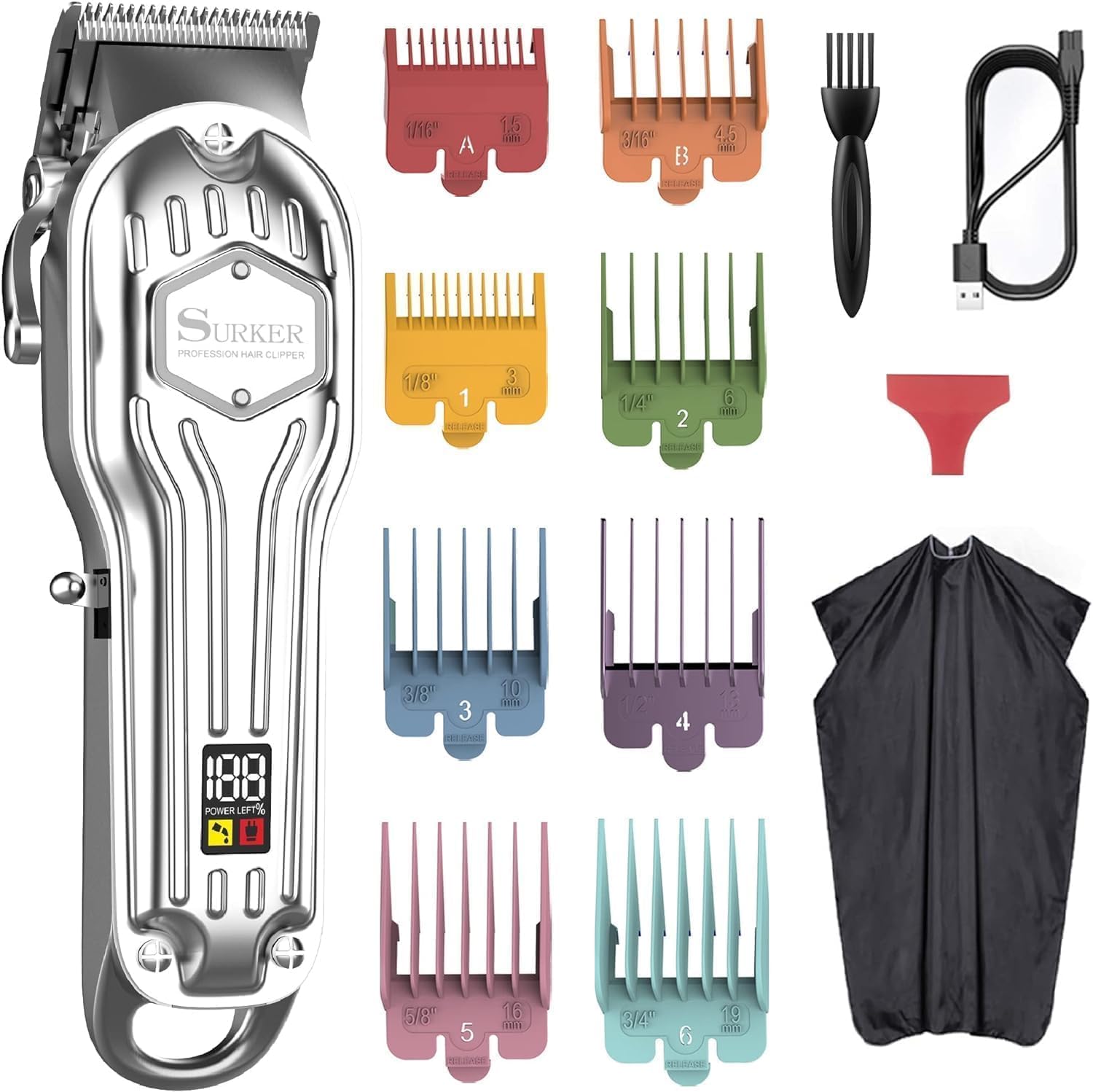
- Hair Clipper
- Cleaning Brush
- Protection Cap
- Hairdressing Cape
- 8 Guide Combs
- USB Cable
Key Features
- Professional Blades: Designed for smooth, quick, and precise clipping performance on all types of hair with long-lasting high-carbon enhanced self-sharpening precision stainless steel blades. The blade can be washed by water for easy cleaning.
- Cordless Operation: Built-in rechargeable premium battery cell offers up to 300 minutes of running time with a 3-hour charge.
- Adjustable Length: The thumb taper lever on the left side enables easy haircut length adjusting from 0.8 mm to 2.0 mm.
- Colorful Guide Combs: Equipped with eight color-coded guide combs (1.5 mm, 3 mm, 4.5 mm, 6 mm, 10 mm, 13 mm, 16 mm, 19 mm) for customized cutting lengths.
- LED Display: Clearly shows the remaining percentage of battery, charging indicator, and maintenance oil add reminder.
- Ergonomic Design: Comfortable to hold, easy to use and clean, even for first-time users.


Initial Setup
Charging the Clipper
Before first use, fully charge your SURKER Hair Clipper. Connect the USB cable to the clipper's charging port and plug the other end into a compatible USB power source. The LED display will indicate the battery level during charging. A full charge takes approximately 3 hours and provides up to 300 minutes of cordless operation.
Attaching Guide Combs
Select the desired guide comb based on the hair length you wish to achieve. Align the comb with the clipper blade and push it firmly until it clicks into place. Ensure the comb is securely attached before operating the clipper.

Operating Instructions
Power On/Off
To turn the clipper ON, slide the ON/OFF switch upwards. To turn it OFF, slide the switch downwards. The LED display will illuminate when the clipper is powered on.
Adjusting Cutting Length
The clipper features a convenient thumb taper lever on the left side. Move the lever up or down to adjust the cutting length of the blade from 0.8 mm to 2.0 mm. This allows for fine-tuning of your haircut without changing guide combs.
Hair Cutting Tips
- For best results, ensure hair is clean and dry before cutting.
- Always start with a longer guide comb and gradually switch to shorter lengths if desired.
- Cut against the direction of hair growth for an even trim.
- Use smooth, overlapping strokes to avoid uneven patches.
- Regularly clear accumulated hair from the blade during use to maintain performance.

Maintenance
Blade Cleaning
After each use, turn off the clipper and remove any attached guide comb. Use the provided cleaning brush to remove loose hairs from the blades. The stainless steel blades are washable; you can rinse them under running water. Ensure the blades are completely dry before reattaching the protection cap or storing.
Oiling the Blades
To maintain optimal cutting performance and blade longevity, it is essential to oil the blades regularly. The LED display includes a 'Maintenance Oil Add Reminder' to prompt you. Apply a few drops of clipper oil (not included, but commonly available) to the teeth of the blades. Turn the clipper on for a few seconds to distribute the oil evenly, then wipe off any excess with a soft cloth.

Troubleshooting
| Problem | Possible Cause | Solution |
|---|---|---|
| Clipper not turning on | Low battery or no charge | Charge the clipper fully (approx. 3 hours). Check charging cable connection. |
| Reduced cutting performance | Blades are dull, dirty, or not oiled; hair clog; incorrect comb attachment | Clean and oil blades. Remove any hair clogs. Ensure guide comb is properly attached. |
| Clipper making unusual noise | Blades need oiling; internal issue | Oil the blades. If noise persists, contact customer support. |
Technical Specifications
- Model Number: K7S-silver
- Product Dimensions: 9.53 x 6.14 x 2.91 inches; 12.35 ounces
- Battery Type: Built-in rechargeable Lithium-Ion battery
- Charging Time: 3 Hours
- Running Time: Up to 300 minutes (5 hours)
- Blade Material: High-carbon enhanced self-sharpening precision stainless steel
- Adjustable Cutting Length: 0.8 mm to 2.0 mm (via taper lever)
- Guide Comb Lengths: 1.5 mm, 3 mm, 4.5 mm, 6 mm, 10 mm, 13 mm, 16 mm, 19 mm
Warranty and Support
Warranty Information
Please refer to the product packaging or the official SURKER website for detailed warranty information regarding your hair clipper. Keep your purchase receipt as proof of purchase for any warranty claims.
Customer Support
For any questions, concerns, or technical assistance, please visit the official SURKER website or contact their customer support team. Contact details can typically be found on the product packaging or the brand's official online presence.
Safety Information
For safe use, ensure the product is fully charged before use, clean blades under running water, and follow all handling instructions. This product is not suitable for children and should be kept out of reach.