
1. Introduction
This manual provides essential information for the safe and efficient operation of your Mobicool MCF40 compressor cooler. Please read these instructions carefully before using the appliance to ensure proper function and longevity. The Mobicool MCF40 is a versatile 38-liter compressor cooler designed for use in various environments, including cars, trucks, boats, and motorhomes, operating on both DC (12/24V) and AC (100-240V) power sources.
2. Safety Instructions
- Ensure the power supply voltage matches the specifications of the cooler before connecting.
- Do not operate the appliance if it is visibly damaged.
- Keep ventilation openings clear of obstructions to prevent overheating.
- Avoid placing the cooler in direct sunlight or near heat sources.
- Do not immerse the cooler in water or expose it to heavy rain.
- Only qualified personnel should perform repairs. Incorrect repairs can lead to significant hazards.
- Unplug the cooler from the power source before cleaning or maintenance.
- This appliance is not intended for use by persons (including children) with reduced physical, sensory or mental capabilities, or lack of experience and knowledge, unless they have been given supervision or instruction concerning use of the appliance by a person responsible for their safety.
3. Package Contents
Upon unpacking, please verify that all items are present and undamaged:
- Mobicool MCF40 Compressor Cooler
- DC Power Cable (12/24V)
- AC Power Cable (100-240V)
- Instruction Manual (this document)
4. Product Overview
4.1 Key Features
- Storage Capacity: 38 liters, accommodating 1.5-liter bottles upright.
- Temperature Range: Adjustable from +10°C to -10°C.
- Digital Display: For precise temperature control and monitoring.
- Compressor Unit: Powerful, fully hermetic compact compressor with integrated control electronics for efficient cooling.
- Interior LED Light: For visibility in low-light conditions.
- Detachable Lid: Provides easy access to the interior.
- Dual Power Input: Operates on 12/24V DC and 100-240V AC.
4.2 Components


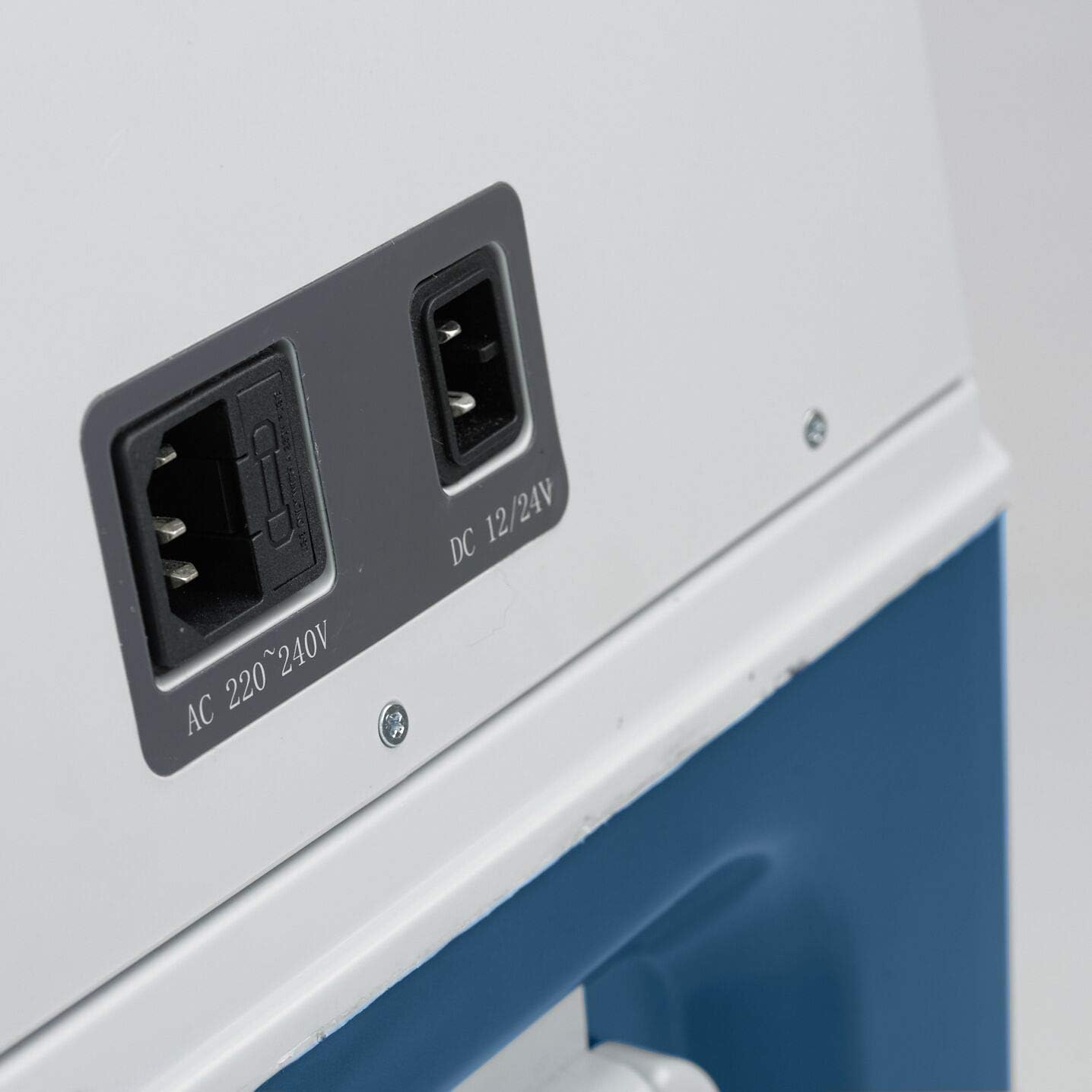
5. Setup
5.1 Placement
- Place the cooler on a stable, level surface.
- Ensure adequate ventilation around the appliance. Do not block the air vents.
- Avoid placing the cooler in direct sunlight or near heat-emitting devices.
5.2 Power Connection
The Mobicool MCF40 can be powered by either DC (12/24V) or AC (100-240V).
- DC Connection (12/24V): Connect the DC power cable to the cooler's DC input port and then to your vehicle's 12V or 24V socket. In many vehicles, the DC socket requires the ignition to be turned on to supply power. If the cooler does not power on, check your vehicle's ignition status.
- AC Connection (100-240V): Connect the AC power cable to the cooler's AC input port and then to a standard wall outlet.
- Ensure the connection is secure for stable operation.
6. Operation
6.1 Turning On/Off
- Press the ON/OFF button on the control panel to turn the cooler on or off.
- The POWER LED will illuminate when the unit is on.
6.2 Temperature Adjustment
- With the cooler on, press the SET button. The digital display will flash the current target temperature.
- Use the UP (+) and DOWN (-) buttons to adjust the desired temperature between +10°C and -10°C.
- Press SET again or wait a few seconds for the display to stop flashing, and the new temperature will be set. The cooler will then work to reach and maintain this temperature.
7. Maintenance
7.1 Cleaning
- Before cleaning, always disconnect the cooler from the power supply.
- Clean the interior and exterior surfaces with a damp cloth and a mild detergent. Avoid abrasive cleaners or solvents.
- Ensure the ventilation grilles are free from dust and debris. Use a soft brush or vacuum cleaner if necessary.
- Dry all parts thoroughly before reconnecting to power.
7.2 Defrosting
The Mobicool MCF40 features an automatic defrost system. However, if a significant layer of ice builds up, manual defrosting may be required:
- Turn off the cooler and disconnect it from the power supply.
- Remove all contents.
- Leave the lid open to allow the ice to melt naturally. Do not use sharp objects or heating devices to speed up defrosting.
- Wipe away melted water with a clean cloth.
- Ensure the interior is completely dry before restarting the cooler.
8. Troubleshooting
If you encounter issues with your Mobicool MCF40, refer to the following common problems and solutions:
| Problem | Possible Cause | Solution |
|---|---|---|
| Cooler does not turn on, POWER LED is off. | No power supply or loose connection. Vehicle ignition off (for DC). | Check power cables are securely connected. Ensure the power outlet is functional. If using DC in a vehicle, turn on the ignition. |
| Cooling performance is poor. | Blocked ventilation, excessive ambient temperature, lid not closed properly, too much content. | Ensure ventilation openings are clear. Move cooler to a cooler environment. Check lid seal. Do not overfill the cooler. |
| ERROR LED is illuminated. | Internal fault or voltage issue. | Disconnect power, wait a few minutes, then reconnect. If the error persists, contact Mobicool customer support. |
| Unusual noises during operation. | Cooler not on a level surface, internal component vibration. | Ensure the cooler is on a stable, level surface. If noises persist and are concerning, contact support. |
9. Specifications
| Feature | Specification |
|---|---|
| Brand | Mobicool |
| Model | MCF40 |
| Capacity | 38 Liters |
| Temperature Range | +10°C to -10°C |
| Power Input (DC) | 12V / 24V |
| Power Input (AC) | 100-240V |
| Product Dimensions (L x W x H) | 22.99 x 14.37 x 17.56 inches (58.4 x 36.5 x 44.6 cm) |
| Item Weight | 7.05 pounds |
| Defrost System | Automatic |
| Special Features | Adjustable Shelves, Digital Display, Interior LED Light, Detachable Lid |
10. Warranty and Support
For warranty information, please refer to the documentation provided at the time of purchase or contact your retailer. For technical support, spare parts, or service inquiries, please visit the official Mobicool website or contact their customer service department. Ensure you have your product model (MCF40) and purchase details available when contacting support.
Mobicool Website: https://www.mobicool.com


