
XTUGA IEM1100
XTUGA IEM1100 UHF Single Channel In-Ear Monitor System User Manual
Model: IEM1100
1. Introduction
Thank you for purchasing the XTUGA IEM1100 UHF Single Channel In-Ear Monitor System. This system is designed to provide clear and stable audio monitoring for performers, musicians, and presenters in various settings such as stage performances, studio recordings, exhibitions, lectures, and speeches. This manual provides detailed instructions on how to set up, operate, and maintain your in-ear monitor system to ensure optimal performance and longevity.
2. Safety Information
- Power Supply: Use only the provided power adapter. Ensure the power source matches the voltage requirements of the device.
- Water and Moisture: Do not expose the unit to water, rain, or excessive moisture. Avoid using it in high-humidity environments.
- Heat Sources: Keep the unit away from heat sources such as radiators, heat registers, stoves, or other heat-producing appliances.
- Ventilation: Ensure proper ventilation. Do not block any ventilation openings.
- Cleaning: Clean only with a dry cloth. Do not use liquid cleaners or aerosol cleaners.
- Servicing: Do not attempt to service this product yourself. Refer all servicing to qualified service personnel.
- Earphone Volume: Prolonged exposure to high volume levels can cause permanent hearing damage. Set the volume to a comfortable level.
3. Package Contents
Please check the package to ensure all items are present and in good condition:
- Transmitter × 1
- Bodypack Receiver × 1
- Antenna × 1
- Earphones × 1
- Cable Lines × 2
- Power Adapter × 1
- Carry Case × 1
- User Manual × 1

Image 3.1: All components included in the XTUGA IEM1100 package, neatly arranged. This includes the main transmitter unit, bodypack receiver, antenna, earphones, connecting cables, power adapter, and a protective carry case.
4. Product Overview
The XTUGA IEM1100 system consists of a main transmitter unit and a portable bodypack receiver.
4.1. Transmitter Unit
The transmitter unit is the central hub for your audio input and broadcast. It features a clear LCD display and various controls for configuration.

Image 4.1: Detailed diagram of the XTUGA IEM1100 Wireless Transmitter, showing the front panel with LCD display, earphone output, volume knob, setting keys, and power switch. The rear panel illustrates the DC power supply input, AF inputs (Left/Right), and antenna interface.
- LCD Display: Shows current frequency, channel, group, and signal strength.
- 6.35mm Earphone Output: For direct monitoring from the transmitter.
- Earphone Volume Knob: Adjusts the volume for the earphone output.
- Down Setting Key: Navigates down through menu options or decreases values.
- Function Setting Key: Enters menu or confirms selections.
- Power Switch: Turns the transmitter on or off.
- Right/Left Channel Input (XLR/6.35mm Jack): Connect audio sources to these inputs.
- DC Power Supply: Connect the power adapter here.
- Antenna Interface: Connect the included antenna for signal transmission.
- Right/Left Channel Potentiometer: Adjusts input levels for each channel.
4.2. Bodypack Receiver
The bodypack receiver is compact and designed for portability, allowing freedom of movement on stage or in the studio.

Image 4.2: Detailed diagram of the XTUGA IEM1100 Bodypack Receiver, highlighting its key components such as the detachable antenna, earphone output socket, power/RF indicator, power switch, LCD display, selection buttons, and battery compartment.
- Detachable Antenna: For receiving the wireless signal.
- Earphone Output Socket: Connect your in-ear earphones here.
- Power / RF Indicator: Lights up to indicate power and RF signal reception.
- Power Switch: Turns the receiver on or off.
- LCD Display: Shows current frequency, channel, and battery status.
- Down Selection Button: Navigates down or decreases values.
- Function Menu Button: Accesses menu options and confirms settings.
- UP Selection Button: Navigates up or increases values.
- Battery Warehouse: Compartment for batteries (uses 2x AA batteries).
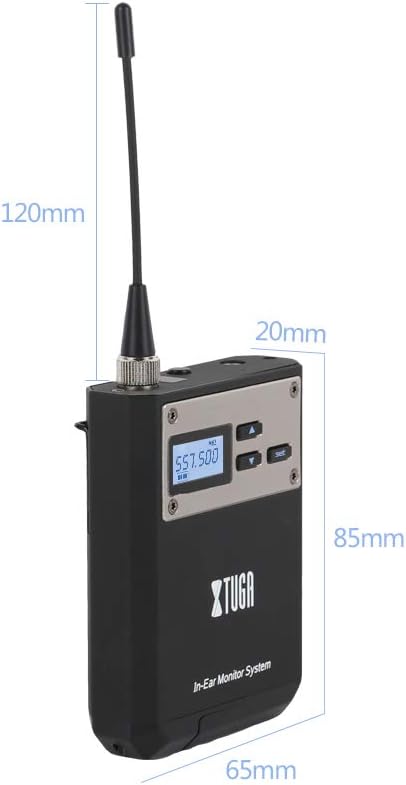
Image 4.3: This image provides the physical dimensions of the XTUGA IEM1100 bodypack receiver, showing its compact size for easy portability and discreet wear during performances.
5. Setup
Follow these steps to set up your XTUGA IEM1100 system:
- Connect Transmitter Power: Connect the provided power adapter to the DC Power Supply input on the rear of the transmitter unit, then plug it into a power outlet.
- Connect Transmitter Antenna: Screw the included antenna onto the Antenna Interface on the rear of the transmitter.
- Connect Audio Source: Connect your audio source (e.g., mixing console, audio interface) to the XLR or 6.35mm Jack AF Inputs (Left/Right) on the rear of the transmitter.
- Insert Batteries into Receiver: Open the Battery Warehouse compartment on the bodypack receiver and insert 2x AA batteries, ensuring correct polarity.
- Connect Earphones to Receiver: Plug your in-ear earphones into the Earphone Output Socket on the bodypack receiver.
- Power On Units: Turn on the transmitter unit using its Power Switch. Then, turn on the bodypack receiver using its Power Switch.
- Select Frequency/Channel: On the transmitter, use the Function Setting Key and Up/Down Setting Keys to select a desired frequency and channel. Ensure the bodypack receiver is set to the same frequency and channel for proper synchronization. The system supports 4 groups of 40 preset channels, allowing for flexible frequency selection within the 550.00~580.00MHz range.

Image 5.1: The XTUGA IEM1100 system, showing the main transmitter unit, bodypack receiver, and earphones. This image provides a visual reference for the primary components during setup.

Image 5.2: This diagram illustrates the UHF Band Phase Lock Loop (PLL) technology used in the XTUGA IEM1100, demonstrating how to select groups and frequencies. The system offers 40 preset frequencies within a 32MHz band for arbitrary switching, ensuring stable signal transmission.
6. Operating Instructions
Once set up, operating the XTUGA IEM1100 is straightforward:
- Volume Adjustment: Adjust the volume on your bodypack receiver to a comfortable listening level. Avoid excessively high volumes to prevent hearing damage.
- Monitoring: The system provides clear, stable audio monitoring, allowing performers to hear themselves and other instruments accurately.
- Wireless Range: The system offers a wireless range of up to 250 feet (75 meters), providing ample freedom of movement.

Image 6.1: An illustration demonstrating the long-distance capability of the XTUGA IEM1100 system, indicating a stable metal bodypack reception range of up to 75 meters (246 feet).
6.1. Applications
The XTUGA IEM1100 is versatile and suitable for various professional audio applications:
- Stage Performance: Ideal for singers and musicians to monitor their mix on stage without the need for bulky floor monitors.
- Recording Studio: Provides accurate monitoring for vocalists and instrumentalists during recording sessions.
- Exhibitions & Lectures: Ensures clear audio for presenters and speakers.
- Speech & Instruction: Useful for public speaking events and educational settings.

Image 6.2: This image showcases the XTUGA IEM1100 system being used in multiple scenarios, including stage performances, recording studios, and bar performances, highlighting its versatility for different professional audio environments.
7. Maintenance
Proper maintenance will extend the life of your XTUGA IEM1100 system:
- Cleaning: Use a soft, dry cloth to clean the surfaces of the transmitter and receiver. Do not use abrasive cleaners or solvents.
- Battery Care: Remove batteries from the bodypack receiver if it will not be used for an extended period to prevent leakage.
- Storage: Store the system in its carry case in a cool, dry place away from direct sunlight and extreme temperatures.
- Antenna Care: Handle the antennas carefully. Do not bend or force them, as this can damage the connection.
8. Troubleshooting
If you encounter issues with your XTUGA IEM1100 system, refer to the following common problems and solutions:
| Problem | Possible Cause | Solution |
|---|---|---|
| No sound from earphones |
|
|
| Interference or static noise |
|
|
| Low volume or distorted sound |
|
|
9. Specifications
9.1. Transmitter (TX)
- Oscillation Mode: PLL Synthesized
- Frequency Stability: ±0.005%
- Frequency Range: 550.00~580.00MHz
- Preset Channels: 4 groups of 40 channels each
- Frequency Response: 50Hz-15KHz±3dB
- Transmitting Power: 100mW (50Ω)
- AF Input: XLR, 6.35mm Jack
- Earphone Load Impedance: ≥16Ω
- Current Consumption: DC12V/300mA
9.2. Receiver (RX)
- Oscillation Mode: PLL Synthesized
- Frequency Stability: ±0.005%
- Preset Channels: 4 groups of 40 channels each
- Frequency Response: 80Hz-15KHz±3dB
- Output Power (32Ω): 2x35mW@1KHz
- Earphone Load Impedance: ≥16Ω
- Current Consumption: 3V/120mA (used at medium volume)
- Antenna: Detachable antenna
10. Warranty and Support
Information regarding product warranty and customer support is not available in this manual. Please refer to the product packaging, the manufacturer's official website, or your point of purchase for details on warranty coverage, technical support, and service options.
Related documentsIEM1100

Ask a question about this manual
Ask about setup, troubleshooting, compatibility, parts, safety, or missing instructions. Manuals+ will review the question and use this page’s manual context to help answer it.