
Introduction
This manual provides detailed instructions for the setup, operation, and maintenance of your Bose Wave Radio/CD Player, Model AWRC-1P. Please read this manual thoroughly before using your system to ensure proper function and to maximize your listening experience.
The Bose Wave Radio/CD Player features award-winning acoustic waveguide speaker technology, designed to produce full, clear stereo sound with realistic bass, comparable to larger audio systems. Its proprietary circuitry automatically adjusts tonal balance for natural sound across all volume levels.

Image: Front view of the Bose Wave Radio/CD Player AWRC-1P.
Key Features
- Acoustic Waveguide Technology: Delivers rich, full-range sound with deep bass from a compact system.
- Integrated CD Player: Supports standard audio CDs and CD-R discs. Note: Not compatible with burned CD-RW, MP3, or SACD formats.
- FM/AM Tuner: Built-in radio tuner for listening to your favorite stations.
- Dual Independent Alarms: Set two separate alarms for different times or users.
- Auxiliary Input (AUX IN): Connect external audio devices such as smartphones, tablets, computers, or optional Bluetooth adapters and voice-controlled devices (e.g., Amazon Alexa Echo) via the RCA Stereo port.
- Remote Control: Full control over system functions using the included credit card-sized remote.
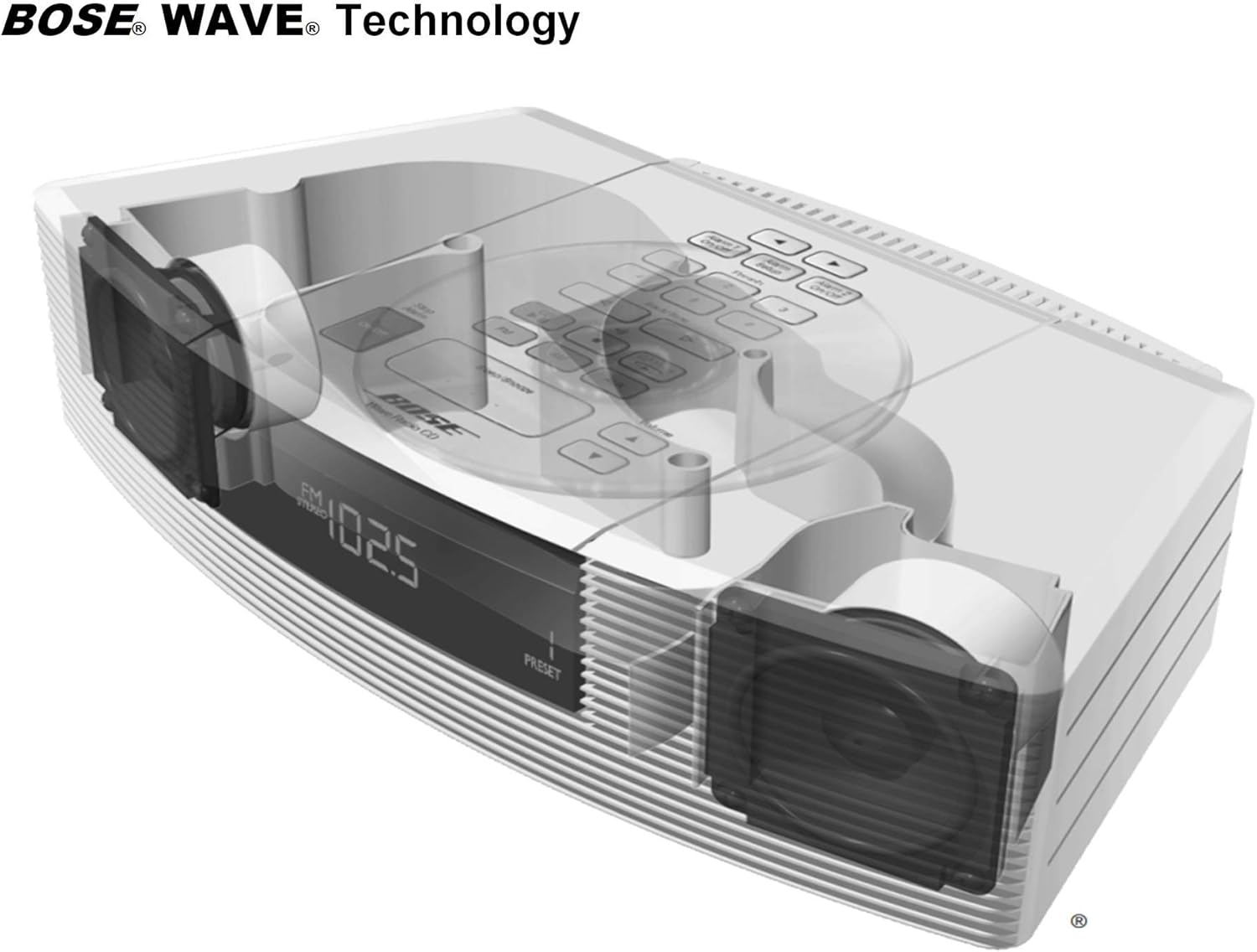
Image: Internal diagram showcasing the Bose Acoustic Waveguide Technology.
Setup
- Unpacking: Carefully remove the system and all accessories from the packaging. Retain packaging for future transport or storage.
- Placement: Place the Wave Radio/CD Player on a stable, flat surface. Ensure adequate ventilation around the unit.
- Power Connection: Plug the power cord into the AC power input on the back of the system, then into a wall outlet. The power cord also functions as the FM antenna.
- AM Antenna (Optional): For improved AM reception, connect an external AM antenna (if provided or purchased separately) to the AM antenna jack on the back of the unit.
- Initial Power On: Press the On/Off button on the top panel or remote control to turn on the system.
- Setting the Time: Use the Time buttons on the remote control to adjust the hour and minute.
Operating Instructions
Controls Overview
The Bose Wave Radio/CD Player can be operated using the buttons on the top panel or the included remote control. The remote control offers comprehensive functionality.

Image: Layout of the remote control for the Bose Wave Radio/CD Player.

Image: Diagram of the top control panel with functions labeled.
CD Player Operation
- Inserting a CD: Gently lift the CD compartment cover on the top of the unit. Place a CD, label side up, onto the spindle. Close the cover.
- Playing a CD: Press the CD button on the remote or top panel. The CD will begin to play automatically.
- Pause/Play: Press the Play/Pause button (►►) to pause or resume playback.
- Stop: Press the Stop button (■) to stop the CD.
- Skip Tracks: Use the Track/Tune buttons (◀◀ / ►►) to skip to the previous or next track.
- CD Mode: Press the CD Mode button to select random or repeat playback.
Radio Operation
- Selecting Band: Press the FM or AM button on the remote or top panel to select the desired radio band.
- Tuning: Use the Track/Tune buttons (◀◀ / ►►) to manually tune to a station or scan for the next available station.
- Setting Presets: Tune to your desired station. Press and hold one of the Presets buttons (1-6) until you hear a beep, indicating the station is saved.
- Recalling Presets: Press the corresponding Presets button (1-6) to quickly access a saved station.
Auxiliary Input (AUX)
- Connecting a Device: Connect your external audio device (e.g., smartphone, Bluetooth adapter) to the AUX IN RCA Stereo port on the back of the Wave Radio/CD Player using an appropriate audio cable.
- Selecting AUX: Press the AUX button on the remote or top panel to switch to the auxiliary input.
- Playback: Begin playback on your connected external device.
Alarms and Sleep/Snooze
- Setting Alarms: Press the Alarm Setup button. Use the Time buttons to set the alarm time and select the alarm source (radio or CD).
- Activating/Deactivating Alarms: Press Alarm 1 On/Off or Alarm 2 On/Off to enable or disable each alarm.
- Snooze: When an alarm sounds, press the Sleep/Snooze button to temporarily silence it. The alarm will sound again after a set interval.
- Sleep Timer: Press the Sleep/Snooze button repeatedly to cycle through sleep timer options (e.g., 10, 20, 30 minutes), allowing the system to play for a set duration before turning off.
Volume Control
Use the Volume Up (▲) and Volume Down (▼) buttons on the remote or top panel to adjust the listening volume. Press the Mute button to temporarily silence the audio.
Maintenance
- Cleaning: Use a soft, dry cloth to clean the exterior of the system. Do not use liquid cleaners or solvents.
- CD Care: Handle CDs by their edges. Clean CDs with a soft, lint-free cloth, wiping from the center outwards.
- Ventilation: Ensure that the ventilation openings on the system are not blocked to prevent overheating.
Troubleshooting
| Problem | Possible Solution |
|---|---|
| No power | Ensure the power cord is securely plugged into both the system and a working wall outlet. |
| No sound | Check the volume level. Ensure the system is not muted. Verify the correct source (CD, FM, AM, AUX) is selected. |
| CD not playing | Ensure the CD is inserted correctly, label side up. Check if the CD is clean and free of scratches. Remember, the system is not compatible with CD-RW, MP3, or SACD formats. |
| Poor radio reception | Adjust the position of the power cord, which acts as the FM antenna. If using an external AM antenna, ensure it is properly connected and positioned. Try moving the system to a different location. |
| Alarm not sounding | Verify that the alarm is enabled (Alarm 1 On/Off or Alarm 2 On/Off). Check that the alarm time is set correctly and the volume is audible. |
| Remote control not working | Replace the CR2 battery in the remote control. Ensure there are no obstructions between the remote and the system. |
Specifications
- Product Dimensions (L x W x H): 8.5 x 4.37 x 14.02 inches
- Item Weight: 7.48 pounds
- Power: AC (via power cord)
- Remote Control Battery: 1 CR2 battery (required)
- Connectivity Technology: Auxiliary, Bluetooth (via optional adapter)
- Color: White
- Speaker Type: Stereo
- Manufacturer: BOSE
- Date First Available: November 4, 2019
Warranty and Support
As a renewed product, the warranty and support terms may differ from new products. Please refer to the specific warranty information provided at the time of purchase or contact your seller for details regarding coverage and support options. For general product inquiries or technical assistance, you may also visit the official Bose support website.


