
Introduction
This manual provides detailed instructions for the setup, operation, and maintenance of your ELEPHAS 720P HD LED Movie Projector (Model CL760). Please read this manual thoroughly before using the projector to ensure proper function and to maximize your viewing experience. Keep this manual for future reference.
Package Contents
Verify that all items listed below are included in your package. If any items are missing or damaged, please contact customer support.
- ELEPHAS 720P HD LED Movie Projector (CL760)
- HDMI Cable
- AV Cable
- Power Cable
- Remote Control (batteries not included)
- User Manual
Product Overview
Familiarize yourself with the projector's components and connectivity options.

Figure 1: Front view of the ELEPHAS CL760 Projector, showing the lens and ventilation.
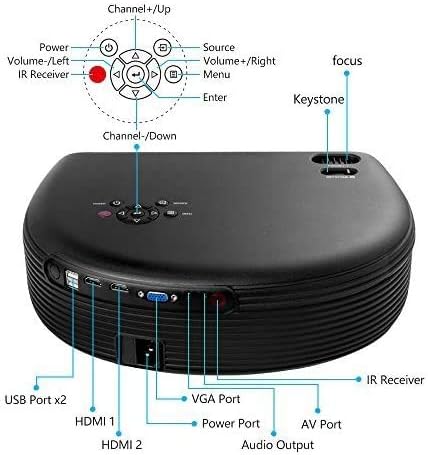
Figure 2: Rear panel of the projector detailing various input/output ports and the included remote control layout. Ports include USB (x2), HDMI (x2), VGA, AV, Audio Out, and Power.

Figure 3: Diagram illustrating various compatible devices such as Fire TV, Roku Streaming Stick, DVD Player, Mobile Phone/Tablet, Laptop/PC, PS3/PS4, USB Drive/Hard Drive, and external Audio systems.
Setup
1. Placement and Power Connection
- Place the projector on a stable, flat surface or mount it securely. Ensure adequate ventilation around the unit.
- Connect the power cable to the projector's power input and then to a power outlet.
- Press the power button on the projector or remote control to turn it on.
2. Adjusting Focus and Keystone

Figure 4: Illustration of projection size adjustment (33-180 inches) and keystone correction mechanism (±20°).
- Focus: Rotate the focus ring near the lens until the projected image is clear and sharp.
- Keystone: Use the keystone correction ring or lever to adjust the image shape if it appears trapezoidal. This corrects for angled projection.
3. Connecting External Devices
The CL760 projector supports various input sources:
- HDMI: Connect devices like Fire TV stick, Roku streaming stick, laptops, Blu-ray DVD players, PS3/PS4, Xbox, or TV boxes using an HDMI cable. The projector has two HDMI ports.
- USB: Insert a U-disk or hard disk device into the USB slot to play media directly. The projector has two USB ports.
- VGA: Connect to a PC using a VGA cable.
- AV: Use the AV cable to connect to older devices with composite video output.
- Audio Out: Connect external headphones or speakers via the audio port for enhanced sound.
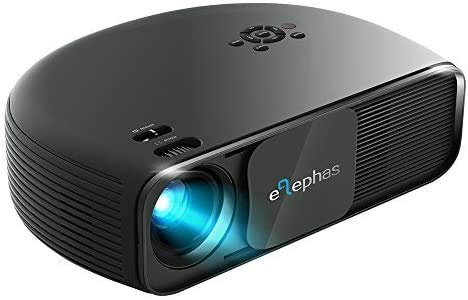
Figure 5: Example of connecting a smartphone or iPad to the projector via a USB to HDMI adapter (adapter not included, required for mobile devices).
Note: Adapters are required if connecting the projector to an iPad, iPhone, or other tablets and smartphones. The projector does not support Google Chromecast directly.
Operating Instructions
1. Selecting Input Source
After connecting your device, press the 'Source' button on the remote control or projector panel to select the appropriate input (e.g., HDMI1, HDMI2, VGA, AV, USB).
2. Menu Navigation
Use the arrow keys on the remote control or projector panel to navigate through the on-screen menu. Press 'OK' or 'Enter' to confirm selections. Adjust settings such as picture mode, aspect ratio, and sound mode as desired.
3. Audio Output
The projector features a built-in Hi-Fi level stereo speaker with SRS sound. For a different audio experience, connect external speakers or headphones to the 'Audio Out' port. Note: The projector does not support Dolby sound.
4. Projection Distance and Size
The optimal projection distance is between 1 meter and 5 meters, yielding an image size from 33 inches to 180 inches. For the best viewing experience, a 130-inch screen size at 2-2.5 meters is recommended.
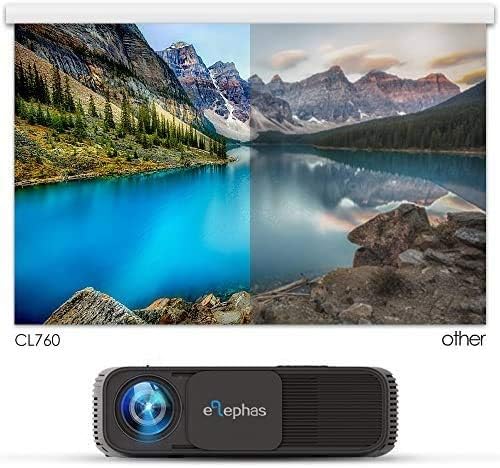
Figure 6: Visual comparison demonstrating the superior color and contrast of the ELEPHAS CL760 projector compared to other projectors.
Maintenance
1. Cleaning the Lens
Use a soft, lint-free cloth specifically designed for optical lenses to gently wipe the projector lens. Avoid using abrasive cleaners or excessive force, which can scratch the lens.
2. Cooling System Care
The projector is equipped with an advanced cooling system. To ensure optimal performance and longevity, keep the ventilation ports clear of obstructions. Regularly clean any dust accumulation from the vents using a soft brush or compressed air.
Troubleshooting
If you encounter issues with your projector, refer to the following common problems and solutions:
- No Image:
- Ensure the power cable is securely connected and the projector is turned on.
- Verify that the correct input source is selected (e.g., HDMI1, VGA).
- Check the connection cable between the projector and the source device. Try a different cable if possible.
- Ensure the source device is powered on and outputting a signal.
- Blurry Image:
- Adjust the focus ring near the lens until the image is sharp.
- Adjust the keystone correction if the image appears distorted or trapezoidal.
- Ensure the projection distance is within the recommended range (1m-5m).
- No Sound:
- Increase the volume on both the projector and the source device.
- Check if external speakers or headphones are connected to the 'Audio Out' port; if so, sound will be routed there.
- Ensure the audio format from the source device is supported (Dolby sound is not supported).
- Remote Control Not Working:
- Ensure batteries are correctly inserted and not depleted. Replace if necessary.
- Point the remote directly at the projector's IR receiver.
- Remove any obstructions between the remote and the projector.
Specifications
| Feature | Specification |
|---|---|
| Brand | ELEPHAS |
| Model Name | CL760 |
| Native Resolution | 1280 x 800 pixels |
| Display Resolution Maximum | 1280 x 720 pixels (720P HD) |
| Contrast Ratio | 2000:1 |
| Connectivity Technology | HDMI, USB, VGA, AV |
| Display Type | LCD |
| Projection Size | 33 - 180 inches |
| Throw Distance | 1 - 5 meters |
| Audio | Built-in Hi-Fi Stereo Speaker (SRS Sound) |
| Cooling System | Advanced with 32dB fan noise |
| Wattage | 60 watts |
| Item Weight | 4.4 Pounds |
| Color | Black |
Warranty and Support
ELEPHAS provides comprehensive support for your projector:
- Warranty: Full ELEPHAS 3-year warranty.
- Returns/Replacements: 2-month hassle-free return/replace policy.
- Technical Support: Premium customer services and lifetime technical support.
For any inquiries or assistance, please contact ELEPHAS customer service.


