
1. Introduction
The Sharper Image Surround Sound Shower System (Model 206890) provides a high-quality audio experience in your shower environment. This system includes two 5-watt Bluetooth speakers designed for rich sound delivery. Each speaker features a waterproof design with an IP67 rating and strong suction cups for secure mounting. Onboard controls allow for easy management of music playback, volume adjustments, and call handling. The speakers operate for up to 8 hours per charge and are compatible with various Bluetooth-enabled devices, including iPhones and Android devices.

Image: Two Sharper Image shower speakers mounted on a tiled shower wall, showcasing their waterproof design and illuminated rings.
2. Safety Information
Please read all safety instructions before using this product to ensure proper operation and to prevent damage or injury.
- Water Resistance: The speakers are IP67 rated, meaning they are protected from dust and can withstand immersion in water up to 1 meter for up to 30 minutes. Do not submerge the speakers for extended periods or beyond the specified depth. Ensure charging ports are dry before charging.
- Charging: Use only the provided charging cable and a compatible power source. Do not attempt to charge the speakers in wet conditions.
- Temperature: Avoid exposing the speakers to extreme temperatures (hot or cold) as this may affect battery life and performance.
- Cleaning: Clean the speakers with a soft, damp cloth. Do not use abrasive cleaners or solvents.
- Disassembly: Do not attempt to disassemble or modify the speakers. This will void the warranty and may cause damage or injury.
- Placement: Ensure the suction cups are securely attached to a clean, smooth, non-porous surface before use to prevent the speakers from falling.
3. Package Contents
Verify that all items are present in your package:
- 2 x Sharper Image Surround Sound Shower Speakers
- 1 x USB Charging Cable
- 1 x Instruction Manual
4. Key Features
- Twin 5-Watt Speakers: Delivers powerful and clear audio.
- IP67 Waterproof Rating: Designed to withstand splashes and temporary immersion in water.
- Strong Suction Cups: For secure mounting on smooth surfaces.
- Bluetooth Connectivity: Wirelessly stream audio from compatible devices.
- Onboard Controls: Easily manage playback, volume, and calls directly from the speaker.
- Built-in Microphone: For hands-free calling.
- Long Battery Life: Up to 8 hours of continuous playback on a single charge.
- Stereo Sound: The two speakers can pair together to provide a true stereo audio experience.
5. Setup
5.1 Charging the Speakers
- Locate the charging port on each speaker.
- Connect the supplied USB charging cable to the speaker's charging port.
- Connect the other end of the USB cable to a USB power adapter (not included) or a computer's USB port.
- The LED indicator will illuminate during charging and change color or turn off when fully charged.
- A full charge typically takes approximately 2-3 hours.
5.2 Mounting the Speakers
- Ensure the desired mounting surface (e.g., shower wall) is clean, smooth, and dry.
- Press the suction cup firmly against the surface until it creates a strong seal.
- Verify that the speaker is securely attached before releasing it.
5.3 Pairing the Speakers for Stereo Sound
For a stereo audio experience, the two speakers must first be paired with each other, and then one speaker will connect to your Bluetooth device.
- Power on both speakers. They will enter Bluetooth pairing mode automatically.
- On one speaker (this will be your primary speaker), press and hold the Mode button for 3-5 seconds until you hear an audible confirmation that the speakers are paired. The LED indicators on both speakers will change to indicate successful inter-speaker pairing.
- Once paired, the primary speaker will be ready to connect to your device.
5.4 Connecting to a Bluetooth Device
- Ensure the speakers are powered on and in pairing mode (after inter-speaker pairing, the primary speaker will be discoverable).
- On your smartphone or other Bluetooth-enabled device, go to the Bluetooth settings.
- Search for available devices and select "Sharper Image Shower Speaker" (or similar name).
- Once connected, you will hear an audible confirmation, and the LED indicator on the primary speaker will change.
Video: An overview demonstrating the Sharper Image Surround Sound Shower Speakers, showing their waterproof nature and ease of use with a smartphone.
6. Operation
6.1 Power On/Off
- Press and hold the Power button to turn the speakers on or off.
6.2 Bluetooth Mode (Music Playback & Calls)
- Play/Pause: Press the Play/Pause button.
- Volume Up/Down: Press the Volume + or Volume - buttons.
- Next/Previous Track: Press and hold the Volume + button for the next track, or Volume - button for the previous track.
- Answer/End Call: Press the Play/Pause button during an incoming call to answer, and again to end the call.
- Reject Call: Press and hold the Play/Pause button during an incoming call to reject it.
6.3 FM Radio Mode
The speakers also feature an FM radio function. Note that only one speaker operates in FM mode; stereo pairing is not available for FM radio.
- Switch Mode: Press the Mode (M) button to switch between Bluetooth and FM radio modes. The speaker will not remember the last mode used and will default to Bluetooth upon power-on.
- Auto Scan: In FM mode, press and hold the Play/Pause button to automatically scan and save available FM stations.
- Tune Stations: Briefly press the Volume + or Volume - buttons to navigate through saved stations.
- Manual Scan: To manually scan for stations one by one, press and hold the Volume + or Volume - buttons. Release when you find a desired station.
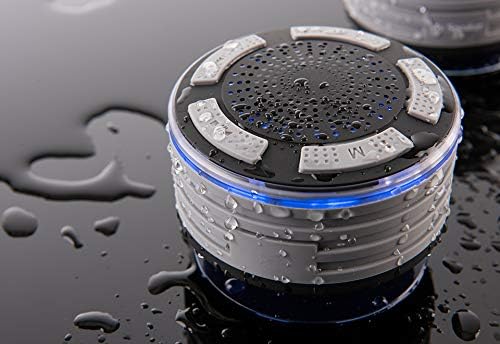
Image: Close-up view of a single speaker, highlighting the control buttons for power, volume, and mode.
7. Maintenance
7.1 Cleaning
- Before cleaning, ensure the speakers are powered off and disconnected from any charging source.
- Wipe the exterior of the speakers with a soft, damp cloth.
- Do not use harsh chemicals, cleaning solvents, or strong detergents.
- Ensure the charging port is dry before reconnecting the charging cable.
7.2 Storage
- Store the speakers in a cool, dry place away from direct sunlight and extreme temperatures.
- If storing for an extended period, charge the speakers periodically to maintain battery health.
8. Troubleshooting
| Problem | Possible Cause | Solution |
|---|---|---|
| Speakers do not power on. | Low battery. | Charge the speakers fully. |
| Cannot pair speakers together. | Speakers are too far apart or not in pairing mode. | Ensure both speakers are powered on and close to each other. Follow the stereo pairing instructions in Section 5.3. |
| Cannot connect to Bluetooth device. | Bluetooth is off on your device; speakers are not in pairing mode; speakers are already connected to another device. | Ensure Bluetooth is enabled on your device. Make sure the primary speaker is in discoverable mode. Disconnect from other devices if necessary. |
| No sound or poor sound quality. | Volume too low; device not connected; interference. | Increase volume on both speakers and your device. Reconnect Bluetooth. Move closer to the connected device. |
| FM radio reception is poor. | Weak signal; environmental interference. | Reposition the speaker to improve reception. Note that FM performance can vary based on location. |
| Frequent "low battery" alerts. | Battery is critically low. | This is an indication that the battery needs immediate recharging. The alerts are designed to be noticeable to prevent unexpected power loss. |
9. Specifications
- Brand: Sharper Image
- Model Number: 206890
- Connectivity Technology: Bluetooth
- Audio Output Mode: Surround (Stereo when paired)
- Speaker Type: Portable Bluetooth Speaker
- Water Resistance: IP67 Rated (Waterproof)
- Battery Life: Up to 8 Hours
- Power Source: Corded Electric (via USB charging)
- Controller Type: Play, Pause, Skip Tracks, Adjust Volume
- Additional Features: Built-in Microphone, FM Radio
- Material: Metal, Plastic
- Item Weight: 11.2 ounces (per speaker)
- Number of Items: 2
- UPC/GTIN: 810022140352
10. Warranty Information
This product may be covered by a standard manufacturer's warranty. For specific details regarding warranty coverage, terms, and conditions, please contact the manufacturer directly.
11. Customer Support
For technical assistance, troubleshooting not covered in this manual, or warranty inquiries, please contact Sharper Image customer support. Refer to the product packaging or the official Sharper Image website for the most current contact information.
