
Introduction
This instruction manual provides detailed information on the setup, operation, and maintenance of your SabineTek SmartMike+ wireless Bluetooth microphone. Please read this manual thoroughly before using the device to ensure optimal performance and longevity.
What's in the Box
- SabineTek SmartMike+ Microphone(s)
- Charging Cable
- Wind-proof Cap (Windscreen)
- Buggy Bag (Carrying Pouch)
- User Manual (this document)
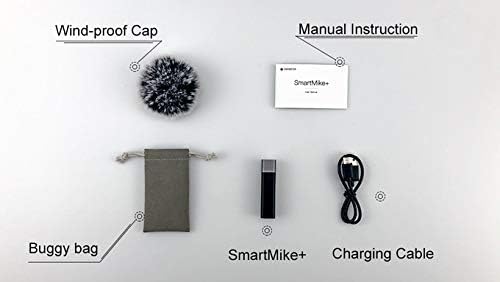
Product Overview
The SabineTek SmartMike+ is a compact and lightweight wireless microphone designed for high-quality audio recording with smartphones, cameras, and other compatible devices. It features advanced noise cancellation and real-time auto-sync technology for professional-grade sound.

Key Features:
- Professional Audio Quality: Full-band audio 44.1~48kHz stereo CD-quality.
- Real-Time Auto-Sync Technology: Reduces post-editing time.
- Advanced Multi-Level Noise Cancellation: Embedded algorithm controlled by the SmartMike+ APP to block outer surrounding noise.
- Real-Time Monitoring: Allows listening to audio during recording via headphones.
- Bluetooth 5.0 Connectivity: Provides faster, easier, and more stable connection.
- Portable & Durable: Lightweight (14g), compact design with 5 hours of battery life.

Setup
1. Charging the SmartMike+
Before first use, fully charge the SmartMike+ using the provided charging cable. The device is equipped with a 110mAh high-quality lithium battery, providing approximately 5 hours of battery life on a full charge.
2. Connecting to Smartphone (Bluetooth)
- Download the SmartMike+ APP from your device's app store (available for iPhone/Android).
- Ensure Bluetooth is enabled on your smartphone.
- Power on the SmartMike+ microphone.
- Open the SmartMike+ APP and follow the on-screen instructions to pair your microphone via Bluetooth.
3. Connecting to Camera/Other Devices (3.5mm Jack)
The SmartMike+ can also be used with cameras or other devices that support a 3.5mm audio input. Use the appropriate cable (not always included, may require separate purchase) to connect the microphone to your device's audio input jack.

Operating Instructions
Powering On/Off
- To power on, press and hold the power button until the indicator light illuminates.
- To power off, press and hold the power button until the indicator light turns off.
Recording Audio/Video
Once connected to your smartphone via the SmartMike+ APP, you can initiate audio or video recording directly within the application. The app provides controls for recording, playback, and managing your audio files.
Noise Cancellation
The SmartMike+ utilizes a multi-level noise cancellation algorithm. This feature is primarily controlled and optimized through the SmartMike+ APP, allowing the microphone to block ambient noise and capture clear, authentic sound even in noisy environments.
Real-Time Monitoring
For real-time audio monitoring during recording, connect headphones to the SmartMike+ or your phone. This allows you to hear the audio being captured, ensuring sound quality and proper levels.

Maintenance
Cleaning
Use a soft, dry cloth to clean the exterior of the SmartMike+. Do not use liquid cleaners or aerosols, as they may damage the device.
Battery Care
- Avoid fully discharging the battery frequently.
- Charge the device regularly, even if not in use, to maintain battery health.
- Store in a cool, dry place when not in use for extended periods.
Storage
When not in use, store the SmartMike+ in its provided buggy bag to protect it from dust and physical damage.
Troubleshooting
| Problem | Possible Cause | Solution |
|---|---|---|
| Device does not power on | Low battery | Charge the SmartMike+ fully. |
| Cannot pair via Bluetooth | Bluetooth not enabled; device out of range; interference | Ensure Bluetooth is on, bring devices closer, restart both devices. |
| Poor audio quality (muffled, distorted, dropouts) | Environmental noise; improper microphone placement; firmware issues; app settings | Ensure wind-proof cap is used in windy conditions. Adjust microphone proximity to source. Check for firmware updates via the app. Experiment with app settings, especially noise reduction levels. Ensure strong Bluetooth connection. |
| Voice gets lost in background noise | High ambient low-frequency noise (e.g., traffic) | While the SmartMike+ has noise cancellation, very loud or persistent low-frequency sounds can still impact voice clarity. Try to record in quieter environments or use external audio editing software for post-production cleanup. |
Specifications
| Feature | Detail |
|---|---|
| Model Number | S610 |
| Item Weight | 11.8 ounces (approx. 0.74 Pounds) |
| Product Dimensions | 2.28 x 0.39 x 0.59 inches |
| Microphone Form Factor | Microphone System |
| Power Source | Rechargeable, Battery Powered, Lithium Battery |
| Material | Metal |
| Signal-to-Noise Ratio | 70 dB |
| Hardware Platform | Smartphone |
| Number of Channels | 2 |
| Audio Sensitivity | 120 dB |
| Polar Pattern | Omnidirectional |
| Connectivity Technology | Bluetooth |
| Connector Type | 3.5 mm Jack |
| Special Feature | Clip |
| Compatible Devices | Camera, Personal Computer, Smartphone, Speaker |
| Color | Black |
Warranty and Support
For warranty information and customer support, please refer to the documentation included with your purchase or visit the official SabineTek website. Keep your proof of purchase for warranty claims.