
1. Product Overview
The SV3C 18X Optical Zoom PTZ IP Camera is a high-performance outdoor security camera designed for comprehensive surveillance. It features 1080P full HD resolution, 18X optical zoom for detailed distant viewing, and Pan-Tilt-Zoom (PTZ) capabilities for wide area coverage. Advanced features include humanoid detection, two-way audio, and robust IP66 waterproofing for reliable outdoor use.

Figure 1.1: SV3C 18X Optical Zoom PTZ IP Camera.
Key Features:
- 18X Optical Zoom: Provides clear, detailed images even from a distance.
- 1080P Full HD Resolution: Delivers crisp and clear video footage.
- Pan-Tilt-Zoom (PTZ): Offers 355° horizontal pan and 90° vertical tilt for extensive coverage.
- Wireless WiFi Connectivity: Easy setup and flexible placement without extensive wiring.
- Humanoid Detection: Intelligent detection to reduce false alarms.
- Two-Way Audio: Built-in microphone and speaker for communication.
- IP66 Waterproof: Designed to withstand harsh outdoor weather conditions.
- Night Vision: Enhanced night vision up to 196ft for 24/7 monitoring.
- Onvif Conformance: Ensures compatibility with various NVRs and surveillance systems.
- SD Card Recording: Supports up to 128GB Micro SD card for local storage.
2. Package Contents
Verify that all items listed below are included in your package. If any items are missing or damaged, please contact SV3C customer support.

Figure 2.1: Visual representation of package contents.
- SV3C 18X Optical Zoom PTZ IP Camera
- Power Adapter
- Network Cable
- Waterproof Lid
- Mounting Screws
- Quick Start Guide
3. Setup
Follow these steps for initial setup and installation of your SV3C PTZ IP Camera.
3.1 Initial Connection
- Download Camhi App: Search for "Camhi" in your mobile app store (iOS/Android) and download the application.
- Power On Camera: Connect the camera to the power adapter.
- Connect Network Cable: For initial setup, connect the camera to your router using the provided network cable. This ensures a stable connection for configuration.
- Add Camera in App: Open the Camhi app, select to add a new camera, and scan the QR code located on the camera or its packaging. Follow the on-screen prompts to configure network settings, including Wi-Fi if desired.
- Remote Live View: Once configured, you can access the live view remotely from your mobile device.

Figure 3.1: Quick setup guide using the Camhi app.
3.2 SD Card Installation
The camera supports a Micro SD card up to 128GB for local video storage. The SD card is not included.
- Unscrew Cover: Carefully unscrew the cover on the camera body to access the internal components.
- Locate SD Card Slot: Identify the Micro SD card slot inside the camera.
- Insert SD Card: Gently insert the Micro SD card into the slot until it clicks into place. Ensure correct orientation.
- Secure Cover: Replace the cover and screw it back tightly to maintain the camera's waterproof rating.

Figure 3.2: SD card installation process.
3.3 Mounting the Camera
Choose a suitable outdoor location for mounting the camera, ensuring a clear field of view and access to power. Use the provided mounting screws to secure the camera to a wall or pole.
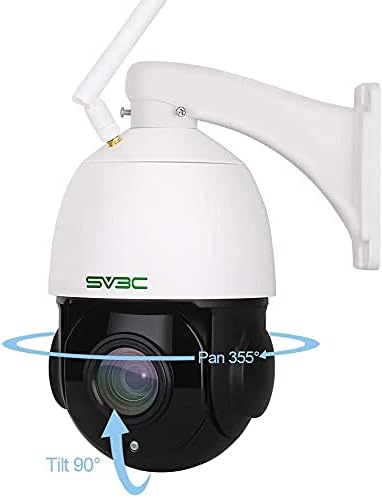
Figure 3.3: Example of camera mounting.
4. Operating Instructions
This section details how to operate your SV3C PTZ IP Camera and utilize its various functions.
4.1 Pan, Tilt, and Zoom (PTZ) Control
Control the camera's viewing angle and zoom level directly from the Camhi app or compatible NVR software.

Figure 4.1: Pan and Tilt capabilities of the camera.

Figure 4.2: Demonstrating 18X Optical Zoom capability.
Video 4.1: Demonstration of 18X optical zoom and PTZ functionality. The video shows the camera zooming in on distant objects and panning across a wide area, highlighting the clarity and responsiveness of the optical zoom and pan/tilt controls.
4.2 Motion Detection and Alerts
Configure motion detection settings to receive alerts and record footage when movement is detected. The camera supports humanoid detection to minimize false alarms.

Figure 4.3: Smart Motion Detection features, including email snapshots, FTP upload, mobile app push notifications, and SD card recording.
4.3 Two-Way Audio
Utilize the built-in microphone and speaker for two-way communication through the camera.

Figure 4.4: Two-Way Audio functionality.
4.4 Night Vision
The camera automatically switches to night vision mode in low-light conditions, providing clear black and white or color images up to 196ft.

Figure 4.5: Day and Night vision capabilities.
5. Maintenance
Proper maintenance ensures the longevity and optimal performance of your SV3C PTZ IP Camera.
5.1 Cleaning
- Regularly wipe the camera lens and body with a soft, damp cloth to remove dust and dirt.
- Do not use harsh chemicals or abrasive cleaners, as they may damage the camera's finish or lens coating.
5.2 Environmental Protection
The camera is IP66 waterproof, designed for outdoor use in various weather conditions.
Figure 5.1: IP66 Waterproof and weather resistance.
5.3 Firmware Updates
Check the SV3C official website or the Camhi app periodically for firmware updates. Keeping your camera's firmware up-to-date ensures access to the latest features and security enhancements.
6. Troubleshooting
This section provides solutions to common issues you might encounter with your SV3C PTZ IP Camera.
| Problem | Possible Cause | Solution |
|---|---|---|
| Camera offline | No power, network disconnection, incorrect Wi-Fi password. | Check power supply. Verify network cable connection or Wi-Fi settings. Re-enter Wi-Fi password in app. |
| No video feed | Network issue, camera malfunction, app error. | Restart camera and router. Check network connection. Reinstall app if necessary. |
| Motion detection not working | Settings incorrect, sensitivity too low, area not configured. | Review motion detection settings in the app. Adjust sensitivity and detection zones. |
| Poor image quality | Dirty lens, poor network signal, low light. | Clean the lens. Ensure strong Wi-Fi signal or use wired connection. Verify sufficient lighting for optimal image. |
| SD card not recording | SD card full, not formatted, faulty, or incorrectly installed. | Check SD card status in app. Format the SD card. Replace if faulty. Ensure proper installation. |
For further assistance, please refer to the SV3C support website or contact customer service.
7. Specifications
| Feature | Detail |
|---|---|
| Model Number | SD7W-1080PS-HX |
| Video Capture Resolution | 1080p |
| Zoom Type | 18X Optical Zoom |
| Pan/Tilt Range | Pan 355°, Tilt 90° |
| Connectivity Technology | Wireless (Wi-Fi), Wired |
| Connectivity Protocol | RTSP, Wi-Fi |
| Storage | Max 128GB SD Card (not included) |
| Water Resistance Level | IP66 Waterproof |
| Power Source | AC/DC (12 Volts) |
| Special Features | Motion Sensor, Night Vision, PTZ Technology, Two-Way Audio, Humanoid Detection |
| Indoor/Outdoor Usage | Outdoor |
| Item Weight | 4.51 pounds |
| Package Dimensions | 11.5 x 9.17 x 6.89 inches |
8. Warranty and Support
SV3C products typically come with a manufacturer's warranty. Please refer to the warranty card included in your product packaging or visit the official SV3C website for detailed warranty terms and conditions.
For technical support, troubleshooting assistance, or any inquiries regarding your SV3C PTZ IP Camera, please contact SV3C customer support through their official channels. Contact information can usually be found on the SV3C website or in the Quick Start Guide.
Note: Warranty terms and support availability may vary by region and retailer.
