
1. Introduction
This user manual provides comprehensive instructions for the Wuloo 1800 Ft Wireless Driveway Alarm System. Please read this manual carefully before installation and operation to ensure proper functionality and longevity of your device. This system is designed to alert you to movement in your driveway or property, offering enhanced security and convenience.
2. Product Features
- Extended Wireless Range: Reliable 1/3-mile (1760 ft; 536m) wireless transmission range, tested in various environments including trees, buildings, walls, and vehicles.
- Weatherproof Design: Motion sensors are designed to operate effectively in rain or snow.
- Multi-functional Receiver: The receiver unit includes features such as a clock, alarm, 36 selectable chimes/tones, 8 adjustable volume levels, and a mute mode.
- Rechargeable Sensor Battery: Sensors are equipped with a rechargeable battery, providing up to 12 months of operation on a full charge.
- Adjustable Sensitivity: Four sensitivity levels (0-15 ft, 0-20 ft, 0-26 ft, 0-33 ft) to minimize false alarms from small animals or environmental factors.
- Expandable System: The system can be expanded to connect up to 8 additional sensors to a single receiver.

Figure 2.1: Key features including waterproof design, operating temperature, and wireless range.

Figure 2.2: Receiver unit highlighting its multi-functional capabilities.

Figure 2.3: Visual representation of the four sensitivity levels for the motion sensor.

Figure 2.4: The expandable nature of the system, supporting up to 8 sensors.
Video 2.1: An overview of the Wuloo driveway alarm system's features and advantages.
3. Setup and Installation
3.1 Initial Sensor Check and Charging
- Confirm Sensor Power: Wave your hand slowly in front of the sensor eye. If a red light flashes, the sensor is powered on. If not, press and hold the POWER button for 3+ seconds to turn it on. (Note: The sensor eye will flash red 3 times when turning on, and once when turning off.)
- Charge the Sensor: Sensors are typically shipped with about 20% charge. Fully charge the sensor before installation. A full charge can last up to 12 months.
3.2 Setting the Sensor Channel
The sensor has 8 channel settings, corresponding to 8 LED indicator lights on the receiver. To set the channel:
- Open the sensor casing.
- Locate the channel switch (DIP switches).
- Adjust the switches to select your desired channel (1-8). Refer to the 'Channel Switch Chart' for specific configurations.
3.3 Pairing the Sensor and Receiver
If you purchased the sensor and receiver together, they are usually pre-paired. If you need to re-pair or pair additional sensors:
- Ensure the sensor is powered on.
- Connect the receiver to power.
- On the receiver, press and hold the PAIRED button for 3 seconds to enter pairing mode.
- Wave your hand slowly in front of the sensor eye. If pairing is successful, the receiver's corresponding channel indicator will flash, and a ring tone will sound. The screen will also display the channel number (e.g., CH08).
3.4 Sensor Installation
Install the sensor in a location that avoids direct sunlight from entering the sensor eye. For optimal performance, adjust the angle of the sensor using its ball joint after installation.
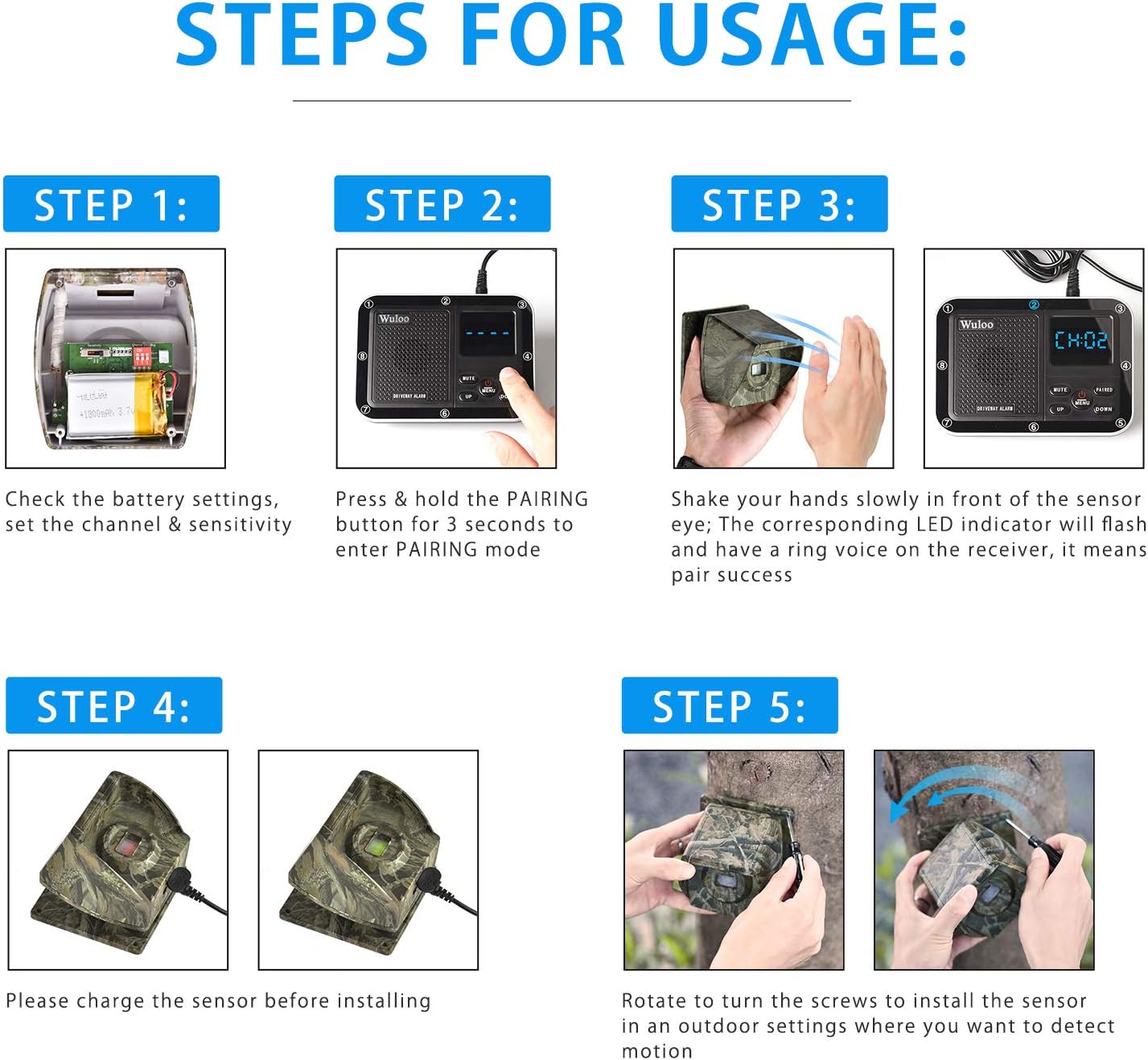
Figure 3.1: Visual steps for initial setup and installation.

Figure 3.2: Internal components of the sensor, including battery and channel settings.
Video 3.1: Detailed instructions on how to use the Wuloo driveway alarm.
Video 3.2: Guide on setting the channel for the Wuloo driveway alarm.
Video 3.3: Instructions for pairing the sensor and receiver of the Wuloo driveway alarm.
4. Operating Instructions
4.1 Adjusting Sensitivity
The sensor features 4 sensitivity levels. Higher sensitivity allows detection of smaller movements or objects farther away. Adjust the sensitivity switch inside the sensor to prevent false alarms from leaves or small animals.
4.2 Setting Time and Alarm
The receiver unit includes clock and alarm functions. To set the time and alarm:
- Press the MENU button once; the hour number will flash. Use UP/DOWN to adjust the hour.
- Press MENU a second time; the minute number will flash. Use UP/DOWN to adjust the minute.
- Press MENU a third time; the alarm setting (default OFF) will flash. Use UP/DOWN to change to ON. The screen will flash a logo when the alarm is ON.
- Press MENU a fourth time; the hour indicator for the alarm will flash. Use UP/DOWN to set the alarm hour.
- Press MENU a fifth time; the minute indicator for the alarm will flash. Use UP/DOWN to set the alarm minute.
- Press MENU a sixth time to exit the time and alarm settings.
4.3 Melody Settings for Each Channel
You can assign a different melody (1-36) to each of the 8 channels to distinguish which sensor has detected movement.
- In standby mode, press the PAIRED button. The screen will display a character sequence like "C101" (Channel 1, Melody 01).
- Use the UP/DOWN buttons to choose the melody for the displayed channel.
- To change melodies for other channels, press the PAIRED button to switch between channels (C1-C8).
- After setting the melodies, press the MENU button to exit and return to standby mode.
4.4 Volume Setting
The receiver offers 8 adjustable volume levels.
- In standby mode (displaying current time), press the UP/DOWN button to adjust the volume.
4.5 Power ON/OFF Button
To turn off the receiver without losing time settings, press and hold the MENU button for 3 seconds. To mute the sound while keeping the system active, press and hold the MUTE button.
Video 4.1: Instructions for setting the time and alarm on the Wuloo driveway alarm.
Video 4.2: Guide on setting different melodies for each sensor channel.
Video 4.3: Additional settings and configurations for the Wuloo driveway alarm system.
5. Maintenance
To ensure optimal performance and longevity of your Wuloo Driveway Alarm System:
- Regularly check the sensor eye for any obstructions like dirt, spiderwebs, or debris. Clean gently with a soft, dry cloth.
- Ensure the sensor's rechargeable battery is adequately charged, especially after prolonged periods of inactivity or before winter months.
- Verify that the sensor is securely mounted and its angle is still optimal for detection, adjusting if necessary.
- Keep the receiver unit in a dry, indoor environment away from extreme temperatures.
6. Troubleshooting
If you encounter issues with your Wuloo Driveway Alarm System, consider the following:
- No Detection:
- Check if the sensor is powered on and fully charged.
- Verify the sensor's sensitivity setting; increase it if necessary.
- Ensure there are no obstructions directly in front of the sensor eye.
- Confirm the sensor and receiver are properly paired (refer to Section 3.3).
- Check the distance between the sensor and receiver; ensure it's within the 1/3-mile range and minimize large obstacles.
- False Alarms:
- Decrease the sensor's sensitivity setting.
- Adjust the sensor's angle to avoid detecting small animals, blowing leaves, or direct sunlight.
- Ensure the sensor is not pointed at heat sources or reflective surfaces.
- Receiver Not Responding:
- Ensure the receiver is plugged into a power source or has fresh AA batteries (if applicable).
- Check if the receiver is in mute mode.
- Re-pair the sensor and receiver.
For further assistance, please refer to the detailed manual available for download on the product page or contact Wuloo customer support.
7. Specifications
| Feature | Specification |
|---|---|
| Brand | Wuloo |
| Model Number | Wuloo Driveway Alarm |
| Color | 1&4-Camouflage |
| Power Source | Battery Powered |
| Item Weight | 3.17 Pounds |
| Maximum Range (Detection) | 30 Feet |
| Wireless Transmission Range | 1800 Ft (1/3 Mile) |
| Mounting Type | Wall Mount |
| Battery Type | Rechargeable Lithium-based batteries (1 Lithium Polymer battery included) |
| Battery Life (Sensor) | Up to 12 months on full charge (stated in feature bullets) / 2 years (stated in specifications) |
| Compatible Devices | Smart Home Systems, Security Systems, Lighting Controls |
| Recommended Uses | Driveway |
| UPC | 631661961685 |
| ASIN | B07ZT7Q85Q |
8. Warranty and Support
Wuloo specializes in FM/ASK/FSK wireless technology with over 20 years of experience, committed to providing reliable products. Customer satisfaction is a priority, and Wuloo offers a "Love it or refund" promise. For any product-related inquiries or support, please refer to the detailed manual or contact Wuloo customer service directly.


