
1. Introduction
Thank you for choosing the ProCase Slim Smart Cover with Translucent Hard Shell Back. This manual provides essential information for the proper installation, use, and maintenance of your new iPad case. Designed for the 10.2-inch iPad (9th, 8th, and 7th Generations), this case offers reliable protection and enhanced functionality.
2. Compatibility
This ProCase is specifically designed for the 10.2-inch iPad models. Please verify your iPad model number before installation to ensure proper fit.
- iPad 9th Generation (2021 Release): Models A2602, A2603, A2604, A2605
- iPad 8th Generation (2020 Release): Models A2270, A2428, A2429, A2430
- iPad 7th Generation (2019 Release): Models A2197, A2198, A2200
This case is NOT compatible with any other iPad models, including iPad 10th Gen, iPad Air, or iPad Pro.

Image illustrating compatible iPad models (9th, 8th, 7th Generation 10.2-inch) and incompatible models, with model numbers for verification.
3. Key Features
- Ultra Slim and Lightweight Design: The case features a minimalist design that adds minimal bulk to your iPad, making it easy to carry and comfortable to hold.

A side view of the ProCase iPad case highlighting its thin and lightweight design, emphasizing minimal bulk.
- Translucent Hard Shell Back: The frosted back cover allows the original Apple logo to be visible while protecting your device from fingerprints and scratches.

The ProCase iPad case from the back, showing the translucent hard shell that allows the Apple logo to be visible while protecting against scratches and fingerprints.
- Precise Cutouts: Enjoy full access to all iPad features, including cameras, speakers, ports, and buttons, without needing to remove the case. Note: This case does NOT support the Smart Keyboard.
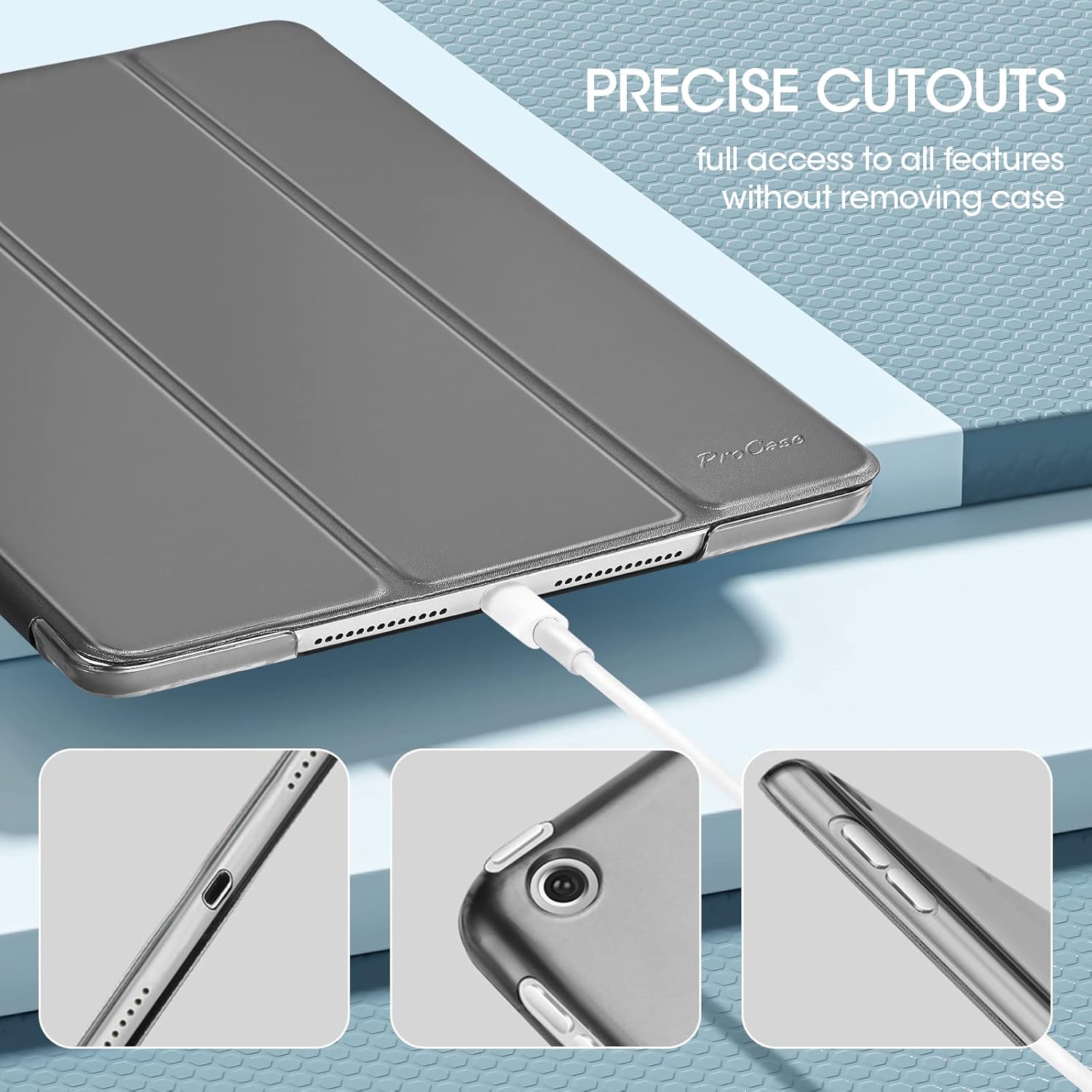
Detailed view of the case's precise cutouts, ensuring full access to the iPad's camera, speakers, charging port, and buttons without removing the case.
- Auto Sleep/Wake Function: The magnetic cover automatically wakes your iPad when opened and puts it to sleep when closed, helping to extend battery life.

An image showing the smart cover opening and closing, illustrating the automatic sleep/wake feature that helps conserve battery life.
- Convenient Trifold Stand: The front cover can be folded into a stable triangle to provide two different viewing angles for your convenience.

The case folded into two stable stand positions: one upright for viewing content and another lower angle ideal for typing or drawing.
4. Setup and Installation
- Prepare Your iPad: Ensure your iPad is clean and free of dust or debris before placing it into the case.
- Align the iPad: Gently place your iPad into the hard shell back, aligning the corners and edges with the case.
- Secure the Corners: Press down gently on each corner of the iPad until it snaps securely into place within the case. Ensure all ports and buttons are accessible through the precise cutouts.
- Check Fit: Once installed, gently tug on the edges of the iPad to confirm it is firmly seated and protected.
Removing the Case
- Start from a Corner: Gently peel back one corner of the hard shell case from the iPad.
- Work Around the Edges: Continue to carefully release the iPad from the case, working your way around the edges until the device is free. Avoid excessive force to prevent damage to your iPad or the case.
Video demonstrating the installation and removal of the ProCase iPad 10.2 inch case, highlighting its fit and basic features.
5. Operating Instructions
Using the Auto Sleep/Wake Feature
The magnetic front cover is designed to automatically control your iPad's sleep and wake functions. Simply open the cover to wake your iPad and close it to put your iPad to sleep. This feature helps conserve battery power.
Utilizing the Trifold Stand
The front cover can be folded into a triangular stand to provide two convenient viewing angles:
- Viewing Angle: Fold the cover into an upright triangle to position your iPad at an optimal angle for watching videos, making video calls, or browsing content.
- Typing/Working Angle: Fold the cover into a lower, more reclined triangle to provide a comfortable angle for typing, drawing, or interacting with your screen.
A detailed video showcasing the slim profile of the ProCase iPad 10.2 inch case and its versatile trifold stand functionality for different viewing and typing angles.
6. Maintenance
To keep your ProCase in optimal condition, follow these simple maintenance guidelines:
- Cleaning: Wipe the exterior of the case with a soft, damp cloth. For stubborn stains, a mild soap solution can be used, followed by wiping with a clean, damp cloth.
- Avoid Harsh Chemicals: Do not use abrasive cleaners, solvents, or harsh chemicals, as these can damage the material and finish of the case.
- Storage: When not in use, store the case in a cool, dry place away from direct sunlight and extreme temperatures.
7. Troubleshooting
- Auto Sleep/Wake Not Working: Ensure your iPad is fully seated in the case and that the magnetic cover is properly aligned when closed. Check your iPad settings to confirm the "Lock/Unlock" feature is enabled (Settings > Display & Brightness > Lock/Unlock).
- Case Feels Loose: Re-install the iPad into the case, ensuring all four corners snap firmly into the hard shell.
- Difficulty Accessing Ports/Buttons: Verify that your iPad model is compatible with this specific case. If compatible, ensure the iPad is correctly aligned within the case.
8. Specifications
| Feature | Detail |
|---|---|
| Product Dimensions | 9.8 x 6.8 x 0.29 inches |
| Item Weight | 5 ounces |
| Item Model Number | PC-08361996 |
| Special Features | Auto Sleep/Wake, Foldable, Hard Back, Slim Fit, Translucent Frosted Back |
| Form Factor | Case |
| Color | Metallic |
| Shell Type | Hard |
| Compatible Devices | 10.2-inch iPad 9th, 8th, 7th Generation |
9. Warranty and Support
For warranty information and customer support, please refer to the official ProCase website or contact their customer service directly. Keep your purchase receipt for any warranty claims.