
Introduction
This manual provides comprehensive instructions for the USARMT TLC-925 universal remote control. Designed for ease of use, this remote is compatible with a wide range of TCL LED LCD Smart TVs. It comes pre-programmed, requiring no complex setup before use.
Please read this manual carefully to ensure proper operation and to maximize your remote control's functionality.
Product Overview
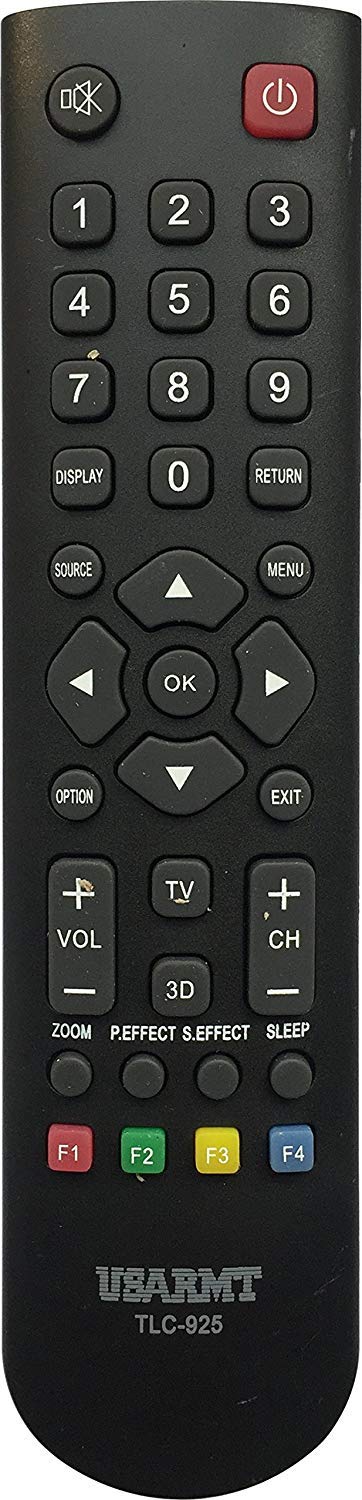
Image: Front view of the USARMT TLC-925 Universal Remote Control. This remote features a standard button layout for TV operation.
The USARMT TLC-925 remote control is a direct replacement or secondary remote for many TCL LED LCD Smart TV models. Its design focuses on simplicity and immediate functionality.
Setup
Battery Installation
The remote requires two AAA batteries (not included). To install:
- Locate the battery compartment on the back of the remote control.
- Slide the battery cover downwards or outwards to open.
- Insert two AAA batteries, ensuring the positive (+) and negative (-) terminals match the diagrams inside the compartment.
- Replace the battery cover by sliding it back into position until it clicks securely.
Initial Use (No Programming Required)
The USARMT TLC-925 remote control is pre-programmed for compatible TCL TV models. Once batteries are installed, it is ready for immediate use. Point the remote directly at your TCL TV and press any function button (e.g., Power, Volume Up) to test its operation.
Factory Reset
If you experience issues or wish to reset the remote to its default factory settings, follow these steps:
- Press and hold the POWER button and the 0 button simultaneously.
- Continue holding both buttons for approximately 2 seconds. The remote will reset.
Operating Instructions
To operate your TCL TV with the USARMT TLC-925 remote control, ensure there is a clear line of sight between the remote's infrared emitter and the TV's IR receiver. Point the remote directly at the TV.
- Power Button: Turns the TV on or off.
- Number Buttons (0-9): Selects channels directly.
- Volume Up/Down: Adjusts the TV's volume level.
- Channel Up/Down: Changes channels sequentially.
- Mute Button: Mutes or unmutes the TV's audio.
- Input/Source Button: Cycles through available input sources (HDMI, AV, etc.).
- Navigation Buttons (Up, Down, Left, Right, OK/Enter): Used to navigate menus and confirm selections on Smart TV interfaces.
- Other Function Buttons: Specific buttons (e.g., Menu, Guide, Back, Exit) will perform their corresponding functions on your TCL TV.
Note: The exact functionality of some buttons may vary slightly depending on your specific TCL TV model.
Maintenance
Cleaning
To clean the remote control, use a soft, dry cloth. For stubborn dirt, lightly dampen the cloth with water or a mild, non-abrasive cleaner. Do not use harsh chemicals or immerse the remote in liquid.
Battery Replacement
Replace batteries when the remote's performance degrades or if it stops responding. Always replace both batteries at the same time with new AAA batteries. Do not mix old and new batteries, or different types of batteries.
Storage
When not in use for extended periods, remove the batteries to prevent leakage, which can damage the remote. Store the remote in a cool, dry place away from direct sunlight and extreme temperatures.
Troubleshooting
| Problem | Possible Cause | Solution |
|---|---|---|
| Remote not responding. | Dead or incorrectly installed batteries. | Replace batteries with new AAA batteries, ensuring correct polarity. |
| Remote not responding. | Obstruction between remote and TV. | Ensure a clear line of sight to the TV's IR receiver. |
| Remote functions intermittently. | Weak batteries. | Replace batteries. |
| Remote does not control all TV functions. | TV model not fully compatible or specific function not supported by remote. | Verify your TV model is listed in the compatibility section. Some advanced Smart TV features may require the original TV remote. Perform a factory reset if necessary. |
Specifications
| Brand | USARMT |
| Model | TLC-925 |
| Item Weight | 3 ounces |
| Special Feature | Universal |
| Max Number of Supported Devices | 1 |
| Compatible Devices | Television (TCL LED LCD Smart TVs) |
| Connectivity Technology | Infrared |
| Date First Available | October 30, 2019 |
Compatible TCL TV Models
The USARMT TLC-925 remote control is compatible with the following TCL LED LCD Smart TV models:
- L26HDF12TA
- L26HDM12
- L32HDF12TA
- L32HDM12
- L32HDP60
- L40FHDF12TA
- L40FHDM12
- L40FHDP60
- LE32HDE5300
- LE32HDF3300
- LE32HDF3300TA
- LE32HDF3300TT
- LE32HDF3310
- LE32HDP21TA
- LE39FHDF3300
- LE39FHDF3300TA
- LE39FHDF3300TT
- LE39FHDF3310
- LE42FHDE5300
- LE43FHDF3300
- LE43FHDF3300TA
- LE46FHDE5300
- LE48FHDF3300Z
- LE48FHDF3300ZTA
- LE48FHDF3310
- LE55FHDF3300Z
- LE55FHDF3300ZTA
- LE55FHDF3310
- 23F3300
- 28D2700
- 32B2800
- 32D100
- 32D2700
- 40D100
- 40FD2700
- 48FD2700
- 49D100
- LE32FHDE3010
- LE32HDF3010
- LE39FHDE3010
- LE40FHDE3010
- LE48FHDE3010
- LE50FHDE3010
- RC2000N02
- 32F2700
- 32S3600
- 39S3600
- 48F2700
- RC3000N02
- 48FS4610
- 48FS4690
- 50FS4690
- 55FS4610
- 55FS4690
Warranty and Support
This product is backed by a 30-Day Hassle-Free Return Policy. For any questions or concerns regarding your USARMT TLC-925 remote control, customer support inquiries are typically responded to within 1 business day.
For further assistance, please refer to the retailer's support channels or contact the manufacturer, USARMT, through their official support avenues.