
1. Introduction
This manual provides detailed instructions for the safe and effective operation, setup, and maintenance of your Reboot RBM-1450 4-in-1 Multiprocess Welder. This versatile machine supports MIG (Gas/Gasless), Stick (MMA), and Lift TIG welding processes, making it suitable for a wide range of applications from home DIY projects to general repair work. It features IGBT inverter technology for stable arc performance and energy efficiency.

Figure 1.1: The Reboot RBM-1450 4-in-1 Multiprocess Welder, showcasing its compact design and integrated welding torch.
2. Safety Information
Welding can be dangerous. Always follow safety precautions to prevent injury or damage. Read and understand all safety warnings before operating the welder.
2.1 General Safety Precautions
- Electric Shock Can Kill: Ensure proper grounding. Do not touch live electrical parts. Wear dry insulating gloves and protective clothing.
- Fumes and Gases Can Be Dangerous: Keep your head out of the fumes. Use ventilation or exhaust to remove fumes from the breathing zone.
- Arc Rays Can Burn Eyes and Skin: Wear a welding helmet with a proper shade filter. Wear protective clothing to protect skin.
- Fire and Explosion Hazard: Remove all flammable materials from the welding area. Have a fire extinguisher readily available.
- Hot Parts Can Cause Severe Burns: Allow hot parts to cool before handling. Use insulated gloves and tongs.
- Always Disconnect Power: Before servicing or moving the unit, disconnect the input power.
- Use in Well-Ventilated Area: Ensure adequate airflow to prevent overheating and fume buildup.
3. What's in the Box
Upon unpacking, please verify that all components listed below are present and undamaged. If any items are missing or damaged, contact customer support immediately.

Figure 3.1: Diagram showing the contents included with the Reboot RBM-1450 welder, including the main unit, cables, and accessories.
- Reboot RBM-1450 Multiprocess Welder Unit
- MIG Torch (integrated)
- Ground Clamp with Cable (2M)
- Electrode Holder with Cable (2M)
- User Manual
- Flux Core Wire Spool (1KG)
- Gas Hose (3M)
- Hose Clamps
- Contact Tips
- Ceramic Nozzles
- Brush with Chipping Hammer
4. Product Overview and Control Panel Introduction
Familiarize yourself with the main components and controls of the RBM-1450 welder.
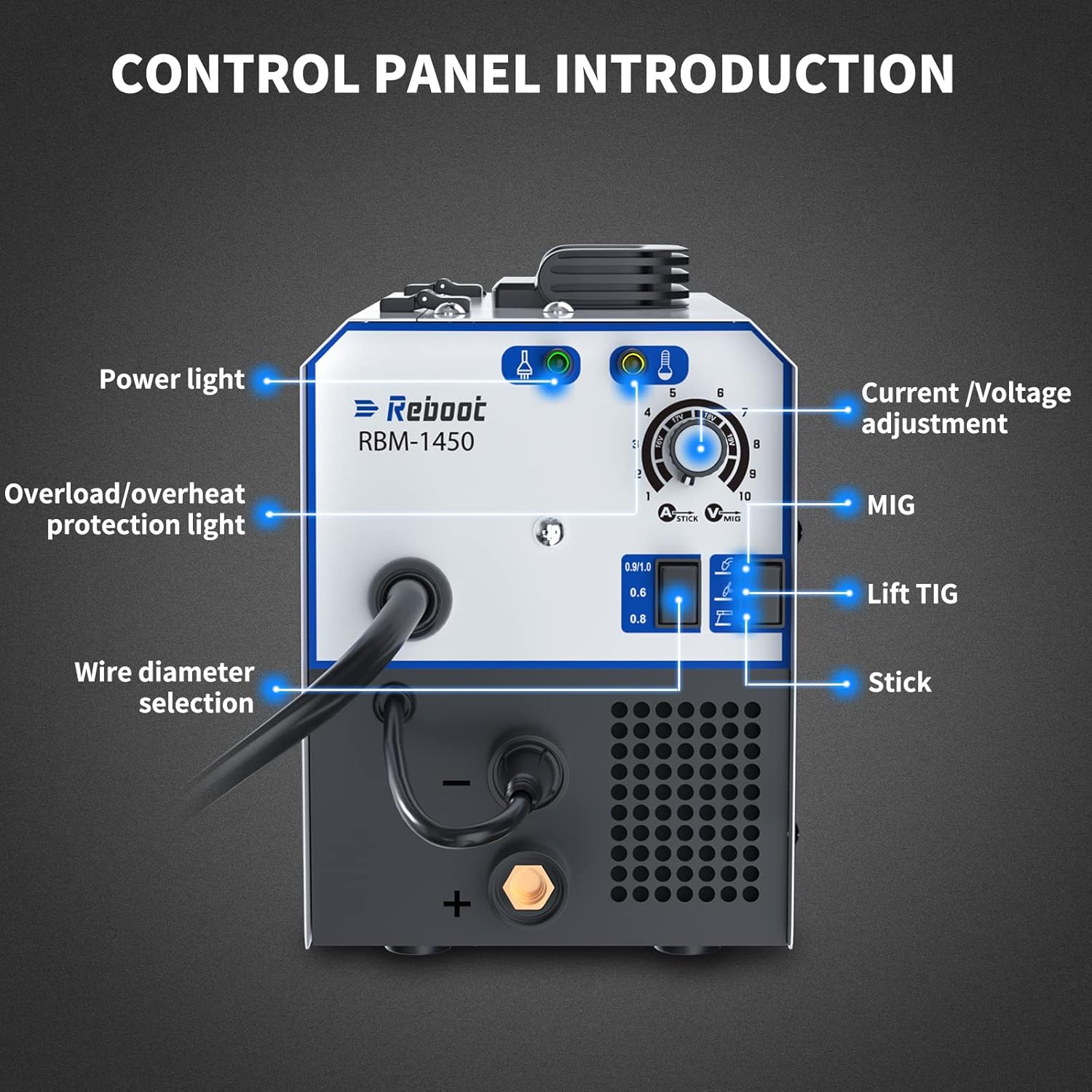
Figure 4.1: Detailed view of the control panel, indicating the function of each light, knob, and switch.
4.1 Front Panel Controls
- Power Light: Indicates when the machine is powered on.
- Overload/Overheat Protection Light: Illuminates if the machine is overloaded or overheats, indicating a temporary shutdown for protection.
- Current/Voltage Adjustment Knob: Used to set the welding current (for Stick/TIG) or voltage (for MIG).
- Process Selection Switch: Allows selection between MIG, Lift TIG, and Stick welding modes.
- Wire Diameter Selection Switch: For MIG mode, select the appropriate wire diameter (0.6mm, 0.8mm, 0.9/1.0mm).
- Positive (+) and Negative (-) Terminals: For connecting welding cables.
4.2 Rear Panel Features

Figure 4.2: Rear view of the welder, showing the main power switch, gas input, and power cord connection.
- Main Power Switch: Turns the welder on or off.
- Gas Input: Connection point for the shielding gas hose (for MIG Gas welding).
- Power Cord: Integrated 220V power cord with US standard plug (NEMA 6-50P).
- Cooling Fan: Ensures proper ventilation and prevents overheating.
5. Setup
5.1 Power Connection
The Reboot RBM-1450 operates on a 220V AC power supply. Ensure your power source meets these requirements and that a 30A breaker is suggested for 220V operation.
- Connect the welder's power cord (220V 50A 6-50P plug) to a suitable 220V outlet.
- Ensure the main power switch on the rear of the unit is in the "OFF" position before connecting to power.
5.2 Wire Spool Installation (MIG Welding)

Figure 5.1: Illustration of how to install the wire spool inside the welder's wire feed compartment.
- Open the wire feed compartment cover.
- Place the wire spool onto the spool holder, ensuring it rotates freely.
- Feed the welding wire through the guide tube and into the drive rollers.
- Close the drive roller tension arm and adjust the tension appropriately. The wire should feed smoothly without slipping or deforming.
- Close the wire feed compartment cover.
5.3 Connecting Welding Cables
- For Stick (MMA) Welding:
- Connect the electrode holder cable to the positive (+) terminal.
- Connect the ground clamp cable to the negative (-) terminal.
- Attach the ground clamp securely to the workpiece or welding table.
- For Lift TIG Welding:
- Connect the TIG torch (if not integrated) to the negative (-) terminal.
- Connect the ground clamp cable to the positive (+) terminal.
- Attach the ground clamp securely to the workpiece or welding table.
- Connect the gas hose from the TIG torch to the gas input on the rear panel, and then to your argon gas cylinder.
- For MIG Welding (Gas/Gasless):
- The MIG torch is integrated.
- For Gas MIG, connect the gas hose from the rear panel to your shielding gas cylinder (e.g., CO2 or Argon/CO2 mix).
- Connect the ground clamp cable to the appropriate terminal based on your wire type (check manual for specific polarity for flux core vs. solid wire). Typically, for flux core, the ground clamp connects to the positive (+) terminal, and for solid wire with gas, it connects to the negative (-) terminal.
- Attach the ground clamp securely to the workpiece or welding table.
6. Operation
The RBM-1450 offers multiple welding processes. Select the appropriate mode and settings for your application.
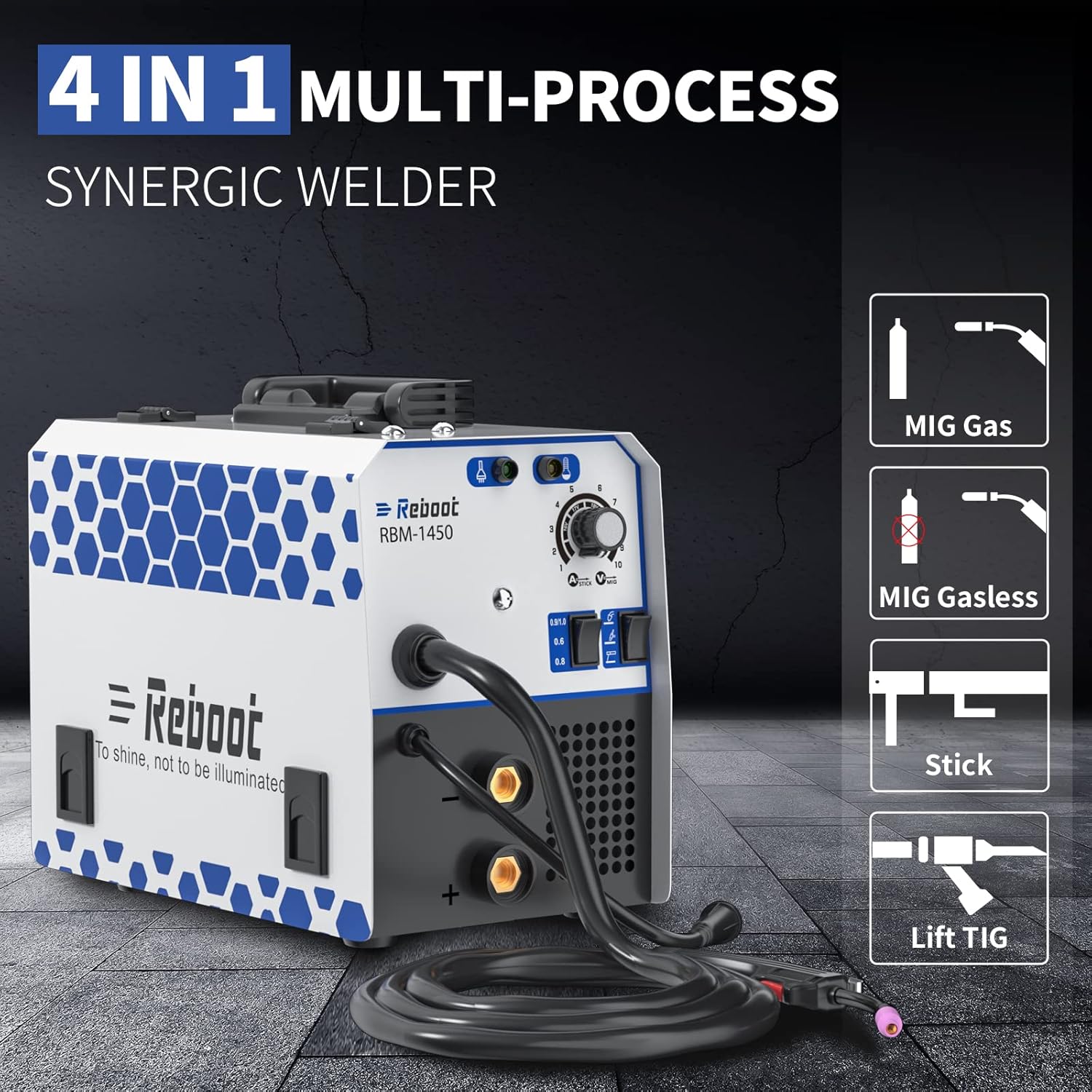
Figure 6.1: Visual representation of the four welding processes supported: MIG Gas, MIG Gasless, Stick, and Lift TIG.
6.1 Selecting Welding Process
Use the process selection switch on the front panel to choose between MIG, Lift TIG, or Stick welding.

Figure 6.2: Close-up of the control panel highlighting the current/voltage adjustment knob and wire diameter selection switch.
6.2 Adjusting Welding Parameters
- Current/Voltage Knob: Rotate this knob to adjust the welding output. Higher numbers typically mean higher current/voltage.
- Wire Diameter Switch (MIG only): Select the setting that matches the diameter of the welding wire you are using (0.6mm, 0.8mm, or 0.9/1.0mm).
6.3 Welding Process Specifics
- Stick (MMA) Welding:
- Suitable for 2.5mm (3/32") 6013 and 7018 rods. Can also handle 3.2mm (1/8") 7018 rods on 220V.
- Set the current based on the electrode type and thickness of the material.
- MIG Welding (Gas/Gasless):
- For Gas MIG, ensure gas flow is set correctly at the regulator.
- For Gasless MIG, use flux-cored wire and ensure correct polarity.
- Adjust voltage and wire feed speed (controlled synergically by the machine) for optimal arc.
- Lift TIG Welding:
- Requires a TIG torch and pure argon shielding gas.
- To initiate arc, touch the tungsten electrode to the workpiece and then lift slightly.
6.4 Compatible Materials

Figure 6.3: Examples of metal types suitable for welding with this machine, including mild steel, cast iron, sheet metal, stainless steel, square pipe, and metal cage.
The RBM-1450 is designed to weld various materials, including stainless steel, alloy steel, carbon steel, copper, and copper alloy. It is not recommended for aluminum without specific accessories and settings not covered in this manual.
7. Maintenance
Regular maintenance ensures the longevity and optimal performance of your welder. Always disconnect power before performing any maintenance.
- Cleaning: Periodically clean the inside of the machine using dry, compressed air to remove dust and metal particles. Ensure the air is dry to prevent moisture damage.
- Wire Feed Mechanism: Inspect the wire feed rollers for wear and cleanliness. Clean any debris from the grooves.
- Cables and Connections: Check all welding cables, torch, and ground clamp for damage, fraying, or loose connections. Replace damaged parts immediately.
- Cooling Fan: Ensure the cooling fan is free from obstructions and operating correctly.
- Contact Tips and Nozzles: Replace worn contact tips and clean or replace clogged nozzles on the MIG torch.
8. Troubleshooting
This section provides solutions to common issues you might encounter. For problems not listed here, contact customer support.
| Problem | Possible Cause | Solution |
|---|---|---|
| Welder does not power on. | No power supply; main switch off; faulty power cord. | Check power outlet and circuit breaker. Ensure main switch is ON. Inspect power cord for damage. |
| No arc or weak arc. | Poor ground connection; incorrect settings; worn consumables; wrong polarity. | Ensure ground clamp is clean and securely attached. Adjust current/voltage. Replace contact tip/electrode. Verify correct polarity for welding process. |
| Overload/Overheat light is on. | Exceeded duty cycle; insufficient ventilation. | Allow machine to cool down. Ensure cooling fan is clear and operating. Improve ventilation in welding area. |
| Wire feeding issues (MIG). | Incorrect wire tension; clogged liner; wrong drive rollers; tangled wire. | Adjust wire tension. Clean or replace torch liner. Ensure correct drive rollers for wire size. Untangle wire spool. |
| Poor weld quality (porosity, spatter). | Incorrect gas flow (MIG); contaminated workpiece; wrong settings; improper technique. | Check gas cylinder and flow rate. Clean workpiece thoroughly. Adjust settings. Practice welding technique. |
9. Specifications
Key technical specifications for the Reboot RBM-1450 Multiprocess Welder.
| Feature | Detail |
|---|---|
| Model Number | ARC1450D |
| Manufacturer | Reboot-US |
| Input Voltage | 220 Volts AC |
| Power Source | AC |
| Welding Processes | MIG (Gas/Gasless), Stick (MMA), Lift TIG |
| Duty Cycle (220V) | 140A @ 60% |
| Item Weight | 18.08 pounds (approx. 8.2 kg) |
| Product Dimensions | 16 x 10 x 8.5 inches (approx. 40.6 x 25.4 x 21.6 cm) |
| Material | Stainless Steel (body) |
| Cord Length | 5 Feet |
| Plug Format | B - US style with ground plug (NEMA 6-50P) |
| Suggested Breaker (220V) | 30A |
10. Warranty & Support
Reboot provides comprehensive support for your product.
10.1 Warranty Information
Reboot supplies a 1 YEAR WARRANTY from the date of purchase. Faulty arc welders can be replaced within 30 days of purchase. This warranty covers manufacturing defects and workmanship under normal use.
10.2 Customer Support
For any questions, technical assistance, or warranty claims, please contact Reboot customer service. We offer 7*24 hours online after-sales service. If you're not satisfied with your purchase, we'll refund you - no questions asked.
For the most up-to-date contact information, please visit the official Reboot website or refer to the contact details provided with your purchase documentation.

