
1. Introduction
This manual provides essential instructions for the safe and efficient operation, setup, maintenance, and troubleshooting of your Blendtec Commercial Stealth 895 Blender with Standard Micronizers. Please read this manual thoroughly before using the appliance.
1.1 Product Overview
The Blendtec Commercial Stealth 895 Blender is designed for high-volume commercial use, featuring a powerful motor and advanced sound enclosure for quiet operation. The included Standard Micronizers and adapter rings allow for direct blending into various cup sizes, optimizing workflow and reducing waste.

Image 1.1: The Blendtec Commercial Stealth 895 Blender with its complete set of accessories, including individual housing units, standard micronizers, and various adapter rings.
1.2 What's Included
- 1 x Blendtec Stealth 895 Commercial Blender Base
- 2 x Individual Housing Units
- 2 x Standard Micronizers (with blades)
- 4 x Adapter Rings (12oz, 16oz, 24oz, 32oz)

Image 1.2: Close-up view of the individual housing units, standard micronizers, and the four adapter rings included with the blender system.
2. Safety Information
WARNING: Read all safety warnings and instructions before using this appliance. Failure to follow the warnings and instructions may result in electric shock, fire, or serious injury.
- Always ensure the blender is unplugged before assembly, disassembly, or cleaning.
- Keep hands and utensils out of the blending container while blending to reduce the risk of severe personal injury and/or damage to the blender.
- Blades are sharp. Handle the micronizers with care to avoid injury.
- Do not blend hot liquids. This appliance is designed for cold beverages only.
- Ensure the sound enclosure is properly closed before operating the blender.
- Do not immerse the blender base in water or other liquids.
- Supervise children and individuals with reduced physical, sensory, or mental capabilities when they are near the appliance.
- Use only Blendtec approved accessories and parts.
3. Setup and Assembly
Follow these steps to set up your Blendtec Commercial Stealth 895 Blender and its components.
3.1 Unpacking
- Carefully remove all components from the packaging.
- Inspect all parts for any damage. Contact your supplier immediately if any damage is found.
- Retain packaging for future transport or storage.
3.2 Assembling the Micronizer System
The Nitro Blending System (NBS) allows for direct blending into various cup sizes using the individual housing units, standard micronizers, and adapter rings.
- Select the appropriate adapter ring for your desired cup size (12oz, 16oz, 24oz, or 32oz).
- Place the selected adapter ring onto the top of an individual housing unit. Ensure it sits securely.
- Insert a standard micronizer (with blades) into the bottom of the individual housing unit. Twist to secure it in place.
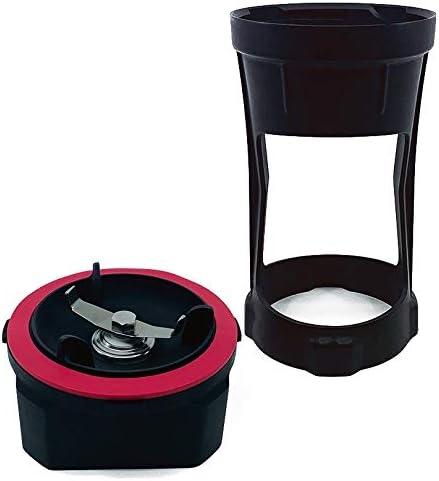
Image 3.1: The individual housing unit and standard micronizer, ready for assembly.

Image 3.2: The four adapter rings, color-coded for different cup sizes.
3.3 Placement of the Blender
- Place the blender on a stable, level, and dry surface.
- Ensure adequate ventilation around the unit.
- Plug the blender into a grounded electrical outlet (120V).
4. Operating Instructions
The Blendtec Stealth 895 features 42 pre-programmed blend cycles, including two specifically for the Nitro Blending System (NBS).
4.1 Preparing for Blending
- Prepare your ingredients and place them into the blending cup.
- Place the assembled individual housing unit with the micronizer and correct adapter ring onto the blending cup.
- Invert the cup and housing unit assembly and place it onto the blender base. Ensure it is seated correctly.

Image 4.1: A blending cup properly seated within the blender base, ready to begin a blend cycle.
4.2 Selecting a Blend Cycle
- Close the sound enclosure. The blender will not operate if the enclosure is open.
- The control panel will illuminate. Use the touch controls to navigate through the pre-programmed cycles.
- Select the desired blend cycle. For NBS blending, choose one of the two dedicated NBS cycles.
- Press the 'Start' button to begin blending.
4.3 After Blending
- Once the cycle is complete, open the sound enclosure.
- Carefully remove the cup and housing unit assembly from the blender base.
- Invert the cup and remove the housing unit and micronizer. Serve the blended beverage.
5. Maintenance and Cleaning
Regular cleaning and maintenance will ensure the longevity and optimal performance of your Blendtec Stealth 895 Blender.
5.1 Daily Cleaning
- Blender Base: Unplug the blender. Wipe down the exterior of the blender base and control panel with a damp cloth. Do not use abrasive cleaners or immerse the base in water.
- Sound Enclosure: Wipe the interior and exterior of the sound enclosure with a damp cloth.
- Micronizers, Housing Units, and Adapter Rings: Disassemble these components. Wash them with warm, soapy water, rinse thoroughly, and allow them to air dry. Blades are sharp; handle with extreme caution.
5.2 Deep Cleaning (Weekly/As Needed)
- For stubborn residue, a mild sanitizing solution can be used on the micronizers, housing units, and adapter rings. Follow the manufacturer's instructions for the sanitizing solution.
- Ensure all parts are completely dry before reassembly or storage.
6. Troubleshooting
This section addresses common issues you might encounter with your Blendtec Stealth 895 Blender.
| Problem | Possible Cause | Solution |
|---|---|---|
| Blender does not turn on | Not plugged in; Power switch off; Circuit breaker tripped; Sound enclosure not closed | Ensure power cord is securely plugged in; Check power switch; Reset circuit breaker; Close sound enclosure completely |
| Poor blending performance | Incorrect cycle selected; Overfilling cup; Ingredients too large; Worn micronizer blades | Select appropriate blend cycle; Do not overfill; Cut ingredients into smaller pieces; Inspect and replace micronizer if blades are dull |
| Blender stops during operation | Overload protection activated; Power interruption | Reduce load, allow motor to cool, then restart; Check power supply |
| Unusual noise during blending | Improperly seated cup/housing; Foreign object in blend; Worn motor bearings | Ensure cup/housing is correctly seated; Check for foreign objects; Contact Blendtec support if noise persists |
If you encounter an issue not listed here, or if the suggested solutions do not resolve the problem, please contact Blendtec customer support.
7. Specifications
| Feature | Detail |
|---|---|
| Brand | Blendtec |
| Model | Stealth 895 (SNBS2C2901-B1K) |
| Special Feature | Multiple Speeds, Sound Enclosure |
| Capacity (with included rings) | 12oz, 16oz, 24oz, 32oz |
| Recommended Use | Commercial Blending (cold beverages only) |
| Power Source | Corded Electric |
| Number of Speeds | 6 (variable) |
| Voltage | 120V |
| Container Material | Plastic |
| Item Weight | 20.1 pounds |
| Package Dimensions | 29 x 15 x 13.5 inches |
| Pre-programmed Cycles | 42 (2 for NBS) |
| Recommended Daily Blends | 200 |
8. Warranty and Support
8.1 Limited Warranty
The Blendtec Commercial Stealth 895 Blender comes with a Limited 3-Year Warranty. This warranty covers defects in materials and workmanship under normal use. Please refer to the warranty card included with your product or visit the official Blendtec website for full terms and conditions.
8.2 Customer Support
For technical assistance, warranty claims, or to order replacement parts, please contact Blendtec Customer Support. Contact information can typically be found on the Blendtec official website or on your product registration materials.
When contacting support, please have your blender's model number (Stealth 895) and serial number ready. The serial number is usually located on the bottom or back of the blender base.


