
1. Introduction
This manual provides comprehensive instructions for the setup, operation, and maintenance of your Dino-Lite AF4515ZT USB Handheld Digital Microscope. The AF4515ZT is a versatile digital microscope designed for various applications, offering optical magnification from 20x to 220x, a 1.3-megapixel true image resolution, and advanced features like polarized light and Automatic Magnification Reading (AMR).
Please read this manual thoroughly before using the device to ensure proper functionality and to maximize your experience.

Figure 1: Dino-Lite AF4515ZT USB Handheld Digital Microscope
2. Product Overview
The Dino-Lite AF4515ZT features a robust design with intuitive controls for precise observation and analysis. Understanding its components is essential for effective use.

Figure 2: Labeled diagram of the Dino-Lite AF4515ZT components. This image illustrates the various parts of the microscope, including the USB 2.0 cable for connectivity, the MicroTouch sensor for image capture and LED control, the scroll lock to fix magnification, the magnification dial for adjustment, the magnification power indicator, the adjustable polarizer to reduce glare, LED lighting with flexible control, and interchangeable caps for different viewing needs.
Key Components:
- Connectivity: USB 2.0 Cable for connection to a computer.
- MicroTouch: A touch sensor trigger for various functions, including image capture and LED controls.
- Scroll Lock: Locks the current magnification power to prevent accidental changes.
- Magnification Dial: Used to adjust the optical magnification of the microscope.
- Magnification Power Indicator: Displays the current magnification level in use.
- Adjustable Polarizer: An integrated polarizer that can be adjusted to reduce or eliminate glare from reflective surfaces.
- LED Lighting: Features 8 LEDs with Flexible Light Control (FLC) for optimal illumination.
- Interchangeable Caps: Various cap designs are available (sold separately) to aid in providing the best possible image for specific applications.

Figure 3: Dino-Lite AF4515ZT dimensions and optional WiFi module. The image shows the microscope's dimensions (approximately 4.65 inches in length) and illustrates how it can be connected to an optional WiFi module (WF-20) for wireless operation, extending its length to approximately 5.5 inches. Accessories are sold separately.
3. Key Features
The Dino-Lite AF4515ZT is equipped with several advanced features to enhance your microscopy experience:
- Optical Magnification: Offers a variable optical magnification range from 20x to 220x.
- Image Resolution: Captures images at 1280 x 1024 (1.3MP) true resolution.
- Video Frame Rate: Provides smooth video at 30 frames per second (FPS).
- Measurement Capabilities: Perform various measurements including straight lines, circles, angles, arches, and grids in different units (inch/mil/mm/um).
- Polarization Control: The polarization feature can be switched on/off or adjusted to full or half polarization to effectively control glare on reflective surfaces.
- Automatic Magnification Reading (AMR): Displays the current magnification directly on the screen within the included software for Windows or Mac OS.
- Comprehensive Software: The included software offers rich features for saving, annotating, stitching, comparison, and analysis of captured images.
- Operating System Compatibility: Supports Windows (XP/Vista/7/8/10), Mac OS 10.5 and above, Android, and iOS (requires WF-20 Wi-Fi adapter).
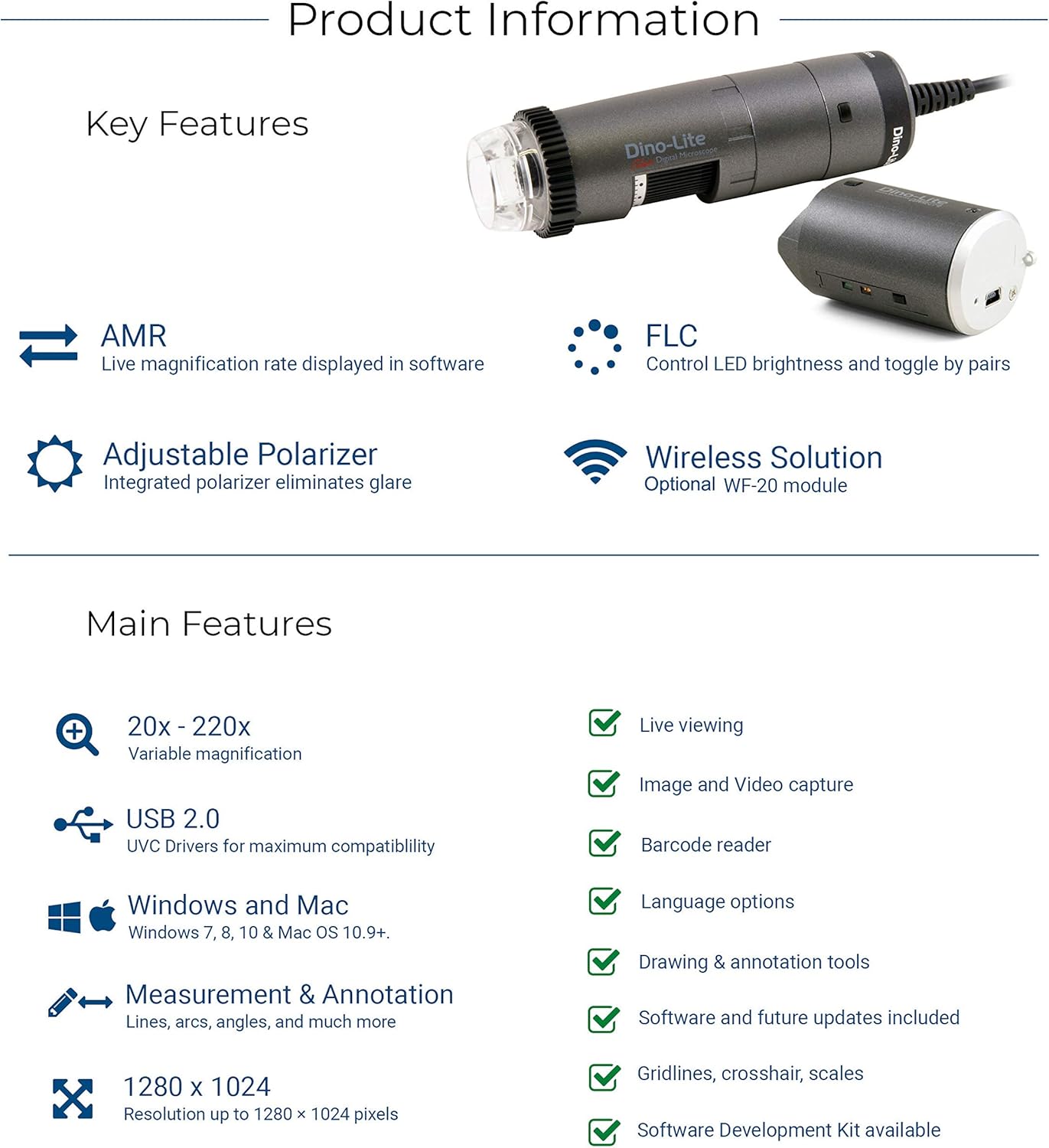
Figure 4: Summary of Dino-Lite AF4515ZT key features, including AMR, FLC, Adjustable Polarizer, Wireless Solution (optional), Variable Magnification (20x-220x), USB 2.0, Windows and Mac compatibility, Measurement & Annotation tools, 1280x1024 resolution, Live viewing, Image and Video capture, Barcode reader, Language options, Drawing & annotation tools, Software and future updates, Grids/crosshairs/scales, and Software Development Kit availability.
4. Setup
Follow these steps to set up your Dino-Lite AF4515ZT microscope:
4.1. Package Contents Verification
Before proceeding, ensure all items are present in the package:
- Dino-Lite AF4515ZT Digital Microscope
- Software CD (DinoCapture 2.0)
- Quick Guide
- Calibration Target
- Storage Pouch
- USB Cable Tie
- Interchangeable Caps (e.g., open cap, closed cap, diffuser cap)

Figure 5: Contents of the Dino-Lite AF4515ZT package, including the microscope, software CD, quick guide, calibration target, storage pouch, USB cable tie, and various interchangeable caps.
4.2. Software Installation
- Insert the included software CD into your computer's optical drive.
- Follow the on-screen instructions to install DinoCapture 2.0 (for Windows) or DinoXcope (for Mac OS).
- Alternatively, the latest software version can be downloaded from the official Dino-Lite website.
- Ensure the software is fully installed before connecting the microscope.
4.3. Hardware Connection
- Connect the USB cable of the Dino-Lite microscope to an available USB 2.0 port on your computer.
- The operating system should automatically detect the device and install necessary drivers.
- Once connected, launch the DinoCapture 2.0 or DinoXcope software.
5. Operating Instructions
This section details the basic operation of your Dino-Lite microscope.
5.1. Live Viewing
- Place the microscope over the object you wish to observe.
- Open the DinoCapture 2.0 (Windows) or DinoXcope (Mac OS) software. The live image from the microscope should appear on your screen.
5.2. Adjusting Magnification and Focus
- Rotate the Magnification Dial on the microscope body to adjust the desired magnification level (20x to 220x).
- Observe the Magnification Power Indicator to see the current magnification.
- To focus, gently move the microscope closer to or further from the object until the image on the screen is clear. For fine adjustment, use a compatible stand (sold separately).
- If you wish to maintain a specific magnification, engage the Scroll Lock.
5.3. Using LED Lighting
The microscope features 8 built-in LEDs. The brightness can be adjusted through the software interface or by using the MicroTouch sensor (if configured for LED control).
5.4. Adjusting Polarization
For reflective surfaces, rotate the Adjustable Polarizer ring located at the front of the microscope. This will reduce or eliminate glare, improving image clarity. You can adjust it for full or half polarization.
5.5. Capturing Images and Videos
To capture an image or record a video:
- Press the MicroTouch sensor on the microscope body once to capture a still image.
- Alternatively, use the capture buttons within the DinoCapture/DinoXcope software interface.
- For video recording, select the video recording option in the software and click to start/stop recording.
6. Software Features (DinoCapture 2.0 / DinoXcope)
The included software is a powerful tool for managing and analyzing your microscopic observations.
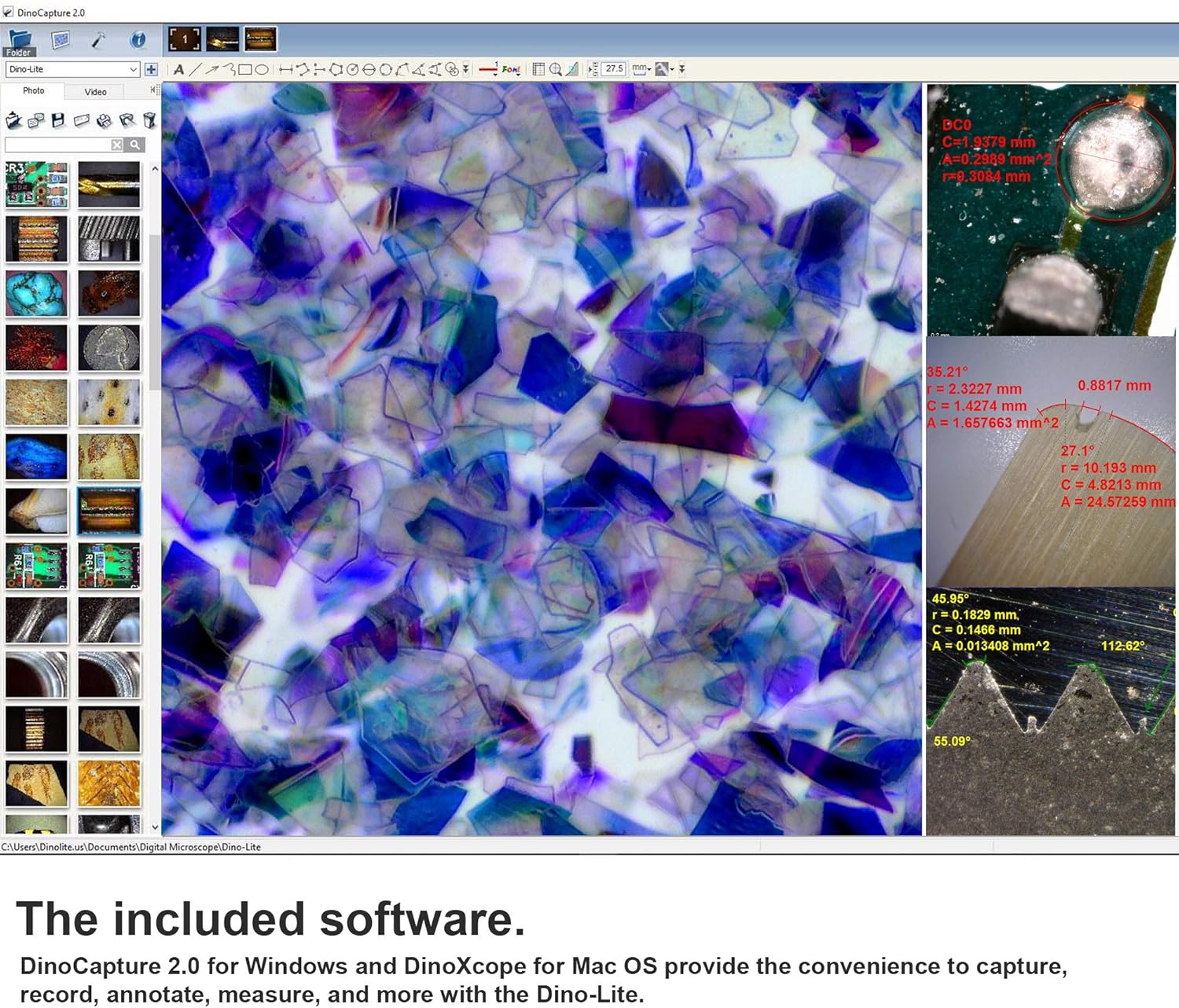
Figure 6: The DinoCapture 2.0 software interface, showing live view, captured images in a sidebar, and various measurement and annotation tools applied to an image. The software allows for detailed analysis and documentation.
Key Software Functions:
- Live Viewing: Real-time display of the microscope's feed.
- Image & Video Capture: Save still images and record video footage.
- Measurement Tools: Perform precise measurements on captured images, including lines, circles, angles, and more.
- Annotation: Add text, arrows, and shapes to images for documentation.
- Image Stitching: Combine multiple images to create a larger field of view.
- Comparison: Compare multiple images side-by-side.
- Automatic Magnification Reading (AMR): Displays the current magnification on the screen.
- Flexible Light Control (FLC): Adjust LED brightness and toggle by pairs.
- Compatibility: Supports Windows (XP/Vista/7/8/10) and Mac OS 10.5 and above.
7. Maintenance
Proper maintenance ensures the longevity and optimal performance of your Dino-Lite microscope.
7.1. Cleaning
- Microscope Body: Wipe the exterior with a soft, dry cloth. For stubborn dirt, use a slightly damp cloth with mild soap, then dry thoroughly. Avoid harsh chemicals or abrasive cleaners.
- Lens: Use a lens cleaning brush or a blower to remove dust. For smudges, use a specialized lens cleaning solution and a microfiber lens cloth. Do not touch the lens with your fingers.
7.2. Storage
- Store the microscope in its original packaging or the provided storage pouch when not in use.
- Keep the device in a cool, dry place, away from direct sunlight, extreme temperatures, and high humidity.
- Avoid storing in dusty environments.
8. Troubleshooting
If you encounter issues with your Dino-Lite AF4515ZT, refer to the following common problems and solutions:
| Problem | Possible Cause | Solution |
|---|---|---|
| No image displayed in software. | Microscope not connected or recognized. Software not launched or configured correctly. | Ensure USB cable is securely connected. Restart software and computer. Verify drivers are installed. Check if another application is using the camera. |
| Image is blurry or out of focus. | Incorrect focus or magnification setting. Lens is dirty. | Adjust the magnification dial and move the microscope closer/further from the object. Clean the lens as per maintenance instructions. |
| Image has glare or reflections. | Reflective surface. | Adjust the Adjustable Polarizer ring on the microscope. |
| LEDs are not lighting up. | LEDs turned off in software or via MicroTouch. Power issue. | Check LED settings in the software. Press MicroTouch to cycle LED states. Ensure USB connection provides sufficient power. |
| Software crashes or freezes. | Software conflict or corruption. Outdated drivers. | Update software to the latest version. Reinstall software. Ensure your computer meets minimum system requirements. |
9. Specifications
Detailed technical specifications for the Dino-Lite AF4515ZT microscope:
| Specification | Value |
|---|---|
| Model Name | AF4515ZT |
| Magnification Range | 20x - 220x (Optical) |
| Image Resolution | 1.3 Megapixel (1280 x 1024) |
| Video Frame Rate | 30 FPS |
| Connectivity | USB 2.0 |
| Light Source Type | LED (8 LEDs with FLC) |
| Polarization | Adjustable |
| Automatic Magnification Reading (AMR) | Yes |
| Product Dimensions | 1.3 x 1.3 x 4.49 inches |
| Item Weight | 0.01 ounces |
| Material | Plastic |
| Color | White |
| Voltage | 5 Volts |
| Objective Lens Description | Achromatic |
10. Warranty and Support
For warranty information, technical support, or service inquiries regarding your Dino-Lite AF4515ZT microscope, please refer to the warranty card included with your product or visit the official Dino-Lite website. Contact information for customer support is typically available on the manufacturer's website.

