
1. Introduction
Thank you for choosing the CREATE/WARM CRYSTAL 1500W Electric Convector Heater. This manual provides essential information for the safe and efficient operation of your new appliance. Please read it thoroughly before use and retain it for future reference.
The CREATE/WARM CRYSTAL 1500W is a modern electric convector heater designed for efficient and silent heating. It features a tempered glass panel, WiFi connectivity for app control, a touch screen interface, and multiple safety functions.
2. Safety Instructions
Always observe the following safety precautions to reduce the risk of fire, electric shock, or injury:
- Read all instructions before using this heater.
- Do not use this heater in the immediate vicinity of a bath, shower, or swimming pool.
- Do not cover the heater. Covering the heater can cause overheating.
- Keep flammable materials such as furniture, curtains, and other combustible items at least 1 meter (3 feet) from the front and sides of the heater.
- Ensure the voltage indicated on the rating label corresponds to the mains voltage in your home.
- This appliance is rated IP24, meaning it is protected against splashing water. It is suitable for use in bathrooms (Zone 2) but must not be installed where it can be splashed by water from a bath or shower.
- Do not operate the heater with a damaged cord or plug, or after the heater malfunctions or has been dropped or damaged in any manner.
- Unplug the heater when not in use.
- This appliance is not intended for use by persons (including children) with reduced physical, sensory or mental capabilities, or lack of experience and knowledge, unless they have been given supervision or instruction concerning use of the appliance by a person responsible for their safety.
- Children should be supervised to ensure that they do not play with the appliance.
3. Package Contents
Before installation, verify that all components are present and undamaged:
- CREATE/WARM CRYSTAL 1500W Electric Convector Heater
- Mounting accessories (feet for freestanding use or wall-mount kit)
- User Manual
4. Product Overview
The CREATE/WARM CRYSTAL 1500W heater features a sleek black tempered glass panel with an integrated LED touch screen display for easy control. The design allows for both freestanding and wall-mounted installation.

Image 4.1: Front view of the CREATE/WARM CRYSTAL 1500W heater with its digital display and a smartphone displaying the control application.

Image 4.2: Side view illustrating the slim profile and ventilation grilles of the heater.
Control Panel
The integrated LED touch screen provides intuitive control over the heater's functions. It displays the current temperature and various indicators for modes and connectivity.

Image 4.3: Detail of the touch control panel with temperature display and function icons.
5. Setup
Freestanding Installation
- Carefully unpack the heater and all accessories.
- Attach the provided feet to the base of the heater using the screws. Ensure they are securely fastened.
- Place the heater on a stable, level surface, ensuring adequate clearance from walls and furniture (at least 1 meter from flammable materials).

Image 5.1: Detail of the heater's feet for freestanding placement.
Wall-Mounted Installation
- Identify a suitable wall location, ensuring it is clear of electrical wiring, plumbing, and other obstructions. Maintain required clearances from flammable materials.
- Use the provided wall-mount bracket as a template to mark drilling points on the wall.
- Drill holes and insert wall plugs (if necessary, depending on wall material).
- Secure the wall-mount bracket to the wall.
- Carefully hang the heater onto the wall-mount bracket, ensuring it is securely seated.

Image 5.2: The heater installed on a wall, demonstrating its wall-mounted configuration.
Power Connection
Plug the power cord into a suitable electrical outlet. Ensure the outlet is properly grounded and rated for the heater's power consumption (1500W).
6. Operating Instructions
Initial Power On
After connecting to power, the heater will enter standby mode. Press the power button on the touch screen to turn it on.
Temperature Adjustment
Use the up and down arrows on the touch screen to set your desired temperature. The display will show the ambient temperature and your set temperature.
Power Levels
The heater offers two power levels. Cycle through these settings using the mode button on the control panel to adjust heating intensity.
Timer Function
Activate the 24-hour timer function via the touch screen to schedule automatic power-on or power-off times. Refer to the on-screen prompts for setting specific durations.
WiFi Connectivity and App Control
The CREATE/WARM CRYSTAL 1500W heater can be controlled remotely via a smartphone application. Follow these steps to connect:
- Download the 'CREATE' app from your smartphone's app store.
- Register or log in to your account.
- Ensure your heater is powered on and in pairing mode (refer to the heater's display for pairing indicator, usually a flashing WiFi icon).
- In the app, follow the instructions to add a new device. You may need to select the heater model from a list.
- Connect your smartphone to a 2.4GHz WiFi network during the pairing process. This heater is compatible with 2.4GHz networks only.
- Once connected, you can control the heater's power, temperature, timer, and other settings from anywhere.

Image 6.1: The heater alongside a smartphone showing the dedicated control application.
7. Maintenance
Cleaning
- Always unplug the heater and allow it to cool completely before cleaning.
- Wipe the exterior surfaces with a soft, damp cloth. Do not use abrasive cleaners or solvents.
- Ensure no water enters the interior of the heater.
Storage
If storing the heater for an extended period, clean it thoroughly and store it in a dry, dust-free location, preferably in its original packaging.
8. Troubleshooting
If you encounter issues with your CREATE/WARM CRYSTAL 1500W heater, refer to the following common problems and solutions:
| Problem | Possible Cause | Solution |
|---|---|---|
| Heater does not turn on. | No power supply; Overheat protection activated. | Check power cord connection and wall outlet. Unplug, wait 30 minutes, then plug back in. |
| No heat output. | Temperature setting too low; Power level too low. | Increase the set temperature. Adjust the power level. |
| WiFi connection fails. | Incorrect WiFi band (5GHz); Incorrect password; Router too far. | Ensure your router is broadcasting a 2.4GHz network and your phone is connected to it during pairing. Verify WiFi password. Move heater closer to router. |
| Display shows an error code. | Internal malfunction. | Refer to the specific error code in the full manual (if available) or contact customer support. |
If the problem persists after attempting these solutions, please contact customer support.
9. Specifications
| Feature | Specification |
|---|---|
| Brand | CREATE |
| Model Number | part_B07ZQMYMHB |
| Color | Black |
| Dimensions (L x W x H) | 24 x 64 x 51.5 cm |
| Weight | 9.08 Kilograms |
| Power | 1500 Watts |
| Voltage | 240 Volts (AC) |
| Number of Speeds | 2 |
| Special Feature | Wi-Fi Compatible |
| Form Factor | Pedestal / Wall-Mount |
| Indoor/Outdoor Use | Indoor |
| Recommended Uses | Home (Home office, Children's room, Bedroom) |
| Thermal Coverage | Up to 20m² |
| Protection Rating | IP24 |
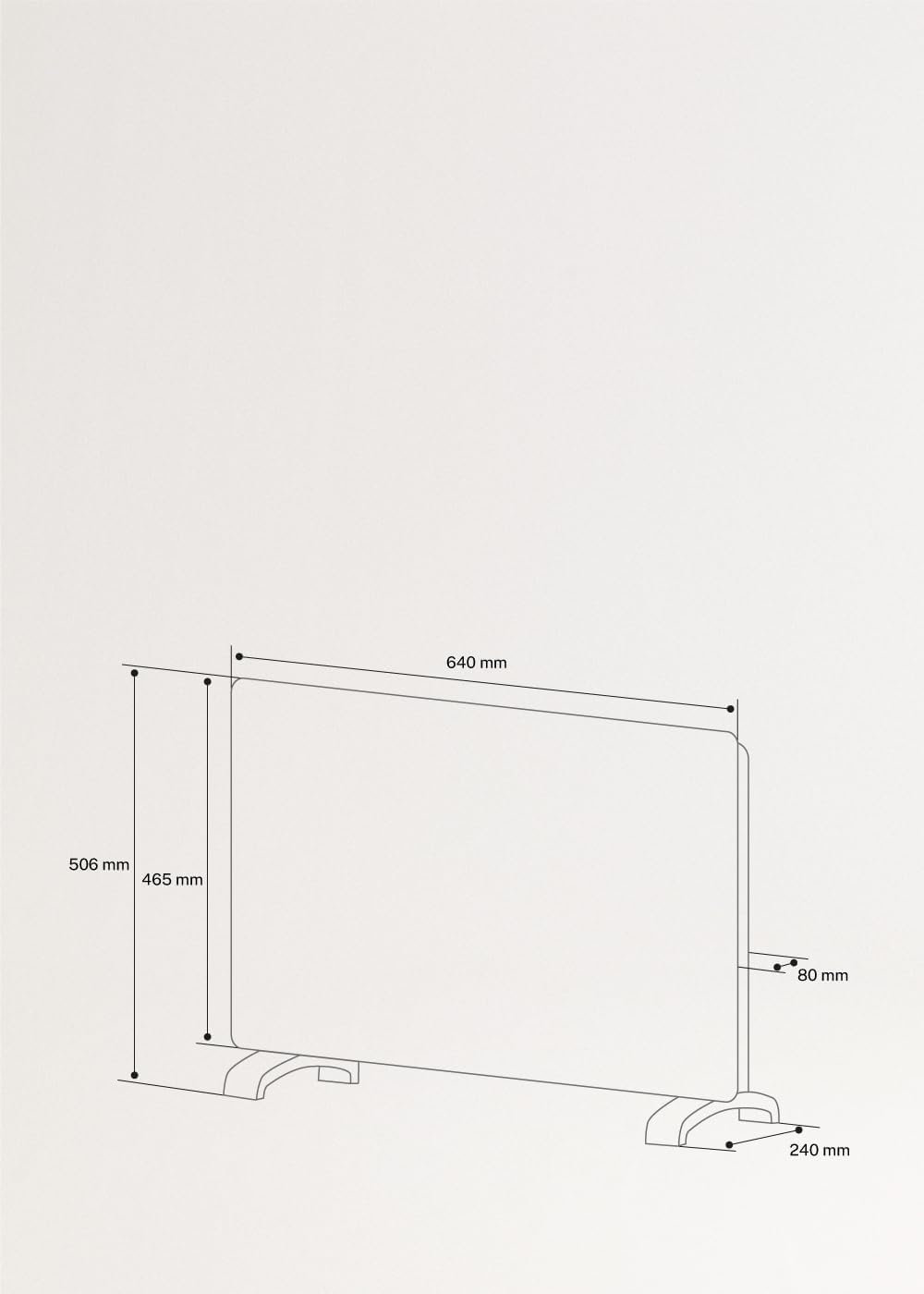
Image 9.1: Dimensional drawing of the heater.
10. Warranty and Support
This product is covered by a manufacturer's warranty. For detailed warranty information, please refer to the documentation included with your purchase or visit the CREATE official website. For technical support, troubleshooting assistance, or to inquire about spare parts, please contact CREATE customer service through their official channels.
You can find more information and contact details on the CREATE Brand Store.


