
Introduction
This manual provides detailed instructions for the installation, operation, and maintenance of the Garza Wireless Programmable Digital Thermostat, Model 400617. This device is designed to offer precise temperature control for your home's heating and cooling systems. Please read this manual thoroughly before installation and use to ensure proper functionality and safety.
Product Overview
The Garza Wireless Programmable Digital Thermostat system consists of two main components: the Thermostat unit and the Receiver unit. The thermostat allows you to set and monitor temperatures, while the receiver connects to your boiler or heating system to control it wirelessly.

Image: The Garza Wireless Programmable Digital Thermostat (left) and its corresponding Receiver unit (right).
Key Features:
- Wireless operation for flexible placement of the thermostat unit.
- Weekly programming (7 days) with up to 6 customizable programs per day.
- Touch-sensitive LCD screen for easy interaction.
- Manual and Automatic temperature regulation modes.
- Adjustable temperature range from 5°C to 35°C.
- Anti-freeze protection.
- Open window detection function.
- Low battery indicator.
Package Contents
- 1x Garza Wireless Programmable Digital Thermostat Unit
- 1x Garza Receiver Unit
- 1x Wall Mount Bracket
- Screws for Installation
- User Manual (this document)

Image: The thermostat and receiver units, highlighting that batteries are not included and installation is straightforward.
Setup and Installation
1. Powering the Thermostat Unit
The thermostat unit requires 4x AAA 1.5V batteries (not included). Open the battery compartment on the back of the thermostat and insert the batteries, ensuring correct polarity. The display will activate once batteries are correctly installed.
2. Installing the Receiver Unit
- Safety First: Before connecting the receiver, ensure the main power supply to your boiler or heating system is turned off at the circuit breaker.
- Mounting: Choose a suitable location near your boiler. The receiver can be wall-mounted using the provided screws.
- Wiring: Connect the receiver to your boiler's control terminals (typically labeled COM and NO for normally open contact). Refer to your boiler's manual for specific wiring diagrams. If you are unsure, consult a qualified electrician or heating engineer.
- Power On: Once wired, restore power to your boiler system. The receiver will power on.
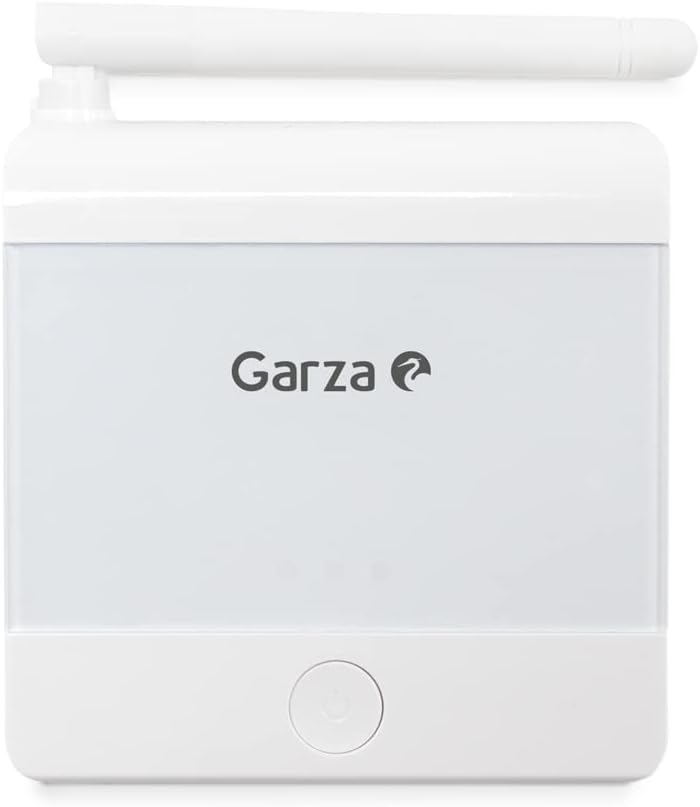
Image: The Garza Receiver unit, which connects to the heating system.
3. Placing the Thermostat Unit
The thermostat unit communicates wirelessly with the receiver via RF (Radio Frequency). Place the thermostat in a central location in your home, away from direct sunlight, drafts, or heat sources, to ensure accurate temperature readings. It can be placed on a surface using the included stand or wall-mounted.

Image: The Garza Thermostat unit with its touch-sensitive LCD screen.
4. Initial Pairing (Automatic)
The thermostat and receiver units are designed to pair automatically upon initial power-up. Ensure both units are powered on. If pairing does not occur automatically, refer to the troubleshooting section.
Operating Instructions
1. Display and Controls
The thermostat features an LCD touch screen. To activate the display, press any button. The display will remain active for a short period to conserve battery life.

Image: A hand touching the display of the Garza Thermostat, showing the current temperature and set temperature.
2. Setting the Time and Day
Refer to the on-screen menu or specific button combinations (usually involving a 'clock' or 'menu' icon) to set the current time and day of the week. Accurate time setting is crucial for programmable schedules.
3. Temperature Adjustment
Use the Up and Down arrow buttons on the thermostat to manually adjust the desired temperature. The adjustable range is from 5°C to 35°C.

Image: An icon representing temperature adjustment, with plus and minus symbols.
4. Programming Schedules (Automatic Mode)
The thermostat supports weekly programming with up to 6 distinct programs per day. This allows you to set different temperatures for various times throughout the day and week to optimize comfort and energy consumption.
- Access the programming menu (typically via a 'grid' or 'menu' icon).
- Select the day of the week you wish to program.
- Set the start time and desired temperature for each of the 6 available programs.
- Repeat for all desired days and programs.
- Ensure the thermostat is set to Automatic Mode for the programmed schedule to take effect.
5. Manual Mode
In Manual Mode, the thermostat maintains a constant temperature set by the user, overriding any programmed schedules. This is useful for temporary adjustments or when a fixed temperature is preferred.
6. Special Functions
- Anti-freeze Protection: This feature automatically activates heating if the ambient temperature drops below a preset minimum (e.g., 5°C) to prevent pipes from freezing.
- Open Window Function: If a sudden drop in temperature is detected (indicating an open window or door), the thermostat may temporarily pause heating to save energy. Heating resumes after a set period or when the temperature stabilizes.
Maintenance
Battery Replacement
The thermostat unit is powered by 4x AAA batteries. When the low battery indicator appears on the display, it is time to replace them. Prompt replacement ensures continuous operation and prevents loss of settings.
- Open the battery compartment on the back of the thermostat.
- Remove the old batteries.
- Insert four new AAA 1.5V batteries, observing correct polarity (+/-).
- Close the battery compartment.
Dispose of used batteries according to local regulations.
Troubleshooting
| Problem | Possible Cause | Solution |
|---|---|---|
| Thermostat display is blank. | Batteries are depleted or incorrectly installed. Display is in power-saving mode. | Press any button to activate the display. Replace batteries if the low battery indicator was shown or if the display remains blank after pressing a button. Ensure correct battery polarity. |
| Heating system not responding to thermostat. | Receiver not powered, incorrect wiring, or loss of RF communication between thermostat and receiver. | Check if the receiver is powered and correctly wired to the boiler. Ensure the thermostat and receiver are within effective RF range. Re-pair the units if necessary (refer to setup section for automatic pairing). |
| Inaccurate temperature readings. | Thermostat placed in an unsuitable location (direct sunlight, drafts, near heat sources). | Relocate the thermostat to a more central area, away from external influences that could affect temperature sensing. |
| Programmed schedule not active. | Thermostat is in Manual Mode. Time and day settings are incorrect. | Switch the thermostat to Automatic Mode. Verify that the current time and day are set correctly. |
Specifications
| Feature | Detail |
|---|---|
| Brand | Garza |
| Model Number | 400617 |
| Thermostat Dimensions (L x W x H) | 124 x 88 x 24.4 mm |
| Receiver Dimensions (L x W x H) | 86 x 86 x 24 mm |
| Color | White |
| Material | Plastic |
| Power Source (Thermostat) | 4x AAA Batteries (1.5V, not included) |
| Voltage (Thermostat) | 6 Volts |
| Display Type | LCD |
| Mounting Type | Wall Mount / Surface Stand |
| Connectivity Technology | RF (Radio Frequency) |
| Temperature Control Type | Digital |
| Adjustable Temperature Range | 5°C to 35°C |
| Programming | Weekly (7 days), up to 6 programs/day |
| Special Functions | Anti-freeze protection, Open window function |
| Usage | Heating and Air Conditioning systems |


