
OMMO
OMMO Metal Detector Instruction Manual
High Accuracy Adjustable Waterproof Metal Detector
1. Introduction
The OMMO Metal Detector is engineered for both novice and experienced treasure hunters, offering high accuracy and versatile detection capabilities. Its robust design includes a waterproof search coil and an adjustable stem, making it suitable for various environments, from beaches to fields. This manual will guide you through the setup, operation, and maintenance of your new metal detector to ensure optimal performance and a rewarding experience.

Image 1.1: Complete OMMO Metal Detector kit with all included accessories.
2. Product Components
Familiarize yourself with the main parts of your OMMO Metal Detector:

Image 2.1: Labeled components of the OMMO Metal Detector.
- Search Coil: The circular part that detects metal objects. It is IP68 waterproof.
- Knob: Secures the search coil to the lower stem.
- Lower Stem: Connects the search coil to the upper stem.
- Upper Stem: The main shaft of the detector, connecting to the control box.
- Stem Lock Nut: Used to adjust and secure the length of the stem.
- Control Box: Houses the electronics, LCD screen, and controls. Note: The control box is not waterproof.
- LCD Screen: Displays detection information, modes, and settings.
- Handle Grip: Provides a comfortable hold during operation.
- Padded Armrest: Supports the forearm for comfortable, extended use.
3. Assembly Instructions
Follow these steps to assemble your OMMO Metal Detector:
- Attach the Search Coil: Connect the search coil to the lower stem using the provided knob. Ensure it is securely fastened but allows for slight angle adjustment.
- Connect the Stems: Slide the lower stem into the upper stem. Adjust the length to a comfortable position (between 30 to 41 inches) and secure it with the stem lock nut.
- Mount the Control Box: Attach the control box to the top of the upper stem. Ensure the cable from the search coil is routed neatly along the stem and plugged into the control box.
- Install Batteries: Open the battery compartment on the control box. Insert 10 'A' batteries (included) according to the polarity indicators. Close the compartment securely.
- Attach Armrest: Secure the padded armrest to the upper stem for ergonomic support.
Video 3.1: A detailed guide on how to install the OMMO Metal Detector components.
4. Operating Instructions
4.1 Powering On and Basic Operation
Press the power button on the control box to turn on the detector. The LCD screen will illuminate, indicating it is ready for use. Ensure headphones are plugged into the earphone jack if desired for private listening.
4.2 Understanding the LCD Display
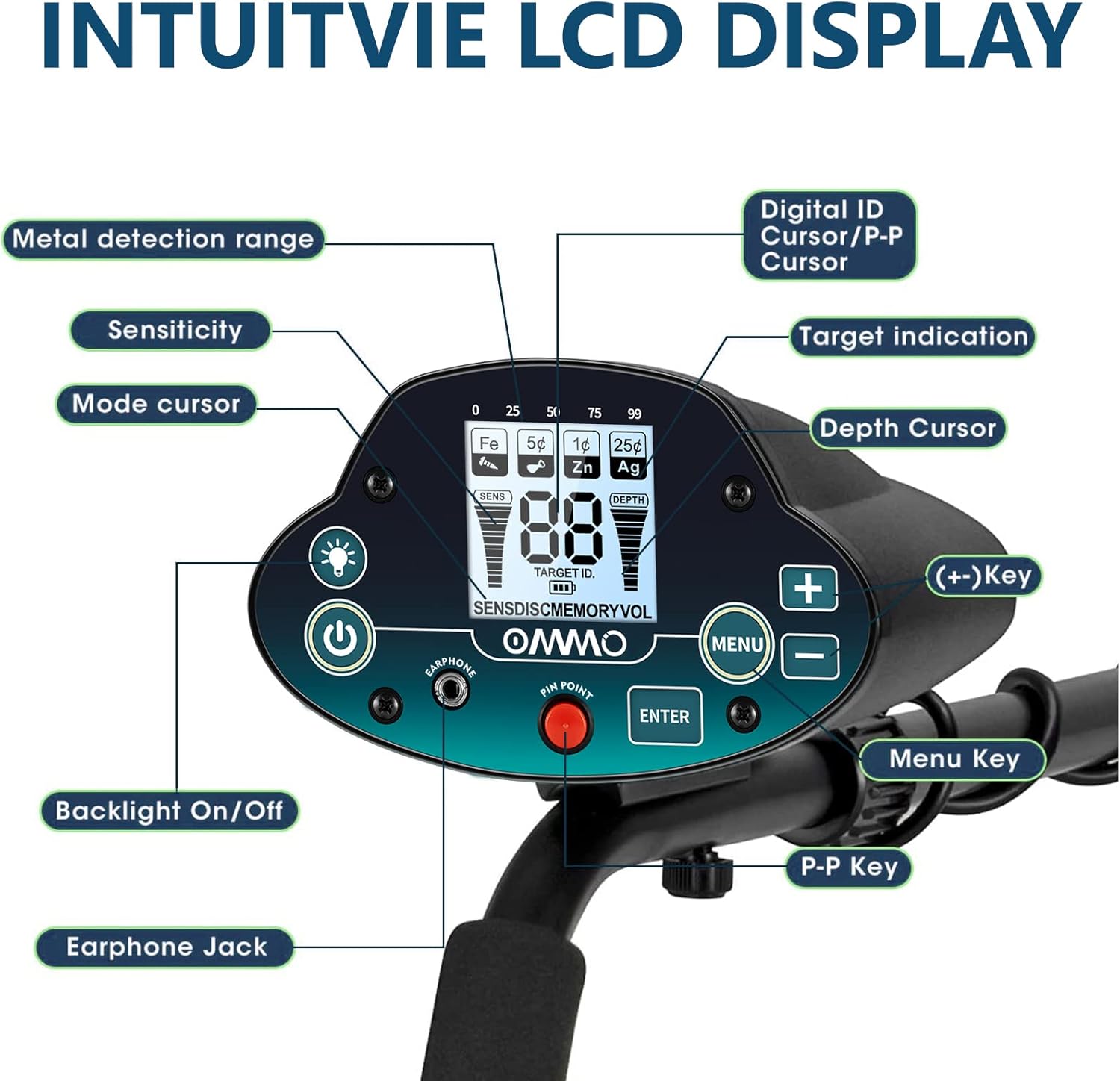
Image 4.1: Intuitive LCD Display of the OMMO Metal Detector.
The large back-lit LCD display provides crucial information:
- Detecting Depth: Indicates the approximate depth of the detected object.
- Discrimination: Shows the type of metal detected (e.g., Iron, 5¢, 1¢, 25¢, Silver).
- Operating Mode: Displays the currently active detection mode.
- Overload Warning: Alerts if the signal is too strong.
- Sensitivity Level: Shows the current sensitivity setting.
- Battery Level: Indicates remaining battery power.
4.3 Operating Modes

Image 4.2: Overview of the OMMO Metal Detector's operating modes.
Your detector features three distinct modes:
- All Metal Mode: Detects all types of metal. The detector will notify you whenever it senses any metal object.
- Disc Mode (Discrimination): Allows you to discriminate against unwanted metal types. You can set the detector to ignore certain metals (e.g., iron) and focus on specific ones (e.g., gold, silver).
- Pinpoint Mode: Aids in precisely locating the detected metal object. Once a target is found, activate Pinpoint mode to narrow down its exact position by listening for the strongest signal.
4.4 Adjusting Sensitivity and Depth

Image 4.3: Detection depth capabilities and advanced smart chip technology.
Use the +/- buttons to adjust the sensitivity. Higher sensitivity increases detection depth (up to 8 inches for small coins, 3 feet for larger objects) but can also increase interference from mineralized soil or electrical sources. Adjust sensitivity based on your environment for optimal performance.
4.5 Backlight Function

Image 4.4: Backlight assist for improved visibility.
To activate the backlight for low-light conditions, long press the backlight button (usually indicated by a light bulb icon) for 2 seconds. This improves visibility of the LCD screen.
4.6 Proper Sweeping Technique

Image 4.5: Ergonomic handle design and waterproof search coil in use.
Sweep the search coil slowly and steadily from side to side, keeping it parallel to the ground and as close as possible without touching. Overlap each sweep by about half the coil's diameter to ensure thorough coverage. Maintain a consistent height above the ground.
5. Maintenance and Care
- Cleaning: After each use, especially in sandy or wet conditions, wipe down the search coil and stem with a damp cloth. Ensure the control box remains dry.
- Storage: Store the metal detector in a cool, dry place. If storing for an extended period, remove the batteries to prevent leakage.
- Battery Replacement: Replace batteries when the low battery indicator appears on the LCD screen to ensure consistent performance.
6. Troubleshooting
If you encounter issues with your OMMO Metal Detector, consider the following:
- False Signals or Interference:
- Avoid using the detector near buildings with metal floors, as embedded metal can cause interference.
- Large electrical appliances can interfere with the detector's signal; avoid using it indoors near such devices.
- In outdoor settings, highly mineralized soil or areas with significant metal waste can cause erratic signals. Try adjusting sensitivity or moving to a different location.
- If carrying a digging tool, keep it a short distance away from the metal detector during operation to prevent interference.
- No Power/No Display:
- Check if the batteries are correctly installed with the correct polarity.
- Ensure batteries are not depleted. Replace with fresh batteries if necessary.
- Verify all cable connections are secure.
- Inaccurate Detection:
- Ensure the search coil is swept parallel to the ground and at a consistent height.
- Adjust sensitivity settings. Too high sensitivity in challenging ground conditions can lead to inaccurate readings.
- Calibrate the detector if it has a calibration function (refer to specific model instructions if available).
7. Product Specifications
| Feature | Specification |
|---|---|
| Brand | OMMO |
| Color | Green |
| Material | Metal |
| Power Source | Battery Powered |
| Batteries Required | Yes (10 A batteries included) |
| Item Weight | 2 Kilograms (4.4 pounds) |
| Product Dimensions (L x W x H) | 13.4" x 5" x 17.5" |
| Adjustable Length | 30 to 41 Inches |
| Search Coil Size | 10 Inches |
| International Protection Rating | IP54 (Control Box), IP68 (Search Coil) |
| Operating Frequency | 7 KHz |
| Display Type | LCD |
| Model Number | MD-7011 |
8. Warranty and Support
For warranty information and customer support, please refer to the documentation included with your purchase or visit the official OMMO brand store. Keep your purchase receipt as proof of purchase for any warranty claims.
OMMO Brand Store: Visit OMMO Store on Amazon
Related documents


Ask a question about this manual
Ask about setup, troubleshooting, compatibility, parts, safety, or missing instructions. Manuals+ will review the question and use this page’s manual context to help answer it.