1. Introduction
The BENFEI Active DisplayPort to HDMI Adapter provides a reliable solution for connecting DisplayPort-enabled devices to HDMI displays. This adapter supports high-resolution video up to 4K@60Hz and 8-channel digital audio, ensuring a clear and stable transmission for various applications, including multi-screen gaming and professional workstations.
Please read this manual thoroughly before using the product to ensure proper setup and optimal performance.
2. Key Features
- Excellent Transmission: Utilizes a robust chip solution and professional multiple shielding for instantaneous and accurate data streaming.
- Ultra 4K@60Hz Resolution: Fully compatible with DisplayPort 1.2a, HDCP 1.3/1.4/2.2, HDMI 2.0, and HBR2 specifications. Supports image resolutions up to 1920x1200 @120Hz, 2560x1600 RB @120Hz, 1080P@120Hz, or 4Kx2K@60Hz. Also supports 8 channels digital audio with sampling rates up to 192kHz and sample sizes up to 24 bits, including HBR audio.
- Ultra Durability: The TPE layer is protected by a nylon braided jacket, offering enhanced performance and longevity even under heavy usage.
- Universal Compatibility: Compatible with a wide range of devices including laptops (HP ProBook EliteBook, Lenovo ThinkPad), desktop towers (HP, Dell, Lenovo), graphics cards (AMD, NVIDIA), and other devices with a DisplayPort output.
3. Package Contents
Please verify that all items are present and in good condition upon opening the package:
- 1 x BENFEI Active DisplayPort to HDMI Adapter 4K@60Hz (Model: 000288grey)
- 1 x User Manual
4. Setup Instructions
Follow these steps to connect your DisplayPort source device to an HDMI display:
- Ensure both your source device (e.g., PC, laptop) and your display (e.g., monitor, TV) are powered off.
- Connect the DisplayPort (DP) male connector of the BENFEI adapter into the DisplayPort output on your source device. Ensure it clicks securely into place.
- Connect a standard HDMI cable (not included) to the HDMI female port of the BENFEI adapter.
- Connect the other end of the HDMI cable to an HDMI input port on your display.
- Power on your display, then power on your source device.
- Select the correct HDMI input on your display using its remote control or on-screen menu.
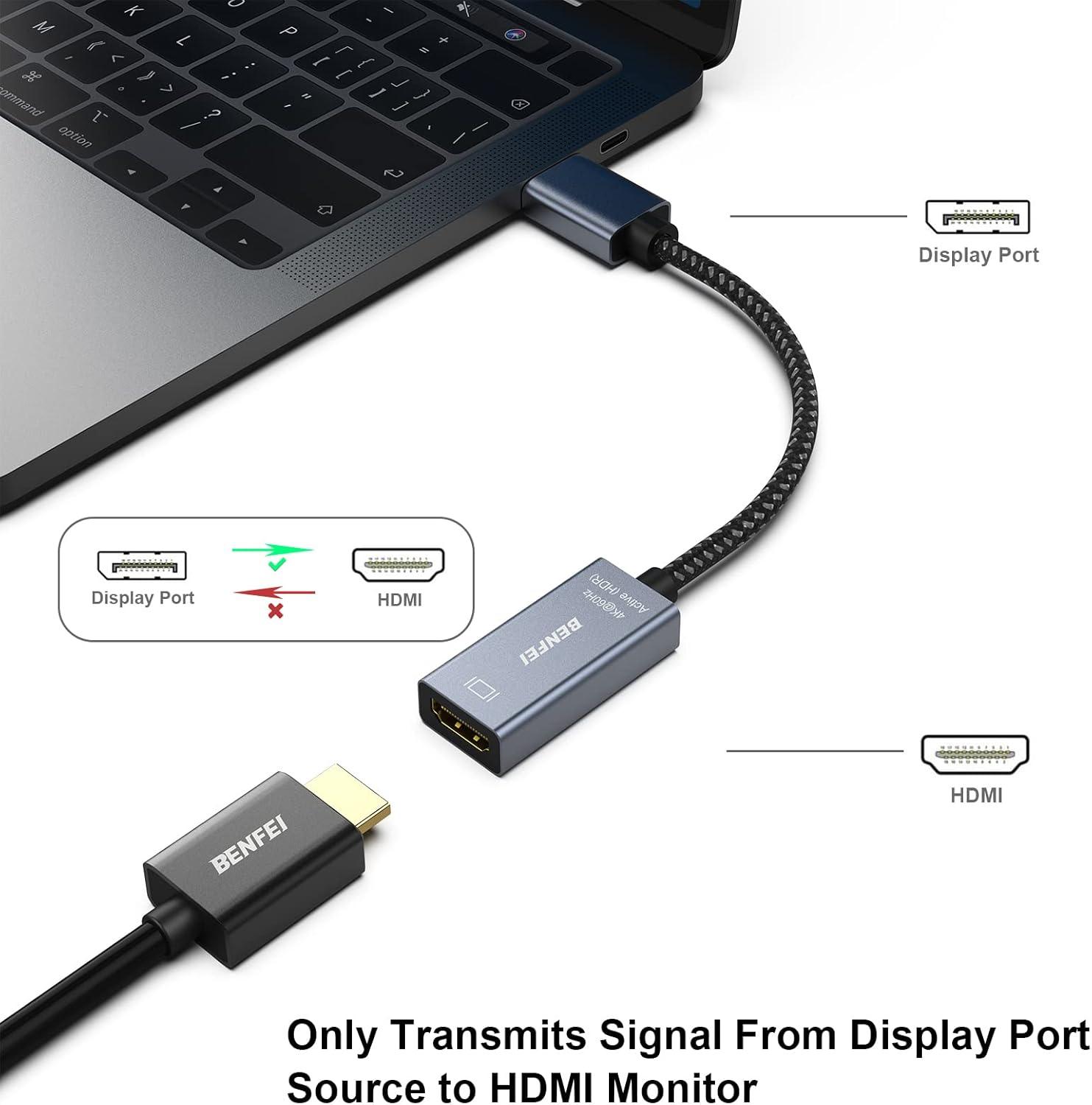
Image: Connecting the BENFEI Active DisplayPort to HDMI Adapter. The DisplayPort end connects to the source device, and the HDMI end connects to an HDMI cable leading to the display.
Important Note: This adapter is unidirectional. It converts a DisplayPort signal to an HDMI signal. It cannot convert an HDMI signal to a DisplayPort signal.

Image: Visual representation of the unidirectional signal flow, indicating DisplayPort (Host Device) to HDMI (Target Screen) is supported, but not vice-versa.
5. Operating Instructions
Once connected, your operating system should automatically detect the external display. You can configure the display settings as follows:
5.1. Windows Display Settings
- Right-click on your desktop and select "Display settings" or "Screen resolution".
- Under "Multiple displays", you can choose from the following options:
- Duplicate these displays: Shows the same content on both your primary screen and the connected HDMI display (Mirror Mode).
- Extend these displays: Extends your desktop across both screens, allowing for more workspace (Extended Mode).
- Show only on 1/2: Displays content only on the selected screen.
- Adjust resolution and refresh rate as needed. For optimal performance, ensure your display is set to 4K (3840x2160) at 60Hz.
5.2. macOS Display Settings
- Go to "System Preferences" > "Displays".
- In the "Arrangement" tab, you can drag the display icons to arrange them as desired for extended desktop.
- To enable Mirror Mode, check the "Mirror Displays" box.
- In the "Display" tab, select the desired resolution and refresh rate for your external monitor.

Image: Illustration of Mirror Mode (same content on both screens) and Extended Mode (desktop spread across screens) using the adapter.

Image: An example of a workstation setup with a desktop PC connected to two external monitors, demonstrating how the adapter can be used to expand display capabilities for increased efficiency.
6. Compatibility
The BENFEI Active DisplayPort to HDMI Adapter is designed for broad compatibility with various DisplayPort-enabled source devices and HDMI displays.
6.1. Compatible Source Devices
- Laptops: HP ProBook, EliteBook; Lenovo ThinkPad; and other laptops with DisplayPort output.
- Desktop Towers: HP, Dell, Lenovo, and other desktop PCs with DisplayPort output.
- Graphics Cards: AMD, NVIDIA, and other graphics cards with DisplayPort output.
- Tablets with DisplayPort output.
6.2. Compatible Displays
- Monitors with HDMI input.
- Projectors with HDMI input.
- Televisions (HDTVs) with HDMI input.

Image: Universal compatibility diagram illustrating various host devices (laptops, desktop PCs, graphics cards) that can connect to different target screens (projectors, TVs, displays) using the adapter.
7. Product Specifications
| Feature | Detail |
|---|---|
| Model Number | 000288grey |
| Product Dimensions | 0.39 x 0.39 x 0.39 inches |
| Item Weight | 1.41 ounces |
| Connector Type | DisplayPort (Male) to HDMI (Female) |
| Max Resolution | 4Kx2K@60Hz (3840x2160@60Hz) |
| Other Supported Resolutions | 1920x1200@120Hz, 2560x1600 RB@120Hz, 1080P@120Hz |
| Audio Support | 8 channels digital audio, up to 192kHz sampling rate, 24 bits sample size, HBR audio |
| DisplayPort Standard | DisplayPort 1.2a |
| HDMI Standard | HDMI 2.0 |
| HDCP Support | HDCP 1.3/1.4/2.2 |
| Color | Grey |
| Manufacturer | BENFEI |

Image: Detailed view of the adapter highlighting its portable size, integrated smart chip for performance, and 24K gold-plated connectors for enhanced durability and signal integrity.
8. Troubleshooting
If you encounter issues while using the adapter, please refer to the following common solutions:
- No Display/Black Screen:
- Ensure both the DisplayPort and HDMI connections are secure.
- Verify that the correct HDMI input is selected on your display.
- Check if your source device's DisplayPort output is active. You might need to enable it in your computer's display settings or graphics card control panel.
- Try restarting your computer and display.
- Test with a different HDMI cable to rule out cable issues.
- Flickering or Unstable Image:
- Ensure the DisplayPort and HDMI connections are firm.
- Lower the resolution or refresh rate in your computer's display settings to see if stability improves.
- Update your graphics card drivers to the latest version.
- Avoid using excessively long HDMI cables, as this can degrade signal quality.
- No Audio:
- Check your computer's sound settings to ensure the HDMI output is selected as the default playback device.
- Verify that the volume on both your computer and display is not muted or set too low.
- Ensure your display supports audio transmission via HDMI.
- Resolution/Refresh Rate Not as Expected:
- Confirm that both your source device's graphics card and your HDMI display support the desired resolution and refresh rate (e.g., 4K@60Hz).
- Check your computer's display settings and manually select the highest available resolution and refresh rate.
9. Care and Maintenance
- Keep the adapter in a dry environment, away from moisture and extreme temperatures.
- Avoid bending or twisting the cable excessively to prevent internal damage.
- Clean the connectors periodically with a soft, dry cloth to ensure optimal signal transmission.
- Do not attempt to disassemble or repair the adapter yourself. This will void the warranty.
10. Warranty and Support
The BENFEI Active DisplayPort to HDMI Adapter comes with an Exclusive Benfei Unconditional 18-month Warranty. This warranty ensures long-term satisfaction with your purchase.
For any questions, technical assistance, or warranty claims, please contact Benfei customer service. Our friendly and easy-to-reach customer service team is available to solve your problems timely.
You can find contact information on the official BENFEI website or through your purchase platform.
11. Product Videos
Display Port to HDMI Adapter Overview
Video: A brief overview demonstrating the BENFEI DisplayPort to HDMI Adapter, showcasing its design and basic functionality.
Product Overview Video
Video: A concise product overview video from Amazon Product Imaging, illustrating the adapter's features and how it connects to devices.


