
1. Introduction
The OREI UHD-402 is a 4x2 HDMI Matrix Switch designed to connect up to four HDMI source devices to two displays. This device allows for flexible content distribution, enabling users to stream different content on each display or mirror the same content across both. It supports UltraHD 4K resolutions at 60Hz and includes an Audio Return Channel (ARC) feature for enhanced audio routing.

Image 1.1: OREI UHD-402 4x2 HDMI Matrix Switch with included remote control.
2. Package Contents
Verify that all items are present in the package:
- 1x OREI UHD-402 HDMI Matrix Switch
- 1x Power Adapter (Dual voltage with US plug, international adapter/converter included)
- 1x IR Remote Control
- 1x User Manual

Image 2.1: Visual representation of the OREI UHD-402 package contents.
3. Product Overview
3.1 Key Features
- HDMI Matrix: 4 inputs and 2 outputs for versatile connectivity.
- Resolution: Supports up to 4K@60Hz (3840x2160) with 18Gbps bandwidth.
- HDMI Standard: Fully compliant with HDMI 2.0 and HDCP 2.2.
- Audio Return Channel (ARC): Functionality between Input 4 and Output 1 for seamless audio routing.
- Audio Support: DTS HD and Dolby TrueHD lossless compressed digital audio.
- Control: IR remote control and manual buttons for input/output selection.
- Design: Stylish housing design, free of interference.
3.2 Front and Rear Panels
The device features clearly labeled ports and indicators for easy setup and operation.

Image 3.1: Key features of the OREI UHD-402 HDMI Matrix Switch.

Image 3.2: Rear panel connections of the UHD-402, including HDMI inputs, outputs, and power port.
4. Setup Instructions
4.1 Connecting Devices
- Power Connection: Connect the provided power adapter to the 'DC 5V' port on the matrix switch and then to a power outlet.
- HDMI Source Devices: Connect up to four HDMI source devices (e.g., Blu-ray player, gaming console, streaming box, PC) to the HDMI Input ports (Input 1-4) on the matrix switch using HDMI cables.
- HDMI Displays: Connect your two HDMI displays (e.g., TV, projector, monitor) to the HDMI Output ports (Output A and Output B) on the matrix switch using HDMI cables.
- ARC Connection (Optional): If using the Audio Return Channel feature, ensure your sound system is connected to Input 4 and your ARC-enabled TV is connected to Output A.

Image 4.1: Basic connection diagram for the OREI UHD-402.
4.2 ARC Functionality
The ARC function allows audio from your ARC-enabled TV (connected to Output A) to be sent back to a sound system connected to Input 4. This eliminates the need for a separate audio cable between the TV and the sound system.

Image 4.2: Detailed diagram of ARC connection setup.
5. Operating Instructions
5.1 Input/Output Selection
The UHD-402 offers two modes of operation: Splitter Mode and Matrix Mode.
- Splitter Mode: Both Output A and Output B display the same content from a single selected input source.
- Matrix Mode: Output A and Output B can display different content from two different input sources.
You can switch between input sources for each output using the front panel buttons or the IR remote control.
Using Front Panel Buttons:
- Press the 'SELECT A' button to cycle through Input 1-4 for Output A.
- Press the 'SELECT B' button to cycle through Input 1-4 for Output B.
Using IR Remote Control:
The remote control provides direct access to each input for both outputs.
- Use buttons '1', '2', '3', '4' under 'SELECT A' to choose the input for Output A.
- Use buttons '1', '2', '3', '4' under 'SELECT B' to choose the input for Output B.
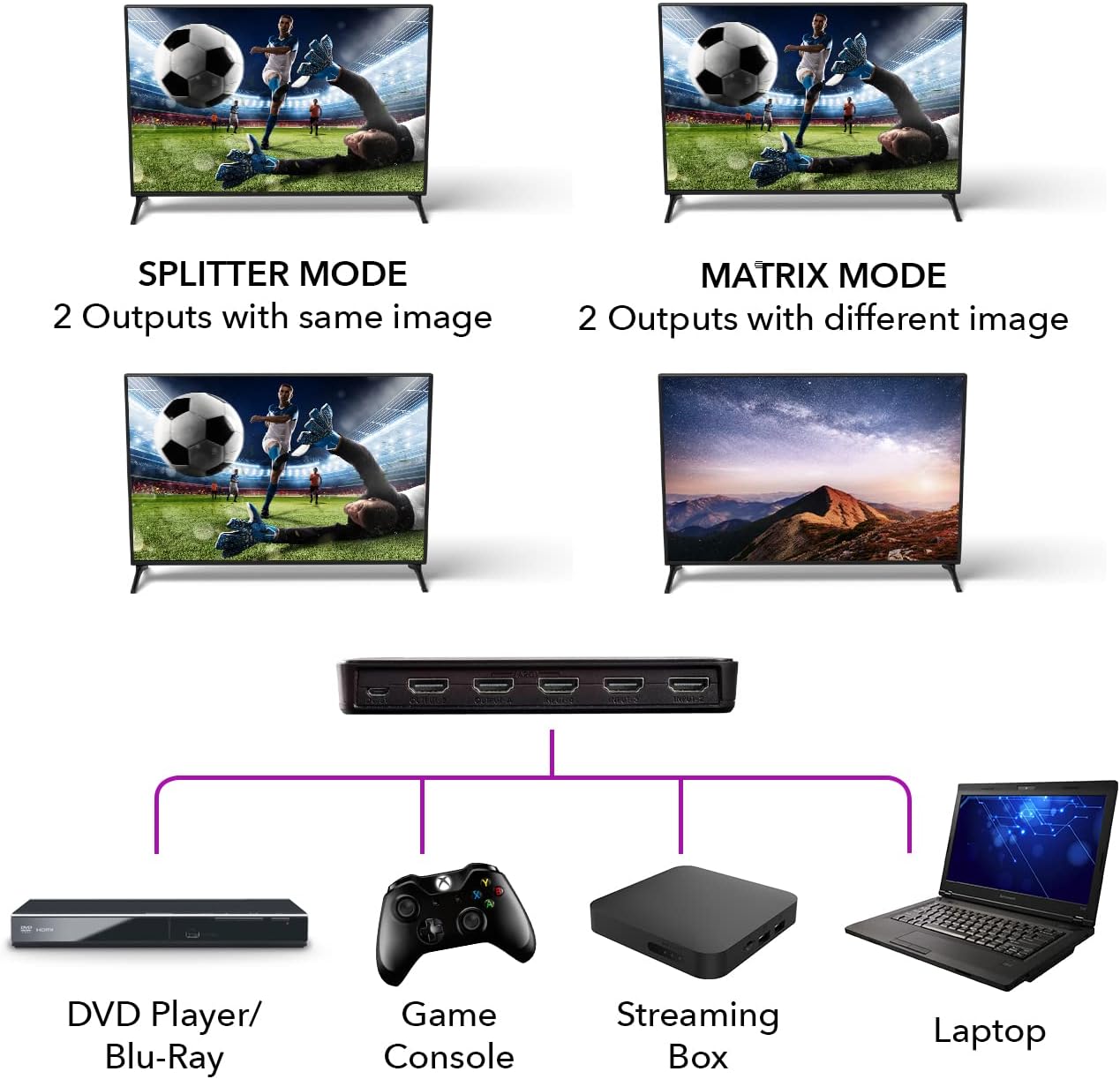
Image 5.1: Comparison of Splitter Mode and Matrix Mode operation.

Image 5.2: The included IR remote control for convenient operation.
6. Technical Specifications
| Feature | Specification |
|---|---|
| HDMI Version | HDMI 2.0 |
| HDCP Version | HDCP 2.2 |
| Resolution Support | Up to 4K@60Hz (3840x2160) |
| Bandwidth | 18Gbps |
| Pixel Clock Rate | Up to 600MHz |
| Inputs | 4x HDMI |
| Outputs | 2x HDMI |
| ARC Function | Supported (Input 4 / Output A) |
| Audio Formats | DTS HD, Dolby TrueHD lossless compressed digital audio |
| Control | IR Remote Control, Front Panel Buttons |
| Product Dimensions | 6 x 3 x 1 inches |
| Item Weight | 8.7 ounces |

Image 6.1: Physical dimensions and weight of the UHD-402.
7. Troubleshooting
If you encounter issues with your OREI UHD-402, please refer to the following common solutions:
- No Video/Audio: Ensure all HDMI cables are securely connected to both the source devices and the displays. Verify that the power adapter is properly connected and the unit is receiving power. Try restarting all connected devices and the matrix switch.
- Incorrect Resolution/Picture Quality: Confirm that your source devices and displays support the desired resolution (e.g., 4K@60Hz). Check the settings on your source device to ensure it is outputting a compatible resolution.
- ARC Not Functioning: Ensure both your TV (connected to Output A) and sound system (connected to Input 4) are ARC-enabled. Check the audio settings on your TV to ensure ARC is activated.
- Remote Control Issues: Ensure there are no obstructions between the remote and the matrix switch. Replace the remote control battery if necessary.
- Intermittent Signal: Try using shorter, high-quality HDMI cables, especially for 4K resolutions. Ensure cables are HDMI 2.0 compliant.
8. Warranty and Support
The OREI UHD-402 HDMI Matrix Switch is backed by a 1-Year Manufacturer’s Warranty. For technical assistance or warranty claims, please contact OREI customer support.