
1. Introduction
Thank you for choosing the Ksix Retro Wireless Headphones. These headphones combine a classic design with modern Bluetooth 5.0 technology, offering a comfortable and high-quality audio experience. This manual provides essential information for the proper setup, operation, and maintenance of your device.
2. Safety Information
- Do not expose the headphones to extreme temperatures, humidity, or corrosive substances.
- Avoid dropping or subjecting the headphones to strong impacts.
- Do not attempt to disassemble or modify the headphones. This will void the warranty.
- Keep the headphones away from children and pets.
- Clean the headphones with a soft, dry cloth. Do not use harsh chemicals.
- These headphones are not waterproof. Avoid contact with water or moisture.
- Listen at moderate volume levels to prevent hearing damage.
3. Package Contents
Please check that all items are present in the package:
- 1 x Ksix Retro Wireless Headphones (Model BXAUHBT01)
- 1 x Charging Cable (Micro USB)
- 1 x Audio Cable (3.5mm Jack)
- 1 x User Manual
4. Product Overview
Familiarize yourself with the components and controls of your Ksix Retro Wireless Headphones.

Image 4.1: Front view of the Ksix Retro Wireless Headphones, showcasing the over-ear design and adjustable headband.

Image 4.2: Close-up view of the control buttons located on the earcup, including volume and track navigation controls.
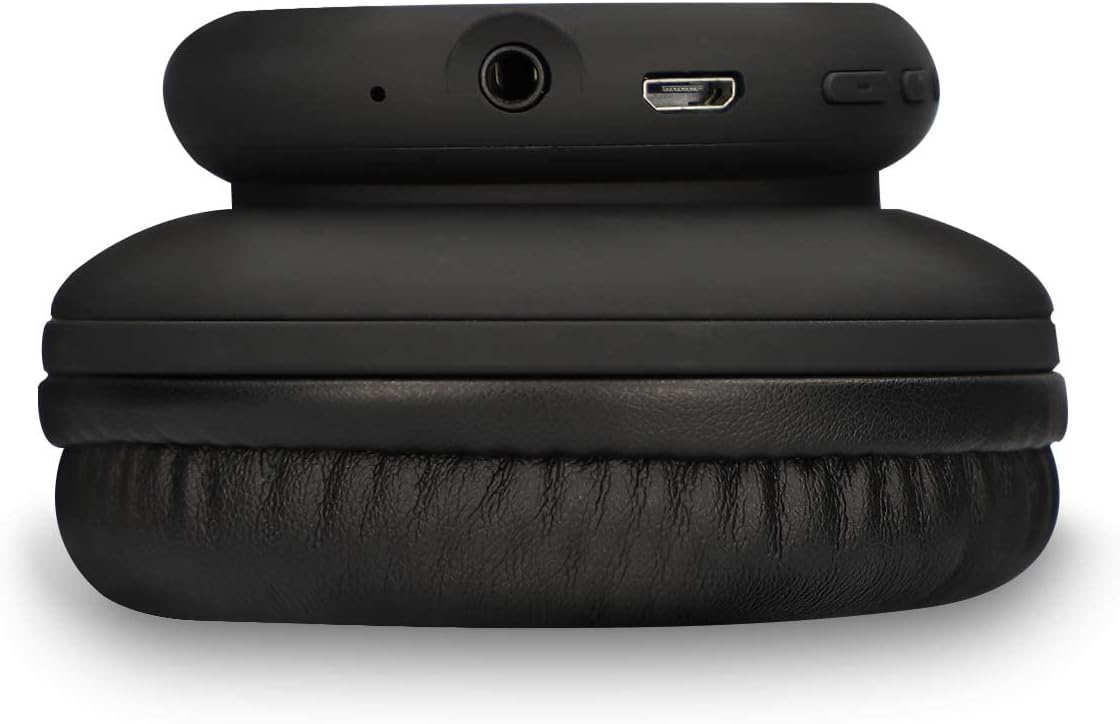
Image 4.3: View of the headphone's connectivity ports, including the 3.5mm audio jack and the Micro USB charging port.
Key Features:
- Bluetooth 5.0: For stable wireless connectivity.
- Integrated Microphone: For hands-free calls.
- Control Buttons: For volume adjustment and track navigation.
- Pressure-Relief Cushions: Designed for comfortable wear.
- 3.5mm Audio Jack: For wired connection when battery is low or for non-Bluetooth devices.
5. Setup
5.1 Charging the Headphones
- Connect the Micro USB end of the charging cable to the charging port on the headphones.
- Connect the USB-A end of the charging cable to a compatible USB power source (e.g., wall adapter, computer USB port).
- The LED indicator will illuminate to show charging status.
- A full charge takes approximately 1.5 hours. The LED indicator will change or turn off once charging is complete.
5.2 Bluetooth Pairing
- Ensure the headphones are fully charged.
- Press and hold the Power button on the headphones until the LED indicator flashes blue and red, indicating pairing mode.
- On your device (smartphone, tablet, computer), enable Bluetooth and search for available devices.
- Select "Ksix Retro Headphones" (or similar name) from the list of found devices.
- Once paired, the LED indicator on the headphones will typically show a solid blue light or flash blue slowly.
- The headphones have a Bluetooth range of up to 30 meters in an open environment.
6. Operating Instructions
6.1 Power On/Off
- Power On: Press and hold the Power button for approximately 3 seconds until the LED indicator lights up.
- Power Off: Press and hold the Power button for approximately 3-5 seconds until the LED indicator turns off.
6.2 Music Playback
- Play/Pause: Press the Multi-function button (often the Power button) once.
- Next Track: Press the "+" button (Volume Up) for 2 seconds.
- Previous Track: Press the "-" button (Volume Down) for 2 seconds.
- Volume Up: Short press the "+" button.
- Volume Down: Short press the "-" button.
6.3 Call Handling
- Answer/End Call: Press the Multi-function button once.
- Reject Call: Press and hold the Multi-function button for 2 seconds.
- Redial Last Number: Double-press the Multi-function button.
6.4 Wired Mode (3.5mm Jack)
You can use the headphones with the included 3.5mm audio cable. This is useful when the battery is depleted or for devices without Bluetooth connectivity.
- Plug one end of the 3.5mm audio cable into the headphone's audio jack.
- Plug the other end into your audio source's 3.5mm port.
- In wired mode, the headphone's battery is not used, and some controls on the headphones may be inactive.

Image 6.1: A person wearing the Ksix Retro Wireless Headphones, demonstrating their use in a daily setting.
7. Maintenance and Care
- Cleaning: Use a soft, dry, lint-free cloth to clean the headphones. Do not use abrasive cleaners, solvents, or sprays.
- Storage: When not in use, store the headphones in a cool, dry place, away from direct sunlight and extreme temperatures.
- Battery: To prolong battery life, charge the headphones regularly, even if not used frequently. Avoid fully discharging the battery for extended periods.
- Water Exposure: As these headphones are not waterproof, protect them from rain, splashes, and sweat.
8. Troubleshooting
| Problem | Possible Cause | Solution |
|---|---|---|
| Headphones do not power on | Low battery | Charge the headphones for 1.5 hours. |
| Cannot pair via Bluetooth | Headphones not in pairing mode; Bluetooth off on device; too far from device | Ensure headphones are in pairing mode (flashing blue/red LED). Turn on Bluetooth on your device. Move headphones closer to your device (within 30m). |
| No sound | Volume too low; incorrect audio source; headphones not connected | Increase volume on headphones and connected device. Ensure headphones are properly paired or connected via 3.5mm cable. Check audio output settings on your device. |
| Poor sound quality | Weak Bluetooth signal; interference; low battery | Move closer to the connected device. Avoid sources of strong electromagnetic interference. Charge the headphones. |
| Microphone not working | Microphone muted; incorrect input device selected | Check call settings on your device to ensure the headphone microphone is selected and not muted. |
9. Specifications
| Brand | KSIX |
| Model Number | BXAUHBT01 |
| Connectivity Technology | Wireless (Bluetooth), Wired (3.5mm Jack) |
| Bluetooth Version | 5.0 |
| Bluetooth Range | Up to 30 meters |
| Battery Life | Up to 6 hours (average) |
| Charging Time | Approximately 1.5 hours |
| Frequency Range | 20 Hz - 20,000 Hz |
| Form Factor | Over-Ear (Supra-Auriculaire) |
| Headphone Jack | 3.5 mm |
| Microphone | Included |
| Material | Synthetic Leather (earcups and headband) |
| Water Resistance | No (Not waterproof) |
| Compatible Devices | Gaming consoles, smartphones with Bluetooth 5.0 or higher, other Bluetooth-compatible devices |
10. Warranty and Support
Ksix products are manufactured to the highest quality standards. This product is covered by a limited warranty from the date of purchase. Please refer to the warranty card included in your package or visit the official Ksix website for detailed warranty terms and conditions.
For technical support, troubleshooting assistance, or any questions regarding your Ksix Retro Wireless Headphones, please contact Ksix customer service through their official website or the contact information provided in your product packaging.


