
1. Introduction
Welcome to the user manual for your Dieffematic EQUO-PLUS 433 MHz Rolling Code Remote Control. This manual provides essential information for the safe and efficient operation of your device. Please read it thoroughly before use and retain it for future reference.
2. Safety Information
- Keep the device out of reach of children.
- Do not expose the remote control to water, high humidity, or extreme temperatures.
- Dispose of used batteries responsibly according to local regulations.
- Do not attempt to open, modify, or repair the device yourself. This will void the warranty.
Warning: Incorrect programming or use may lead to unintended operation of the controlled device, potentially causing damage or injury.
3. Product Overview
The Dieffematic EQUO-PLUS is a 433 MHz rolling code remote control designed for various automation systems, such as gate openers and garage door systems. It features secure rolling code technology to prevent unauthorized access and enhance security.
Components:
- Dieffematic EQUO-PLUS Remote Control Unit
- Battery (typically pre-installed or included)
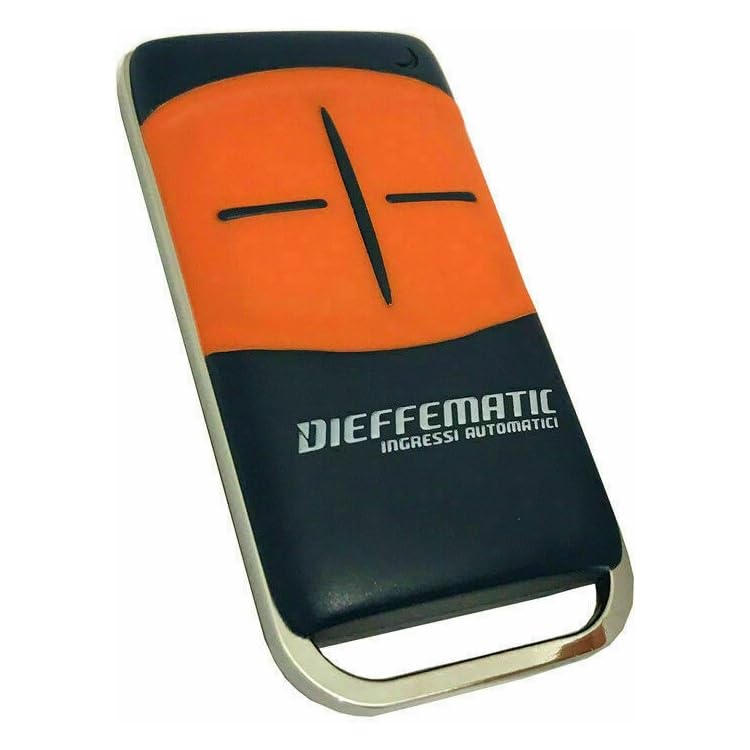
Image Description: This image displays the front of the Dieffematic EQUO-PLUS remote control, highlighting its buttons and the LED indicator.
4. Setup and Programming
The programming procedure for the EQUO-PLUS remote control typically involves pairing it with your existing receiver unit. It is crucial to refer to your specific receiver's manual for precise instructions, as steps can vary between different automation systems.
Common Programming Steps (General Guide):
- Access Receiver: Locate the programming button or switch on your receiver unit (e.g., gate opener, garage door opener control board). This button is often labeled 'PROG', 'LEARN', or 'MEMO'.
- Activate Learning Mode: Press and hold the programming button on the receiver until its LED indicator lights up or flashes, indicating it is in learning mode. This mode is usually active for a short period (e.g., 5-10 seconds).
- Transmit Code: Within the receiver's learning window, press and hold the desired button on your new Dieffematic EQUO-PLUS remote control for 2-3 seconds.
- Confirmation: The receiver's LED should change its state (e.g., flash rapidly, turn off, or light up steadily) to confirm successful pairing.
- Test: Release the button on the remote and test its operation. If successful, the controlled device should respond. If not, repeat the steps.
Note: Some systems may require a different programming sequence, specific timing, or multiple button presses. Always consult the manual of the device you intend to control for the most accurate programming instructions.
No official product videos were provided for embedding in this section.
5. Operating the Remote Control
Once successfully programmed, operating the Dieffematic EQUO-PLUS remote control is straightforward.
- Button Function: Each button on the remote control corresponds to a specific function or channel on your receiver. Press the desired button to activate the associated function (e.g., open gate, close garage door, stop).
- LED Indicator: The LED on the remote control will illuminate briefly when a button is pressed, indicating that a signal is being transmitted.
Range: Ensure you are within the operational range of your receiver for reliable signal transmission. Environmental factors and obstacles (e.g., walls, large vehicles) can reduce the effective range.
6. Maintenance
Battery Replacement:
The Dieffematic EQUO-PLUS remote control uses a standard coin cell battery (e.g., CR2032). When the LED indicator becomes dim, flashes inconsistently, or the remote's operational range significantly decreases, it is time to replace the battery.
- Open Casing: Carefully open the remote control casing. This usually involves prying it open with a small flat-head screwdriver or a similar tool at a designated notch or seam.
- Remove Old Battery: Remove the old battery, carefully noting its polarity (which side is facing up, typically the positive '+' side).
- Insert New Battery: Insert a new battery of the same type (CR2032), ensuring correct polarity. Incorrect polarity will prevent the remote from functioning.
- Close Casing: Snap the casing back together securely until it clicks into place.

Image Description: This diagram illustrates the typical process of opening the remote control casing and replacing the internal CR2032 battery.
Cleaning:
Clean the remote control with a soft, dry cloth. Do not use abrasive cleaners, solvents, or excessive moisture, as these can damage the electronics or casing.
7. Troubleshooting
| Problem | Possible Cause | Solution |
|---|---|---|
| Remote not working (no response from receiver) | Dead or low battery | Replace the battery (CR2032). |
| Remote not working (no response from receiver) | Not programmed correctly or programming lost | Repeat the programming steps (refer to Section 4 and your receiver's manual). |
| Reduced operational range | Low battery or environmental interference | Replace the battery. Check for sources of radio interference (e.g., other wireless devices, large metal objects). |
| LED on remote does not light up when button is pressed | Dead battery or faulty unit | Replace the battery. If the problem persists, contact customer support. |
| Remote activates wrong device or multiple devices | Incorrect programming or interference | Clear the remote from the receiver's memory (if possible, refer to receiver manual) and reprogram it. Ensure no other remotes are transmitting during programming. |
8. Specifications
- Model: Dieffematic EQUO-PLUS
- Frequency: 433 MHz
- Coding: Rolling Code
- Number of Buttons: (Typically 2 or 4, depending on variant)
- Battery Type: CR2032 (3V Lithium Coin Cell)
- Operating Temperature: -10°C to +50°C (approximate)
- ASIN: B07ZKLVRQ9
- Manufacturer Reference: 223542843326
Note: Specifications are subject to change without prior notice for product improvement.
9. Warranty Information
This Dieffematic product is covered by a standard manufacturer's warranty against defects in materials and workmanship. The warranty period typically lasts for 12 to 24 months from the date of purchase, as per local consumer protection laws.
What is covered: Manufacturing defects under normal use.
What is not covered: Damage caused by misuse, accidents, unauthorized repairs or modifications, normal wear and tear, battery depletion, or improper installation/programming.
For specific warranty terms and conditions, please refer to your purchase documentation or contact Dieffematic customer support. Proof of purchase is required for all warranty claims.
10. Customer Support
If you encounter any issues or have questions regarding your Dieffematic EQUO-PLUS remote control that are not addressed in this manual, please contact Dieffematic customer support.
Manufacturer: Dieffematic
Website: www.dieffematic.com (Note: This is a placeholder URL. Please refer to official Dieffematic documentation or packaging for actual contact details.)
Email: support@dieffematic.com (Note: This is a placeholder email.)
When contacting support, please have your product model (EQUO-PLUS) and ASIN (B07ZKLVRQ9) ready to help expedite the service process.