
1. Important Safety Instructions
Please read all safety and operating instructions carefully before using this television. Keep these instructions for future reference.
- Power Source: Connect the TV only to the power supply indicated on the label.
- Ventilation: Ensure proper ventilation. Do not block ventilation openings.
- Cleaning: Unplug the TV from the wall outlet before cleaning. Use a soft, dry cloth. Do not use liquid cleaners or aerosol cleaners.
- Water and Moisture: Do not use this TV near water, such as a bathtub, washbowl, kitchen sink, laundry tub, swimming pool, or in a wet basement.
- Heat: Position the TV away from heat sources such as radiators, heat registers, stoves, or other products (including amplifiers) that produce heat.
- Cables: Protect the power cord from being walked on or pinched, particularly at plugs, convenience receptacles, and the point where they exit from the TV.
- Lightning: Unplug this TV during lightning storms or when unused for long periods.
- Servicing: Do not attempt to service this TV yourself. Refer all servicing to qualified service personnel.
2. Product Overview
The CHIQ L40H7N is a 40-inch Full HD Smart TV designed to provide an immersive viewing experience with integrated smart features. It offers a resolution of 1080p and includes connectivity options such as Wi-Fi and Bluetooth.
Key Features:
- Full HD (1080p) Resolution: Delivers clear and detailed images.
- Smart TV Functionality: Access popular streaming services like Netflix, YouTube, and Prime Video.
- Integrated Wi-Fi and Bluetooth: For wireless connectivity and device pairing.
- Multiple Connectivity Ports: Includes 3 HDMI and 2 USB ports for various external devices.
- Triple Tuner: Supports DVB-T/T2/C/S/S2 for versatile broadcast reception.
- Dolby Audio: Enhanced sound experience.
- HDR10 Support: Provides improved contrast and color reproduction.
- Quad Core CPU: Ensures smooth performance for smart features and applications.

Image: Front view of the CHIQ L40H7N Smart TV, showcasing its slim bezel and display.
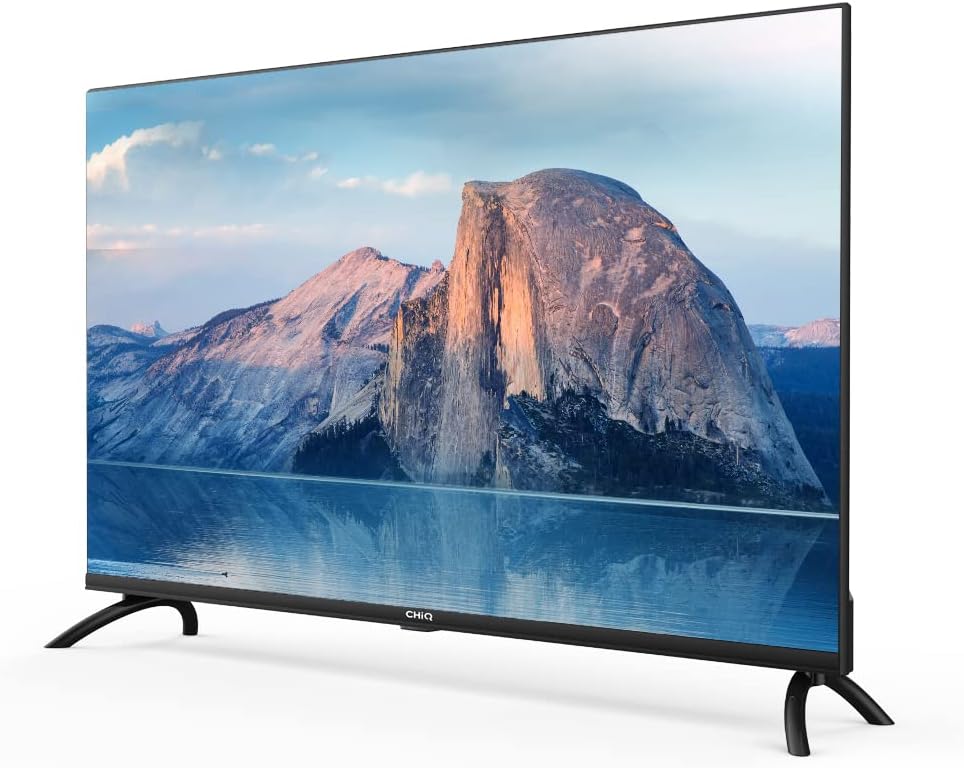
Image: Side view of the CHIQ L40H7N Smart TV, highlighting its thin profile.
3. Setup
3.1 Unpacking
- Carefully open the packaging and remove the TV and all accessories.
- Ensure all components are present: TV unit, remote control, batteries, power cord, stand components, and user manual.
- Retain the packaging materials for future transport or servicing.
3.2 Stand Installation
To install the TV stand:
- Place the TV face down on a soft, flat surface (e.g., a blanket or foam) to prevent screen damage.
- Align the stand legs with the corresponding slots on the bottom of the TV.
- Secure the stand legs using the provided screws. Ensure they are tightened firmly.

Image: Diagram showing the dimensions of the CHIQ L40H7N TV, including height with stand (568.9mm), width (900.3mm), and depth with stand (178.9mm).
3.3 Wall Mounting (Optional)
If you choose to wall mount your TV, please consult a professional installer and refer to the specific instructions provided with your wall mount bracket. Ensure the wall mount is compatible with the TV's VESA mounting pattern.
3.4 Connecting Peripherals
Connect your external devices to the TV's ports:
- HDMI: Connect Blu-ray players, game consoles, or set-top boxes to the HDMI ports (HDMI1, HDMI2, HDMI3).
- USB: Insert USB drives for media playback into the USB ports (USB1, USB2).
- Antenna/Cable: Connect your antenna or cable TV signal to the appropriate input.
- Ethernet: For a stable wired internet connection, connect an Ethernet cable to the LAN port.
3.5 Power Connection
After connecting all necessary cables, plug the power cord into the TV's power input, then into a wall outlet.
3.6 Initial Power On
Press the power button on the remote control or on the TV. Follow the on-screen instructions to complete the initial setup, including language selection, network connection, and channel scanning.
4. Operating the TV
4.1 Remote Control Functions
The remote control allows you to navigate the TV's features:
- Power Button: Turns the TV on or off.
- Volume +/-: Adjusts the volume level.
- Channel +/-: Changes TV channels.
- Input/Source: Selects the input source (HDMI, USB, TV).
- Navigation Buttons (Up/Down/Left/Right/OK): Navigates menus and confirms selections.
- Home/Smart Hub: Accesses the Smart TV interface.
- App Buttons: Dedicated buttons for Netflix, YouTube, Prime Video, etc.
4.2 Smart TV Features
Your CHIQ L40H7N TV provides access to a range of smart features and applications:
- Accessing Apps: Press the Home button or dedicated app buttons to launch applications like Netflix, YouTube, and Prime Video.
- App Store: Download and install additional applications from the integrated app store.
- Screen Mirroring: Cast content from compatible smartphones or tablets to your TV.

Image: The CHIQ Smart TV displaying the Netflix application interface, along with other streaming apps like YouTube and Prime Video.

Image: A CHIQ Smart TV screen showing a variety of content from streaming services, indicating a rich media experience.
4.3 Network Connection
To use Smart TV features, connect your TV to the internet:
- Wi-Fi: Go to Settings > Network > Wi-Fi, select your network, and enter the password.
- Ethernet: Connect an Ethernet cable from your router to the TV's LAN port. The TV will automatically detect the wired connection.
4.4 Bluetooth Connectivity
Pair Bluetooth devices like headphones or speakers:
- Enable Bluetooth on your external device and set it to pairing mode.
- On the TV, go to Settings > Remotes & Accessories > Bluetooth.
- Select your device from the list and follow the on-screen prompts to pair.
4.5 Input Selection
Press the 'Input' or 'Source' button on your remote to switch between connected devices (HDMI1, HDMI2, HDMI3, USB, TV Tuner).
4.6 Picture and Sound Settings
Adjust display and audio preferences via the Settings menu:
- Picture Mode: Choose from standard, dynamic, movie, or custom settings.
- Brightness/Contrast/Color: Fine-tune image quality.
- Sound Mode: Select audio presets like standard, music, movie, or custom.
- Dolby Audio: The TV supports Dolby Audio for enhanced sound.
- HDR10: Experience improved contrast and color with HDR10 content.

Image: The CHIQ L40H7N TV displaying a scene with the Dolby Audio logo, indicating support for enhanced sound.

Image: A split-screen comparison on the CHIQ L40H7N TV, demonstrating the visual improvement with HDR10 technology, showing richer colors and contrast.

Image: An illustration of a Quad Core CPU, representing the processing power within the CHIQ L40H7N TV for smooth operation.

Image: The CHIQ L40H7N TV positioned on a media console in a living room, showcasing its aesthetic integration into a home environment.
5. Maintenance
5.1 Cleaning the TV
To maintain the TV's appearance and performance:
- Screen: Gently wipe the screen with a soft, lint-free cloth. For stubborn marks, lightly dampen the cloth with water or a specialized screen cleaner (do not spray directly onto the screen).
- Cabinet: Wipe the TV cabinet with a soft, dry cloth. Avoid using abrasive cleaners or solvents.
- Always unplug the TV before cleaning.
5.2 Software Updates
Regular software updates can improve performance and add new features:
- Automatic Updates: Ensure your TV is connected to the internet for automatic updates.
- Manual Check: You can manually check for updates in the Settings menu (e.g., Settings > About > System Update).
6. Troubleshooting
If you encounter issues with your TV, refer to the following common problems and solutions:
- No Power:
- Check if the power cord is securely plugged into the TV and the wall outlet.
- Ensure the wall outlet is functioning by testing it with another device.
- Try pressing the power button on the TV itself, not just the remote. - No Picture, But Sound is Present:
- Check the input source. Ensure it matches the device you are trying to view (e.g., HDMI1 for a Blu-ray player).
- Verify that the external device is powered on and functioning correctly.
- Try a different HDMI cable or port. - No Sound, But Picture is Present:
- Check the volume level and ensure the TV is not muted.
- Verify audio output settings in the TV menu (e.g., internal speakers, external audio system).
- If using an external device, check its volume and audio settings. - Remote Control Not Working:
- Replace the batteries in the remote control.
- Ensure there are no obstructions between the remote and the TV's IR sensor.
- Point the remote directly at the TV. - Network Connection Issues:
- Restart your router and modem.
- Check Wi-Fi password if connecting wirelessly.
- If using a wired connection, ensure the Ethernet cable is properly connected.
If the problem persists, consult the CHiQ customer support or a qualified technician.
7. Specifications
Below are the technical specifications for the CHIQ L40H7N Smart TV:
| Feature | Specification |
|---|---|
| Brand | CHiQ |
| Model Name | L40H7N |
| Screen Size | 40 Inches |
| Display Technology | LCD |
| Resolution | 1080p (Full HD) |
| Refresh Rate | 60 Hz |
| Special Feature | Full HD, Smart TV, HDR10, Dolby Audio |
| Connectivity Technology | Bluetooth, Ethernet, HDMI (3 ports), USB (2 ports), Wi-Fi |
| Supported Internet Services | Amazon Instant Video, Netflix, YouTube |
| Compatible Devices | Laptop, Smart Speaker, Smart Watch, Tablet, Car Audio System, Cellphone |
| Power Consumption (SDR) | 47.0 W |
| Energy Efficiency Class (SDR) | G |
| Screen Diagonal (cm) | 100.3 cm |
| Screen Resolution (pixels) | 1920 x 1080 |
| Minimum Guaranteed Software Updates Until | 20-01-2030 |
| Minimum Guaranteed Spare Parts Until | 20-01-2029 |
For detailed energy information, please refer to the EPREL database: https://eprel.ec.europa.eu/qr/454406

Image: The EU Energy Label for the CHIQ L40H7N TV, showing an energy efficiency class G and consumption of 47 kWh/1000h.
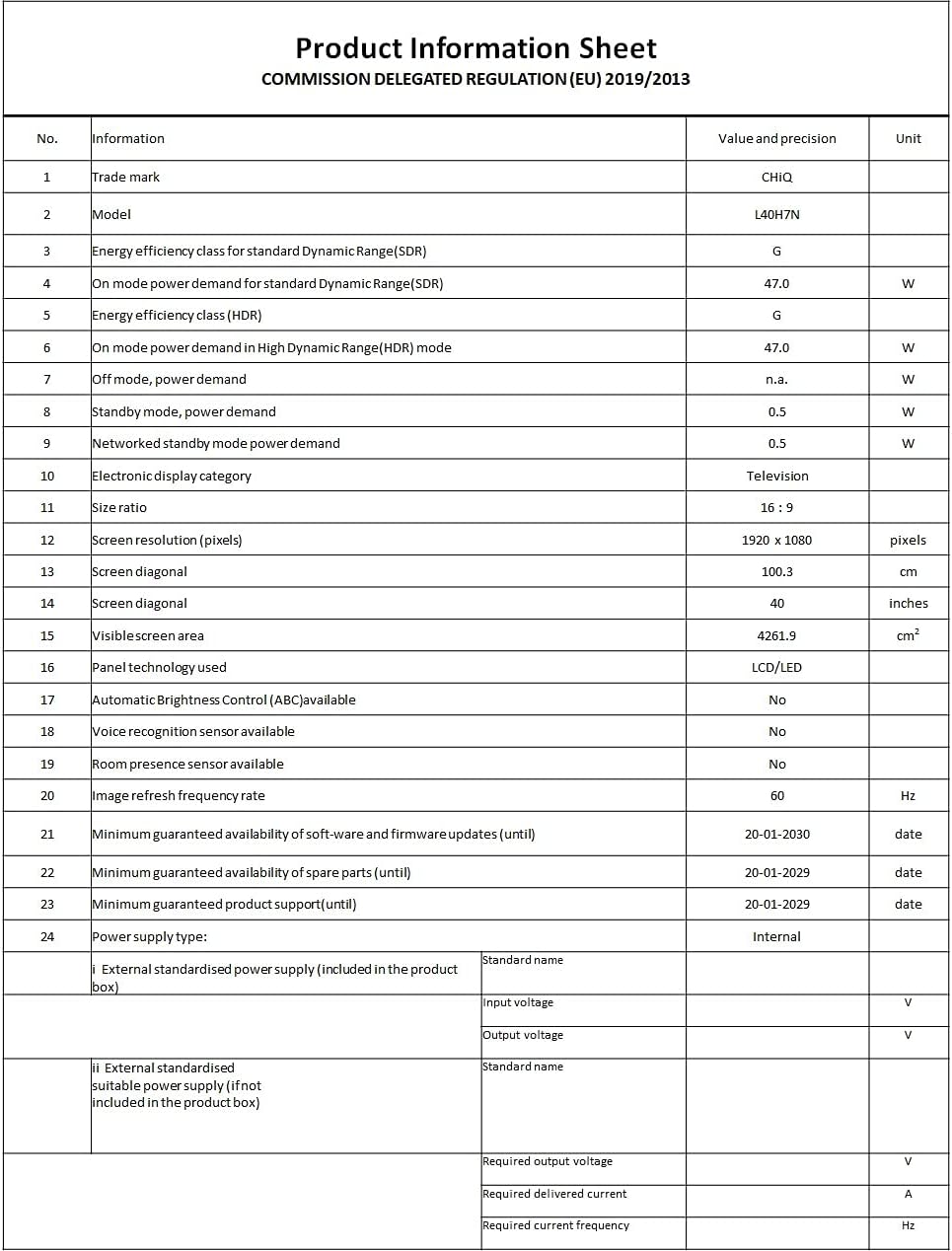
Image: A Product Information Sheet for the CHIQ L40H7N, detailing various specifications and compliance with COMMISSION DELEGATED REGULATION (EU) 2019/2013.
8. Warranty and Support
Your CHIQ L40H7N Smart TV comes with a manufacturer's warranty. Please refer to the warranty card included in your product packaging for specific terms and conditions, including warranty period and coverage details.
Customer Support:
For technical assistance, troubleshooting, or warranty claims, please contact CHiQ customer support. Contact information can typically be found on the CHiQ official website or in your product documentation.