
Introduction
Welcome to the Hot Pepper Ghost Smartphone User Manual. This guide provides essential information on setting up, operating, maintaining, and troubleshooting your new device. The Hot Pepper Ghost is a certified unlocked smartphone designed for compatibility with major carriers, featuring 3GB RAM, 32GB ROM, and an expandable microSD slot.
What's in the Box
- Hot Pepper Ghost Smartphone
- USB Cable
- (Note: Other accessories like charger, headphones, or SIM ejector tool may be sold separately or vary by region.)
Product Overview

Figure 1: Front view of the Hot Pepper Ghost smartphone, showcasing the display.
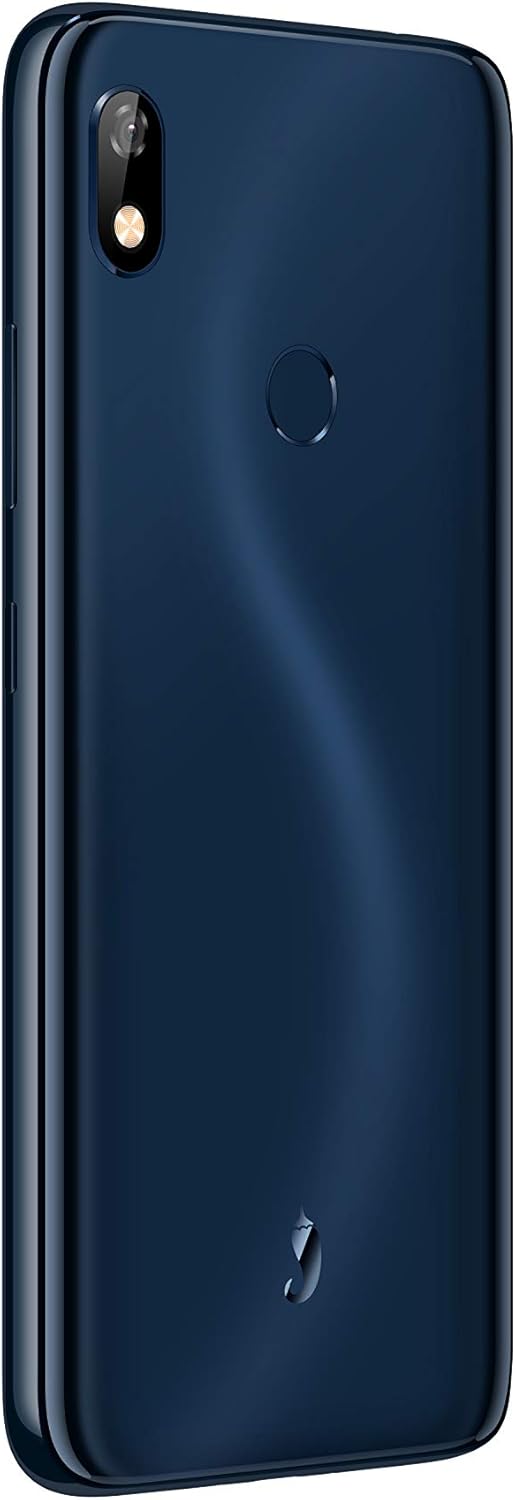
Figure 2: Back view of the Hot Pepper Ghost smartphone, showing the camera module and fingerprint sensor.
Key Components:
- Display: 6-inch LCD touchscreen.
- Rear Camera: Located on the upper left of the back panel.
- Fingerprint Sensor: Circular sensor located on the back panel for secure unlocking.
- Audio Jack: 3.5mm audio jack for headphones.
- Charging Port: Type-C charging port.
- Speakers: Located at the bottom of the device.
Setup
1. SIM Card Installation
- Locate the SIM tray on the side of your device.
- Insert a SIM ejector tool (if available) or a small paperclip into the small hole next to the tray to open it.
- Carefully pull out the SIM tray.
- Place your Nano-SIM card(s) into the designated slots on the tray, ensuring the gold contacts face down.
- Gently push the tray back into the phone until it clicks into place.
2. MicroSD Card Installation
The Hot Pepper Ghost supports expandable storage via a microSD slot.
- Follow steps 1-3 for SIM card installation to open the tray.
- Place your microSD card into the dedicated slot on the tray.
- Gently push the tray back into the phone.
3. Initial Power On and Charging
- To power on, press and hold the Power button (usually on the right side) until the Hot Pepper logo appears.
- For first use, it is recommended to fully charge the device. Connect the provided USB cable to the Type-C port on your phone and the other end to a compatible USB power adapter (not included) or computer.
- A full charge takes approximately 2.75 hours.
Operating Your Device
Basic Navigation (Android 9 Pie)
- Home Screen: Swipe left or right to access different home screens.
- App Drawer: Swipe up from the bottom of the screen to access all installed applications.
- Notifications & Quick Settings: Swipe down from the top of the screen to view notifications and quick settings toggles.
- Back, Home, Recent Apps: Use the on-screen navigation buttons at the bottom of the display.
Connectivity
- Wi-Fi: Go to Settings > Network & internet > Wi-Fi to connect to available networks. Supports 2.4GHz/5GHz.
- Bluetooth: Go to Settings > Connected devices > Bluetooth to pair with Bluetooth 5.0 compatible devices.
- Mobile Data: Ensure your SIM card is active and mobile data is enabled in Settings > Network & internet > Mobile network.
Camera Usage
- Open the Camera app from your home screen or app drawer.
- Tap the shutter button to take a photo.
- Switch between front and rear cameras using the camera toggle icon.
Fingerprint Sensor
- To set up your fingerprint, go to Settings > Security & location > Fingerprint.
- Follow the on-screen instructions to register your fingerprint(s).
- Once registered, you can use your fingerprint to unlock the device and authorize purchases.
Maintenance
Battery Care
- Avoid extreme temperatures, which can degrade battery life.
- Do not leave the phone charging for extended periods after it reaches 100%.
- For optimal battery health, try to keep the charge level between 20% and 80%.
Cleaning Your Device
- Use a soft, lint-free cloth to clean the screen and body.
- For stubborn smudges, slightly dampen the cloth with water or a screen cleaner.
- Avoid harsh chemicals or abrasive materials.
Software Updates
Your Hot Pepper Ghost smartphone runs on Android 9 Pie and receives regular updates for up to 2 years. These updates provide security patches, performance improvements, and new features.
- To check for updates, go to Settings > System > Advanced > System update.
- Ensure your device is connected to Wi-Fi and has sufficient battery life before performing an update.
Troubleshooting
If you encounter issues with your Hot Pepper Ghost smartphone, please refer to the following common solutions:
- Device Not Responding/Freezing: Press and hold the Power button for about 10-15 seconds to force a restart.
- Battery Draining Quickly: Check background app usage in Settings > Battery. Reduce screen brightness and disable unnecessary features like GPS or Bluetooth when not in use.
- Connectivity Issues (Wi-Fi/Bluetooth/Mobile Data):
- Toggle Wi-Fi/Bluetooth/Mobile Data off and on.
- Restart your phone.
- For Wi-Fi, try forgetting the network and reconnecting.
- For mobile data, ensure your APN settings are correct for your carrier (Settings > Network & internet > Mobile network > Advanced > Access Point Names).
- Call Quality Issues (Cannot Hear/Be Heard):
- Ensure nothing is blocking the microphone or earpiece.
- Test with headphones to determine if the issue is with the phone's speaker/mic or the network.
- Restart the device.
- Slow Performance/App Loading:
- Close unused apps running in the background.
- Clear app caches (Settings > Apps & notifications > [App Name] > Storage & cache > Clear cache).
- Ensure you have sufficient free storage space.
- Fingerprint Sensor Not Working:
- Ensure your finger is clean and dry.
- Re-register your fingerprint if the issue persists (Settings > Security & location > Fingerprint).
- Text Message Issues:
- Verify your mobile data connection.
- Check your messaging app settings.
- Contact your carrier if the issue persists across different messaging apps.
- Factory Reset: As a last resort, if software issues persist, you may perform a factory reset. Warning: This will erase all data on your phone. Back up important data before proceeding. Go to Settings > System > Advanced > Reset options > Erase all data (factory reset).
Specifications
| Feature | Detail |
|---|---|
| Model Number | HPP-GS1 |
| Operating System | Android 9 Pie |
| RAM | 3 GB |
| Internal Storage | 32 GB |
| Expandable Storage | microSD slot |
| Processor | Mediatek MTK6762 8-core |
| Screen Size | 6 Inches |
| Resolution | 1280 x 720 |
| Display Technology | LCD |
| Battery Capacity | 3850 mAh Lithium Ion (included) |
| Charging Time | Approx. 2.75 Hours |
| Wireless Technologies | Bluetooth 5.0, Wi-Fi (2.4GHz/5GHz) |
| Cellular Technology | 4G (Compatible with AT&T, Cricket, T-Mobile, Verizon) |
| Audio Jack | 3.5 mm |
| Charging Port | Type-C |
| Dimensions (L x W x H) | 6.43 x 3.06 x 0.37 inches (163.4mm x 77.7mm x 9.5mm) |
| Item Weight | 14.8 ounces (160g) |
| Color | Blue |
Warranty Information
The Hot Pepper Ghost smartphone comes with a US Warranty. For specific details regarding warranty coverage, terms, and conditions, please refer to the warranty card included with your product or visit the official Hot Pepper website. Keep your proof of purchase for warranty claims.
Support
For further assistance, technical support, or service inquiries, please contact Hot Pepper customer support.
- Online Support: Visit the official Hot Pepper website for FAQs, support articles, and contact forms.
- Email Support: Refer to your product packaging or the official website for email contact information.
- Phone Support: Refer to your product packaging or the official website for phone support numbers.
When contacting support, please have your model number (HPP-GS1) and purchase information ready.

