
Introduction

Figure 1: The CIOKS DC-4 Power Supply, a compact black unit designed for powering electronic devices.
The CIOKS DC-4 is a compact and versatile multi-output power supply designed to provide clean, isolated power for various electronic devices, particularly musical effects pedals. It features four isolated DC outlets, each offering selectable voltage options. The DC-4 can function as a standalone unit or as an expander for existing power supplies like the CIOKS DC7.
This manual provides essential information for the proper setup, operation, and maintenance of your CIOKS DC-4 Power Supply.
Key Features
- Ultra-low noise operation through multistage filtering.
- Four isolated DC outlets, each providing up to 6W of power.
- Each outlet offers four selectable voltage options: 9V, 12V, 15V, and 18V DC.
- Capable of delivering 660mA at 9V DC per outlet.
- Flexible power input options:
- 9V to 24V DC via non-polarized DC socket input.
- 9V to 12V AC via non-polarized DC socket input.
- 5V USB-C input for power banks or USB-C adapters.
- Includes mounting hardware for Pedaltrain and Templeaudio boards.
- Compatible with CIOKS Mini GRIP for drill-free mounting on Pedaltrain boards (Mini GRIP sold separately).
- Comes with 5 Flex cables for connecting devices.
- Global overload status LED indicator.
Setup Instructions
1. Unpacking and Inspection
Carefully remove the CIOKS DC-4 from its packaging. Inspect the unit for any signs of damage. Ensure all included accessories, such as Flex cables and mounting hardware, are present.
2. Powering the DC-4
The CIOKS DC-4 offers multiple ways to receive power:
- As an Expander (with CIOKS DC7 or similar): Connect the DC-4 to the 24V outlet of a CIOKS DC7 (or a Strymon Zuma 24V output) using a compatible cable.
- Standalone DC Power: Use a 9V to 24V DC power adapter (not included) and connect it to the non-polarized DC socket input.
- Standalone AC Power: Use a 9V to 12V AC power adapter (not included) and connect it to the non-polarized DC socket input.
- USB-C Power: Connect a 5V USB-C power bank or a USB-C wall adapter (not included) to the 5V USB-C input.
Note: Ensure the input power source meets the specified voltage and current requirements to prevent damage to the unit.

Figure 2: Side view of the CIOKS DC-4, illustrating the power input options (USB-C and DC/AC input) and the four DC output jacks.
3. Mounting (Optional)
The DC-4 can be mounted under most pedalboards. Use the included mounting hardware for Pedaltrain and Templeaudio boards. For drill-free mounting on Pedaltrain boards, the CIOKS Mini GRIP (sold separately) can be used.
Operating Instructions
1. Setting Output Voltages
Each of the four isolated DC outlets has a set of DIP switches to select the desired output voltage (9V, 12V, 15V, or 18V DC). Refer to the markings on the unit for the correct switch positions for each voltage. Ensure the power supply is disconnected from the main power source before adjusting DIP switches.
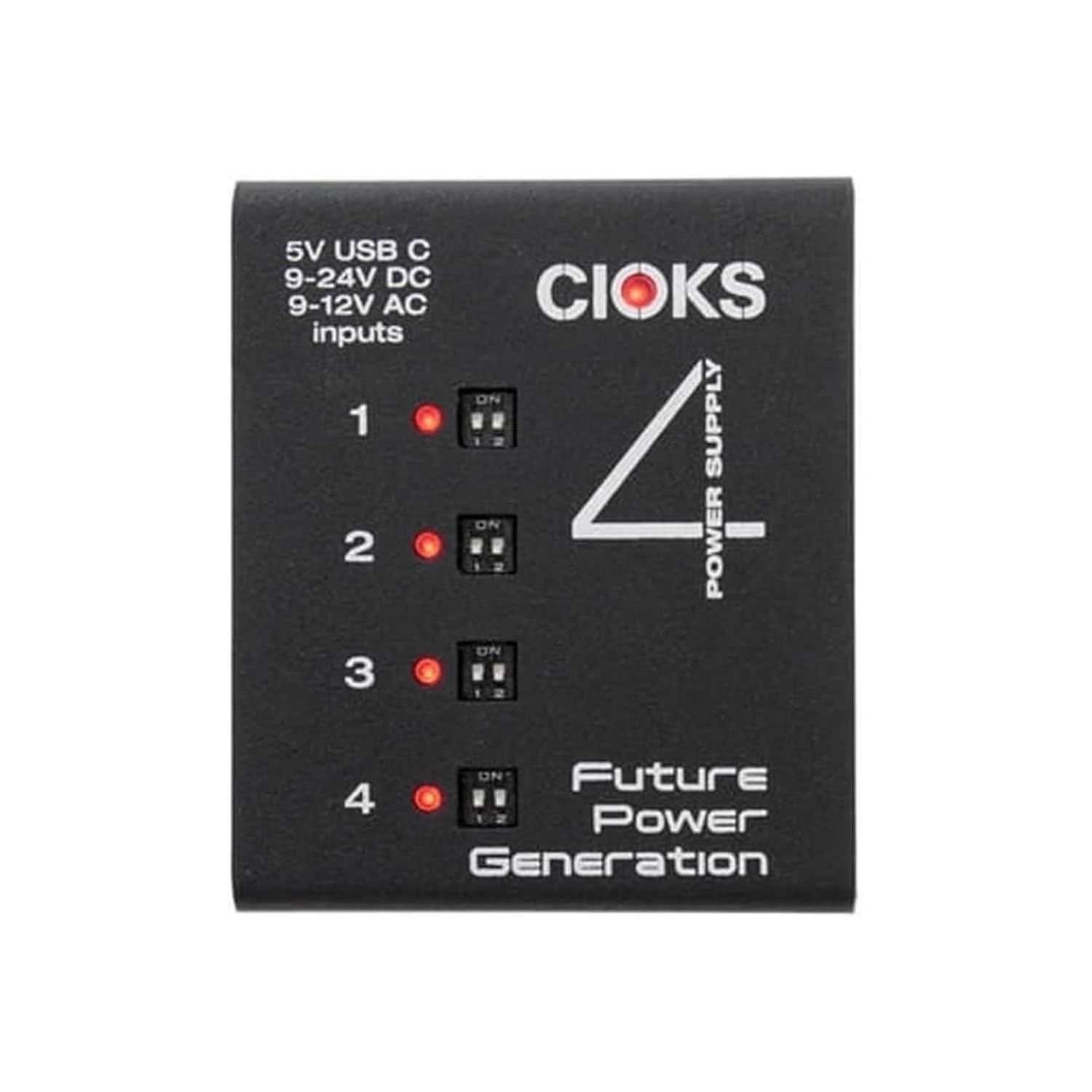
Figure 3: Top view of the CIOKS DC-4, highlighting the DIP switches for each of the four outputs, used to select the voltage.
2. Connecting Devices
Use the included Flex cables to connect your devices (e.g., effects pedals) to the DC output jacks. Ensure the voltage selected for each outlet matches the voltage requirement of the connected device. Also, verify the polarity of the Flex cable matches your device's requirements. CIOKS Flex cables are typically center-negative, which is standard for most pedals.
- Connect one end of a Flex cable to an output jack on the DC-4.
- Connect the other end of the Flex cable to the power input of your device.
- Repeat for all devices.
Caution: Connecting a device to an incorrect voltage or polarity can cause irreversible damage to the device or the power supply.
3. Powering On
Once all connections are secure and voltages are correctly set, connect the CIOKS DC-4 to its power source. The global overload status LED will indicate operational status. If an overload or short circuit occurs on an output, that specific output will shut down to protect the connected device and the power supply. The LED will indicate a fault condition.
Maintenance
- Cleaning: Clean the unit with a soft, dry cloth. Do not use liquid cleaners or solvents.
- Storage: Store the DC-4 in a dry environment, away from extreme temperatures and direct sunlight.
- Cable Inspection: Periodically inspect all power and Flex cables for any signs of wear or damage. Replace damaged cables immediately.
- No User-Serviceable Parts: The CIOKS DC-4 contains no user-serviceable parts. Do not attempt to open or repair the unit, as this will void the warranty.
Troubleshooting
| Problem | Possible Cause | Solution |
|---|---|---|
| No power to connected devices. |
|
|
| Noise or hum in audio signal. |
|
|
| Global overload LED indicates fault. |
|
|
Specifications
- Model: CIOKS 4
- Brand: Cioks
- Manufacturer: CIOKS
- Output Jacks: 4 isolated DC outlets
- Output Power per Outlet: Max 6W
- Output Current per Outlet: Max 660mA at 9V DC (or equivalent for higher voltages)
- Selectable Output Voltages: 9V, 12V, 15V, 18V DC
- Input Power (Non-polarized DC Socket): 9V-24V DC or 9V-12V AC
- Input Power (USB-C): 5V DC
- Dimensions: 2.91 x 1 x 3.46 inches (7.4 x 2.54 x 8.8 cm)
- Weight: 1 Pound (0.45 kg)
- Color: Black
- Material: Plastic
- Included Accessories: 5 Flex cables, mounting hardware for Pedaltrain and Templeaudio boards.
Warranty Information
The CIOKS DC-4 Power Supply comes with a 5-year worldwide warranty. This warranty covers defects in materials and workmanship under normal use. It does not cover damage caused by misuse, accident, unauthorized modification, or improper connection. Please retain your proof of purchase for warranty claims.
Support and Contact
For technical support, troubleshooting assistance beyond this manual, or warranty inquiries, please contact CIOKS customer service through their official website or authorized distributors. Refer to the official CIOKS website for the most up-to-date contact information.
Manufacturer: CIOKS
Website: www.cioks.com