
1. Setup
1.1 Unpacking and Initial Inspection
Carefully remove your Behringer MS-1 from its packaging. Inspect the unit for any signs of damage that may have occurred during transit. Retain all packaging materials for future transport or storage.
1.2 Power Connection
Connect the included power adapter to the DC IN port on the rear panel of the MS-1. Ensure the adapter is rated for 9V DC and 800mA. Plug the adapter into a suitable power outlet.

Image: Rear panel of the Behringer MS-1, highlighting the DC IN, audio, and MIDI/USB connections.
1.3 Audio Connections
- OUTPUT: Connect this 1/4" TS jack to your amplifier, mixer, or audio interface for main audio output.
- PHONES: Use this 1/4" TRS jack to connect headphones for private monitoring.
- EXT AUDIO IN: This 1/4" TS jack allows you to process external audio signals through the MS-1's filter and VCA sections.
1.4 MIDI and USB Connections
- MIDI IN/OUT/THRU: Use standard 5-pin DIN MIDI cables to connect the MS-1 to other MIDI devices for control or synchronization.
- USB: Connect the MS-1 to your computer via a USB cable for MIDI over USB functionality, allowing integration with Digital Audio Workstations (DAWs) and firmware updates.
1.5 Attaching the Keytar Handle (Optional)
The MS-1 includes a detachable handle for use as a keytar. Align the handle with the designated slot on the left side of the synthesizer and secure it firmly. This allows for mobile performance.
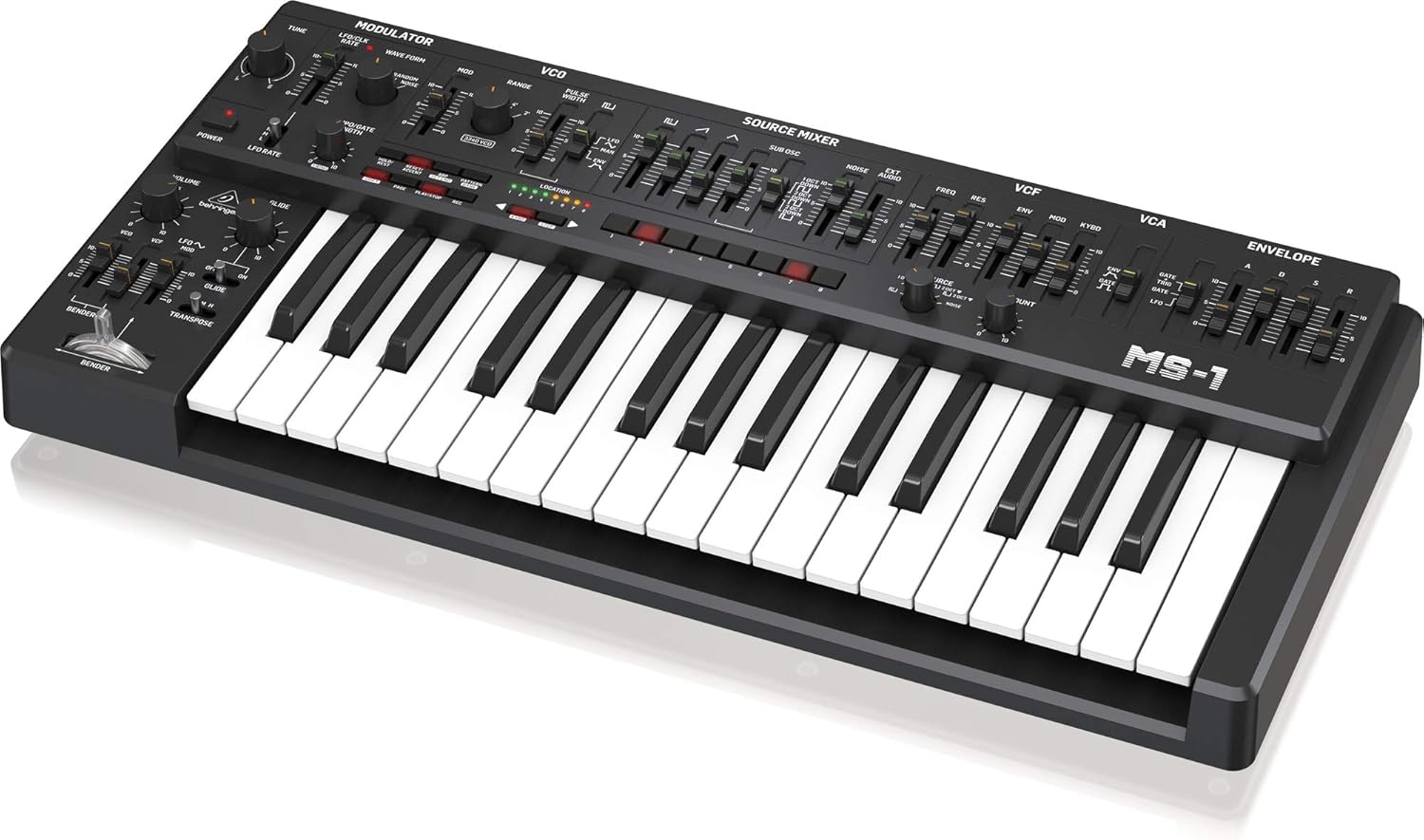
Image: The Behringer MS-1 shown with its optional keytar handle attached, ready for live performance.
2. Operating Your MS-1
2.1 Overview of Controls
The Behringer MS-1 features a logical layout of controls, divided into several key sections: Modulator, VCO, Source Mixer, VCF, VCA, and Envelope. It is equipped with 32 full-size keys for expressive playability.

Image: A comprehensive top-down view of the Behringer MS-1, displaying all knobs, sliders, and keys.
2.2 Modulator Section
- TUNE: Adjusts the overall pitch of the synthesizer.
- LFO/CLK RATE: Controls the speed of the Low-Frequency Oscillator (LFO) or the clock for the sequencer/arpeggiator.
- WAVE FORM: Selects the LFO waveform (e.g., triangle, square, random noise).
- MOD: Adjusts the modulation depth.
2.3 VCO (Voltage Controlled Oscillator)
- RANGE: Sets the octave range of the VCO.
- PULSE WIDTH: Modifies the pulse width of the square wave, affecting the timbre.
- The MS-1 utilizes a 3340 VCO, known for its classic analog sound.
2.4 Source Mixer
This section allows you to blend different sound sources before they enter the filter. Adjust the individual sliders for VCO, Sub Oscillator, Noise, and External Audio to create your desired initial sound.
2.5 VCF (Voltage Controlled Filter)
- FREQ (Cutoff Frequency): Determines the point at which the filter begins to attenuate frequencies.
- RES (Resonance): Boosts frequencies around the cutoff point, creating a distinctive


