1. Introduction
The Green Cell INV07 is a 300W Pure Sine Wave Power Inverter designed to convert 12V DC power from a car battery or similar DC source into 230V AC power. This device allows you to operate standard household appliances and electronic devices while on the go, providing a stable and clean power output suitable for sensitive electronics. This manual provides essential information for the safe and efficient use of your power inverter.
2. Safety Instructions
Please read all safety instructions carefully before operating the device. Failure to follow these instructions may result in electric shock, fire, or serious injury.
- Ventilation: Ensure the inverter is placed in a well-ventilated area. Do not block the ventilation openings or fan.
- Moisture: Do not expose the inverter to water, rain, snow, or spray.
- Environment: Avoid placing the inverter in direct sunlight, near heat sources, or in areas with flammable materials or gases.
- Voltage Compatibility: Connect the inverter only to a 12V DC power source. Do not attempt to connect it to a 24V or higher DC source.
- Load Capacity: Do not exceed the inverter's rated power output of 300W. Overloading can damage the inverter and connected devices.
- Polarity: Always connect the DC input cables with correct polarity (red to positive, black to negative). Incorrect polarity will damage the inverter.
- Grounding: Ensure proper grounding of the inverter if required by local regulations.
- Children: Keep the inverter out of reach of children.
- Maintenance: Do not attempt to open or modify the inverter. Refer all servicing to qualified personnel.
3. Package Contents
Verify that all items are present in the package:
- Green Cell INV07 300W Pure Sine Wave Power Inverter
- DC Connection Cables (Red and Black)
- User Manual
- Spare Fuses (2x)
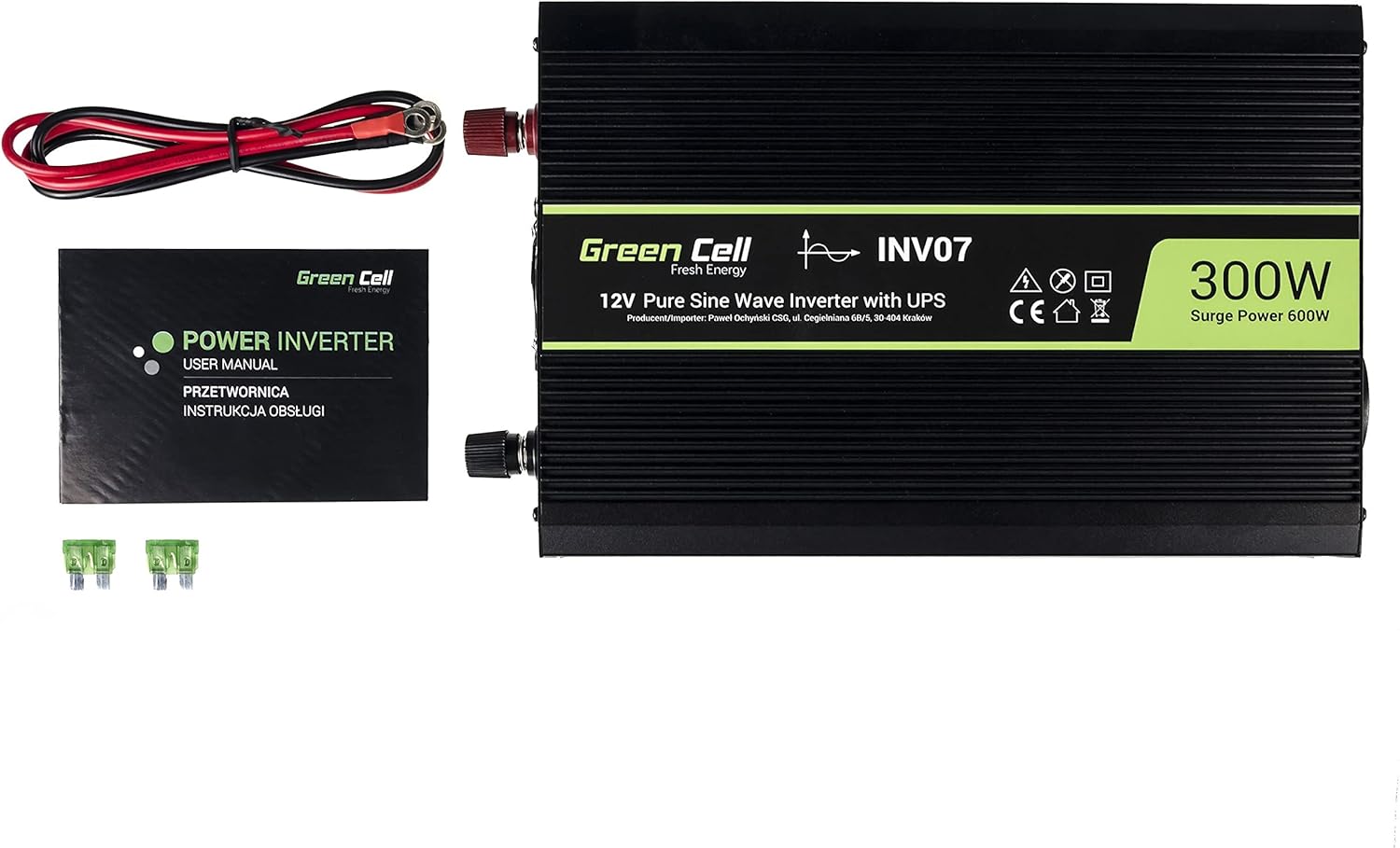
Figure 1: Overview of the Green Cell INV07 Power Inverter and its included accessories, including the inverter unit, DC connection cables, user manual, and two spare fuses.
4. Setup
Follow these steps to set up your Green Cell INV07 Power Inverter:
- Prepare the Inverter: Place the inverter on a stable, flat surface in a well-ventilated area, away from direct sunlight, heat, and moisture.
- Connect DC Input Cables:
- Ensure the inverter's power switch is in the OFF position.
- Connect the RED DC cable to the positive (+) terminal on the inverter.
- Connect the BLACK DC cable to the negative (-) terminal on the inverter.
- Tighten the terminal screws securely.
- Connect to Power Source:
- Connect the other end of the RED DC cable to the positive (+) terminal of your 12V DC battery.
- Connect the other end of the BLACK DC cable to the negative (-) terminal of your 12V DC battery.
- Ensure all connections are tight and secure to prevent loose connections and sparking.
- Connect AC Appliances: Once the inverter is connected to the DC power source, you can connect your AC appliances to the inverter's AC output socket. Ensure the total power consumption of your appliances does not exceed 300W.

Figure 2: The DC input side of the Green Cell INV07 inverter, showing the positive (+) and negative (-) terminals for battery connection and the cooling fan.
5. Operating Instructions
To operate your Green Cell INV07 Power Inverter:
- Power On: After connecting the inverter to the DC power source and your AC appliances, switch the inverter's ON/OFF switch to the ON position.
- Indicator Lights: Observe the indicator lights. The 'POWER' light (usually green) should illuminate, indicating the inverter is operational. If a 'FAULT' light (usually red) illuminates, refer to the Troubleshooting section.
- Using AC Output: Plug your 230V AC devices into the AC output socket.
- Using USB Output: If your inverter model includes a USB port, you can connect and charge compatible USB devices.
- Power Off: When you are finished using the inverter, first turn off and unplug all connected AC appliances. Then, switch the inverter's ON/OFF switch to the OFF position. Finally, disconnect the inverter from the DC power source.
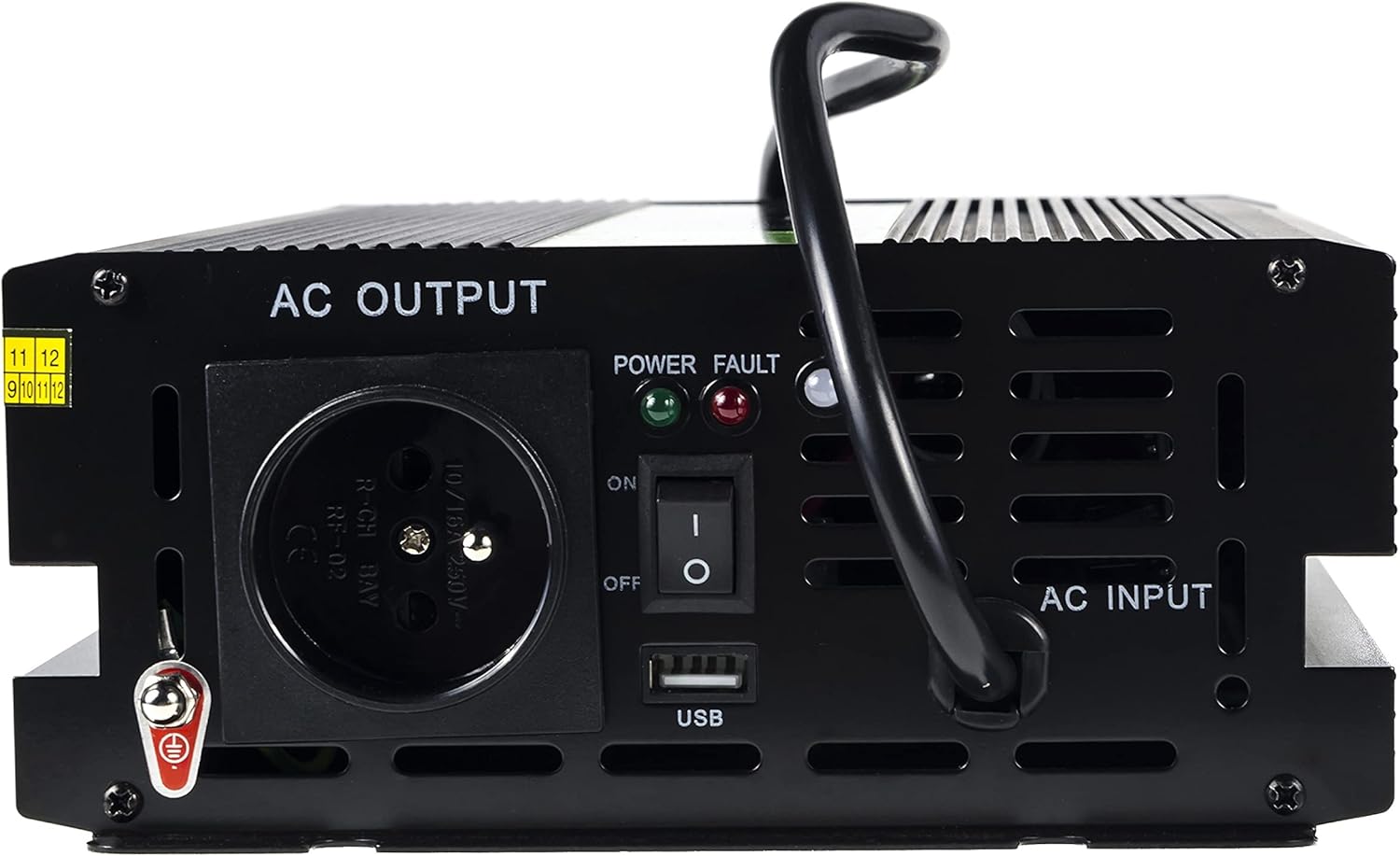
Figure 3: The AC output side of the Green Cell INV07 inverter, featuring the 230V AC socket, ON/OFF switch, Power and Fault indicator lights, and a USB charging port.
6. Maintenance
Proper maintenance ensures the longevity and reliable operation of your inverter:
- Cleaning: Keep the inverter clean and free from dust and debris. Use a dry, soft cloth for cleaning. Do not use liquid cleaners.
- Ventilation: Regularly check that the cooling fan and ventilation openings are clear and not obstructed. Blocked vents can lead to overheating.
- Connections: Periodically inspect the DC input cable connections to ensure they are tight and free from corrosion.
- Storage: When not in use for extended periods, store the inverter in a cool, dry place, disconnected from any power source.
7. Troubleshooting
If you encounter issues with your Green Cell INV07 inverter, refer to the following common problems and solutions:
- No Power Output / Inverter Not Turning On:
- Check DC input connections: Ensure the cables are securely connected to both the inverter and the battery, with correct polarity.
- Check battery voltage: Ensure the 12V DC battery has sufficient charge.
- Check fuses: The inverter has internal fuses. If the fuses are blown, they will need to be replaced (refer to a qualified technician).
- Ensure the inverter's ON/OFF switch is in the 'ON' position.
- Fault Light Illuminated:
- Overload: The total power consumption of connected devices exceeds 300W. Disconnect some devices to reduce the load.
- Overheating: The inverter may be too hot. Ensure proper ventilation and allow it to cool down.
- Low/High Input Voltage: The battery voltage may be too low or too high. Check the battery condition.
- Short Circuit: A short circuit in the connected appliance or wiring. Disconnect all appliances and check for faults.
- Weak or Intermittent Output:
- Check DC input connections for loose or corroded terminals.
- Ensure the battery is fully charged and capable of supplying the required current.
8. Specifications
| Brand | Green Cell |
| Model | INV07 |
| Input Voltage | 12 Volts DC |
| Output Voltage | 230 Volts AC |
| Continuous Power | 300W |
| Surge Power | 600W |
| Output Waveform | Pure Sine Wave |
| Number of AC Outlets | 1 |
| USB Output | Yes |
| Color | Black |
| Item Weight | 2850 Grams |

Figure 4: An angled view of the Green Cell INV07 Power Inverter, highlighting its compact design and robust casing.
9. Warranty and Support
The Green Cell INV07 Power Inverter comes with a 2-year warranty from the date of purchase. This warranty covers manufacturing defects and ensures the product meets its specified performance standards.
For technical support, warranty claims, or any questions regarding your product, please contact Green Cell customer service through their official website or the retailer where the product was purchased. Please have your product model number (INV07) and proof of purchase ready when contacting support.


