
Disney Frozen FR-v111V2
Disney Frozen II Sing Along Boombox with MP3 Connectivity and Microphone (Model FR-v111V2) Instruction Manual
Introduction
This manual provides comprehensive instructions for the safe and effective use of your Disney Frozen II Sing Along Boombox. Please read this manual thoroughly before operating the device and retain it for future reference. This product allows users to sing along to built-in music or connect an external MP3 player for a personalized musical experience.
Safety Information
- Recommended Age: This product is recommended for children aged 36 months to 8 years.
- Battery Safety: Always use the specified battery type (2 AA batteries). Ensure correct polarity when inserting batteries. Do not mix old and new batteries, or different types of batteries. Remove batteries if the device will not be used for an extended period.
- Choking Hazard: Small parts may be present. Not suitable for children under 3 years.
- Electrical Safety: Do not expose the device to water or moisture. Do not attempt to disassemble or modify the device.
- Volume Control: Advise children to use the device at a moderate volume to protect their hearing.
Product Features
- Integrated microphone for sing-along functionality.
- Ability to connect an external MP3 player for expanded music options.
- Compact and lightweight design with a flexible handle for portability.
- Features distinct Elsa & Anna display from Disney Frozen II.
Package Contents
- 1 x Disney Frozen II Sing Along Boombox
- 1 x Real Microphone (attached)
- 1 x Instruction Manual
Setup
Battery Installation
- Locate the battery compartment on the back of the boombox.
- Using a small screwdriver (not included), open the battery compartment cover.
- Insert 2 new AA batteries, ensuring correct polarity (+/-) as indicated inside the compartment.
- Replace the battery compartment cover and secure it with the screw.

Image Description: A detailed diagram illustrating the product's dimensions and identifying key components, including the battery compartment location on the back. It indicates that 2 AA batteries are required.
Microphone Connection
The microphone is pre-attached to the boombox. Ensure the microphone cable is securely plugged into its designated port on the side of the unit before use.
Operating Instructions
Powering On/Off
Locate the power switch, typically on the side or back of the unit. Slide it to the 'ON' position to power on the boombox. Slide it to 'OFF' to power off.
Playing Built-in Music
- Ensure the boombox is powered on.
- Press the 'Music' button (often indicated by a musical note icon) on the front of the unit to play the pre-loaded Disney Frozen II song.
- Press the 'Music' button again to stop or cycle through available built-in tracks.
Connecting an External MP3 Player
- Locate the AUX IN jack on the side of the boombox.
- Connect one end of a 3.5mm audio cable (not included) to your MP3 player or other audio device.
- Connect the other end of the audio cable to the AUX IN jack on the boombox.
- Ensure the boombox is powered on. Play music from your connected MP3 player. The audio will now play through the boombox speakers.

Image Description: An image demonstrating how to connect an external music device, such as a smartphone, to the boombox using an AUX cable for expanded music options.
Using the Microphone
- With music playing (either built-in or from an external device), hold the microphone close to your mouth.
- Press and hold the 'Microphone' button (often indicated by a microphone icon) on the front of the unit to amplify your voice through the boombox speakers.
- Release the button to stop amplifying your voice.
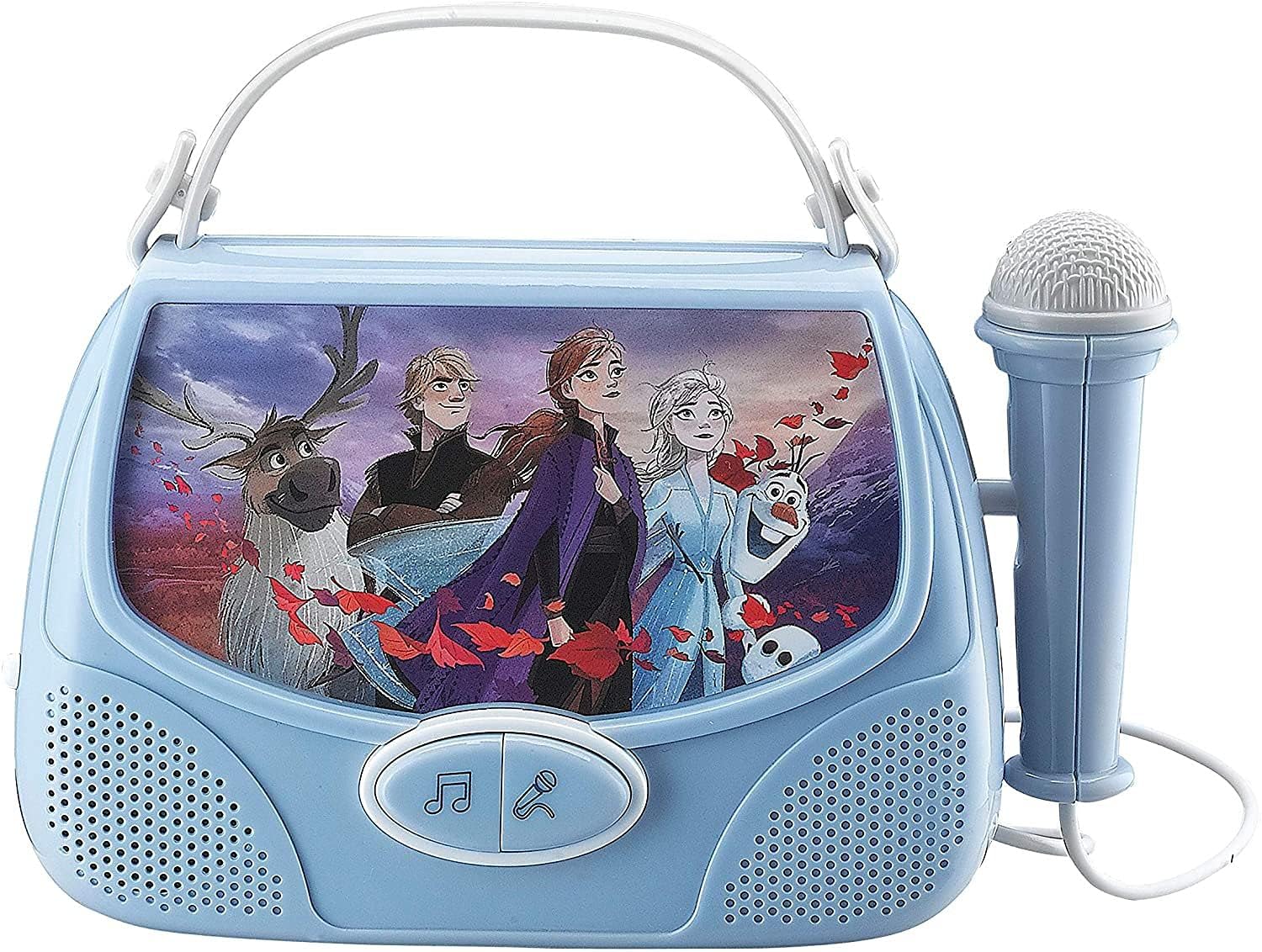
Image Description: Direct front view of the boombox, highlighting the character display, music and microphone buttons, and the attached microphone.
Volume Control
Adjust the volume using the 'Volume High' and 'Volume Low' switches or buttons, typically located on the side of the unit. For external MP3 players, you may also need to adjust the volume on the connected device.
Maintenance
- Cleaning: Wipe the surface of the boombox with a soft, dry cloth. Do not use abrasive cleaners or solvents.
- Storage: Store the device in a cool, dry place away from direct sunlight and extreme temperatures.
- Battery Care: Remove batteries if the unit is not in use for extended periods to prevent leakage.
Troubleshooting
| Problem | Possible Cause | Solution |
|---|---|---|
| No power | Batteries are dead or incorrectly inserted. | Replace batteries with new AA batteries, ensuring correct polarity. |
| No sound from speakers | Volume is too low; MP3 player not connected properly or its volume is low. | Increase volume on the boombox and/or the connected MP3 player. Ensure AUX cable is fully inserted. |
| Microphone not working | Microphone button not pressed; microphone cable loose. | Press and hold the microphone button. Ensure the microphone cable is securely connected. |
| Distorted sound | Volume too high; weak batteries. | Lower the volume. Replace batteries if they are low. |
Specifications
| Feature | Detail |
|---|---|
| Product Dimensions | 10 x 2.1 x 8 inches |
| Item Weight | 14.6 ounces |
| Model Number | FR-v111V2 |
| Manufacturer Recommended Age | 36 months - 8 years |
| Batteries Required | 2 AA batteries (not included) |
| Brand | Disney Frozen |
| Special Feature | Compact, MP3 Connectivity |
| Included Components | Real Microphone |
Warranty and Support
Specific warranty information for this product is not provided in the available data. For warranty claims or technical support, please refer to the contact information provided on the product packaging or contact the manufacturer, Tech 2 Go, directly.
Related documentsFR-v111V2


Ask a question about this manual
Ask about setup, troubleshooting, compatibility, parts, safety, or missing instructions. Manuals+ will review the question and use this page’s manual context to help answer it.