
Introduction
The Behringer PRO-1 is an analog synthesizer featuring a dual VCO design, 3 simultaneous waveforms, a 4-pole VCF, and an extensive modulation matrix. It is designed for creating a wide range of sounds, from classic retro tones to modern sonic textures. This manual provides essential information for setting up, operating, and maintaining your PRO-1 synthesizer.
Setup
Unboxing and Initial Inspection
Carefully remove the PRO-1 from its packaging. Inspect the unit for any signs of damage during transit. Ensure all included components, such as the power adapter and cables, are present.
Connections
The PRO-1 offers various connection options for integration into your studio or live setup.
- Power: Connect the supplied power adapter to the DC input on the unit and then to a suitable power outlet.
- Audio Output: Connect the 1/4-inch audio output to your mixer, audio interface, or amplifier.
- MIDI In: Use the 5-pin MIDI IN port to connect a MIDI controller or sequencer for external control.
- USB MIDI: Connect the USB port to your computer for MIDI control and data transfer.
- CV/Gate: Utilize the various CV/Gate inputs and outputs for modular synthesis integration.
Power On/Off
After making all necessary connections, turn on the PRO-1 using the power switch. Allow a few moments for the unit to initialize.
Operating Instructions
The Behringer PRO-1 features a comprehensive set of controls for sound design. Familiarize yourself with the layout and functions described below.
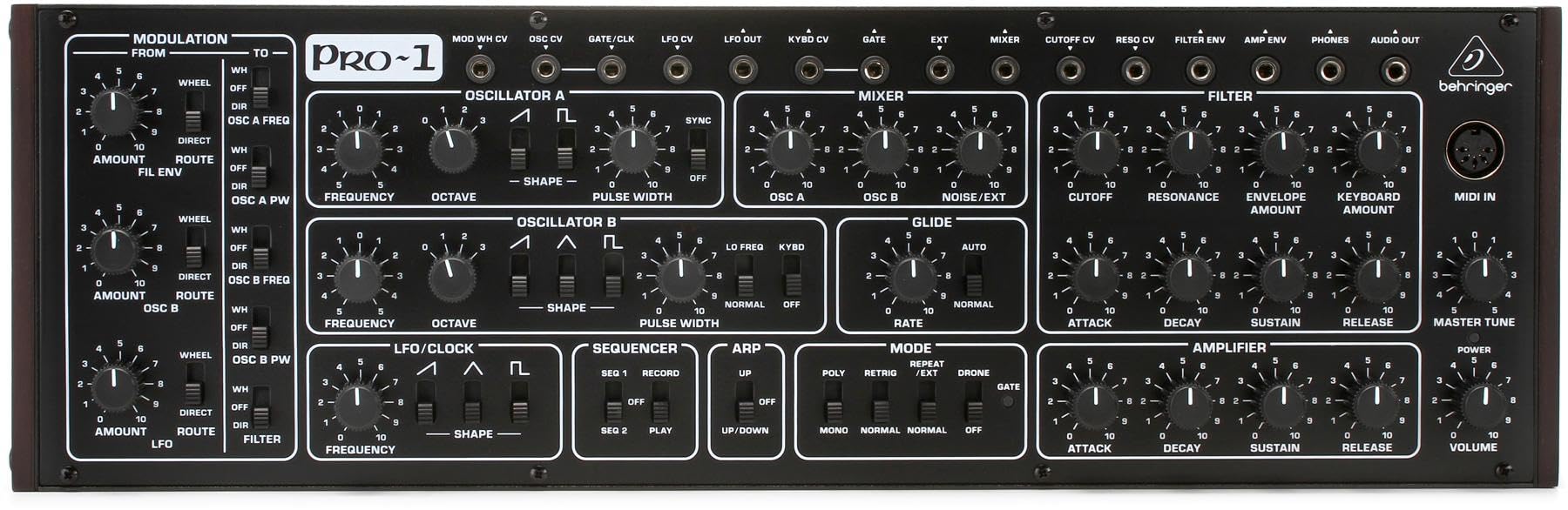
This image displays the full front panel of the Behringer PRO-1, showing all knobs, switches, and patch points for sound creation and modulation.
Oscillators (VCOs)
The PRO-1 features two voltage-controlled oscillators, OSC A and OSC B, which are the primary sound sources.
- Frequency: Adjusts the pitch of the oscillator.
- Octave: Selects the octave range for the oscillator.
- Shape: Selects the waveform (Saw, Triangle, Pulse). OSC A offers Saw/Pulse, OSC B offers Saw/Triangle/Pulse.
- Pulse Width: Modifies the width of the pulse waveform, creating timbral changes.
Filter (VCF)
The 4-pole voltage-controlled filter shapes the harmonic content of the sound.
- Cutoff: Determines the frequency at which the filter begins to attenuate harmonics.
- Resonance: Emphasizes frequencies around the cutoff point, creating a "wah" effect or self-oscillation at high settings.
- Envelope Amount: Controls how much the filter envelope affects the cutoff frequency.
- Keyboard Amount: Adjusts how much the keyboard's pitch affects the filter cutoff.
Amplifier (VCA)
The voltage-controlled amplifier controls the overall volume contour of the sound.
- Attack: Sets the time it takes for the sound to reach its peak volume after a key is pressed.
- Decay: Sets the time it takes for the sound to fall from its peak to the sustain level.
- Sustain: Determines the volume level held while a key is pressed after the decay phase.
- Release: Sets the time it takes for the sound to fade to silence after a key is released.
- Volume: Master output level control.
Modulation
The PRO-1 offers extensive modulation capabilities to add movement and expression to your sounds.
- LFO (Low Frequency Oscillator): Generates periodic waveforms to modulate parameters like pitch, filter cutoff, or pulse width. Controls include Frequency and Shape.
- Modulation Matrix: A flexible routing system allows you to assign various modulation sources (e.g., LFO, Filter Envelope, OSC B) to different destinations (e.g., OSC A Freq, OSC A PW, Filter).
- Wheel: Controls the amount of modulation applied via the modulation wheel (if connected via MIDI).
Sequencer and Arpeggiator
The built-in sequencer and arpeggiator provide tools for creating rhythmic patterns and melodic sequences.
- Sequencer: Record and play back melodic sequences. Controls include Record, Play, and sequence selection (SEQ 1, SEQ 2).
- Arpeggiator: Generates arpeggiated patterns from held notes. Controls include Mode (Up, Down, Up/Down) and Rate.
MIDI and USB Control
The PRO-1 can be controlled externally via MIDI (5-pin DIN) or USB MIDI, allowing integration with DAWs and other MIDI devices.
Maintenance
Cleaning
To clean the PRO-1, use a soft, dry cloth. Do not use abrasive cleaners, solvents, or waxes, as these can damage the finish and controls. Ensure the unit is powered off and disconnected from the power source before cleaning.
Storage
When not in use, store the synthesizer in a cool, dry place away from direct sunlight and extreme temperatures. Protect it from dust and moisture.
Troubleshooting
If you encounter issues with your Behringer PRO-1, refer to the following common problems and solutions:
- No Power:
- Ensure the power adapter is securely connected to the unit and a working power outlet.
- Verify the power switch is in the 'ON' position.
- Test the power outlet with another device.
- No Sound Output:
- Check all audio cable connections from the PRO-1 to your mixer/interface/amplifier.
- Ensure the master volume knob on the PRO-1 is turned up.
- Verify that the VCA Attack, Decay, Sustain, and Release settings are not set to produce an immediate silence.
- Check the volume levels on your mixer/interface/amplifier.
- Ensure a MIDI signal is being received if controlling externally, and that the correct MIDI channel is selected.
- MIDI Not Responding:
- Confirm MIDI cables are correctly connected (MIDI Out of controller to MIDI In of PRO-1).
- Check MIDI channel settings on both the PRO-1 and your MIDI controller/DAW.
- For USB MIDI, ensure the correct drivers are installed on your computer and the device is recognized.
For further assistance, please contact Behringer customer support.
Specifications
| Feature | Detail |
|---|---|
| Model Name | PRO-1 |
| Item Model Number | E9BHRPRO1 |
| Brand | Behringer |
| Product Dimensions (L x W x H) | 5.35 x 16.69 x 3.74 inches |
| Item Weight | 3.94 pounds (1787 Grams) |
| Body Material | Metal |
| Color | Black, White |
| Connector Type | 10-pin header |
| Included Components | Power Adapter, Monoprice 1/8 TRS Male to Two 1/4 TS Cable (3 Feet), 4751 Premier Series XLR 6 Female 16AWG Gold Plated Select 16 AWG Speaker Wire (100ft) |
| UPC | 653341344731 |
| Date First Available | October 21, 2019 |
Warranty Information
Behringer products are covered by a limited warranty. For detailed information regarding warranty terms, conditions, and registration, please refer to the official Behringer website or the warranty card included with your product. Keep your proof of purchase for warranty claims.
Support
For technical support, service, or additional product information, please visit the official Behringer website or contact their customer service department. You can also find more resources and product details on the Behringer Store on Amazon.


