
1. Introduction
Thank you for choosing the Ingco FBLI2001 20V 2.0Ah Lithium-Ion Battery Pack. This manual provides essential information for the safe and efficient use, maintenance, and storage of your battery pack. Please read these instructions carefully before first use and keep them for future reference. Proper use ensures optimal performance and extends the lifespan of your battery.
2. Product Overview
The Ingco FBLI2001 is a high-performance 20V 2.0Ah Lithium-Ion battery pack designed to power a wide range of Ingco P20S series cordless tools. It features advanced technology for durability and consistent power delivery.
Key Features:
- Voltage: 20V
- Capacity: 2.0 Ampere-hour (Ah)
- Battery Type: Lithium-Ion (Li-Ion)
- Compatibility: Fully compatible with all Ingco P20S Lithium-Ion cordless tools.
- LED Power Indicator: Integrated LED lights accurately display the remaining battery charge level.
- No Memory Effect: Lithium-Ion technology ensures the battery can be charged at any time without reducing its overall capacity.
- Protection Features: Built-in safeguards against over-discharge, overheating, and overload to ensure long battery life and safe operation.
- Balanced Charging Technology: Contributes to a very long operating time and extended battery lifespan.
Battery Pack Components:
The battery pack consists of high-quality lithium-ion cells, a protective casing, and an integrated circuit board for power management and safety.

Figure 2.1: Ingco FBLI2001 20V 2.0Ah Lithium-Ion Battery Pack. This image shows the overall design of the battery pack, highlighting its compact form and the 20V MAX SHARE branding.
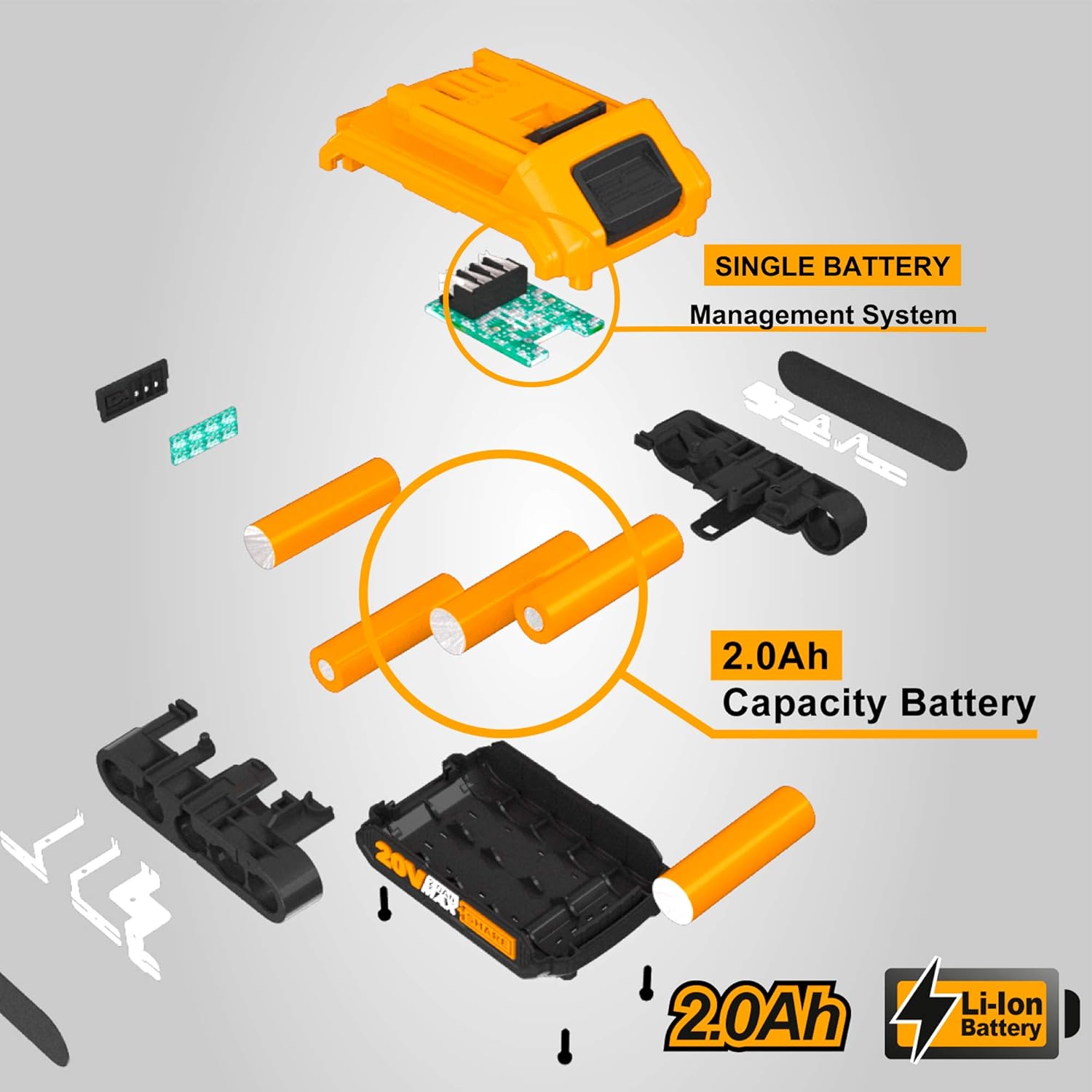
Figure 2.2: Exploded view of the Ingco FBLI2001 battery pack. This illustration details the internal components, including the 2.0Ah capacity battery cells and the single battery management system.
3. Setup
3.1 Initial Charging
Your battery pack is shipped with a partial charge. Before first use, it is recommended to fully charge the battery. Note: The charger is not included with this battery pack. Use only an Ingco P20S compatible charger (e.g., Ingco FCLI2001 or FCLI2003) to charge the battery.
- Connect the compatible Ingco charger to a power outlet.
- Slide the battery pack onto the charger until it clicks into place.
- Allow the battery to charge until the charger's indicator light signals a full charge (refer to your charger's manual for specific indications).
- Once fully charged, remove the battery pack from the charger.

Figure 3.1: Illustration of battery charging. This image demonstrates how the 20V 2.0Ah battery charges in approximately 1 hour when connected to a compatible Ingco charger.
3.2 Attaching to a Tool
To attach the battery pack to an Ingco P20S tool:
- Align the battery pack with the battery port on the tool.
- Slide the battery pack firmly into the tool until it clicks securely into place. Ensure it is fully seated and does not wobble.
3.3 Removing from a Tool
To remove the battery pack from an Ingco P20S tool:
- Locate the battery release button(s) on the tool.
- Press and hold the release button(s) while sliding the battery pack out of the tool.
4. Operating Instructions
4.1 Checking Battery Charge Level
The Ingco FBLI2001 battery pack is equipped with an LED power indicator to show the remaining charge. To check the charge level:
- Press the battery indicator button located on the battery pack.
- The LED lights will illuminate, indicating the charge level:
- 3 LEDs: Full charge
- 2 LEDs: Medium charge
- 1 LED: Low charge, recharge soon
- No LEDs: Battery is discharged, recharge immediately
4.2 General Usage Tips
- Always ensure the battery is fully charged before starting a task for optimal performance.
- Avoid completely discharging the battery, as this can reduce its overall lifespan. Recharge when the power indicator shows low charge.
- If the battery becomes excessively hot during use, allow it to cool down before recharging or continuing operation.
- This battery pack is designed for use with Ingco P20S series tools only. Do not attempt to use it with other brands or incompatible tools.

Figure 4.1: Ingco P20S system compatibility. This image illustrates that the FBLI2001 battery is part of the 20V MAX SHARE P20S system, compatible with over 150 Ingco tools.
5. Maintenance
5.1 Charging
- Always use an original Ingco P20S compatible charger. Using an incompatible charger may damage the battery and void the warranty.
- Charge the battery in a well-ventilated area, away from flammable materials.
- Do not charge batteries in extreme temperatures (below 0°C or above 40°C).
- Do not leave a fully charged battery on the charger for extended periods.
5.2 Storage
- Store the battery pack in a cool, dry place, away from direct sunlight and moisture.
- For long-term storage, it is recommended to store the battery with approximately 50% charge. Fully charged or fully discharged batteries can degrade faster.
- Keep the battery away from metal objects that could short-circuit the terminals.
- Store out of reach of children.
5.3 Cleaning
- Clean the battery pack's exterior with a soft, dry cloth.
- Do not use water, solvents, or harsh chemicals to clean the battery.
- Keep the battery terminals clean and free of debris to ensure good electrical contact.
5.4 Disposal
Lithium-Ion batteries should not be disposed of with household waste. They contain materials that can be harmful to the environment. Please dispose of the battery pack at an authorized recycling center or according to local regulations for battery disposal.
6. Troubleshooting
| Problem | Possible Cause | Solution |
|---|---|---|
| Battery not charging. | Charger not plugged in; faulty charger; battery too hot/cold; damaged battery. | Check power connection; try another charger; allow battery to reach room temperature; replace battery if damaged. |
| Battery not powering tool. | Battery not fully inserted; battery discharged; tool fault; battery damaged. | Ensure battery is clicked into place; recharge battery; test with another battery/tool; replace battery if damaged. |
| Battery overheats during use. | Heavy load on tool; prolonged use; high ambient temperature. | Reduce load; allow battery to cool down; operate in cooler conditions. The battery has built-in overheating protection. |
| LED indicator not working. | Battery fully discharged; internal fault. | Recharge battery; if still not working, the battery may be faulty and require replacement. |
If you encounter problems not listed here or if the suggested solutions do not resolve the issue, please contact Ingco customer support.
7. Specifications
| Specification | Value |
|---|---|
| Brand Name | Ingco |
| Model Number | FBLI2001 |
| Voltage | 20 Volts |
| Current | 2 Amperes |
| Battery Capacity | 2.0 Ah |
| Battery Cell Composition | Lithium-Ion |
| Reusability | Rechargeable |
| Number of Batteries | 1 (included) |
| Item Dimensions (LxWxH) | 8 x 6 x 13 cm |
| Battery Weight | 410 grams |
| Recommended Uses For Product | Power Tool |
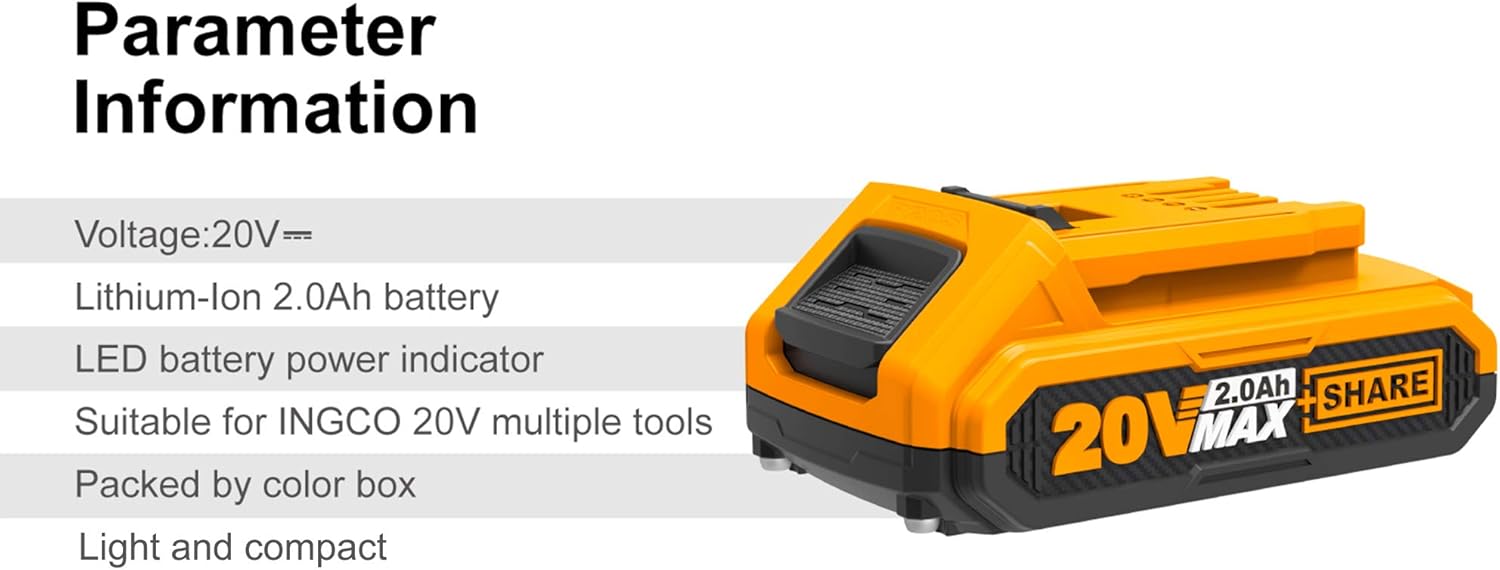
Figure 7.1: Parameter Information for Ingco FBLI2001. This image provides a summary of key specifications for the battery pack.
8. Warranty Information
Ingco products are manufactured to high-quality standards. This battery pack is covered by a limited warranty against defects in materials and workmanship. The specific terms and duration of the warranty may vary by region and retailer. Please retain your proof of purchase for warranty claims. For detailed warranty information, refer to the documentation provided with your purchase or contact your local Ingco dealer.
9. Support
For technical assistance, spare parts, or any questions regarding your Ingco FBLI2001 battery pack, please contact Ingco customer support or your authorized Ingco service center. Contact information can typically be found on the Ingco official website or on your product packaging.
Website: www.ingco.com (Please check for your regional website)


