
1. Introduction
This manual provides comprehensive instructions for the installation, operation, and maintenance of the Knowtek DSE5110 Automatic Start Control Module. The DSE5110 is designed to manage diesel and gas generating sets, particularly those with non-electronic engines, ensuring reliable automatic start and stop functionality.
Please read this manual thoroughly before attempting to install or operate the DSE5110 module to ensure safe and correct usage.
2. Product Overview
The DSE5110 is a robust control module featuring a user-friendly interface and comprehensive monitoring capabilities. It is housed in a durable enclosure suitable for various generator applications.
2.1 Front Panel Layout
The front panel includes an LCD display, navigation buttons, and status indicators for easy interaction and monitoring.

Figure 1: Front view of the DSE5110 control module, showing the display screen, control buttons, and status indicators.
2.2 Rear Connections
The rear of the module features clearly labeled terminals for power input, sensor connections, output relays, and communication ports.

Figure 2: Rear view of the DSE5110 control module, illustrating the various numbered terminal blocks for electrical connections.
2.3 Mounting Hardware
The module is supplied with mounting clips and a gasket to ensure secure installation and environmental protection.
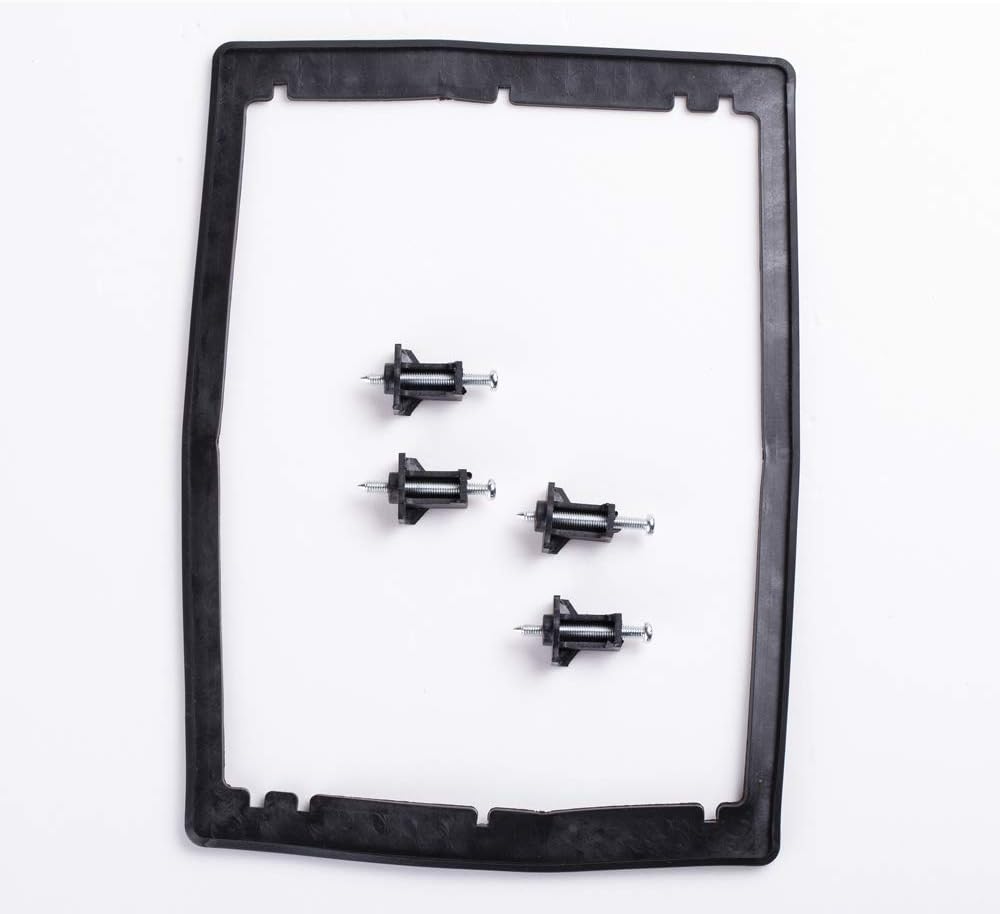
Figure 3: Included mounting gasket and screws for panel installation of the DSE5110 module.
3. Key Features
The DSE5110 module offers a range of features for effective generator management:
- Automatic start and stop control for diesel and gas generating sets.
- Comprehensive engine monitoring and protection.
- Ability to monitor under speed and over speed conditions.
- Charge failure detection.
- Emergency stop input.
- Low oil pressure and high engine temperature protection.
- Fail to start and fail to stop alarms.
- Loss of speed sensing signal detection.
- User-friendly interface with LCD display.
4. Setup and Installation
Proper installation is crucial for the reliable operation of the DSE5110 module. It is recommended that installation be performed by qualified personnel.
4.1 Mounting
- Cut a panel opening of the specified dimensions (refer to specifications section).
- Insert the DSE5110 module into the opening from the front.
- Secure the module using the provided mounting clips and screws from the rear of the panel. Ensure the gasket is properly seated for environmental sealing.
4.2 Wiring
All wiring must comply with local electrical codes and standards. Refer to the wiring diagrams provided with the product packaging for detailed connection instructions.
- Power Supply: Connect the module to a stable DC power source (typically 8V to 35V DC).
- Engine Sensors: Connect engine sensors (oil pressure, water temperature, speed sensor) to their respective inputs.
- Fuel Solenoid/Starter Motor: Connect the fuel solenoid and starter motor to the appropriate output relays.
- Emergency Stop: Wire the emergency stop button to the dedicated input.
- Generator Output: Connect generator voltage and current sensing inputs as required for monitoring.
Caution: Ensure all power is disconnected before performing any wiring to prevent electrical shock or damage to the module.
5. Operating Instructions
The DSE5110 module provides intuitive control over your generator set.
5.1 Control Modes
- STOP Mode (Red 'O' button): Disables the generator set and clears any active alarms.
- MANUAL Mode (Hand button): Allows manual starting and stopping of the generator set. Press the green 'I' button to start, red 'O' button to stop.
- AUTO Mode (AUTO button): Enables automatic operation. The module will start and stop the generator based on configured remote start signals or utility power status.
- TEST Mode (Plus/Minus buttons): Used for testing specific functions or parameters. Refer to the detailed programming manual for advanced test procedures.
5.2 Starting the Generator (Manual Mode)
- Ensure the module is in STOP mode.
- Press the MANUAL button.
- Press the Green 'I' button to initiate the start sequence. The engine will crank and run.
5.3 Stopping the Generator
To stop the generator in any mode, press the Red 'O' button. In AUTO mode, the generator will stop automatically when the start condition is removed.
6. Maintenance
The DSE5110 module is designed for minimal maintenance. However, regular checks are recommended to ensure optimal performance and longevity.
- Cleaning: Keep the front panel clean and free from dust and debris. Use a soft, dry cloth. Do not use abrasive cleaners or solvents.
- Connections: Periodically check all wiring connections for tightness and signs of corrosion.
- Firmware: Ensure the module's firmware is up to date. Refer to the manufacturer's website for updates and instructions.
- Environmental Conditions: Ensure the operating environment remains within the specified temperature and humidity ranges.
7. Troubleshooting
This section provides guidance on common issues encountered with the DSE5110 module. For complex problems, contact technical support.
| Problem | Possible Cause | Solution |
|---|---|---|
| Module does not power on | No DC supply; Blown fuse; Incorrect wiring | Check battery connections; Inspect fuses; Verify wiring against diagram. |
| Engine fails to start | Low fuel; Low battery voltage; Emergency Stop active; Engine fault (e.g., low oil pressure, high temperature) | Check fuel level; Charge/replace battery; Reset Emergency Stop; Check engine fault indicators and address underlying issue. |
| Engine stops unexpectedly | Engine protection activated (e.g., over speed, low oil pressure, high temperature); Fuel supply interruption | Identify active alarm on display; Address the specific engine fault; Check fuel supply. |
| Incorrect readings on display | Faulty sensor; Incorrect sensor calibration | Check sensor wiring and integrity; Recalibrate sensors if necessary (refer to programming manual). |
8. Technical Specifications
Below are the general specifications for the Knowtek DSE5110 Generator Control Module:
- Model: DSE5110
- Brand: Knowtek
- Material: Metal
- Color: Black
- Item Weight: 0.94 Kilograms
- Display Type: LCD or LED
- Manufacturer: KNOWTEK
- Unit Count: 1.0 Count
- Operating Voltage: Typically 8V to 35V DC (refer to product label for exact range)
- Operating Temperature: -30°C to +70°C (approximate, refer to product label)
9. Warranty and Support
For warranty information, technical support, or service inquiries, please refer to the documentation included with your purchase or contact Knowtek customer service through their official channels. Keep your purchase receipt as proof of purchase.
For further assistance, visit the Knowtek Store on Amazon.