
NOLYTH CT17
NOLYTH External DVD/CD Drive User Manual
Model: CT17 | Brand: NOLYTH
1. Introduction
This manual provides comprehensive instructions for the NOLYTH External DVD/CD Drive (Model CT17). This versatile device allows you to read and write CDs and DVDs, and features integrated SD, TF card slots, and two USB 3.0 ports for enhanced connectivity. It is designed for ease of use and broad compatibility across various operating systems.
Key features include:
- Multifunctional Design: Functions as an external CD/DVD reader and burner, with additional SD/TF card slots and 2 USB 3.0 ports.
- High-Speed Performance: Supports high-speed reading and writing for both CDs (up to 24x) and DVDs (up to 8x).
- Plug and Play: No additional drivers or software required for most operating systems.
- Wide Compatibility: Compatible with Windows (11/10/8.1/7/XP), macOS (all versions), and Linux.
- Portable and Compact: Ultra-slim and lightweight design, ideal for use on the go.
- Includes Carry Case: Comes with a high-quality CD case for convenient storage and protection.
2. Product Overview and Features
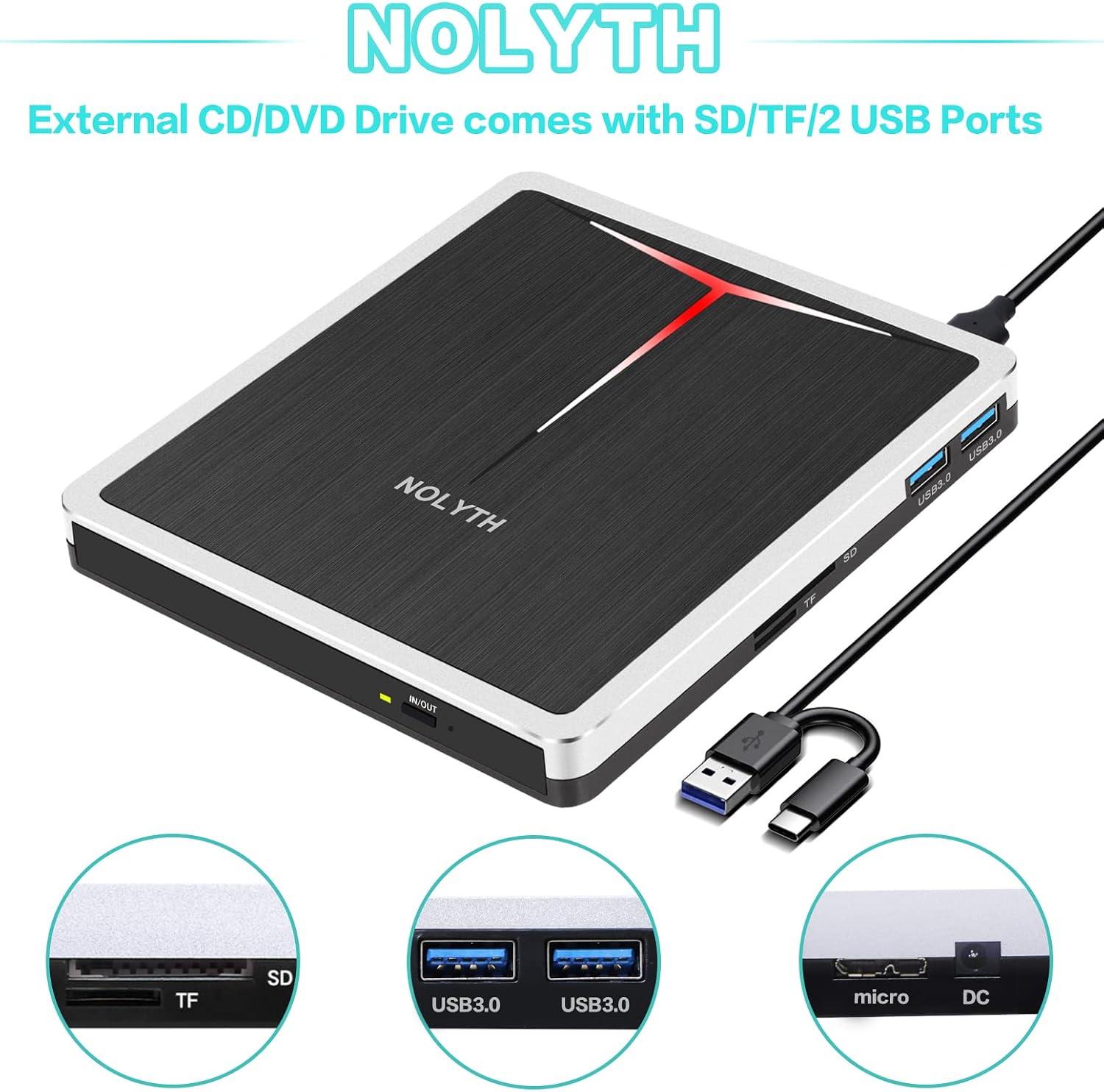
The NOLYTH External DVD/CD Drive features dedicated slots for SD and TF cards, along with two USB 3.0 ports, providing versatile connectivity options for various media and peripherals.

Engineered with a new core, the drive offers reliable performance with features such as noise reduction, error correction, shock proofing, high-speed data transfer, and a lightweight build.
The NOLYTH external drive is designed for robust performance and convenience. It supports a wide range of disc formats including CD±R, DVD-RW, DVD±R, CD-ROM, DVD-ROM, DVD-R DL, VCD-ROM, and DVD±RW. The integrated card slots and USB ports allow for easy data transfer from SD and TF cards, and connection of other USB devices.
3. Setup Guide
3.1 Connecting the Drive
The NOLYTH External DVD/CD Drive is designed for simple plug-and-play operation. Follow these steps to connect it to your computer:
- Locate an available USB or USB-C port on your laptop or desktop computer.
- Connect the USB cable from the NOLYTH drive to the USB or USB-C port on your computer.
- The drive should be automatically recognized by your operating system. No additional software or drivers are typically required.

The drive connects easily to your laptop or desktop via a single USB cable, providing immediate functionality.

If your computer cannot supply sufficient power through a single data cable, an extra power supply cord (not included) can be used. This is particularly useful for some desktop PCs or older laptops.
3.2 Power Supply (Optional)
For optimal performance, especially with older computers or when experiencing power-related issues, you may use an additional USB power supply cable (not included). Connect this cable to the micro DC port on the drive and to a USB power source (e.g., a power bank or a USB wall adapter).
4. Operating Instructions
4.1 Reading and Writing Discs
Once connected, the drive is ready to read or write discs:
- Press the eject button on the drive to open the disc tray.
- Carefully place a CD or DVD onto the tray, ensuring it is centered.
- Gently push the tray back into the drive until it clicks shut.
- Your computer's operating system will typically prompt you with options for the disc (e.g., play movie, open folder, burn files).
- For burning discs, use appropriate burning software on your computer.

The drive supports various functions including playing music and movies, backing up data, installing software, and burning/copying CDs/DVDs.
4.2 Using SD/TF Card Slots
Insert your SD or TF card into the corresponding slot on the drive. The card will appear as a removable drive on your computer, allowing you to access, transfer, or save files.
4.3 Using USB 3.0 Ports
The two USB 3.0 ports on the drive can be used to connect other USB devices such as flash drives, mice, or keyboards. These ports provide high-speed data transfer capabilities.
5. Compatibility
The NOLYTH External DVD/CD Drive offers broad compatibility with a variety of operating systems and hardware platforms:
- Operating Systems: Windows 11 / 10 / 8.1 / 7 / XP, all versions of macOS, and Linux.
- Hardware Platforms: PC, Laptop, Mac (MacBook Pro/Air, iMac, Mac Mini), Desktop computers.
Note: This drive does not support Chromebook, TV, iPad, truck, or car systems.
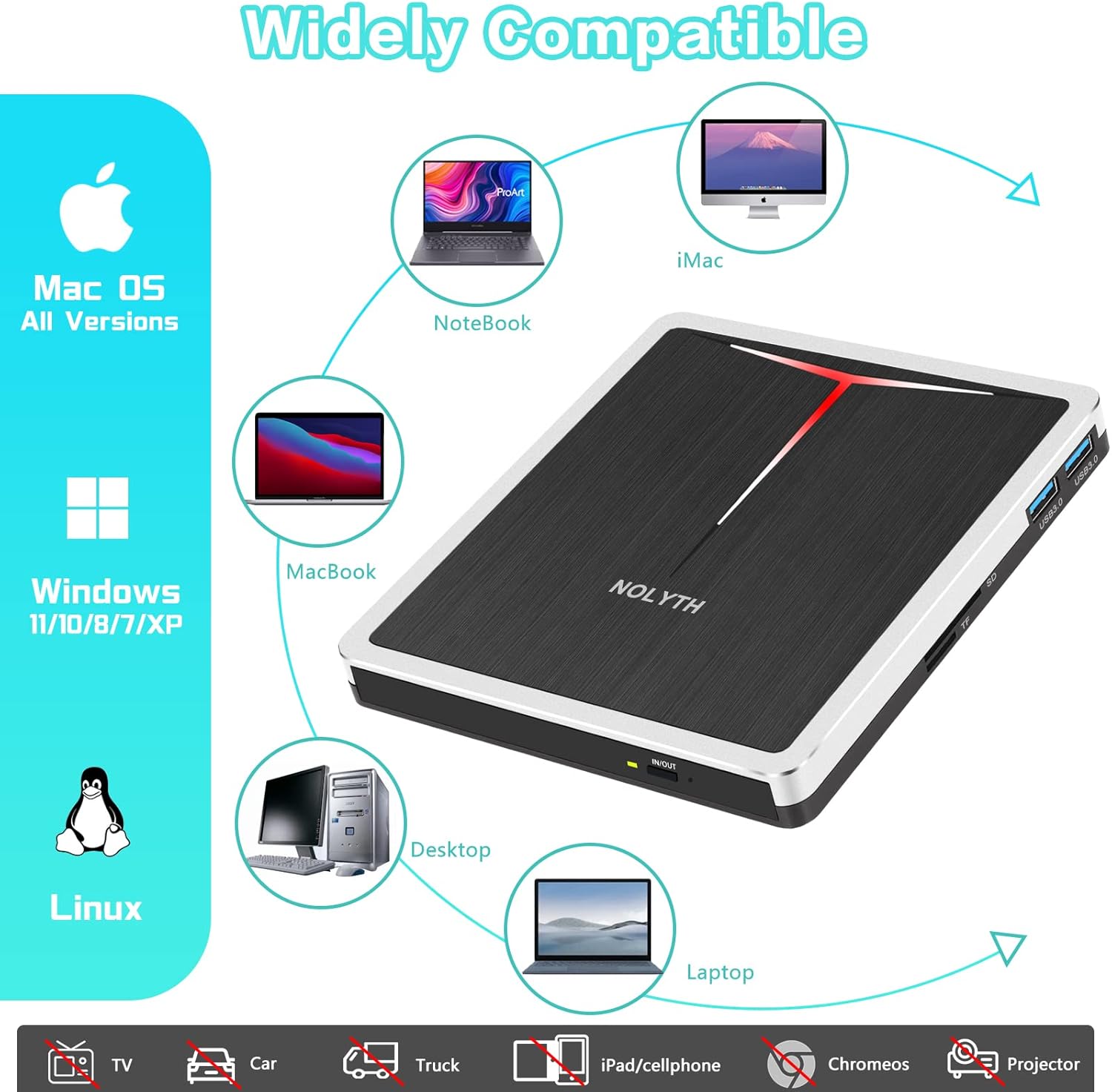
The drive is widely compatible with major operating systems and computer types, ensuring versatile use.
6. Specifications
| Feature | Specification |
|---|---|
| Brand | NOLYTH |
| Model Number | CT17 |
| Color | Silver/Black |
| Operating System Compatibility | Windows, macOS, Linux |
| Hardware Platform | PC, Laptop, Mac |
| Write Speed | DVD: 8x, CD: 24x |
| Read Speed | DVD: 8x, CD: 24x |
| Hardware Interface | USB 3.0, USB 3.0 Type-C |
| Connector Type | USB |
| Device Compatibility | Laptop, Desktop |
| Dimensions (L x W x H) | 14.9 x 14.1 x 1.9 cm |
| Product Weight | 350 Grams |
| Special Features | 2 USB Ports, SD Card Slot, TF Slot |
| Material | Aluminum |
| UPC | 192188210118 |
7. Maintenance
To ensure the longevity and optimal performance of your NOLYTH External DVD/CD Drive, follow these simple maintenance guidelines:
- Cleaning: Gently wipe the exterior of the drive with a soft, dry cloth. Avoid using liquid cleaners or abrasive materials. For the disc tray, use a soft, lint-free cloth to remove dust.
- Storage: When not in use, store the drive in its provided protective case to prevent dust accumulation and physical damage. Keep it in a cool, dry place away from direct sunlight and extreme temperatures.
- Handling Discs: Always handle discs by their edges to avoid fingerprints and scratches on the data surface. Ensure discs are clean and free of damage before inserting them into the drive.
- Cable Care: Avoid bending or twisting the USB cable excessively. Store the cable neatly to prevent tangles and damage.
8. Troubleshooting
If you encounter issues with your NOLYTH External DVD/CD Drive, try the following troubleshooting steps:
- Drive Not Recognized:
- Ensure the USB cable is securely connected to both the drive and your computer.
- Try connecting the drive to a different USB port on your computer.
- Restart your computer.
- If using a desktop PC, try connecting to a USB port on the back of the computer (directly on the motherboard) rather than front panel ports.
- If your computer's USB port cannot provide sufficient power, use an additional USB power supply cable (not included) connected to a power source.
- Disc Not Reading/Writing:
- Ensure the disc is clean and free of scratches or damage.
- Verify that the disc is placed correctly on the disc tray, data side down.
- Try a different disc to rule out a faulty disc.
- Ensure you have appropriate software installed for playing or burning discs (e.g., VLC Media Player for playback, ImgBurn for burning).
- Slow Performance:
- Ensure you are connected to a USB 3.0 port on your computer for optimal speed.
- Close any unnecessary applications running in the background that might be consuming system resources.
If these steps do not resolve the issue, please refer to the Warranty and Support section for further assistance.
9. Warranty and Support
NOLYTH is committed to providing excellent customer service and support for your external DVD/CD drive.
- Technical Support: NOLYTH offers lifetime technical support for this product.
- Warranty: The external DVD/CD drive comes with a 2-year warranty.
- Money-Back Guarantee: A 60-day money-back guarantee is provided.
- Customer Service: Our customer service team is available 24/7 to assist you with any questions or issues you may encounter with your NOLYTH external DVD/CD drive.
For support, please contact NOLYTH customer service through the platform where you purchased the product or refer to the contact information provided in the product packaging.
Ask a question about this manual
Ask about setup, troubleshooting, compatibility, parts, safety, or missing instructions. Manuals+ will review the question and use this page’s manual context to help answer it.