
Marsrock 1000W24V
Marsrock 1000W Solar Grid Tie Inverter with Limiter User Manual
Model: 1000W24V
1. Product Overview
The Marsrock 1000W Solar Grid Tie Inverter with Limiter is designed for home solar power systems, converting 22-60V DC to 110V/240V AC with auto-matching capabilities. It features a pure sine wave output, ensuring compatibility with household appliances, and incorporates advanced MPPT technology for maximum energy harvest.
- Current Limiter Equipped: Provides power only as required by the load, ensuring efficient and safe operation.
- MPPT Technology: Maximizes energy harvest from solar panels by ensuring each unit operates at peak efficiency.
- Pure Sine Wave Output: Reduces electrical noise and extends the lifespan of connected appliances.
- Comprehensive Protection: Includes over-current, over-temperature, anti-islanding, and reverse polarity protection for enhanced safety.
- Stackable Design: Multiple inverters can be combined to meet higher power requirements.
2. Setup and Installation
2.1 Unboxing and Package Contents
Carefully unpack the inverter and verify all components are present. The package should contain the inverter body, a setup toolkit, this instruction manual, and a limiter sensor.
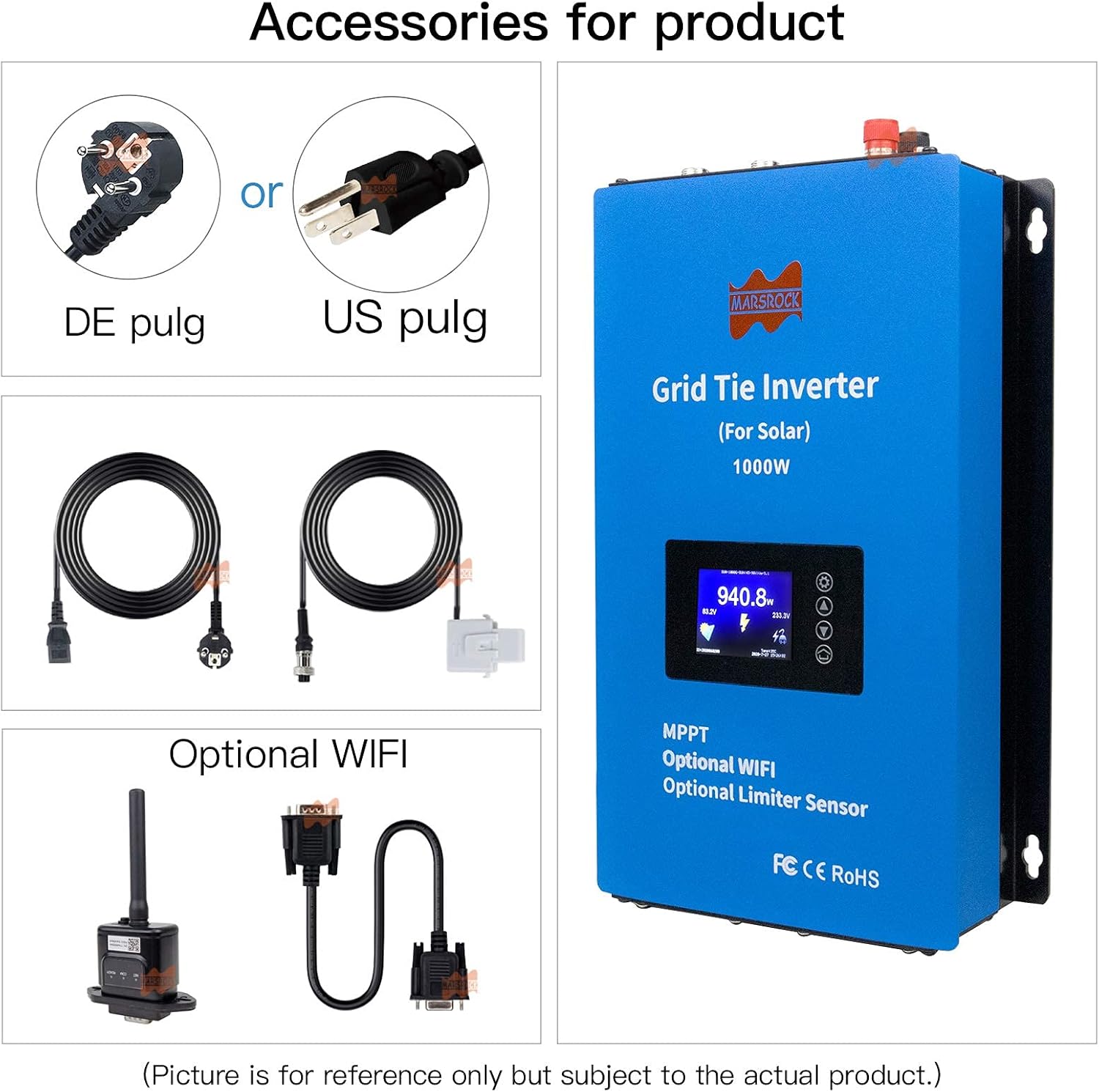
Figure 1: Inverter and included accessories, such as power cables, limiter sensor, and an optional WiFi module.
Video 1: Unboxing and overview of the Y&H Grid Tie Inverter, showing the main unit, cables, and limiter sensor.
Video 2: Detailed unboxing and port introduction for the Y&H-GTN Micro Solar Inverter, highlighting various connection points.
Video 3: Unboxing and port introduction for the Y&H Solar Grid Tie Micro Inverter, demonstrating the components and connection points.
2.2 Physical Dimensions
The inverter measures 7.72"L x 3.46"W x 12.68"H and weighs 9.46 pounds. Ensure adequate space for installation and proper ventilation.

Figure 2: Dimensions of the Marsrock 1000W Solar Grid Tie Inverter, showing length, width, and height.
2.3 Connection Steps
Follow these steps for proper connection of the inverter to your solar panels and the AC grid. Always ensure safety precautions are followed, including disconnecting power before making any connections.
- Connect the DC input from your solar panels to the inverter's DC input terminals. Ensure correct polarity (positive to positive, negative to negative).
- Connect the AC output of the inverter to your home's electrical grid.
- If using the limiter sensor, connect it to the designated port on the inverter.
- If using the optional WiFi module, connect it to the remote port.
- Turn on the inverter. The red light will illuminate, followed by a flashing green light, and then a solid green light once grid connection is established.

Figure 3: Inverter with optional WiFi module and a smartphone displaying the rapid configuration process for network connection.
Video 4: Step-by-step DC and AC connection process for the GTI1300 inverter, demonstrating power-on and grid synchronization.

Figure 4: The limiter sensor, which helps regulate power output to match household consumption.

Figure 5: LCD screen display with navigation buttons and various menu options for monitoring and configuration.
3. Operation
3.1 Monitoring and Display
The inverter features an LCD screen for real-time monitoring of power generation, voltage, current, and other operational parameters. Use the navigation buttons to access different menus and settings.
Figure 6: Detailed view of the LCD screen and its functions for monitoring and control.
3.2 Limiter Function
The integrated current limiter ensures that the inverter only supplies the necessary power to your household loads, preventing excess energy from being fed back into the grid if not desired. This optimizes self-consumption.
3.3 MPPT Technology
Maximum Power Point Tracking (MPPT) continuously adjusts the inverter's operating point to extract the maximum possible power from your solar panels under varying conditions, such as sunlight intensity and temperature.
3.4 WiFi Monitoring (Optional)
With the optional WiFi module, you can monitor your inverter's performance remotely via a smartphone application. This allows for real-time data viewing, historical data analysis, and system configuration.

Figure 7: Overview of the WiFi monitoring system, showing data accessible on various devices.
Video 5: Demonstration of the Marsrock Wind and Solar Inverter in operation, showing power output and system status.
Video 6: Power test of the Marsrock 1000W G2 series micro inverter, displaying real-time power generation and grid feedback.
4. Maintenance
Regular maintenance ensures optimal performance and longevity of your inverter. Always disconnect the inverter from both DC and AC power sources before performing any maintenance.
- Cleaning: Periodically clean the exterior of the inverter and cooling fins to prevent dust buildup, which can hinder heat dissipation. Use a soft, dry cloth. Do not use liquid cleaners.
- Connections Check: Annually inspect all electrical connections (DC input, AC output, limiter sensor, WiFi module) to ensure they are secure and free from corrosion.
- Ventilation: Ensure the area around the inverter is clear of obstructions to allow for proper airflow and cooling.
- Firmware Updates: Check the manufacturer's website or the monitoring app for any available firmware updates to ensure your inverter operates with the latest features and improvements.
5. Troubleshooting
If you encounter issues with your inverter, refer to the following common troubleshooting steps. For persistent problems, contact customer support.
- No Power Output:
- Check if the DC input from solar panels is connected and providing sufficient voltage (22-60V DC).
- Verify the AC grid connection is secure and the main breaker is on.
- Ensure the inverter's power switch is in the "ON" position.
- Error Indicator Light:
- Refer to the LCD display for specific error codes or messages.
- Check for over-current, over-temperature, or reverse polarity conditions.
- If an anti-islanding error occurs, ensure the grid connection is stable.
- Low Power Generation:
- Inspect solar panels for shading, dirt, or damage.
- Verify DC input voltage and current are within the inverter's operating range.
- Check ambient temperature to ensure the inverter is operating within its optimal range (-20°C to +50°C).
- WiFi Connection Issues:
- Ensure the WiFi module is correctly installed and powered.
- Verify your home WiFi network is 2.4GHz (5GHz is not supported).
- Check the WiFi signal strength at the inverter's location.
- Follow the rapid configuration steps in the monitoring app.

Figure 8: Inverter protection features and operating temperature range.
6. Technical Specifications
| Feature | Value |
|---|---|
| Brand | Marsrock |
| Recommended Uses For Product | Home |
| Power Source | Solar Powered |
| Wattage | 1000 watts |
| Model Name | 1000W24V |
| Voltage | 24 Volts (DC) |
| Number of Outlets | 1 |
| Input Voltage | 22 Volts |
| Output Power | 1000 Watts |
| Standby Power Shutoff | 90% |
| Output Voltage | 230 Volts |
| Display Type | LCD |
| Peak Output Power Watts | 1000 |
| Inverter Capacity Volt-Amp | 947 |
| Electrical Output Waveform | Pure Sine Wave |
| Frequency | 46 Hz |
| Color | Blue |
| Antenna Location | Home |
| Built-In Media | Instruction Manual, Inverter Body, Setup Toolkit, limiter sensor |
| Model Number | 1000W24V |
| UPC | 803856281605 |
| Manufacturer | Marsrock Power |
| Item Dimensions L x W x H | 7.72"L x 3.46"W x 12.68"H |
| Item Weight | 9.46 Pounds |
7. Warranty and Support
The Marsrock 1000W Solar Grid Tie Inverter comes with a 1 Year Manufacturer Warranty. For warranty claims, technical assistance, or any product-related inquiries, please contact Marsrock Power customer support.
For additional resources and information, you may visit the Marsrock Store on Amazon.
Ask a question about this manual
Ask about setup, troubleshooting, compatibility, parts, safety, or missing instructions. Manuals+ will review the question and use this page’s manual context to help answer it.