
1. Introduction
The Cisco ASR1000-ESP40 is an Embedded Services Processor (ESP) designed for the Cisco ASR 1000 Series Aggregation Services Routers. This module serves as the central processing unit for the router, handling all network traffic processing, advanced services, and control plane functions. The ESP40 provides a data transfer rate of 40 Gigabits Per Second, ensuring high performance for demanding network environments. This manual provides essential information for the proper installation, operation, and maintenance of your ASR1000-ESP40 module.
Please note that this product is a renewed item, professionally inspected and tested to work and look like new. For details regarding the Amazon Renewed Guarantee, please refer to the purchase documentation.
2. Safety Information
Always observe the following safety precautions when handling or operating the ASR1000-ESP40 module:
- Electrical Safety: Ensure the router chassis is powered off and disconnected from the power source before installing or removing the ESP40 module.
- Professional Installation: Installation of this module should only be performed by qualified personnel familiar with Cisco ASR 1000 Series routers and networking equipment.
- Ventilation: Ensure adequate airflow around the router chassis to prevent overheating. Do not block ventilation openings.
- Weight: The module weighs approximately 12 pounds. Use proper lifting techniques to avoid injury.
- Electrostatic Discharge (ESD): Always use an ESD-preventative wrist strap and follow proper ESD procedures when handling the module to prevent damage to sensitive electronic components.
3. Package Contents
Verify that your package contains the following items:
- Cisco ASR1000-ESP40 Embedded Services Processor module (Quantity: 1)
- Any accompanying documentation (if applicable)
If any items are missing or damaged, contact your supplier immediately.
4. Product Overview
The ASR1000-ESP40 is a critical component within the Cisco ASR 1000 Series router architecture. It is responsible for executing the Cisco IOS XE operating system, performing packet forwarding, and managing various network services. Its high-performance capabilities are essential for maintaining network efficiency and supporting advanced features.
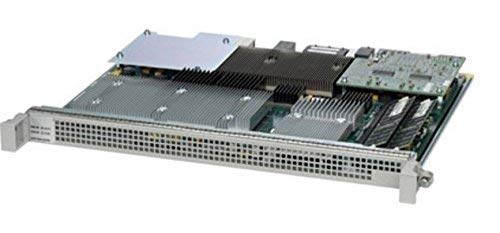
Figure 1: Cisco ASR1000-ESP40 Embedded Services Processor module. This image displays the front panel of the ESP40 module, typically featuring status indicator LEDs and a handle for insertion/removal from the router chassis.
Key features include:
- High Performance: 40 Gbps data transfer rate for efficient packet processing.
- Cisco IOS XE: Runs the robust Cisco IOS XE operating system for comprehensive routing and service capabilities.
- Service Integration: Supports various embedded services and features within the ASR 1000 platform.
5. Setup and Installation
The ASR1000-ESP40 is a field-replaceable unit (FRU) that installs into a dedicated slot within a Cisco ASR 1000 Series router chassis. Follow these general steps for installation:
- Prepare the Chassis: Ensure the router chassis is powered off and all power cables are disconnected. Refer to the specific ASR 1000 Series router installation guide for detailed chassis preparation.
- ESD Protection: Wear an ESD-preventative wrist strap connected to a bare metal surface on the chassis.
- Locate Slot: Identify the correct ESP slot in your ASR 1000 Series chassis.
- Insert Module: Carefully align the ESP40 module with the slot guides. Push the module firmly into the slot until it is fully seated. Use the ejector levers or captive screws (if present) to secure the module.
- Power On: Reconnect power cables and power on the router chassis. The system will detect and initialize the new ESP40 module.
- Verify Installation: Check the status LEDs on the ESP40 module and the router chassis. Consult the Cisco IOS XE command-line interface (CLI) to verify the module's status and configuration.
For detailed, model-specific installation instructions, always refer to the official Cisco ASR 1000 Series router hardware installation guide.
6. Operating Instructions
Once installed and initialized, the ASR1000-ESP40 operates under the control of the Cisco IOS XE operating system. As an embedded services processor, its operation is integral to the overall function of the ASR 1000 Series router. Users interact with the router and its services primarily through the Cisco IOS XE command-line interface (CLI) or network management systems.
- System Boot-up: Upon powering on the router, the ESP40 loads the Cisco IOS XE software and begins its operational sequence.
- Configuration: All configuration of routing protocols, network interfaces, and services is performed via the Cisco IOS XE CLI.
- Status Monitoring: Monitor the ESP40's operational status, CPU utilization, and memory usage using CLI commands such as
show platform,show processes cpu, andshow memory. - Data Processing: The ESP40 efficiently processes network packets, applies security policies, and manages quality of service (QoS) settings as configured.
Refer to the Cisco IOS XE configuration guides for detailed information on configuring and managing your ASR 1000 Series router and its services.
7. Maintenance
Regular maintenance helps ensure the longevity and optimal performance of your ASR1000-ESP40 module and the entire router system:
- Environmental Control: Maintain a stable operating environment with appropriate temperature and humidity levels as specified by Cisco for the ASR 1000 Series.
- Dust Removal: Periodically inspect the router chassis and module for dust accumulation. Use compressed air to gently clean ventilation openings and module surfaces. Ensure the router is powered off before cleaning.
- Firmware/Software Updates: Keep the Cisco IOS XE software up-to-date. Consult Cisco's official documentation for recommended software versions and upgrade procedures.
- Physical Inspection: Periodically check the module's seating in the chassis and the condition of any visible connectors.
8. Troubleshooting
If you encounter issues with your ASR1000-ESP40 module, consider the following basic troubleshooting steps:
- Check Status LEDs: Observe the LEDs on the ESP40 module. Refer to the ASR 1000 Series hardware guide for LED indicator meanings (e.g., power, status, activity).
- Reseat the Module: Power off the router, disconnect power, and carefully reseat the ESP40 module in its slot to ensure proper connection.
- Verify Power: Ensure the router chassis is receiving adequate power and that the power supply units are functioning correctly.
- Console Access: Connect to the router's console port to access the Cisco IOS XE CLI. Check system logs (
show logging) and module status (show platform) for error messages. - Consult Documentation: Refer to Cisco's official troubleshooting guides for the ASR 1000 Series for more advanced diagnostics.
9. Specifications
| Feature | Specification |
|---|---|
| Brand | CISCO DESIGNED |
| Model Name | ASR1000 |
| Mfr Part Number | ASR1000-ESP40-cr |
| Product Type | NETWORKING ROUTER (Component) |
| Data Transfer Rate | 40 Gigabits Per Second |
| LAN Port Bandwidth | 1000 Mbps |
| Operating System | Cisco IOS |
| Connectivity Technology | Powerline |
| Connectivity Protocol | Powerline |
| Security Protocol | WPS |
| Special Feature | WPS |
| Compatible Devices | Laptop, Personal Computer (via router) |
| Recommended Uses | Business |
| Item Weight | 12 Pounds |
| Number of Ports | 1 (Internal connection to chassis) |
| Controller Type | Switch |
| Is Modem Compatible | No |
| UPC | 760575163165 |
10. Warranty and Support
This Cisco ASR1000-ESP40 module, as a renewed product, typically comes with a 90-day limited warranty. Please refer to your purchase documentation or contact the seller for specific warranty terms and conditions.
For technical support, troubleshooting assistance, or further information regarding the Cisco ASR 1000 Series routers and their components, please consult the official Cisco documentation and support resources. For issues related to the renewed product status or warranty claims, contact your Amazon Renewed supplier or Amazon customer service.