
Introduction
This instruction manual provides essential information for the safe and effective use of your Ceptics South Africa Power Adapter Travel Set. Designed for travelers, this adapter set ensures your electronic devices remain powered in various African countries and beyond, offering multiple charging options in a compact design. Please read this manual thoroughly before use.
Safety Information
IMPORTANT: THIS TRAVEL ADAPTER IS NOT A VOLTAGE CONVERTER.
This adapter is designed to work with dual voltage products and electronics (100-240V). It will NOT convert voltage from 220V to 110V or vice versa. Ensure your devices are dual voltage compatible before plugging them into this adapter. Using single voltage (120V or 125V) electronics with this adapter in a country with a different voltage supply may damage your device or pose a safety risk. Examples of devices NOT compatible with this adapter if they are single voltage include hair dryers, curling irons, and some kitchen appliances.

Figure 1: Compatibility and Voltage Warning. This adapter is suitable for dual voltage electronics like phones, laptops, and tablets, but not for single voltage appliances such as hair dryers or irons.
- Always check the voltage requirements of your electronic devices before connecting them.
- Do not exceed the maximum current rating of the adapter.
- Keep the adapter away from water and moisture.
- Do not disassemble or attempt to repair the adapter.
- Ensure the adapter is fully inserted into the wall socket.
Product Overview
The Ceptics South Africa Power Adapter Travel Set (Model: PK8-AF) is a versatile charging solution for international travel. It features a main adapter unit with multiple charging ports and includes SWadAPt™ compatible plug attachments for various global power outlets.
Key Features:
- SWadAPt™ Compatible Plug Attachments: Includes Type E/F, M, and G attachments for use in South Africa, Ghana, Uganda, Zambia, Zimbabwe, Nigeria, Kenya, Seychelles, Morocco, Madagascar, Egypt, Ethiopia, Rwanda, Sudan, and many other African countries.
- Charge 4 Devices Simultaneously: Equipped with 2 USA outlets, 1 USB-A port, and 1 USB-C port (total max 3.1A).
- Fast Charging: USB-C port offers QC-18W and PD-20W, while the USB-A port offers QC-18W.
- Input Voltage Indicator LEDs: Clearly indicates whether the outlet is 110V or 220V.
- Compact & Reliable Design: Small and lightweight for easy portability.
Components:
- Main Adapter Unit with 2 USA Outlets (1x Grounded, 1x Non-grounded)
- 1x USB-A Charging Port
- 1x USB-C Charging Port
- Type M SWadAPt™ Attachment
- Type G SWadAPt™ Attachment
- Type E/F SWadAPt™ Attachment
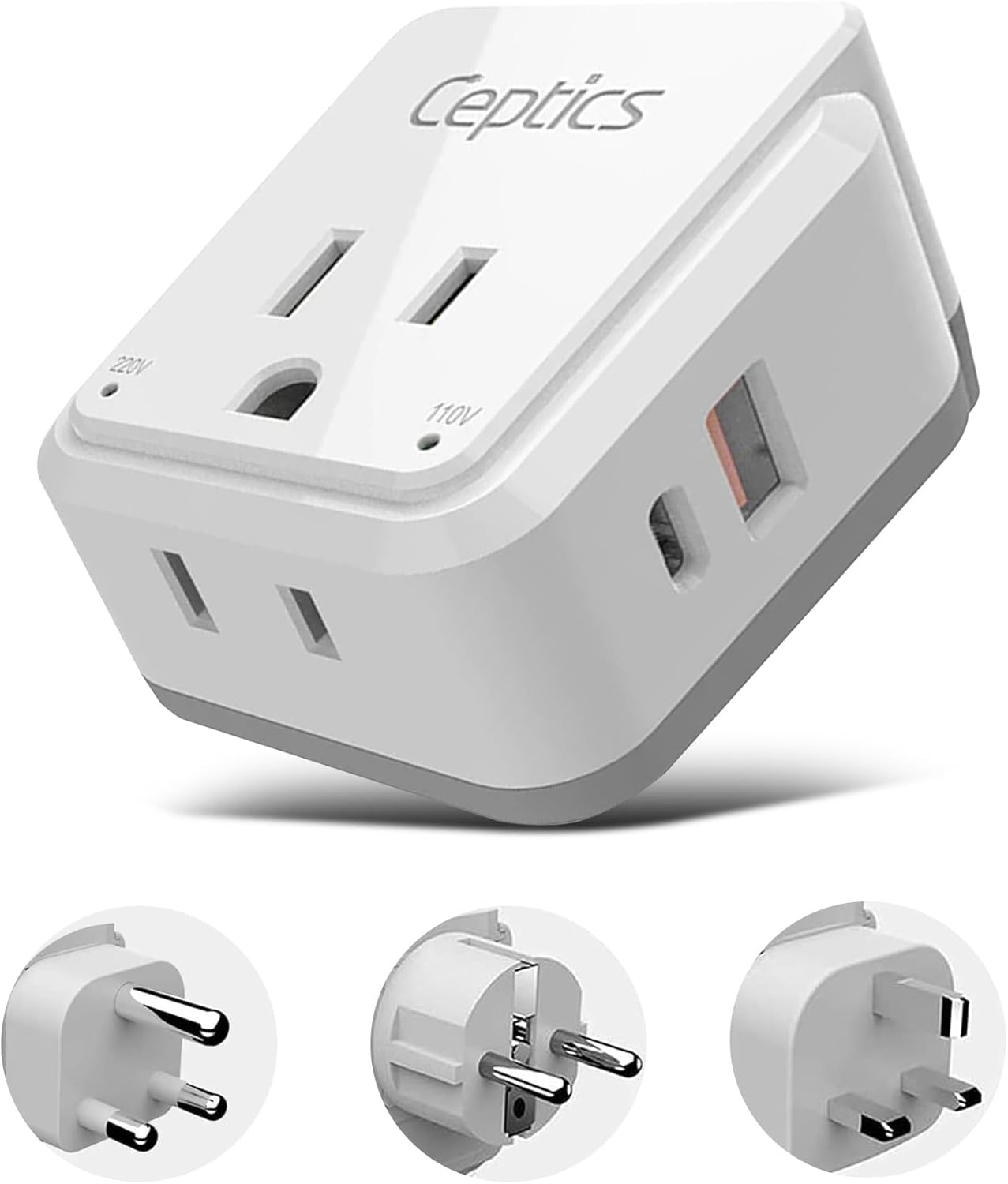
Figure 2: Main Adapter Unit and Included SWadAPt™ Attachments (Type M, G, E/F).

Figure 3: Detailed view of the adapter's ports, outlets, and voltage indicator LEDs.
Video 1: Ceptics PAK Travel Adapter Overview. This video demonstrates the compact design, charging capabilities, and interchangeable plug system of the Ceptics travel adapters, highlighting their efficiency compared to standard adapters.

Figure 4: SWadAPt™ Attachments. The modular design allows easy interchangeability of plug types without replacing the entire adapter.
Setup
- Identify the Correct Plug Attachment: Based on your travel destination, select the appropriate SWadAPt™ plug attachment (Type E/F, M, or G) for the local wall outlet.
- Attach the Plug: Align the chosen plug attachment with the main adapter unit and slide it firmly into place until it clicks securely.
- Connect to Power Outlet: Insert the assembled adapter into the wall outlet. The input Voltage Indicator LEDs (110V or 220V) on the adapter will illuminate to indicate the detected voltage.

Figure 5: Attaching a SWadAPt™ plug. Ensure the attachment is securely fastened to the main unit.
Operating Instructions
Once the adapter is securely plugged into a wall outlet, you can begin charging your devices.
- Charging via USA Outlets: Plug your dual voltage devices (e.g., laptop chargers, CPAP machines) directly into the 2 USA outlets on the adapter.
- Charging via USB-A Port: Connect your USB-A compatible devices (e.g., older smartphones, power banks) using their respective USB cables to the USB-A port.
- Charging via USB-C Port: Connect your USB-C compatible devices (e.g., newer smartphones, tablets, laptops) using their respective USB-C cables to the USB-C port for fast charging.
- You can charge up to four devices simultaneously using a combination of the outlets and USB ports.

Figure 6: Charging multiple devices. The adapter supports simultaneous charging of up to four devices.
Maintenance
- Cleaning: Wipe the adapter with a dry, soft cloth. Do not use liquid cleaners or abrasive materials.
- Storage: Store the adapter and its attachments in a cool, dry place when not in use. The included drawstring bag can help keep all pieces together.
- Inspection: Periodically inspect the adapter and cables for any signs of damage. Discontinue use if any damage is observed.
Troubleshooting
| Problem | Possible Cause | Solution |
|---|---|---|
| No power to devices. | Adapter not fully inserted; wall outlet is dead; device is not dual voltage compatible. | Ensure adapter is fully inserted. Test wall outlet with another device. Verify your device's voltage compatibility. |
| Charging is slow. | Too many devices connected; device requires higher power than provided by the port. | Disconnect some devices. Ensure you are using the correct USB port (USB-C for faster charging if supported by device). |
| Voltage indicator LEDs not lighting up. | Adapter not receiving power from the wall outlet. | Check wall outlet. Ensure adapter is securely plugged in. |
| Plug attachment does not fit. | Incorrect attachment selected for the country. | Refer to a reliable travel plug guide to confirm the correct plug type for your destination. |
Specifications
| Feature | Detail |
|---|---|
| Model Number | PK8-AF |
| Product Dimensions | 1.93 x 1.6 x 2.18 inches (Main Unit) |
| Item Weight | 2.1 ounces |
| Input Voltage | 100-240 Volts (AC) |
| USB-A Output | QC-18W |
| USB-C Output | QC-18W, PD-20W |
| Total USB Output | Max 3.1A (shared) |
| Max Amps (AC Outlets) | Up to 10A |
| Max Voltage (AC Outlets) | Up to 250V |
| Color | White |

Figure 7: Compact and Lightweight Design of the PAK-AF adapter.
Warranty and Support
For warranty information and customer support, please refer to the official Ceptics website or contact their customer service directly. Ceptics is committed to providing high-quality products and support.
You can visit the Ceptics Store on Amazon for more information and product details.
