
UGREEN 70594
UGREEN 40W Dual USB-C PD Car Charger
User Manual
1. Introduction
Thank you for choosing the UGREEN 40W Dual USB-C PD Car Charger (Model: 70594). This compact and powerful car charger is designed to provide fast and efficient charging for your mobile devices while you are on the go. Featuring two USB-C Power Delivery (PD) ports, it can simultaneously fast charge two devices, ensuring you stay connected during your travels. Its durable construction and multi-protection features ensure safe and reliable performance.

Image: The UGREEN 40W Dual USB-C PD Car Charger, showcasing its sleek silver design with two USB-C ports.
2. Package Contents
- 1 x UGREEN 40W Dual USB-C PD Fast Car Charger (Model: 70594)
- 1 x User Manual
3. Setup
The UGREEN 40W Dual USB-C PD Car Charger is designed for easy plug-and-play setup in your vehicle.
- Locate Your Car's Power Outlet: Identify the 12V/24V cigarette lighter socket or power outlet in your vehicle.
- Insert the Charger: Firmly insert the UGREEN car charger into the power outlet. Ensure it is fully seated for a stable connection.
- Verify Power: Once properly inserted, the charger may display a subtle LED indicator (if present) to confirm it is receiving power.

Image: The UGREEN car charger inserted into a car's power outlet, highlighting its ultra-compact design and ease of use.
4. Operating Instructions
This car charger features two USB-C Power Delivery ports, each capable of delivering up to 20W for fast charging compatible devices.
- Connect Your Device: Use a compatible USB-C to USB-C cable (or USB-C to Lightning cable for Apple devices) to connect your smartphone, tablet, or other device to either of the USB-C ports on the charger.
- Initiate Charging: Charging will begin automatically. The charger intelligently detects your device and delivers the optimal charging speed.
- Dual Device Charging: You can charge two devices simultaneously. Each port provides independent 20W Power Delivery, allowing for efficient fast charging of both devices at the same time.

Image: The UGREEN car charger connected to two devices, illustrating its capability to quick charge two devices simultaneously.

Image: A visual representation of the UGREEN car charger supporting dual fast charging for an iPhone and a Samsung S22, showing charging progress over 60 minutes.
5. Maintenance and Safety
To ensure the longevity and safe operation of your UGREEN car charger, please follow these guidelines:
- Cleaning: Disconnect the charger from the car outlet before cleaning. Use a soft, dry cloth to wipe the surface. Do not use liquid cleaners or aerosols.
- Storage: When not in use for extended periods, store the charger in a cool, dry place away from direct sunlight and extreme temperatures.
- Avoid Physical Damage: Do not drop, disassemble, or attempt to repair the charger yourself. This can void the warranty and pose safety risks.
- Temperature: Avoid exposing the charger to extremely high or low temperatures.
- Moisture: Keep the charger away from water and other liquids.
- Multi-Protection Features: The charger is built with multiple safety protections including over-charge, over-current, over-voltage, over-temperature, short-circuit, and anti-interference protection.
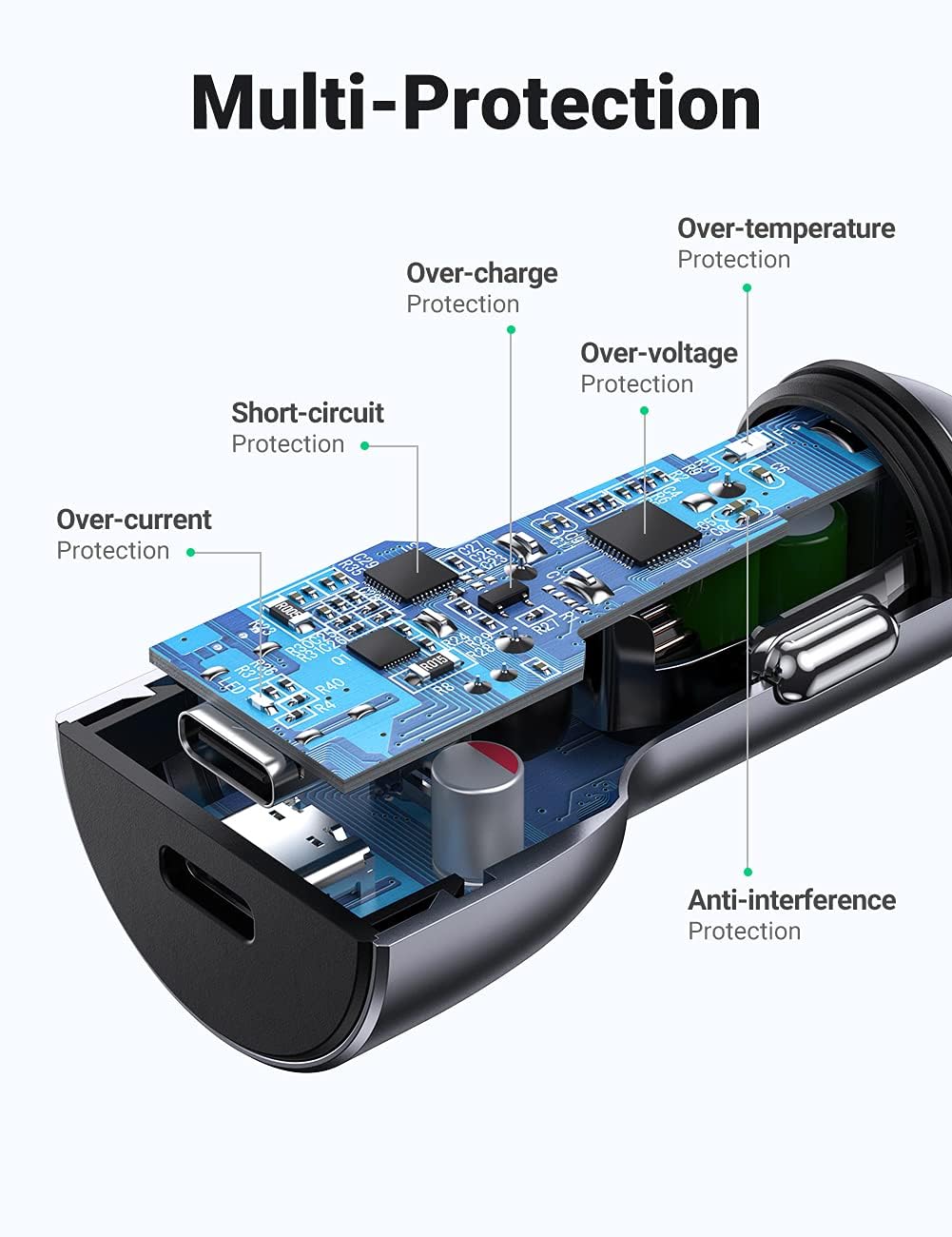
Image: An internal view of the UGREEN car charger highlighting its multi-protection features, including safeguards against over-charge, over-current, over-voltage, over-temperature, short-circuit, and anti-interference.

Image: A diagram illustrating the durable and safe construction of the UGREEN car charger, featuring an aluminum exterior for heat dissipation, a hardened layer for wear and scratch resistance, and pearl plating for fire prevention and safety.
6. Troubleshooting
| Problem | Possible Cause | Solution |
|---|---|---|
| Charger not powering on / No LED indicator | Loose connection in car outlet; Car outlet is not active; Blown fuse in car. | Ensure the charger is firmly inserted. Test the car outlet with another device. Check your car's fuse box for a blown fuse related to the power outlet. |
| Device not charging or charging slowly | Incompatible charging cable; Device not compatible with fast charging; Device drawing too much power; Cable or device issue. | Use a certified USB-C PD compatible cable. Ensure your device supports PD fast charging. Try charging one device at a time. Test with a different cable or device. |
| Charger feels warm during use | Normal operation during fast charging; Overload. | A slight warmth is normal during fast charging. If it becomes excessively hot, disconnect immediately and reduce the number of devices or use a lower power cable. The charger has built-in over-temperature protection. |
7. Specifications
| Feature | Detail |
|---|---|
| Brand | UGREEN |
| Model Number | 70594 |
| Product Dimensions | 2.6 x 1.2 x 1.2 inches |
| Item Weight | 1.12 ounces |
| Color | Silver |
| Input Voltage | 12V/24V DC (compatible with most vehicles) |
| Output Ports | 2 x USB-C PD (Power Delivery) |
| Total Output Power | 40W (20W per port) |
| Compatible Phone Models | Google Pixel, iPhone (16/15/14/13/12/11/X/8/SE), Samsung Galaxy (S23/S22/S21/S20/S10/Note 20), Moto, Huawei, Xiaomi, etc. |
| Compatible Devices | Smartphones, Tablets (iPad Pro/Mini/Air), Nintendo Switch, GoPro, GPS, Dash Cameras, Portable Power Banks, etc. |
| Safety Features | Over-charge, Over-current, Over-voltage, Over-temperature, Short-circuit, Anti-interference Protection |

Image: A visual guide to the universal compatibility of the UGREEN car charger, showing various devices like iPad Pro, iPhone, Galaxy S21, Google Pixel, Huawei P40 Pro, Redmi Note 9, Moto G10, Nintendo Switch, Tomtom SatNav, and GoPro Hero 9.
8. Warranty and Support
UGREEN products come with a standard warranty. For detailed warranty information, product support, or technical assistance, please visit the official UGREEN website or contact their customer service directly. Please retain your purchase receipt as proof of purchase for warranty claims.
UGREEN Official Website: www.ugreen.com
Related Documents - 70594
 |
UGREEN AG9310 Hub Firmware Update Guide for iPad Pro iOS 16.1 Instructions for updating the UGREEN AG9310 USB-C hub firmware to resolve video output issues with iPad Pro running iOS 16.1. Requires a MacBook M1. |
 |
UGREEN USB-C Multifunction Adapter CM511 User Manual User manual for the UGREEN USB-C Multifunction Adapter Model CM511. This adapter features an HDMI port, USB-C port with PD 100W support, and SD/TF card slots. It is compatible with Windows, macOS, and Linux systems. |
 |
UGREEN PB312 20000mAh PD 20W Power Bank User Manual This user manual provides comprehensive instructions for the UGREEN PB312 20000mAh Power Bank with 20W PD fast charging. It covers initial setup, charging procedures, product specifications, and essential safety guidelines. |
 |
Listwa zasilająca Ugreen S622 – Instrukcja obsługi Instrukcja obsługi listwy zasilającej Ugreen S622. Dowiedz się, jak bezpiecznie korzystać z urządzenia, poznać specyfikację techniczną oraz zasady konserwacji. |
 |
UGREEN FineTrack CM816 45297 P&R Guide User guide for the UGREEN FineTrack CM816 45297, covering setup, compatibility, battery replacement, and location features. Explains how to add the device to Find My and transfer it between iPhones. |
 |
UGREEN FineTrack Slim P & R Guide This document provides a Product & Response (P & R) guide for the UGREEN FineTrack Slim, covering setup, compatibility, troubleshooting, and usage with Apple's Find My network. |
Ask a question about this manual
Ask about setup, troubleshooting, compatibility, parts, safety, or missing instructions. Manuals+ will review the question and use this page’s manual context to help answer it.