
BTMETER BT-38B
BTMETER Digital Pen Multimeter BT-38B User Manual
Model: BT-38B (2000 Counts)
1. Introduction
Thank you for choosing the BTMETER Digital Pen Multimeter BT-38B. This compact and versatile instrument is designed for accurate measurement of AC/DC voltage, resistance, and continuity. Its pen-type design, backlit screen, and integrated flashlight make it ideal for various electrical testing applications in residential, industrial, and DIY settings. Please read this manual thoroughly before operation to ensure safe and proper use.
2. Safety Information
Always adhere to safety precautions when using electrical testing equipment. Failure to do so may result in electric shock, injury, or damage to the meter or equipment under test.
- Do not exceed the maximum input values specified for each measurement range.
- Exercise extreme caution when working with voltages above 30V AC RMS, 42V peak, or 60V DC. These voltages pose a shock hazard.
- Inspect test leads for damage before each use. Do not use if insulation is compromised.
- Ensure the function switch is in the correct position for the desired measurement before connecting to the circuit.
- Do not operate the meter if it appears damaged or is not functioning properly.
- Keep hands and fingers behind the probe barriers during testing.
- Replace batteries promptly when the low battery indicator appears to ensure accurate readings.
3. Package Contents

Figure 3.1: Package Contents
The BTMETER BT-38B package typically includes:
- 1 x BTMETER Digital Pen Multimeter (BT-38B)
- 1 x User Manual
- 2 x AAA Batteries (may be included separately or pre-installed)
4. Product Overview and Key Functions

Figure 4.1: Key Functions Overview
The BT-38B is designed for ease of use with clearly labeled components:
- Lamp Light: Provides illumination for working in dim environments.
- Test Lead Fixture: Securely holds the test leads.
- LCD Display: Shows measurement readings, units, and indicators.
- Toggle Switch: Used to select between OFF, Voltage (V), and Ohms (Ω) / Continuity / Diode Test modes.
- HOLD Key: Press to hold the current reading on the display. Press again to exit.
- Backlight/Flashlight Button: Press for more than 2 seconds to turn on the backlight. Press again for more than 2 seconds to turn it off. The backlight automatically turns off after 15 seconds. A short press activates the front LED flashlight.
- SELECT Key: In the Ohms/Continuity/Diode Test range, press this key to cycle through Resistance, Diode, and Continuity test modes. In Voltage mode, it switches between DC and AC voltage measurements.
- Battery Cover: Access point for battery installation and replacement.
- COM Input Test Lead: Common (negative) input for measurements.
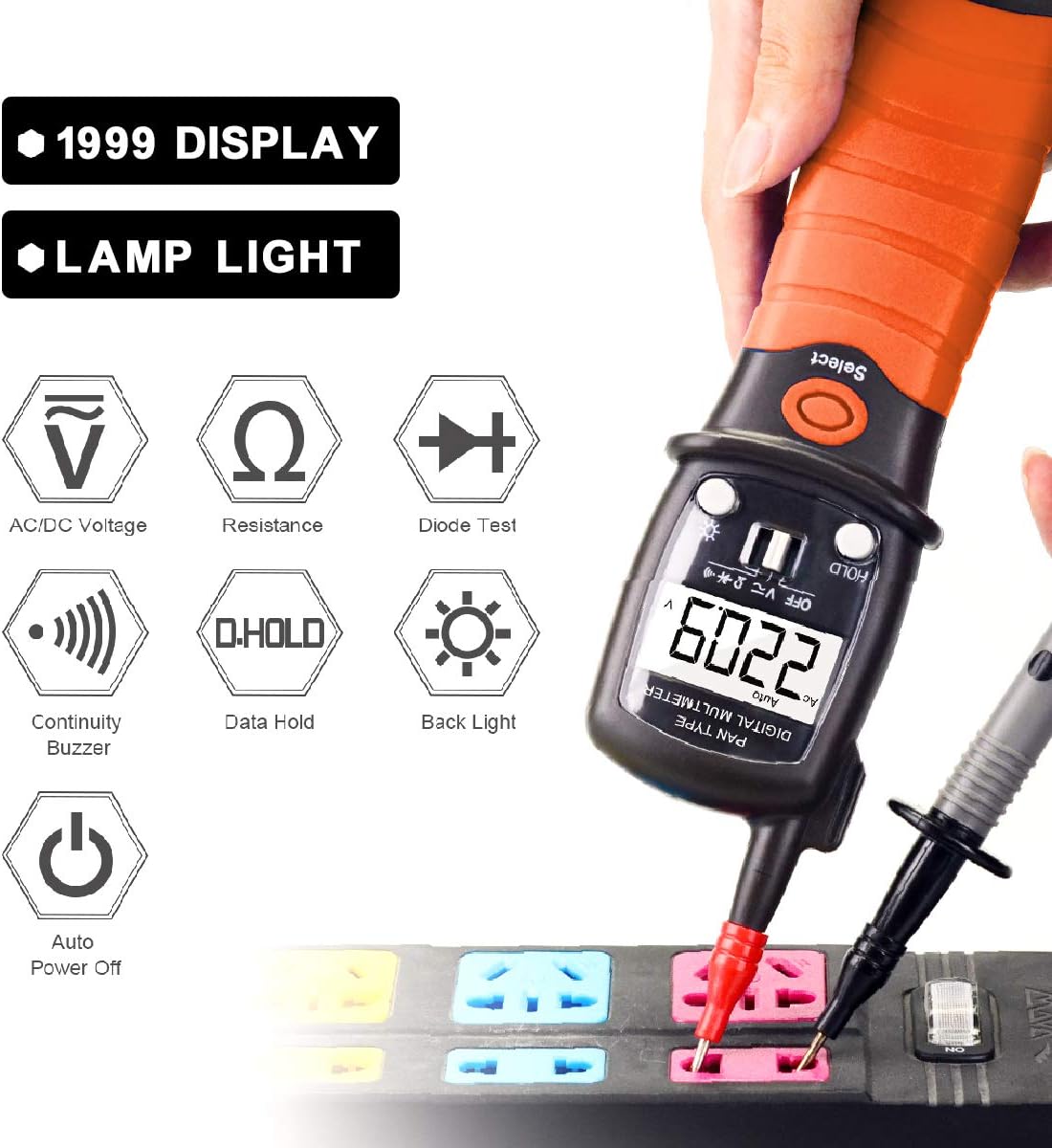
Figure 4.2: Functional Icons
5. Setup
5.1 Battery Installation
The BTMETER BT-38B requires two AAA batteries for operation.

Figure 5.1: Battery Replacement
- Locate the battery cover at the bottom of the multimeter.
- Rotate the battery bin counter-clockwise until it pops up.
- Carefully pull out the battery bin.
- Insert two AAA batteries, ensuring correct polarity (+/-).
- Slide the battery bin back into the multimeter and rotate clockwise to secure it.
When the battery icon 🔋 lights up on the screen, it indicates that the battery needs to be replaced.
6. Operating Instructions
6.1 General Operation
- Turn the toggle switch from OFF to the desired measurement function (Voltage or Ohms/Continuity/Diode).
- Connect the test leads to the circuit or component under test.
- Read the measurement value on the LCD display.
- The meter features an Auto Power Off function after 15 minutes of inactivity to conserve battery life. A "BEEP" warning will sound before auto power off.
6.2 AC/DC Voltage Measurement
The BT-38B can measure AC voltage from 2V to 600V and DC voltage from 200mV to 600V.
- Turn the toggle switch to the "V" position.
- Press the SELECT button to switch between AC and DC voltage modes as needed. The display will indicate "AC" or "DC".
- Connect the red test lead to the positive (+) side of the circuit and the black test lead (COM) to the negative (-) side or ground.
- Read the voltage value on the LCD display.
6.3 Resistance Measurement
Measure resistance from 200 Ohm to 20M Ohm.
- Turn the toggle switch to the "Ω" position.
- Ensure the circuit is de-energized before measuring resistance.
- Connect the test leads across the component whose resistance you wish to measure.
- Read the resistance value on the LCD display.
6.4 Continuity Test
The built-in buzzer sounds if resistance is less than 50Ω.
- Turn the toggle switch to the "Ω" position.
- Press the SELECT button until the continuity symbol (a sound wave icon) appears on the display.
- Connect the test leads across the circuit or component.
- If there is continuity (low resistance), the buzzer will sound.
6.5 Data Hold Function
To freeze the current reading on the display:
- Press the HOLD button during a measurement. The "HOLD" indicator will appear.
- Press the HOLD button again to release the data hold and resume live readings.
6.6 Backlight and Flashlight

Figure 6.1: LED Flashlight in Use
- Backlight: Press and hold the backlight button (sun icon) for more than 2 seconds to turn on the LCD backlight. Press and hold again for more than 2 seconds to turn it off. The backlight will automatically turn off after 15 seconds.
- Flashlight: A short press of the backlight button (sun icon) will activate the front LED flashlight, useful for illuminating dark work areas.
7. Maintenance
7.1 Cleaning
Wipe the meter with a dry, clean cloth. Do not use abrasives or solvents.
7.2 Battery Replacement
Refer to Section 5.1 for detailed instructions on battery replacement. Always use fresh AAA batteries.
7.3 Storage
If the meter is not used for an extended period, remove the batteries to prevent leakage and damage. Store in a cool, dry place away from direct sunlight.
8. Troubleshooting
| Problem | Possible Cause | Solution |
|---|---|---|
| Meter does not turn on. | Dead or incorrectly installed batteries. | Check battery polarity or replace batteries. |
| Inaccurate readings. | Low battery; incorrect function selected; damaged test leads. | Replace batteries; ensure correct function mode; inspect and replace test leads if damaged. |
| No continuity beep. | Not in continuity mode; open circuit; resistance too high. | Press SELECT to enter continuity mode; check circuit for breaks; ensure resistance is below 50Ω. |
| Display shows "OL" (Overload). | Measurement exceeds the selected range. | Ensure the measurement is within the meter's specified range. |
9. Specifications
| Parameter | Value |
|---|---|
| Brand | BTMETER |
| Model | BT-38B (2000 Counts) |
| Measurement Type | Multimeter, Voltmeter |
| AC Voltage Range | 2V ~ 600V |
| DC Voltage Range | 200mV ~ 600V |
| Resistance Range | 200 Ohm ~ 20M Ohm |
| Continuity Test | Buzzer sounds if resistance < 50Ω |
| Display | Backlit LCD, 12mm tall digits |
| Power Source | 2 x AAA Batteries |
| Auto Power Off | After 15 minutes of no operation |
| Item Weight | 200 Grams (approx. 7.1 ounces) |
| Material | ABS |
| Specification Met | CE |
10. Warranty and Support
BTMETER products are designed for reliability and performance. For warranty information, technical support, or any inquiries regarding your BT-38B Digital Pen Multimeter, please refer to the contact details provided with your purchase or visit the official BTMETER website.
BTMETER offers fast and effective 24x7 professional tech support.
Related documentsBT-38B

Ask a question about this manual
Ask about setup, troubleshooting, compatibility, parts, safety, or missing instructions. Manuals+ will review the question and use this page’s manual context to help answer it.