
Introduction
Thank you for choosing the PerfectAire 1PFD50 Dehumidifier. This manual provides essential information for the safe operation, installation, maintenance, and troubleshooting of your dehumidifier. Please read it thoroughly before use and retain it for future reference. This unit is designed to remove excess moisture from the air, improving comfort and preventing issues related to high humidity in spaces up to 484 square feet.
Safety Information
Always follow basic safety precautions when using electrical appliances to reduce the risk of fire, electric shock, and injury.
- Ensure the power supply matches the voltage requirements specified on the unit's rating label.
- Do not operate the dehumidifier with a damaged cord or plug.
- Do not block air inlets or outlets. Maintain at least 8 inches (20 cm) clearance around the unit.
- Never insert fingers or foreign objects into the air grilles.
- Keep the unit on a level, stable surface to prevent water spillage.
- Unplug the dehumidifier before cleaning, moving, or performing any maintenance.
- Do not use the unit in areas where flammable gases or liquids are stored.
- This appliance is not intended for use by persons (including children) with reduced physical, sensory or mental capabilities, or lack of experience and knowledge, unless they have been given supervision or instruction concerning use of the appliance by a person responsible for their safety.
Product Overview
Familiarize yourself with the main components of your PerfectAire 1PFD50 Dehumidifier.
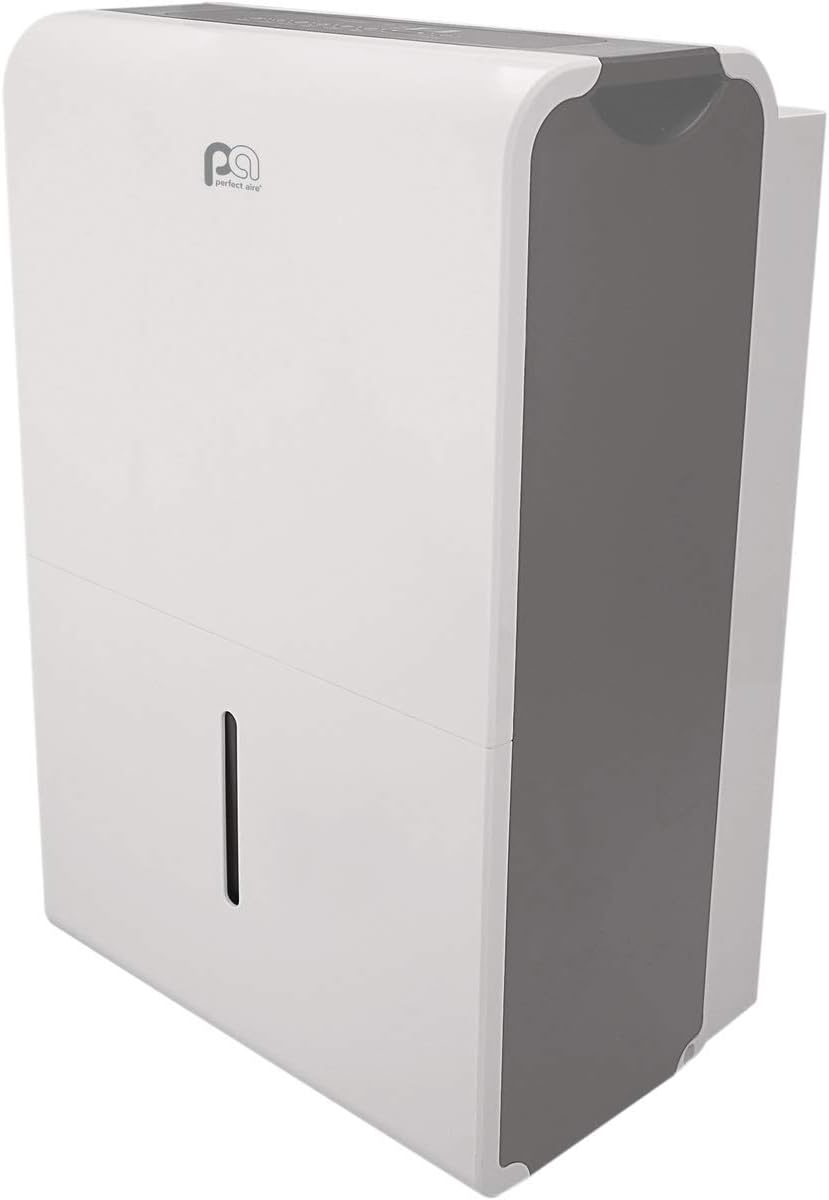
Figure 1: Angled front view of the PerfectAire 1PFD50 Dehumidifier. This image shows the overall design, including the top control panel area, the main body, and the water bucket indicator on the lower front.

Figure 2: Front view of the PerfectAire 1PFD50 Dehumidifier. The front panel features the PerfectAire logo at the top and a vertical water level indicator window on the lower section, allowing users to monitor the water collection bucket.

Figure 3: Side view of the PerfectAire 1PFD50 Dehumidifier. This perspective highlights the air intake grille on the side, designed for efficient air circulation and moisture removal.

Figure 4: Rear view of the PerfectAire 1PFD50 Dehumidifier. The back of the unit shows the air exhaust grille, the continuous drain outlet, and the power cord storage area, indicating its portable design.
Key Components:
- Control Panel: Located on the top, for setting humidity levels, fan speed, and timer.
- Air Inlet Grille: Located on the side, where humid air enters the unit.
- Air Outlet Grille: Located on the rear, where dehumidified air exits.
- Water Bucket: Removable container for collecting condensed moisture.
- Water Level Indicator: Transparent window on the front to monitor water level.
- Continuous Drain Outlet: Port on the rear for connecting a hose for continuous drainage.
- Power Cord Storage: Area on the rear for neatly storing the power cord.
- Casters/Wheels: For easy portability.
Setup
- Unpacking: Carefully remove the dehumidifier from its packaging. Retain packaging materials for future storage or transport.
- Placement: Place the unit on a firm, level surface in the area where dehumidification is desired. Ensure there is at least 8 inches (20 cm) of space around the unit for proper airflow. Avoid placing it near heat sources or in direct sunlight.
- Power Connection: Plug the power cord into a grounded electrical outlet. Ensure the outlet meets the electrical requirements of the unit.
- Initial Operation: For optimal performance, allow the unit to stand upright for at least 24 hours before initial operation if it was not stored upright.
Operating Instructions
Control Panel Functions:
- Power Button: Turns the unit ON or OFF.
- Humidity Setting: Adjusts the desired humidity level (e.g., 30% to 80% relative humidity). The unit will operate until the set humidity is reached.
- Fan Speed: Selects between High and Low fan speeds. High speed provides faster dehumidification, while Low speed offers quieter operation.
- Timer: Sets a delay for the unit to turn ON or OFF (e.g., 2, 4, 8 hours).
- Filter Indicator: Illuminates when the air filter needs cleaning.
- Bucket Full Indicator: Illuminates when the water collection bucket is full and needs to be emptied. The unit will automatically shut off.
Water Removal Options:
The PerfectAire 1PFD50 offers two methods for water removal:
- Manual Emptying: When the water bucket is full, the "Bucket Full" indicator will light up, and the unit will stop operating. Carefully remove the bucket from the front of the unit, empty the collected water, and then reinsert the bucket firmly until it clicks into place. The unit will resume operation.
- Continuous Drainage: For extended operation without manual emptying, connect a standard garden hose (not included) to the continuous drain outlet located on the rear of the unit (refer to Figure 4). Ensure the hose is sloped downwards to a floor drain or suitable receptacle to allow gravity drainage. Do not allow the hose to kink or rise above the drain outlet.
Maintenance
Regular maintenance ensures optimal performance and extends the lifespan of your dehumidifier.
- Cleaning the Air Filter:
The air filter should be cleaned every two weeks or when the "Filter" indicator light illuminates. A dirty filter reduces airflow and efficiency.
- Turn off the unit and unplug it from the power outlet.
- Remove the filter from its slot (usually located behind the air inlet grille).
- Wash the filter with warm, soapy water. Rinse thoroughly and allow it to air dry completely before reinserting.
- Once the filter is clean and dry, reinsert it into the unit.
- Cleaning the Water Bucket:
Clean the water bucket periodically to prevent mold and mildew growth.
- Remove the water bucket and empty any remaining water.
- Wash the bucket with warm water and a mild detergent. Rinse thoroughly.
- Dry the bucket completely before placing it back into the dehumidifier.
- External Cleaning: Wipe the exterior of the unit with a soft, damp cloth. Do not use harsh chemicals or abrasive cleaners.
- Storage: If storing the unit for an extended period, ensure the water bucket is empty and clean, and the unit is dry. Wrap the power cord and store the unit in an upright position in a cool, dry place.
Troubleshooting
Before contacting customer service, please refer to the following troubleshooting guide for common issues.
| Problem | Possible Cause | Solution |
|---|---|---|
| Dehumidifier does not turn on. |
|
|
| Unit runs but does not dehumidify. |
|
|
| Unit is noisy. |
|
|
| Water leaks from the unit. |
|
|
Specifications
| Model Name | 1PFD50 |
| Brand | PerfectAire |
| Dehumidification Capacity | 50 Pints per Day (AHAM) |
| Recommended Floor Area | Up to 484 Square Feet |
| Color | Silver |
| Special Feature | Portable |
| Product Dimensions (L x W x H) | 11 x 15.5 x 24.5 inches |
| Item Weight | 77 pounds (35 Kilograms) |
| Operation Mode | Comfort |
| UPC | 842149089412 |
| ASIN | B07Z11QWRY |
Warranty and Support
For warranty information or technical support, please refer to the warranty card included with your product or visit the official PerfectAire website. You may also contact PerfectAire customer service directly for assistance with product operation, parts, or service inquiries.
Please note: Specific warranty terms and conditions may vary and are subject to change. Always consult the documentation provided with your purchase for the most accurate and up-to-date warranty details.


