
1. Introduction
Thank you for choosing the Sona SACN-6266 Portable Air Conditioner. This manual provides essential information for the safe and efficient operation, maintenance, and troubleshooting of your new appliance. Please read it thoroughly before use and retain it for future reference.

Figure 1: Sona SACN-6266 Portable Air Conditioner
2. Safety Information
To reduce the risk of fire, electrical shock, or injury, always follow basic safety precautions when using this appliance.
- Ensure the power supply matches the voltage specified on the unit (220-240V~ 50Hz).
- Do not operate the unit with a damaged cord or plug.
- Keep the unit away from water or other liquids.
- Do not block air inlets or outlets.
- Always unplug the unit before cleaning or servicing.
- This appliance is not intended for use by persons (including children) with reduced physical, sensory or mental capabilities, or lack of experience and knowledge, unless they have been given supervision or instruction concerning use of the appliance by a person responsible for their safety.
3. Product Features
The Sona SACN-6266 Portable Air Conditioner is designed for efficient cooling and enhanced comfort. Key features include:
- Cooling Capacity: 10,000 BTU, suitable for various room sizes.
- Temperature Range: Adjustable from 18°C to 32°C.
- Refrigerant: Utilizes R410A/420g.
- Fan Speeds: Three selections (High, Medium, Low) for customized airflow.
- 24-Hour Timer: Allows for pre-setting operation times.
- Water Auto-Evaporation: Reduces the need for frequent water drainage.
- Dehumidification Feature: Helps reduce excess moisture in the air.
- Self-Diagnosis: Provides error codes for easy troubleshooting.
- Control Options: Intuitive touch screen control panel and a convenient remote control.
- Up-down Oscillation: Distributes cool air evenly throughout the room.
- Washable Filter: Easy to clean for maintaining air quality.
- Low Noise Operation: Operates at 51-54dB for a quiet environment.
4. Setup
4.1 Unpacking
- Carefully remove the air conditioner from its packaging.
- Check for any damage during transit. If damaged, do not operate and contact customer service.
- Ensure all accessories, including the remote control and power cable, are present.
4.2 Placement
- Place the unit on a flat, stable surface.
- Ensure there is adequate space around the unit for proper airflow (at least 20cm from walls or furniture).
- Position the unit near a power outlet.
4.3 Power Connection
- Connect the power cable to the unit's power input.
- Plug the power cable into a grounded 220-240V~ 50Hz electrical outlet.
- The unit can also be powered via a USB power bank for portable use (ensure the power bank meets the unit's power requirements).
4.4 Filling the Water Tank
- Locate the water tank cap on the top of the unit.
- Open the cap and carefully pour clean water into the tank. Do not overfill.
- For enhanced cooling, you may use chilled water.
- Close the water tank cap securely.
5. Operating Instructions
The Sona SACN-6266 can be operated using the touch screen control panel on the unit or the provided remote control.
5.1 Power On/Off
- Press the Power button on the control panel or remote control to turn the unit on or off.
5.2 Adjusting Fan Speed
- Press the Speed button repeatedly to cycle through High, Medium, and Low fan speeds.
5.3 Cooling and Dehumidification
- To activate the cooling and humidifying function, ensure the water tank is filled. Press the Cool or Humidify button. The unit will begin to release cool mist.
- To adjust the cooling intensity, you can change the fan speed.
5.4 Oscillation
- Press the Oscillation button to activate the up-down oscillation feature, which helps distribute air more widely. Press again to stop.
5.5 Timer Function
- Press the Timer button to set the desired operating duration (up to 24 hours). Each press typically increases the time by one hour.
5.6 LED Lights
- The unit features LED lights. Use the dedicated Light button on the control panel or remote to cycle through different light modes or turn them off.
6. Maintenance
Regular maintenance ensures optimal performance and longevity of your air conditioner.
6.1 Cleaning the Washable Filter
- Unplug the air conditioner from the power outlet.
- Locate the washable filter (typically at the back or side of the unit).
- Gently remove the filter.
- Rinse the filter under running water to remove dust and debris. For stubborn dirt, use a soft brush and mild detergent.
- Allow the filter to air dry completely before reinserting it into the unit.
- Clean the filter regularly, especially during periods of frequent use.
6.2 Water Tank Cleaning
- Periodically drain and clean the water tank to prevent mold and mildew buildup.
- Use a soft cloth and mild soap to clean the interior of the tank. Rinse thoroughly.
- Ensure the tank is dry before refilling.
6.3 Exterior Cleaning
- Wipe the exterior of the unit with a soft, damp cloth. Do not use abrasive cleaners or solvents.
7. Troubleshooting
Before contacting customer service, refer to the following common issues and solutions:
| Problem | Possible Cause | Solution |
|---|---|---|
| Unit does not turn on. | No power supply; Power cable not connected; Unit is off. | Check power outlet; Ensure power cable is securely plugged in; Press the Power button. |
| No cool air/mist. | Water tank is empty; Cooling/Humidification function not activated; Filter is dirty. | Fill water tank; Activate cooling/humidification function; Clean the air filter. |
| Weak airflow. | Air filter is dirty; Air inlets/outlets are blocked. | Clean the air filter; Ensure no obstructions around the unit. |
| Unusual noise. | Unit not on a flat surface; Internal component issue. | Place unit on a stable, flat surface; If noise persists, contact customer service. |
For issues not listed above or if problems persist, please contact Sona customer support.
8. Specifications
| Feature | Detail |
|---|---|
| Brand | Sona |
| Model Number | SACN 6266 |
| Cooling Capacity | 10,000 BTU |
| Temperature Range | 18°C - 32°C |
| Refrigerant | R410A/420g |
| Voltage | 220-240V~ 50Hz |
| Wattage | 1245 watts |
| Fan Speeds | 3 (Hi, Med, Lo) |
| Air Flow Volume | 350m³/Hr |
| Noise Level | 51-54dB |
| Special Features | Dehumidifier, Water Auto-evaporate, Self-Diagnosis, Up-down Oscillation |
| Control Method | Remote, Touch |
| Filter Type | Washable Filter |
| Installation Type | Portable |
| Dimensions (Approximate) | 72 cm (29 inches) height |
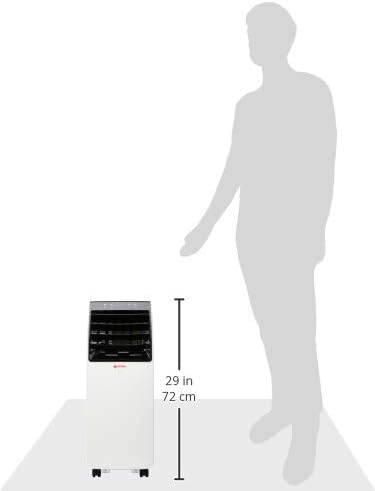
Figure 2: Sona SACN-6266 Portable Air Conditioner showing approximate height of 72 cm (29 inches).
9. Warranty and Support
The Sona SACN-6266 Portable Air Conditioner comes with a 5-year warranty on the compressor. For other components, standard brand warranty terms apply.
For warranty claims, technical support, or service inquiries, please contact Sona customer service. Keep your purchase receipt as proof of purchase.