
Introduction
This manual provides detailed instructions for the safe and efficient operation of your UBON SP-6575 Portable Wireless Bluetooth Speaker. Please read this manual thoroughly before using the device and retain it for future reference. The UBON SP-6575 is a versatile portable speaker featuring Bluetooth connectivity, FM radio, USB and TF-card playback, and an integrated torch.
Product Overview
The UBON SP-6575 is designed for portability and multi-functionality. It offers wireless audio streaming, local media playback, and a convenient built-in torch.
Key Features:
- Wireless Bluetooth Connectivity
- Integrated FM Radio
- USB Flash Drive Playback
- TF-Card (MicroSD) Playback
- Built-in LED Torch
- Portable Design with Lanyard
- Rechargeable Battery
Components and Controls:
Familiarize yourself with the speaker's various parts and controls as illustrated below.
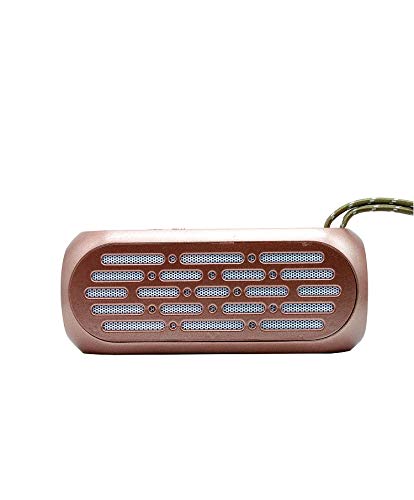
Figure 1: Front view of the UBON SP-6575 speaker, highlighting its compact design and integrated torch.
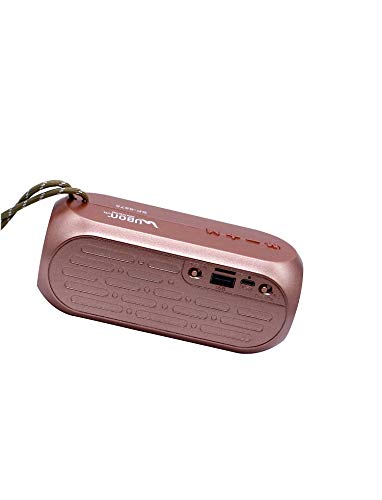
Figure 2: Rear panel of the speaker, detailing the USB port, TF card slot, and charging input.
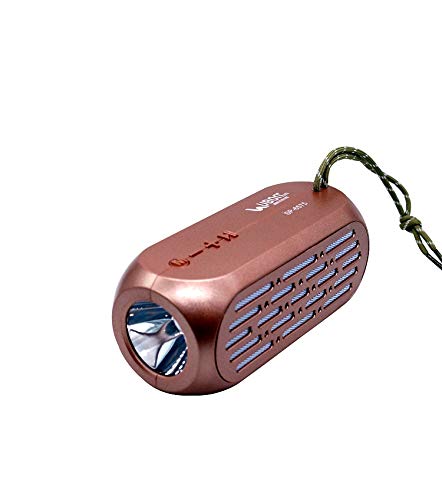
Figure 3: Side view illustrating the torch functionality and the placement of control buttons.
Setup
Charging the Speaker:
- Locate the charging port on the rear panel of the speaker (refer to Figure 2).
- Connect the provided USB charging cable to the speaker's charging port.
- Connect the other end of the USB cable to a compatible USB power adapter (not included) or a computer's USB port.
- The charging indicator light will illuminate, typically red, during charging.
- Once fully charged, the indicator light may change color or turn off. Disconnect the speaker from the power source.
Note: For optimal battery life, fully charge the speaker before first use.
Operating Instructions
Power On/Off:
- To power on, press and hold the Power button (usually marked with ⏻ or ON/OFF symbol) for a few seconds until you hear an audible prompt or see an indicator light.
- To power off, press and hold the Power button again until the device shuts down.
Bluetooth Pairing:
- Ensure the speaker is powered on and in Bluetooth mode. If not, press the Mode button (often marked M) to cycle through modes until you hear "Bluetooth Mode" or see a flashing blue indicator light.
- On your mobile device (smartphone, tablet, computer), enable Bluetooth.
- Search for available Bluetooth devices. The speaker will appear as "UBON SP-6575" or similar.
- Select the speaker from the list to pair. You will hear a confirmation tone or voice prompt once successfully connected.
- Once paired, audio from your device will play through the UBON SP-6575 speaker.
Note: The speaker will automatically attempt to reconnect to the last paired device when powered on.
FM Radio Operation:
- Power on the speaker. Press the Mode button (M) to switch to FM Radio mode. You will hear "FM Mode".
- To auto-scan and save available FM stations, press and hold the Play/Pause button (►||). The speaker will scan and store stations automatically.
- Once scanning is complete, use the Previous (-) and Next (+) buttons to navigate between saved stations.
- Short press the Previous (-) or Next (+) buttons to change the station. Long press to adjust volume.
USB and TF-Card Playback:
- Insert a USB flash drive or a TF-card (MicroSD card) containing MP3 audio files into the respective port on the speaker (refer to Figure 2).
- The speaker will automatically detect the storage device and switch to USB or TF-Card mode, beginning playback.
- Use the Play/Pause button (►||) to pause or resume playback.
- Use the Previous (-) and Next (+) buttons for track navigation. Short press for previous/next track, long press for volume adjustment.
Torch Function:
- To activate the built-in torch, locate the dedicated torch button (if available) or a multi-function button that controls the torch.
- Press the button once to turn the torch on.
- Press the button again to turn the torch off.
Maintenance
- Cleaning: Use a soft, dry cloth to clean the speaker's exterior. Do not use abrasive cleaners, alcohol, or solvents.
- Storage: Store the speaker in a cool, dry place away from direct sunlight and extreme temperatures.
- Battery Care: To prolong battery life, avoid fully discharging the battery frequently. Recharge the speaker regularly, even if not in use for extended periods.
- Water Resistance: While the product description mentions "Is Waterproof: TRUE", avoid submerging the speaker in water. It is generally designed to withstand splashes, not full immersion.
Troubleshooting
| Problem | Possible Cause | Solution |
|---|---|---|
| Speaker does not power on. | Low battery. | Charge the speaker fully. |
| No sound. | Volume too low; device not connected; incorrect mode. | Increase volume on speaker and connected device. Ensure Bluetooth is paired or correct mode (USB/TF/FM) is selected. |
| Cannot pair via Bluetooth. | Speaker not in pairing mode; device Bluetooth off; too far apart. | Ensure speaker is in Bluetooth pairing mode. Turn Bluetooth on your device. Move devices closer. Try unpairing and re-pairing. |
| FM radio reception is poor. | Weak signal; environmental interference. | Relocate the speaker to an area with better reception. Ensure no large metal objects are nearby. |
| USB/TF card not playing. | Incorrect file format; card/drive not inserted correctly; corrupted files. | Ensure files are in MP3 format. Reinsert the USB drive/TF card. Try a different drive/card. |
Specifications
| Model Name | SP 6575 |
| Brand | UBON |
| Connectivity Technology | Bluetooth, USB, Wireless |
| Wireless Technology Type | Bluetooth |
| Audio Output Mode | Stereo |
| Speaker Type | Bookshelf (Note: This typically refers to a compact speaker design.) |
| Product Features | FM Radio |
| Control Method | Touch (Note: Refers to button controls, not necessarily a touchscreen.) |
| Speaker Size | 5 Inches (Subwoofer Speaker Diameter) |
| Specific Uses For Product | Travel |
| Power Source | Battery Powered |
| Compatible Devices | Phones, Computers, Laptops, etc. |
| Impedance | 4 Ohms |
| Number of Audio Channels | 2.1 (Note: This typically implies two main channels and one subwoofer channel.) |
| Waterproof | Yes (Note: Refer to maintenance section for clarification on water resistance.) |
Warranty and Support
For information regarding warranty coverage, technical support, or service inquiries for your UBON SP-6575 speaker, please refer to the warranty card included with your product or visit the official UBON website. Contact details for customer support are typically provided on the product packaging or the manufacturer's website.
